Page: 1
/ 14
Total 32 questions
Fortinet NSE 5 - FortiNAC-F 7.6 Administrator NSE5_FNC_AD_7.6 Exam Questions
Question 1
An administrator manages a corporate environment where all users log into the corporate domain each time they connect to the network. The administrator wants to leverage login scripts to use a FortiNAC-F agent to enhance endpoint visibility
Which agent can be deployed as part of a login script?
Answer : A
In a corporate domain environment where 'enhanced endpoint visibility' is required, the Persistent Agent is the recommended choice. Unlike the Dissolvable Agent, which is temporary and intended for one-time compliance scans during registration, the Persistent Agent is an 'install-and-stay-resident' application.
The Persistent Agent is specifically designed to be distributed through automated enterprise methods, including login scripts, Group Policy Objects (GPO), or third-party software management tools. When deployed via a login script, the agent can be configured to silently install and immediately begin communicating with the FortiNAC-F service interface. Once active, it provides continuous visibility by reporting host details such as logged-on users, installed applications, and adapter information. It also listens for Windows session events (logon/logoff) to trigger automatic single-sign-on (SSO) registration in FortiNAC-F, ensuring that as soon as a user connects to the domain, their device is identified and assigned the correct network access policy.
'The Persistent Agent can be distributed to Windows domain machines via login script or by any other software distribution method your organization might use. The Persistent Agent remains installed on the host at all times. Once the agent is installed it runs in the background and communicates with FortiNAC at intervals established by the FortiNAC administrator.' --- FortiNAC-F Administration Guide: Persistent Agent Overview.
Question 2
An administrator wants FortiNAC-F to return a group of user-defined RADIUS attributes in RADIUS responses.
Which condition must be true to achieve this?
Answer : B
In FortiNAC-F, the RADIUS Attribute Groups feature allows administrators to return customized RADIUS attributes (such as specific VLAN IDs, filter IDs, or vendor-specific attributes) in an Access-Accept packet sent back to a network device. This is particularly useful for supporting 'Generic RADIUS' devices that are not natively supported but can be managed using standard AVPairs.
According to the FortiNAC-F Generic RADIUS Wired Cookbook and the RADIUS Attribute Groups section of the Administration Guide, there is one critical prerequisite for this feature to function: the inbound RADIUS request must contain the Calling-Station-ID attribute. The Calling-Station-ID typically contains the MAC address of the connecting endpoint. Because FortiNAC-F is a host-centric system, it uses the MAC address as the unique identifier to look up the host record, evaluate the associated Network Access Policy, and determine which Logical Network (and thus which Attribute Group) should be applied. If the incoming request lacks this attribute, FortiNAC-F cannot reliably identify the host and, as a safety mechanism, will not include any user-defined RADIUS attributes in the response. This ensures that unauthorized or unidentifiable devices do not receive privileged access through misapplied attributes.
'Configure a set of attributes that must be included in the RADIUS Access-Accept packet returned by FortiNAC... Requirement: Inbound RADIUS request must contain Calling-Station-Id. Otherwise, FortiNAC will not include the RADIUS attributes. This attribute is used to identify the host and its current state within the FortiNAC database.' --- FortiNAC-F 7.6.0 Generic RADIUS Wired Cookbook: Configure RADIUS Attribute Groups.
Question 3
During an evaluation of state-based enforcement, an administrator discovers that ports that should not be under enforcement have been added to enforcement groups.
In which view would the administrator be able to identify who added the ports to the groups?
(Selected)
Answer : A
In FortiNAC-F, accountability and forensic tracking of configuration changes are managed through the Admin Auditing functionality. When an administrator performs an action that modifies the system state---such as creating a policy, changing a device's status, or adding a switch port to an Enforcement Group---the system generates an audit record. This record is essential for troubleshooting scenarios where unauthorized or accidental configuration changes have occurred, leading to unintended network behavior.
The Admin Auditing view (found under Logs > Admin Auditing) provides a comprehensive log of the 'Who, What, and When' for every administrative session. Each entry includes the username of the administrator, the source IP address from which they accessed the FortiNAC-F console, a precise timestamp, and a detailed description of the modification. In the scenario described, where ports have been incorrectly added to enforcement groups, the Admin Auditing view allows a supervisor to filter by the specific 'Port' or 'Group' object to identify exactly which administrator executed the command.
In contrast, the Event Management view (B) is designed to monitor system and network events, such as RADIUS authentications, host connections, and SNMP trap arrivals. While it tracks system activity, it does not typically log the manual configuration changes performed by admins. The Port Changes view (C) tracks the operational history of a port (such as VLAN assignment changes and host movements) but does not attribute the administrative assignment of the port to a group. Finally, the Security Events view (D) is dedicated to alerts triggered by security rules and external threat feeds.
'Admin Auditing displays a record of all modifications made to the FortiNAC-F system by an administrator. This view includes the administrator's name, the date and time of the change, and a description of the action taken. It is the primary resource for determining which administrative user performed a specific configuration change, such as modifying port group memberships or altering policy settings.' --- FortiNAC-F Administration Guide: Logging and Auditing Section.
Question 4
When creating a device profiling rule, what are two advantages of registering the device in the host view? (Choose two.)
Answer : B, C
In FortiNAC-F, the Device Profiler is a rule-based engine that evaluates unknown 'rogue' devices and classifies them based on fingerprints and behavior. When a profiling rule matches a device, the administrator can configure the rule to automatically register that device. The registration process can place the device record in two primary locations: the Topology View (as a device) or the Host View (as a registered host).
According to the FortiNAC-F Administration Guide, registering a device in the Host View provides significant advantages for identity management and historical tracking. First, the devices can be associated with a user (C). In the FortiNAC database architecture, the Host View is the primary repository for endpoint identity; placing a profiled device here allows the system to link that hardware (MAC address) to a specific user account, whether that user is an employee, guest, or a system-level 'owner'. This association is essential for Role-Based Access Control (RBAC) and for tracking accountability across the network fabric.
Second, devices registered in the Host View will have connection logs (B). FortiNAC-F maintains a detailed operational history for all host records, including every instance of the device connecting to or disconnecting from a port, its IP address assignments, and the specific policies applied during each session. These logs are invaluable for troubleshooting connectivity issues and for security forensic audits, as they provide a clear timeline of the device's lifecycle on the network. In contrast, devices managed only in the Topology View are typically treated as infrastructure components where the focus is on device availability rather than individual session history.
'Devices that are registered and associated with a user are placed in the Host View and removed from the Profiled Devices window... Placing a device in the Host View allows for the tracking of connection history and the association of the device with a specific identity or user record within the FortiNAC database.' --- FortiNAC-F Administration Guide: Device Profiler How it Works.
Question 5
When configuring FortiNAC-F to manage FortiGate VPN users, an endpoint compliance policy must be created for the integration.
Why is the endpoint compliance policy necessary for this type of integration?
Answer : A
The integration of FortiNAC-F with FortiGate VPN requires a specific policy workflow to bridge the gap between initial user authentication and full network access. When a user connects to the VPN, the FortiGate typically provides the User ID and IP address, but FortiNAC-F requires a MAC address to uniquely identify and manage the endpoint's record.
According to the FortiGate VPN Integration Guide, the Endpoint Compliance Policy is a mandatory component of this setup because it is used to designate the required agent type. Because a VPN connection is Layer 3, FortiNAC cannot 'see' the MAC address through traditional SNMP or L2 polling. The compliance policy instructs the system to present a Captive Portal to the remote user, requiring them to download and run either the Persistent or Dissolvable Agent. The agent then reports the device's MAC address back to FortiNAC, allowing the system to correlate the VPN session with a host record.
Once the agent is running and the MAC is known, FortiNAC-F can evaluate the device's security posture (if scanning is configured) and send the necessary FSSO tags back to the FortiGate to lift the initial network restrictions. Without the compliance policy to enforce the agent requirement, the connection would remain in an isolated 'IP-only' state with no unique hardware identity.
'The Endpoint Compliance Policy is necessary to control the agent requirement for VPN users. Create a default VPN Endpoint Compliance Policy to distribute an agent via captive portal for isolated machines. This policy allows the administrator to designate the required agent type (Persistent or Dissolvable) that will be used to collect the hardware (MAC) address and perform health scans on the remote endpoint.' --- FortiNAC FortiGate VPN Integration Guide: Default Endpoint Compliance Policy (Optional) Section.
Question 6
Where should you configure MAC notification traps on a supported switch?
Answer : D
In FortiNAC-F, MAC notification traps (also known as MAC Move or MAC Change traps) are essential for achieving real-time visibility of endpoint connections and disconnections. When a device connects to a switch port, the switch generates an SNMP trap that informs FortiNAC-F of the new MAC address on that specific interface. This allows FortiNAC-F to immediately initiate the profiling and policy evaluation process without waiting for the next scheduled L2 poll.
According to the FortiNAC-F Administration Guide and Switch Integration documentation, MAC notification traps should be configured on all ports except uplink ports. Uplink ports are the interfaces that connect one switch to another or to the core network. Because these ports see the MAC addresses of every device on the downstream switches, enabling MAC notification on uplinks would cause the switch to send a massive volume of redundant traps to FortiNAC-F every time any device anywhere in the downstream branch moves or reconnects. This can overwhelm the FortiNAC-F process queue and degrade system performance.
By only enabling these traps on 'edge' or 'access' ports---where individual endpoints like PCs, printers, and VoIP phones connect---FortiNAC-F receives precise data regarding exactly where a device is physically located. Uplinks should be identified in the FortiNAC-F inventory as 'Uplink' or 'Learned Uplink,' which tells the system to ignore MAC data seen on those specific ports.
'To ensure accurate host tracking and optimal system performance, SNMP MAC notification traps must be enabled on all access (downlink) ports. Do not enable MAC notification traps on uplink ports, as this will result in excessive and unnecessary trap processing. Uplink ports should be excluded to prevent the system from attempting to map multiple downstream MAC addresses to a single infrastructure interface.' --- FortiNAC-F Administration Guide: SNMP Configuration for Network Devices.
Question 7
Refer to the exhibit.
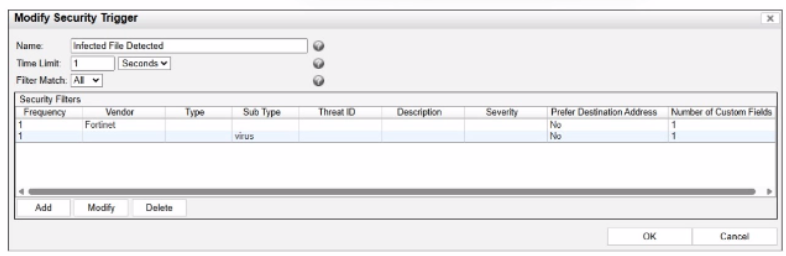
What would FortiNAC-F generate if only one of the security fitters is satisfied?
Answer : D
In FortiNAC-F, Security Triggers are used to identify specific security-related activities based on incoming data such as Syslog messages or SNMP traps from external security devices (like a FortiGate or an IDS). These triggers act as a filtering mechanism to determine if an incoming notification should be escalated from a standard system event to a Security Event.
According to the FortiNAC-F Administrator Guide and relevant training materials for versions 7.2 and 7.4, the Filter Match setting is the critical logic gate for this process. As seen in the exhibit, the 'Filter Match' configuration is set to 'All'. This means that for the Security Trigger named 'Infected File Detected' to 'fire' and generate a Security Event or a subsequent Security Alarm, every single filter listed in the Security Filters table must be satisfied simultaneously by the incoming data.
In the provided exhibit, there are two filters: one looking for the Vendor 'Fortinet' and another looking for the Sub Type 'virus'. If only one of these filters is satisfied (for example, a message from Fortinet that does not contain the 'virus' subtype), the logic for the Security Trigger is not met. Consequently, FortiNAC-F does not escalate the notification. Instead, it processes the incoming data as a Normal Event, which is recorded in the Event Log but does not trigger the automated security response workflows associated with security alarms.
'The Filter Match option defines the logic used when multiple filters are defined. If 'All' is selected, then all filter criteria must be met in order for the trigger to fire and a Security Event to be generated. If the criteria are not met, the incoming data is processed as a normal event. If 'Any' is selected, the trigger fires if at least one of the filters matches.' --- FortiNAC-F Administration Guide: Security Triggers Section.
 All Official Question Types