Page: 1
/ 14
Total 374 questions
Palo Alto Networks Certified Security Engineer PAN-OS 11.0 PCNSE Exam Questions
Question 1
Exhibit.
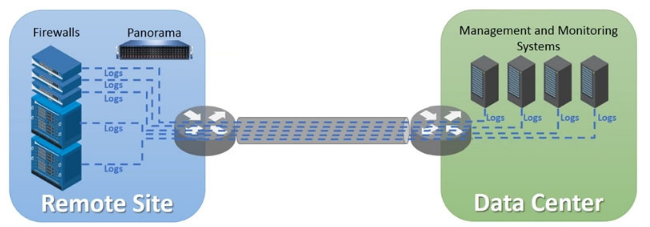
An organization has Palo Alto Networks NGFWs that send logs to remote monitoring and security management platforms The network team has reported excessive traffic on the corporate WAN How could the Palo Alto Networks NGFW administrator reduce WAN traffic while maintaining support for all the existing monitoring/security platforms?
Answer : D
Question 2
An engineer is designing a deployment of multi-vsys firewalls.
What must be taken into consideration when designing the device group structure?
Answer : B
https://knowledgebase.paloaltonetworks.com/KCSArticleDetail?id=kA10g000000ClETCA0
A device group is a logical grouping of firewalls that share the same security policy rules. A device group can contain multiple vsys and firewalls, including multi-vsys firewalls. A multi-vsys firewall can have each vsys in a different device group, depending on the desired security policy for each vsys.This allows for granular control and flexibility in managing multi-vsys firewalls with Panorama1.Reference:Device Group Push to a Multi-VSYS Firewall,Configure Virtual Systems, PCNSE Study Guide (page 50)
Question 3
Which protocol is natively supported by GlobalProtect Clientless VPN?
Answer : C
Question 4
Which statement regarding HA timer settings is true?
Answer : A
https://docs.paloaltonetworks.com/pan-os/10-2/pan-os-admin/high-availability/ha-concepts/ha-timers
Question 5
An administrator needs to build Security rules in a Device Group that allow traffic to specific users and groups defined in Active Directory. What must be configured in order to select users and groups for those rules from Panorama? The Security rules must be targeted to a firewall in the device group and have Group Mapping configured.
Answer : A
To create Security rules in Panorama that reference specific users and groups from Active Directory (AD), the Panorama-managed firewalls need access to user-to-group mapping information. This is achieved through Group Mapping, which relies on User-ID functionality. In a Panorama-managed environment, a 'master device' must be designated within the device group to provide this Group Mapping data. The master device is a firewall that retrieves user and group information from AD (via LDAP or User-ID agent) and shares it with other firewalls in the device group. This ensures consistent user-based policies across all devices in the group.
Option B (User-ID Redistribution) is incorrect because redistribution is used to share IP-to-user mappings, not group mappings, and is typically configured between firewalls or via Panorama's User-ID redistribution feature, not a requirement for selecting users/groups in rules. Option C (User-ID Certificate profile) is unrelated, as it pertains to certificate-based authentication, not AD group mapping. Official documentation specifies that a master device with Group Mapping configured is essential for this scenario.
Question 6
A consultant advises a client on designing an explicit Web Proxy deployment on PAN-OS 11 0 The client currently uses RADIUS authentication in their environment
Which two pieces of information should the consultant provide regarding Web Proxy authentication? (Choose two.)
Answer : A, D
For explicit Web Proxy deployment on PAN-OS, Palo Alto Networks currently supports Kerberos and SAML as authentication methods. RADIUS is not supported for explicit or transparent Web Proxy authentication on Palo Alto Networks appliances, which means that if the client is currently using RADIUS, they will need to configure an alternate supported authentication method. LDAP or TACACS+ authentication is not directly supported for Web Proxy authentication in PAN-OS.
For more information on supported Web Proxy authentication methods, please refer to the latest Palo Alto Networks 'PAN-OS Web Interface Reference Guide'.
Question 7
A company is deploying User-ID in their network. The firewall team needs to have the ability to see and choose from a list of usernames and user groups directly inside the Panorama policies when creating new security rules.
How can this be achieved?
Answer : D
 All Official Question Types