Page: 1
/ 14
Total 50 questions
Adobe Marketo Engage Business Practitioner Expert AD0-E559 Exam Questions
Question 1
An Adobe Marketo Engage user created a form in Design Studio rather than within a program in Marketing Activities.
According to best practices, what is a reason for creating a form in Design Studio?
Answer : C
A reason for creating a form in Design Studio rather than within a program in Marketing Activities is that the form can be used across multiple programs. This allows for reusability and consistency of forms.Creating a form in Design Studio does not offer more design options or enable sharing across workspaces
Question 2
A marketer has run a whole email A/B test within an email program, and there was a clear winner defined when the test finished running. The marketer then wants to send a follow-up email to everyone who received the losing email.
How would they find the list of people who received the losing email?
Answer : C
To find the list of people who received the losing email, they would use the Was Sent Email filter with the Test Variant constraint. This filter allows them to specify which email and which test variant they want to target.The Was Sent A/B Test filter does not have a Variant constraint, and it is not possible to see who received which test variant without using a constraint.
Question 3
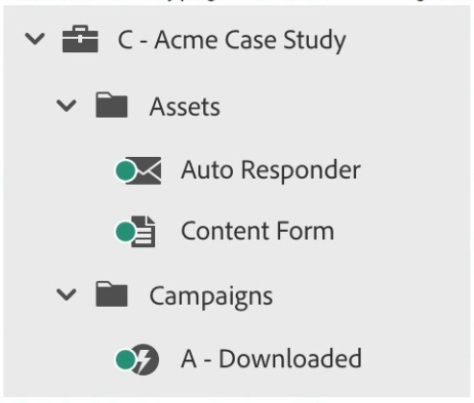
The Acme Case Study program contains the following assets and campaigns:
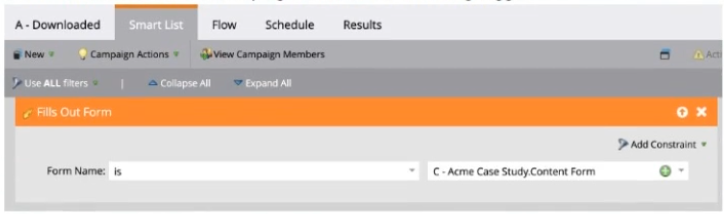
The A - Downloaded smart campaign contains the following trigger:
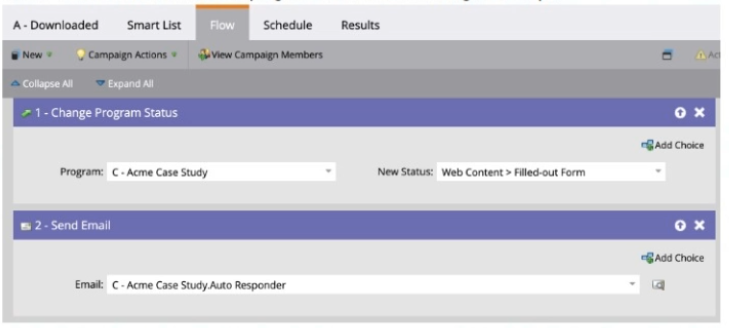
The A - Downloaded smart campaign contains the following flow steps:
A new person fills out the Content Form, which is embedded on the website. How will the acquisition program be captured for the person?
Answer : C
The acquisition program will be captured for the person automatically because the Content Form is local to this program. This is because Adobe Marketo Engage automatically sets the acquisition program for a person when they fill out a form that is local to a program for the first time. The Change Program Status flow step does not set program membership or acquisition program, but only changes the status of an existing member.The program does not contain any other mechanism to set the acquisition program for the person.
Question 4
Keeghan consistently monitors new names that are created in his Adobe Marketo Engage instance. His people performance report shows that there were 100 new leads created yesterday. He asked his team if they could confirm where the leads came from but unfortunately they did not know. There are no operational programs tracking and setting person source in the instance.
Which field can Keeghan check to give him some indication of where the leads came from?
Answer : A
A field that can give some indication of where the leads came from is Original Source Info. This is a system-managed field that captures the first known referrer URL for a person. It can help identify the source of web traffic that led to the person's creation in the database.Lead Source and Acquisition Program are not system-managed fields and may not be populated or accurate for all leads
Question 5
Which two Sales CRM platforms are natively synchronized with Adobe Marketo Engage? (Choose two.)
Answer : A, C
Adobe Marketo Engage natively synchronizes with Salesforce and Microsoft Dynamics CRM platforms.These are the only two CRM platforms that have a native integration with Adobe Marketo Engage and do not require any third-party connectors or custom solutions
Question 6
A marketer built an event program and added a forecasted period cost of $25,000 for the month/year the event will take place. The event was yesterday and today the marketer realized that they had additional variable costs above the original forecasted amount and updated the Period Cost to $30,000 in the Adobe Marketo Engage event program the same day.
Their CEO wants to know the value in terms of how much the event cost compared to the pipeline and or revenue generated asap.
When should the marketer generate a Revenue Cycle Explorer (RCE) report to ensure the true period cost is reflected?
Answer : A
The marketer should wait 24 hours for the updated period cost to be reflected in RCE. This is because RCE data is refreshed once a day, usually at night. Therefore, any changes made to the period cost or other program attributes will not be visible in RCE until the next day.RCE does not update in real time, and the updated period cost will be reflected in RCE eventually.
Question 7
Sarah has logged in to her Adobe Marketo Engage Instance and realized that she can only view and access the Default Workspace. Sarah sent a request to the Adobe Marketo Engage Admin, Greg, to update her permissions so that she can also view and access the APJ Workspace.
What does Greg need to do in order to make this happen?
Answer : B
To grant access to a different Workspace, Greg needs to adjust the team member's User to allow access to the APJ Workspace. This can be done by editing the User and selecting the APJ Workspace from the Workspaces drop-down menu.Assigning the User to a different Partition will not change the Workspace access, and adjusting the Role will affect all Users with that Role
 All Official Question Types