Page: 1
/ 14
Total 106 questions
Appian Certified Senior Developer ACD201 Exam Questions
Question 1
You're designing a report to show the total number of cases per month grouped by region. A synced record exists for the data source.
Which design pattern is most appropriate in this case?
Answer : B
Using a!queryRecordType() with a!aggregationFields() to group by case creation date and region, storing the result in a local variable and passing it to the data input of a!columnChartField() ensures efficient aggregation and flexible chart display for your report.
Question 2
You're configuring Health Check settings under the Admin Console.
Which section would you find the setting to indicate that the Health Check will run on a Production Environment?
Answer : C
The Automatic Upload section in the Health Check settings of the Admin Console includes the option to indicate that the Health Check is running on a Production Environment, which helps Appian appropriately analyze and benchmark the data.
Question 3
You're creating a support case record type while working on a support case management system. You want to track support case status changes.
You want to use record events to track this information.
Which record data source type is the most appropriate for you to use?
Answer : B
A database source with data sync enabled is required to use record events for tracking support case status changes, as Appian record events are only supported for synced record types with a database as the data source.
Question 4
You're designing an integration object with JSON (application/json) as the content type.
Which two data types can be automatically converted to JSON in Appian? (Choose two.)
Answer : A, C
Appian Custom data types (CDTs) can be automatically converted to JSON for integration.
Primitive data types such as text, number, and boolean are also automatically converted to JSON.
Question 5
You need to create a quality control (QC) review process for a factory that allows a QC technician to review each production line regularly.
You have the following requirements:
* Each technician has 45 minutes to complete their review.
* After 45 minutes, the review will expire.
* Expired reviews are flagged as 'Review expired.'
* 'Review expired' flags trigger an email notification to a supervisor, and the review data should not be saved.
* The technician can save a Draft copy of their review before submission and can come back to work on it later if necessary.
* Once a review is 'Submitted.' the review data is saved to the database
What should you implement?
Answer : C
Question 6
An insurance application has a dashboard in which all the cases with "Accident" case type and "Health Insurance" insurance type are displayed to the user, using the following query:
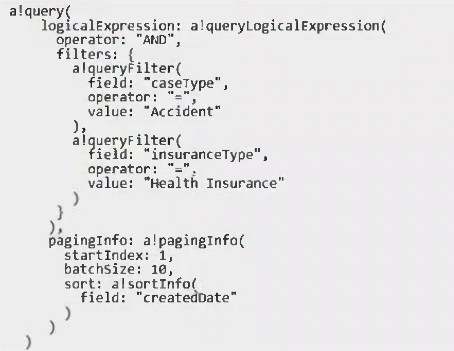
You need to update the query entity to display all the cases that are "Accident" case type and "Health Insurance" insurance type, or created in the last ten days.
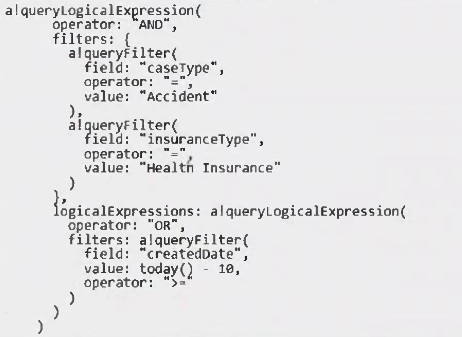
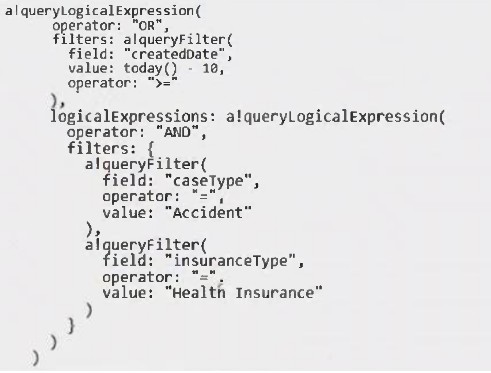
What is the right configuration for the logical expression?
A)
B)
C)
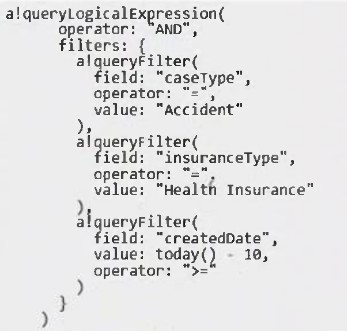
Answer : B
A filter for createdDate >= today() -- 10 (records created in the last 10 days).
A nested AND logical expression that requires both caseType = 'Accident' and insuranceType = 'Health Insurance'.
Question 7
Your client reported that a form in the application is very slow to load.
You investigate and find a query entity which is nor performing well.
Which action should you perform to improve query performance for the query entity?
Answer : C
Applying appropriate filters and indices in both Appian and the database ensures that only relevant data is retrieved and the database query runs efficiently, improving overall query performance.
 All Official Question Types