Page: 1
/ 14
Total 42 questions
Cisco Certified Support Technician IT Support 100-140 CCST IT Support Exam Questions
Question 1
You are working from home over a weekend to resolve a backlog of employee help desk tickets. A user issue requires you to access their Windows 11 computer in the home office to check its settings. You have verified that the machine is available, but the user is not present.
Which remote access application is best suited for this task?
Answer : C
Question 2
You receive an email request for personal information.
You need to make sure you are working with the right individual to avoid a social engineering attempt.
Which step should you take?
Answer : C
The safest and most professional approach is to use company-approved methods to verify identity, such as callback procedures, employee ID verification, or multi-factor authentication. This helps prevent falling victim to phishing or social engineering.
Question 3
You receive an email from a user with the display name of the President of your company. The email requests that you do them a favor and purchase gift cards and send the gift cards to an email address provided.
What should you do?
Answer : C
This scenario is a classic example of email spoofing and a social engineering attack. You should contact the IT department immediately using internal communication methods to verify the legitimacy of the request. Never respond or take action based on suspicious emails.
Question 4
Which document outlines a commitment between an organization and a customer, including details of the service, the standards the provider must adhere to, and compensation for the successful completion of those milestones?
Answer : D
A Service Level Agreement (SLA) is the formal document that specifies the services provided, performance standards, and any penalties or compensation related to meeting those service milestones.
Question 5
An employee is having problems reaching URLs on the World Wide Web. You examine the addressing configuration for the employee's PC that is shown as follows:
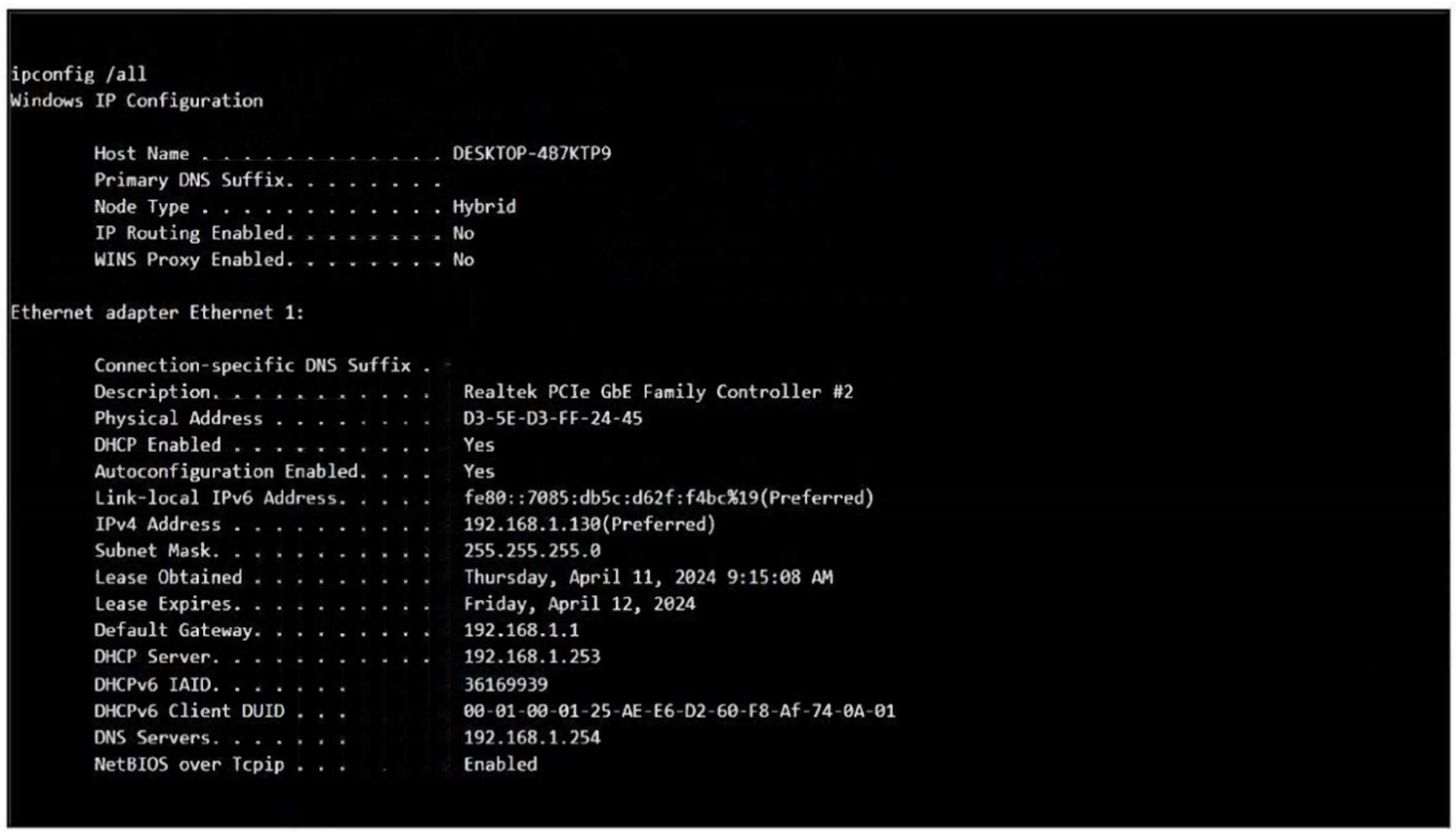
You have verified that you can open a website on the employee's PC by entering the website's IP address in their browser.
Which IP address should you ping to determine what the problem is?
Answer : D
Since you can access websites by IP but not by name, the issue lies with name resolution. Pinging the configured DNS server (192.168.1.254) will verify whether the DNS service is reachable and functioning.
Question 6
A customer reports the following problem:
I purchased a 256 GB USB drive to use for transferring files from my personal computer to my work computer. My personal computer runs Sonom
a. My work computer runs Windows. I can copy files from my work computer to the USB drive. However, I cannot copy files from my personal computer to the USB drive.
What should the customer do to solve this problem?
Answer : D
The issue is likely caused by the USB drive being formatted in NTFS, which macOS Sonoma can read but not write to by default. Formatting the drive with the exFAT file system ensures full read/write compatibility between macOS and Windows.
Question 7
Which three pieces of information would be considered Personally Identifiable Information (PII)? (Choose three.)
Note: You will receive partial credit for each correct selection.
Answer : B, C
Fingerprint is a unique biometric identifier and qualifies as PII.
Email Address directly identifies or contacts an individual.
Date of Birth is a personal datum that, when combined with other data, identifies someone.
 All Official Question Types