Page: 1
/ 14
Total 72 questions
Cisco Supporting Cisco Routing & Switching Network Devices 100-490 RSTECH Exam Questions
Question 1
What does Cisco use for Return Materials Authorization tracking of field-replaceable parts?
Answer : C
RMA (Return Materials Authorization) is a tracking number that is assigned to a product that is being returned to the manufacturer for repair or replacement. The RMA number allows the manufacturer to track the progress of the return and ensure that the product is returned to the correct customer.
Question 2
What is the default operating mode when you initially log in to a router?
Answer : A
When you initially log in to a Cisco router, the default operating mode isuser EXEC mode. This mode provides a limited set of basic monitoring commands but does not allow for any configuration changes to the router's settings. To make configuration changes, you must enterprivileged EXEC mode(often accessed by theenablecommand), which offers a wider range of commands that allow for the viewing and modification of the configurationGlobal configuration modeis accessed from privileged EXEC mode to modify the router's configuration, andROM monitor modeis a low-level mode used mainly for recovery purposes1.
Question 3
From the enable mode, which command loads the configuration during the password recovery process on a Cisco router?
Answer : D
The copy startup-config running-config command is used during the password recovery process on a Cisco router to load the saved configuration into the device's active running configuration. Here's why this is the correct choice:
Password Recovery Context: Password recovery often involves booting into ROMmon mode and changing the configuration register to bypass the normal boot process. This leaves the device with a blank running configuration.
Restoring Configuration: The copy startup-config running-config command copies the stored configuration (startup-config) from NVRAM into the running-config, which is used by the router for its operations.
Why other options are incorrect:
load_helper: While the load_helper command sometimes appears in password recovery procedures, it's typically used for older models and may not be necessary for all Cisco routers.
configure terminal: This command simply enters global configuration mode. It doesn't directly load a configuration.
copy running-config startup-config: This command saves the active running configuration into NVRAM as the startup-config. It's the reverse of what you need for password recovery.
Question 4
How are IPv6 addresses notated?
Answer : B
IPv6 addresses are 128 bits in length and are written as eight groups of four hexadecimal digits. Each group is separated from the others by colons (:). The correct notation for IPv6 addresses allows for the omission of leading zeros within each block of four hexadecimal digits and the use of double colons (::) to represent consecutive blocks of zeros. However, the double colons can only be used once in an address to ensure proper expansion to the full 128 bits. Option B is the only choice that correctly represents a full IPv6 address without any abbreviation.Options A and C use double colons incorrectly, and option D represents a prefix length rather than a full address.Reference:= The information is based on standard IPv6 address notation practices, which include the representation of addresses in hexadecimal format and the rules for abbreviating zeros1
Question 5
Which type of memory is used to store Cisco IOS Software permanently?
Answer : B
The type of memory used to store Cisco IOS Software permanently isflash memory. Flash memory is non-volatile, meaning it retains its content even after the device is powered down or restarted. It is commonly used in Cisco devices to store one or more Cisco IOS software images, as well as other files such as backup configuration files.This allows the device to reload the operating system after a reboot without the need to retransfer the IOS image
Question 6
Refer to the exhibit.
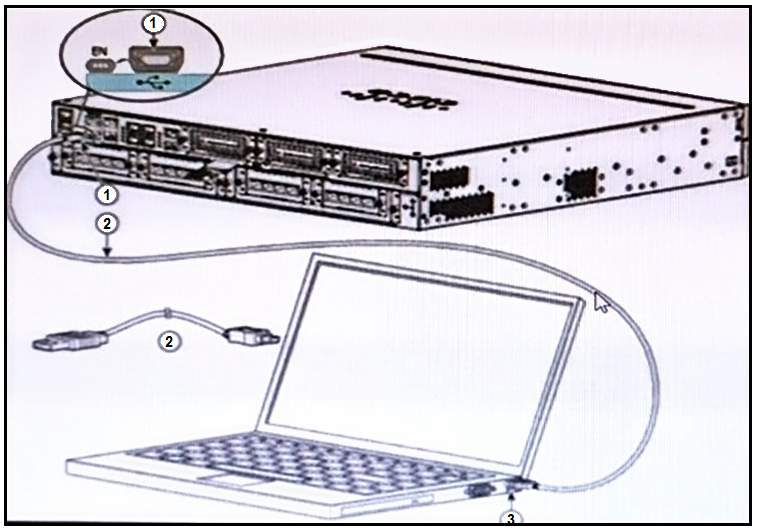
Which two statements about the hardware components are true? (Choose two.)
Answer : C, E
The image provided shows a networking device connected to a laptop via a console cable. Based on the visual indicators and standard port designs:
C . 3 is a USB 5-pin mini USB Type B port: The port labeled ''3'' on the laptop is smaller than a standard USB Type A port, which suggests it is a mini USB Type B port, commonly used for connecting to networking devices for console access.
E . 2 is a USB 5-pin mini USB Type B to USB Type A console cable: The cable labeled ''2'' has one end that fits into the mini USB Type B port on the laptop (as identified in point 1), and the other end, which is not clearly visible in the image, is inferred to be a USB Type A connector that would typically connect to a computer's USB port.
Question 7
Which two commands are valid for copying a saved configuration to RAM? (Choose two.)
Answer : A, C
The commands to copy a saved configuration to RAM on Cisco devices are:
copy startup-config running-config: This command is used to copy the startup configuration (saved configuration) into the running configuration (current configuration in RAM).It is typically used when you want to restore the device to a previously saved configuration after changes have been made1.
copy tftp running-config: This command allows you to copy a configuration file from a TFTP server directly into the running configuration of the device.It's useful for applying a new configuration or for restoring a configuration from a backup located on a TFTP server1.
The other options listed are not valid for copying a saved configuration to RAM:
copy running-config startup-configcopies the current running configuration to the startup configuration, which is the opposite of what's asked.
copy running-config tftpis used to save the running configuration to a TFTP server, not to copy to RAM.
copy tftp startup-configwould copy a file from a TFTP server to the startup configuration, not to the running configuration in RAM.
 All Official Question Types