Page: 1
/ 14
Total 68 questions
Cisco Designing and Implementing Enterprise Network Assurance 300-445 ENNA Exam Questions
Question 1
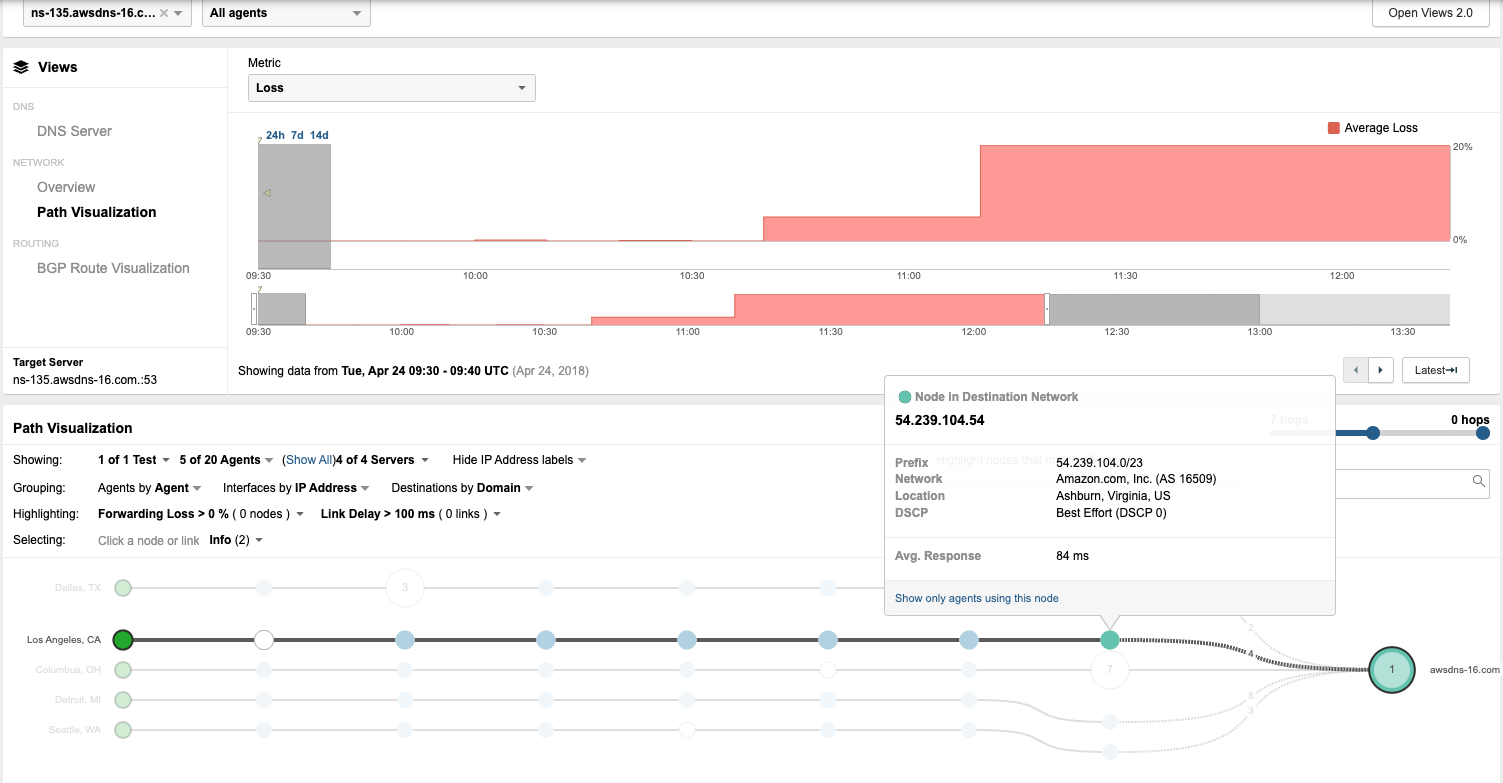
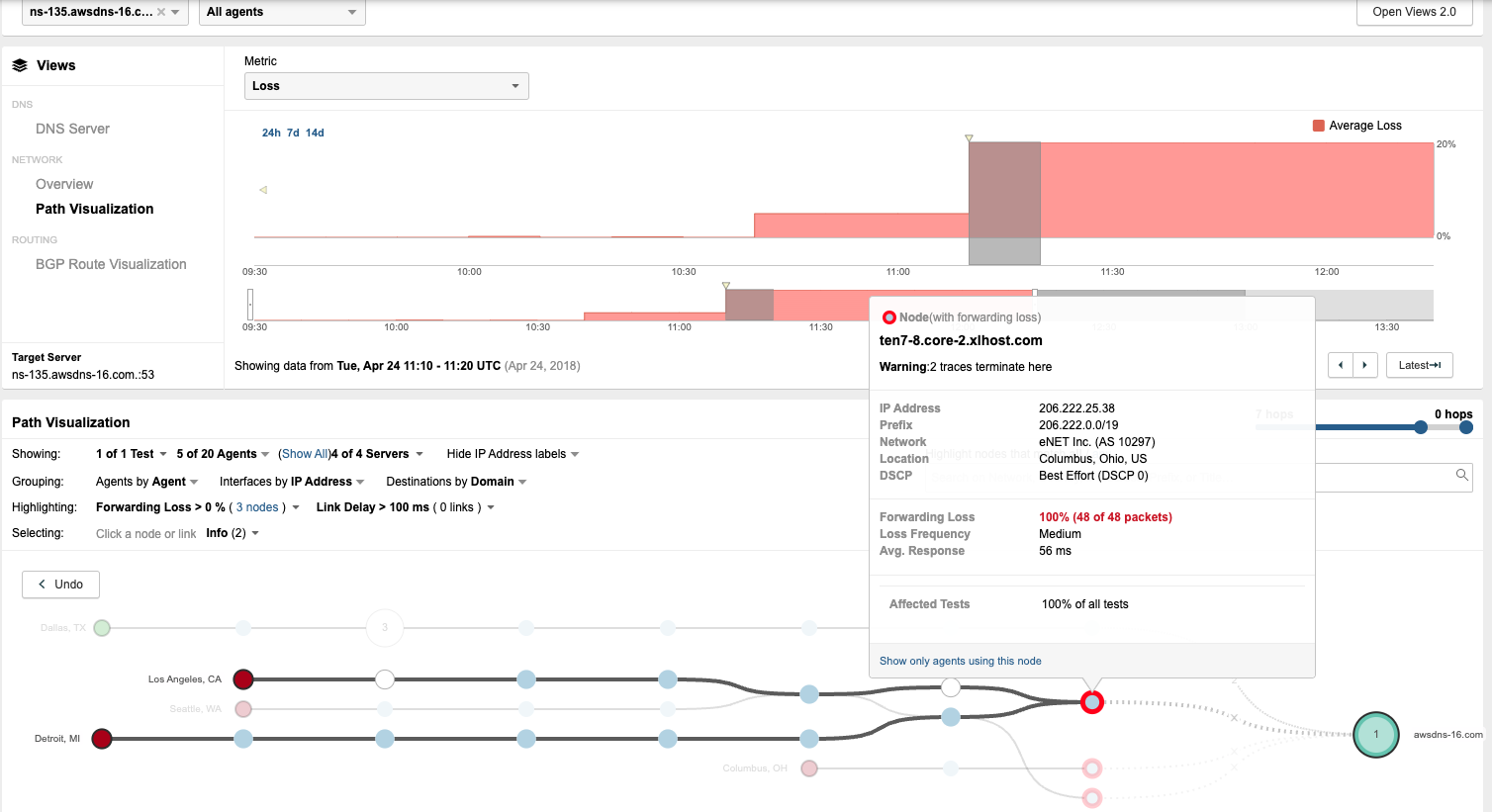
Carefully review the exhibits. Which detail indicates the network issue might be caused by a BGP Hijack?
Answer : B
In the Designing and Implementing Enterprise Network Assurance (300-445 ENNA) curriculum, identifying routing anomalies such as BGP Hijacking is a critical aspect of external network assurance. A BGP Hijack occurs when an Autonomous System (AS) illegitimately announces a prefix it does not own, causing traffic intended for the rightful owner to be misdirected.
By contrasting Exhibit 3.4-1 (Before the Outage) and Exhibit 3.4-2 (During the Outage), a definitive change in the routing path is observed. In the baseline view (Exhibit 3.4-1), traffic from the Los Angeles agent reaches the destination network 54.239.104.0/23, which is correctly associated with Amazon.com, Inc. (AS 16509). However, during the outage (Exhibit 3.4-2), the path visualization shows the traffic being redirected into a different network: eNET Inc. (AS 10297). At this new location, the traffic encounters 100% Forwarding Loss at the node ten7-8.core-2.xlhost.com.
The change in the Autonomous System (AS) number from 16509 to 10297 (Option B) is the most concrete indicator of a BGP Hijack. While symptoms such as Availability Drop (Option A), Response Delay (Option C), and Packet Loss (Option D) are clearly visible in the ThousandEyes telemetry, these symptoms are generic and could be caused by various other issues like physical link failures or congestion. The shift in the AS path---specifically to an AS that does not legitimately host the target's IP prefix---provides the forensic evidence needed to identify the root cause as a routing takeover. This visualization allows network administrators to bypass internal troubleshooting and immediately focus on external remediation with upstream providers.
Question 2
Refer to the exhibit.
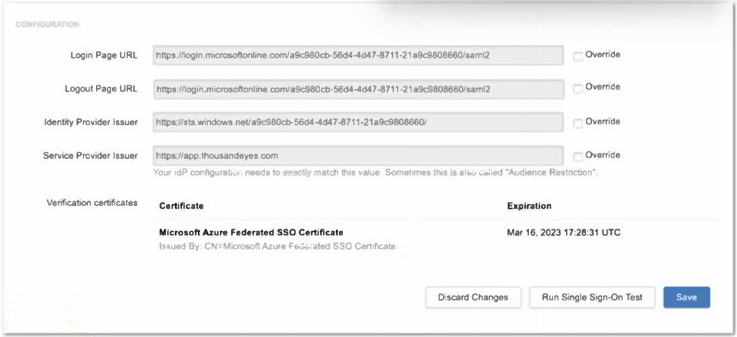
An engineer must configure Cisco ThousandEyes SSO to use Microsoft Entra ID using the configuration shown in the exhibit. Which feature must be set to override to complete the configuration?
Answer : D
In the Designing and Implementing Enterprise Network Assurance (300-445 ENNA) architecture, secure administrative access via Single Sign-On (SSO) is a critical component of platform governance. The exhibit illustrates the ThousandEyes SSO configuration panel being integrated with Microsoft Entra ID (formerly Azure AD). When configuring SAML-based authentication, the 'Identity Provider Issuer' (Option D) is a unique identifier provided by the IdP (Microsoft) that must match exactly between the two systems.
According to ENNA implementation guidelines, ThousandEyes populates default fields based on standard SAML metadata. However, Microsoft Entra ID often utilizes a specific GUID-based format for the Issuer URL (e.g., https://sts.windows.net/tenant-id/) that may differ from the generic URL format expected by the platform's initial auto-fill. To ensure a successful SAML handshake, the engineer must select the 'Override' checkbox next to the Identity Provider Issuer field. This action unlocks the field, allowing the engineer to manually paste the exact string provided in the Entra ID Federation Metadata document. If this value is not overridden and matched precisely, the SAML assertion will be rejected, resulting in a failed authentication attempt.
While the Login and Logout URLs (Options B and C) are also critical, they are typically correctly identified during the initial setup or metadata import; the Identity Provider Issuer is the most frequent point of mismatch requiring an manual override in Entra ID environments due to its strict 'Audience Restriction' requirements. The Service Provider Issuer (Option A) is generally a fixed value (https://app.thousandeyes.com) that rarely requires overriding as it defines ThousandEyes' own identity to the IdP.
Therefore, selecting the override for the Identity Provider Issuer is the necessary step to complete the integration and allow enterprise users to authenticate securely using their corporate credentials.
Question 3
Employees and customers of a retail company are experiencing performance issues with the store website, such as slowness during the login process or failure when adding items to the cart. Which test type is the most useful for identifying the root cause of these problems?
Answer : C
In the Designing and Implementing Enterprise Network Assurance (300-445 ENNA) curriculum, selecting the appropriate test type is essential for isolating performance bottlenecks in complex web applications. When users report issues with specific multi-step workflows---such as logging into a portal or interacting with a shopping cart---the Transaction test type (Option C) is the most effective tool.
A Transaction test is a specialized Web-layer test that utilizes a script (typically written in JavaScript/TypeScript) to mimic real user interactions with a website. Unlike a simple HTTP Server test (Option A) that only checks for a 200 OK response from a single URL, or a Page Load test (Option B) that measures the rendering of a single page, a Transaction test follows a predefined user journey. For this retail scenario, the test can be configured to navigate to the homepage, enter credentials, click the login button, search for a product, and add it to the cart.
The primary advantage of this approach is that it provides granular, step-specific timing. It allows the engineer to identify precisely where the latency or failure occurs---for example, if the backend database takes too long to process the login or if an API call fails during the 'add to cart' action. While Agent-to-server (Option D) and DNS Server (Option E) tests provide valuable network and infrastructure data, they cannot validate the functional logic of a web application. Agent-to-agent (Option F) is used for measuring throughput between two managed points and is irrelevant for public-facing website testing. Therefore, for troubleshooting interactive web processes, the Transaction test type is the definitive choice for pinpointing the source of the issue.
Question 4
Which strategy is most effective for a scalable, secure, and minimally disruptive deployment of ThousandEyes Endpoint Agents to Windows users?
Answer : B
According to the Designing and Implementing Enterprise Network Assurance (300-445 ENNA) best practices, the goal of a successful endpoint assurance rollout is to maximize coverage while minimizing the burden on both IT staff and end-users. The most effective strategy for achieving this is to use a centralized software deployment tool (e.g., GPOs, Intune) that supports silent installation (Option B).
Centralized deployment tools allow administrators to push the ThousandEyes Endpoint Agent to thousands of machines simultaneously from a single management console.12 By using silent installation parameters (such as /quiet or /qn for MSI packages), the agent is installed in the background without requiring any user interaction or even showing a setup wizard.13 This 'minimally disruptive' approach ensures that business operations are not interrupted. Furthermore, centralized tools provide a 'secure' deployment method because the IT team retains control over the version of the agent being installed and can ensure that the Account Group Token is correctly embedded, which is necessary for the agent to register with the ThousandEyes dashboard.
Contrasting this with other methods:
Manual Installation (Option A): This is not scalable and is highly labor-intensive, making it unsuitable for large enterprises.
Emailing links (Option C) or Web Portals (Option D): These methods rely on the end-user to perform the installation correctly and to have the necessary local administrative privileges. This often leads to low adoption rates, inconsistent configurations, and security risks associated with users running installers manually.
By leveraging existing enterprise infrastructure like Active Directory GPOs or Microsoft Intune, organizations can ensure a 100% compliant deployment that immediately begins providing the 'user-centric' visibility required for modern network assurance.
Question 5
What type of endpoint agent test will gather browser activity?
Answer : C
The Designing and Implementing Enterprise Network Assurance (300-445 ENNA) curriculum identifies Real User Tests (RUM) as the primary method for capturing actual browser-based interactions. While synthetic tests provide proactive baselines, Real user tests (Option C) provide visibility into the 'lived experience' of an employee as they navigate corporate websites and SaaS platforms.
Real user tests utilize a lightweight browser extension (available for Chrome, Edge, and Safari) that is part of the Endpoint Agent deployment. When a user visits a domain defined in a 'Monitored Domain Set,' the extension automatically begins recording performance metrics. This includes the time spent on each page, DNS resolution time, and a full browser waterfall of every object (images, scripts, CSS) loaded during the session. Crucially, it calculates an 'Experience Score' for each session, allowing IT teams to identify if a user's frustration is caused by slow page rendering or underlying network issues.
In contrast:
Scheduled tests (Option A) and Dynamic tests (Option B) are forms of Synthetic Monitoring. They simulate traffic using a headless browser or simple network probes to check availability but do not record the actual clicks or browsing activity of the real human user.
Network Access tests (Option D) is not a standard test category in the ThousandEyes endpoint ecosystem; rather, network connectivity is a layer monitored within the other test types.
Therefore, Real user tests are the definitive tool for organizations needing to analyze actual employee browser behavior and the resulting application performance.
Question 6
A company is noticing sporadic slowdowns in their web application performance, impacting user experience. They suspect it might be related to high CPU utilization on employee laptops, potentially caused by background processes. Which ThousandEyes alert type and condition combination would be most effective in identifying if endpoint CPU performance is contributing to this issue?
Answer : C
In the Designing and Implementing Enterprise Network Assurance (300-445 ENNA) curriculum, isolating performance issues on end-user machines requires a combination of application-layer experience data and local system telemetry. When an architect suspects that local hardware constraints, such as high CPU usage, are degrading the digital experience, the Endpoint Agent is the required vantage point.
The correct combination is Real User Tests > Endpoint, CPU utilization % (Option C). This alert configuration is effective for several reasons:
Targeted Visibility: It directly monitors the user's device (Endpoint) where the hardware bottleneck is suspected to reside.
Real-Time Context: By utilizing Real User Tests (RUM), the agent gathers performance data during actual user activity (e.g., browsing the web application). This ensures that the CPU spikes are correlated with active application usage, providing a representative view of the impact on experience.
Threshold Alerting: The condition monitors for CPU utilization exceeding a defined percentage threshold ( %). This allows IT teams to be notified only when the CPU load reaches problematic levels that are known to cause application sluggishness or browser 'freezing'.
Alternative options are less effective for this specific troubleshooting goal:
Option A: Monitors network loss, which would not identify a local CPU bottleneck.
Option B: Monitors path length (hops), which is a routing metric irrelevant to local hardware performance.
Option D: Monitors memory load during scheduled tests. While memory is a factor, the specific suspicion in this scenario is CPU utilization, and scheduled tests do not always capture the same load impact as a real user interacting with the browser.
Question 7
ThousandEyes offers several native integrations for receiving instant event notifications triggered by alerts. Which of the following integrations are available directly within the ThousandEyes platform? Select all that apply.
Answer : A, B, C, D, F, G, H
According to the Designing and Implementing Enterprise Network Assurance (300-445 ENNA) architecture, ThousandEyes provides a suite of native, 'out-of-the-box' integrations specifically designed for alert notifications. These integrations are configured via the Manage > Integrations or Alert Rules > Notifications tabs and allow the platform to push instant event data to a variety of collaboration, IT operations, and observability tools.
The verified list of native notification integrations includes:
ServiceNow (A): Facilitates direct incident management and automated ticketing workflows.
PagerDuty (B): Allows for automated incident escalation and on-call routing based on ThousandEyes alerts.
MS Teams (C) & Slack (H): Enable real-time chatops by pushing alert details and permalinks directly into specified channels for team collaboration.
Splunk (D): Utilizes the Cisco ThousandEyes App for Splunk to ingest alert data for historical analysis and correlation within a SIEM or logging platform.
AppDynamics (F): Sends alert notifications directly into an AppDynamics instance, allowing application owners to correlate network issues with APM metrics.12
Webex (G): Integrates with the Webex Control Hub and specific Webex spaces to provide unified visibility for collaboration performance.34
AWS (Option E) is not a native alert notification destination 5in this context; instead, ThousandEyes integrates with AWS for 'Cloud Insights' (ingesting VPC Flow Logs) and 'Test Recommendations' rather than acting as a receiver for event notifications like a chat or ITSM tool. By utilizing these native integrations, enterprise teams ensure that the right stakeholders are notified through their preferred communication channels the moment a performance threshold is breached, drastically improving response times across the organization.
 All Official Question Types