Page: 1
/ 14
Total 75 questions
Cisco Automating Cisco Data Center Networking Solutions 300-635 DCNAUTO Exam Questions
Question 1
Refer to the exhibit.
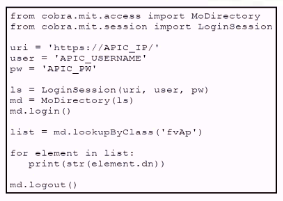
A Python script using ACI Cobra SDK has been constructed. What is the result when running this script?
Answer : B
The Python script uses the ACI Cobra SDK to interact with Cisco's Application Centric Infrastructure (ACI). It logs into the APIC and retrieves a list of all application profiles ('fvAp'), then prints out their distinguished names (dn), which uniquely identify each application profile within the ACI fabric.Reference:
Cisco Developer Network
Cisco Learning Network
Question 2
Which two benefits of using network configuration tools such as Ansible and Puppet to automate data center platforms are valid? (Choose two )
Answer : A, B
Consistency of Systems Configuration: Network configuration tools like Ansible and Puppet ensure that configurations across multiple devices in a data center are uniform.This consistency reduces the risk of errors that can occur when configurations are applied manually, leading to a more stable and reliable network infrastructure12.
Automation of Repetitive Tasks: These tools automate routine tasks such as deploying updates, applying configurations, and provisioning systems.By automating these tasks, data center operations become more efficient, reducing the time and effort required for manual configuration and increasing productivity
Question 3
How should the Kubernetes manifests be modified to allow Kubernetes environment integration with Cisco ACI?
Answer : C
In order to integrate a Kubernetes environment with Cisco ACI, the Kubernetes manifests typically need to include references to ACI End Point Groups (EPGs). This allows for the application components within Kubernetes to be associated with the networking policies defined in ACI, ensuring consistent network policy application across both environments.Reference: Since I can't provide direct links to external sources, I recommend checking Cisco's official documentation and training materials for the most accurate and up-to-date information.
https://www.ciscolive.com/c/dam/r/ciscolive/emea/docs/2019/pdf/BRKACI-2505.pdf
https://www.cisco.com/c/en/us/td/docs/switches/datacenter/aci/apic/sw/kb/b_Kubernetes_Integration_with_ACI.html#:~:text=Infrastructure%20(ACI).-,Cisco%20ACI%20and%20Kubernetes%20Integration,Application%20Centric%20Infrastructure%20(ACI).
Question 4
How is an ACI class name composed?
Answer : C
In Cisco Application Centric Infrastructure (ACI), class names are composed by combining the package name with the class name, separated by a colon. This naming convention helps in organizing and referencing classes within the ACI's object model, which is essential for automation and programmability in the data center.
Question 5
Refer to the exhibit.
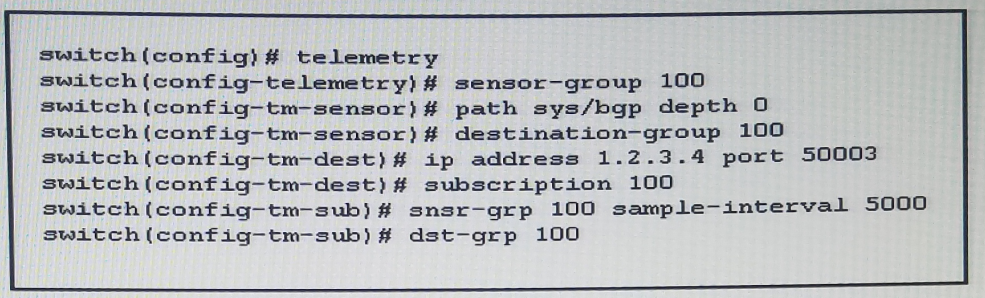
Refer to the exhibit. How often is the subscription stream for sys/bgp going to be sent?
Answer : A
The subscription stream for sys/bgp is set to be sent every 5000 milliseconds, as indicated by the configuration lineswitch(config-tm-sub)# snsr-grp 100 sample-interval 5000. Since there are 1000 milliseconds in a second, a sample interval of 5000 milliseconds equates to a frequency of every 5 seconds.Reference:Cisco Nexus 9000 Series NX-OS System Management Configuration Guide
Question 6
Refer to the exhibit.
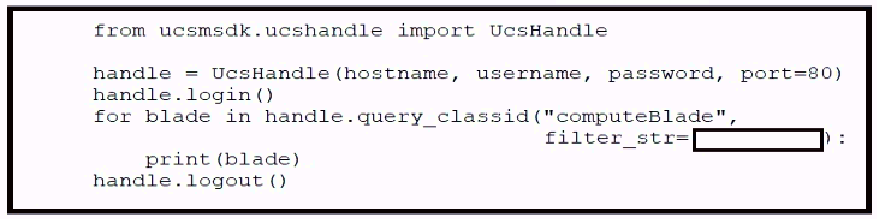
When Cisco UCS is configured, which filter must be added to the str_filter string to retrieve all discovered compute blades with two CPUs?
Answer : A
In the context of Cisco UCS, filters are used in query strings to specify criteria for retrieving information about compute blades. The correct filter is ''(num_of_cpus eq 2) and (discovery eq complete)'' because it specifies that we are looking for compute blades with exactly two CPUs (num_of_cpus eq 2) and where the discovery status is 'complete' (discovery eq complete). This ensures that only compute blades that have been fully discovered by UCS Manager and have exactly two CPUs will be returned by the query.
Implementing Automation for Cisco Data Center Solutions (DCAUI)
Cisco Learning Network - Data Center Training Videos
Question 7
A server profile with the ''WEST15'' in its name must have the string ''WEST15'' changed to ''LXT14''. For example, server profile ''Vmhost-west 15-01'' would need to be changed to ''VMHOST-LXT 14-01''. Using the Cisco Intersight REST API in a Python script, which two GET API requests are used to retrieve just the server profile with the string ''WEST 15'' in the name and the correct body for the API request to update the name? Assume the variable ''sp_name'' contains the name of the retrieved server profile. (Choose two.)
Answer : D, E
To retrieve server profiles with ''WEST15'' in the name, the correct GET API request is D. GET https://intersight.com/api/v1/server/Profiles?$select=Name&$filter=startswith(Name, 'WEST15'). This request filters the server profiles to only those that start with ''WEST15''. For updating the name, option E is correct. The BODY = {'' Name'': sp_name.replace('WEST15','LXT14')} uses the Pythonreplacemethod to change ''WEST15'' to ''LXT14'' in the server profile name.Reference: Cisco Intersight API documentation and Python programming resources.
https://intersight.com/apidocs/introduction/query/#referencing-properties-by-name
 All Official Question Types