Page: 1
/ 14
Total 103 questions
Cisco Implementing and Operating Cisco Wireless Core Technologies 350-101 WLCOR Exam Questions
Question 1
An IT team is deploying Meraki APs at a remote branch and must ensure that they are automatically assigned to the correct network in the Meraki dashboard. The branch is scheduled to receive 20 new APs, and site connectivity to headquarters was set up. Before shipping the APs, the team must make sure that each one is claimed by the intended network for management and monitoring. Which deployment action must they take before physically connecting the APs?
Answer : B
When deploying Meraki APs, it is essential to claim each AP in the Meraki dashboard to ensure that they are automatically assigned to the correct network and can be managed remotely. This process involves registering the APs with the Meraki cloud, which is done by adding the AP serial numbers to the network within the Meraki dashboard before physically installing them at the branch.
Option B: 'Add the AP serial numbers to the required network within the Meraki dashboard.'
This is the correct answer. Before the APs are physically connected, the administrator needs to log into the Meraki dashboard and add the serial numbers of the new APs to the intended network. This ensures that once the APs are powered on and connected, they automatically join the correct network and are ready for monitoring and management without requiring further configuration.
Option A: 'Activate mesh networking mode for all the new APs before installation.'
Mesh networking mode is used when APs need to communicate wirelessly to extend coverage, but it is not a requirement for the deployment and registration process. The APs should be connected normally for initial setup, and mesh mode can be enabled later if needed.
Option C: 'Preconfigure SSID names and VLAN tags on the local page of each AP in the Meraki dashboard.'
While configuring SSID and VLAN settings is essential, this is not the first action required for ensuring the APs are claimed by the correct network. The priority is to add the AP serial numbers to the Meraki dashboard for proper network assignment.
Option D: 'Create a separate DHCP scope for all the new APs on the local server.'
DHCP scope configuration is important for assigning IP addresses, but this is not the primary step for ensuring the APs are correctly registered in the Meraki dashboard. The APs can obtain IP addresses from an existing DHCP scope once they are connected and claimed in the dashboard.
Therefore, the best approach is Option B, as it ensures that the APs are correctly assigned to the intended network in the Meraki cloud, ready for management and monitoring once connected.
Question 2
Refer to the exhibit.
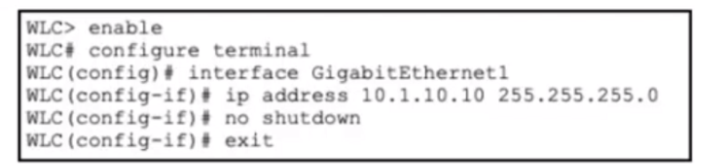
Refer to the exhibit. A network engineer is deploying a new Cisco 9800 WLC and is performing the Day-0 setup. The IP address and subnet mask have been assigned to the management interface, and network connectivity between the WLC and the upstream switch has been verified. Which CLI command must the engineer use next to configure management access?
Answer : D
After assigning an IP address to the management interface of a Cisco 9800 WLC, the next step in Day-0 deployment is configuring the default route to ensure management traffic can reach devices outside the local subnet. The correct command is ip route 0.0.0.0 0.0.0.0 <gateway>, which establishes a default route for all traffic destined for networks not explicitly known in the routing table. In this case, ip route 0.0.0.0 0.0.0.0 10.1.10.1 sets the upstream router at 10.1.10.1 as the default gateway, allowing the WLC to communicate with the broader network for management and client services. Option A, route add default gw, is Cisco IOS classic syntax but not valid in IOS XE WLC CLI. Option B is invalid syntax for default routing. Option C, ip default-gateway, is only used for Layer 2 management devices without routing capabilities, whereas a WLC requires a proper Layer 3 route. Configuring the default route ensures that remote administration, SNMP, syslog, and device registration functions operate correctly. Cisco Wireless Core Technologies recommend this step as part of initial WLC setup to establish full network reachability for management access. Reference topics: Wireless Network Implementation --- Day-0 WLC setup, management interface configuration, default route, IP routing in Cisco 9800 IOS XE.
Question 3
Refer to the exhibit.
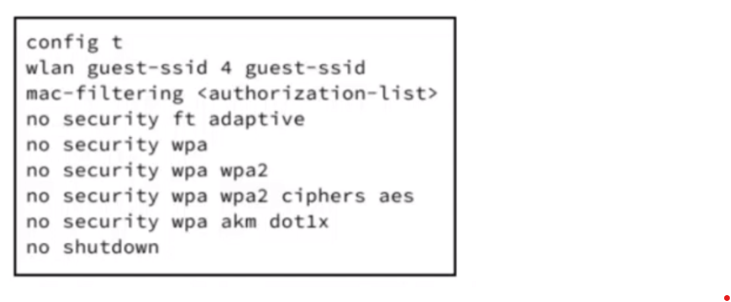
Refer to the exhibit. An engineer must configure a wireless guest WLAN, which requires clients to use VLAN 10 for a deployment at site A. Based on the configuration commands shown, which additional configuration meets the requirements?
Answer : A
In Cisco Catalyst 9800 WLAN configurations, assigning a VLAN to a WLAN is done using the access vlan <vlan-id> command under the WLAN context. This ensures that clients associating with the guest SSID are placed in the correct Layer 2 VLAN for proper segmentation and network access. The exhibit shows that security features are removed and the WLAN is operational, but no VLAN is yet assigned. Option A correctly uses access vlan 10 under the WLAN configuration, enabling client traffic to be tagged or untagged into VLAN 10 for site A deployment. Option B is invalid syntax; simply using vlan 10 is insufficient and not recognized in IOS XE WLAN configuration. Options C and D involve policy profile commands, which define WLAN policies but do not directly assign the VLAN to the guest WLAN itself. Cisco Wireless Core Technologies emphasize that proper VLAN assignment ensures guest isolation, correct DHCP assignment, and traffic segregation, which is critical for security and compliance in enterprise deployments. Assigning the VLAN in this manner also allows downstream switches to correctly forward traffic to the intended network segment. Reference topics: Client Connectivity Configuration --- WLAN VLAN assignment, guest SSID, access vlan, Cisco Catalyst 9800.
Question 4
What is the main benefit of using AI Enhanced RRM on the Cisco Catalyst 9800 wireless controller?
Answer : D
AI Enhanced RRM is not a static-threshold tuning feature and it is not designed to simply raise AP transmit power. Cisco defines AI Enhanced RRM as a radio resource management technology that applies artificial intelligence and machine learning to optimize RF environments, uses distributed data collection from Cisco wireless controllers with cloud-based analytics, and automates adaptive RF parameter tuning for Cisco wireless networks.
The operational model is telemetry-driven. RF telemetry is collected from APs by the Catalyst 9800 WLC, sent through Cisco Catalyst Center to the Cisco AI Analytics Cloud, analyzed by RRM algorithms, and then configuration-change information is returned through Catalyst Center toward the managed wireless infrastructure. Cisco's AI-Enhanced RRM deployment guide further identifies DCA, TPC, FRA, and DBS as examples of optimizations performed, meaning the feature enhances dynamic RF control rather than disabling it.
Therefore, option D is the only correct answer. Options A, B, and C describe either legacy/static behavior, harmful power-only logic, or a fixed RF design model that contradicts Cisco AI Enhanced RRM. Reference topics: Automation and AI --- AI/ML-driven RF optimization, Catalyst Center assurance, RRM telemetry, DCA, TPC, FRA, and DBS.
Question 5
A wireless engineer is rolling out a group of new Meraki APs across multiple office floors. The APs must be centrally managed through the Meraki dashboard and be set up for automatic cloud registration. Network connectivity has been established, and the company firewall follows standard security policies. To minimize manual configuration for each AP the engineer must configure them to automatically discover the dashboard. Which action must the engineer take?
Answer : D
Meraki AP onboarding is designed around cloud-initiated registration, not manual controller discovery. A Meraki AP must obtain network reachability, resolve Meraki cloud services, and establish outbound connectivity to the Meraki dashboard. Cisco Meraki documentation states that the dashboard provides centralized management and that, for dashboard management, a Meraki device must communicate with the Cisco Meraki cloud over a secure tunnel. The MR quick-start process further describes that, after power-on, the AP requests an IP address by DHCP, reaches the Meraki cloud through the Internet, and checks in to the dashboard.
Therefore, the required action is to connect the APs to a network with Internet access and permit the necessary outbound firewall flows to Meraki cloud services. A site-to-site VPN is unnecessary for dashboard discovery. Static management addressing may be used in constrained environments, but it increases manual work and is not required for automatic registration. DHCP lease-table serial registration is not a Meraki onboarding mechanism. Reference topics: Wireless Network Implementation --- Meraki AP cloud onboarding, DHCP/DNS reachability, outbound firewall policy, and dashboard-based AP lifecycle management.
Question 6
How does U-NII-1 operate with regards to the common frequency bands supported in enterprise wireless networks?
Answer : C
U-NII-1 (Unlicensed National Information Infrastructure-1) is a segment of the 5 GHz band commonly used in enterprise wireless deployments. It is specifically designated for indoor use to help minimize interference with other devices and reduce regulatory conflicts. U-NII-1 operates in the lower 5 GHz range (5.150--5.250 GHz in the U.S.) and imposes power and indoor restrictions, which prevents outdoor deployment that could interfere with radar and other critical communications. This band supports 802.11a/n/ac/ax Wi-Fi clients, providing multiple non-overlapping channels that facilitate high-density enterprise deployments. By restricting usage to indoor environments, U-NII-1 helps maintain predictable coverage and mitigates interference from outdoor sources, making it ideal for office and campus environments where controlled radio propagation is critical. The access points and wireless controllers dynamically handle channel assignment and power levels to ensure efficient spectrum usage while conforming to these regulatory limitations. Option C accurately reflects these operational parameters by highlighting indoor restriction and interference minimization, whereas the other options mischaracterize the frequency range, power, or permitted use. Reference topics: 802.11 Technology Fundamentals --- U-NII-1 band, indoor use restriction, interference mitigation, enterprise 5 GHz Wi-Fi deployment.
Question 7
An engineer must troubleshoot complex wireless performance issues in a large office which is using a Cisco 9176 AP. The engineer must analyze traffic patterns and identify potential sources of interference. The AP must capture all wireless frames in the air and send them to a remote protocol analyzer for detailed inspection. Client connectivity is not required from the AP during the troubleshooting window. Which CLI command must the engineer use on the WLC to enable the required AP mode for this purpose?
Answer : B
For in-depth wireless troubleshooting using a Cisco 9176 AP, the correct operational mode is the sniffer mode. This mode allows the AP to capture all RF frames, including management, control, and data frames, across all configured channels, and forward these to a remote protocol analyzer such as Wireshark. Sniffer mode is distinct from other AP modes because the AP does not serve clients in this state; its sole function is passive packet capture for analysis of interference, RF performance, and client behavior. The command ap name
Monitor mode (option A) is used to observe client behavior and RF environment, but it does not provide complete over-the-air packet capture. Local mode (option C) is the standard AP mode for client connectivity and normal CAPWAP operation. Rogue-detector mode (option D) is used to identify unauthorized APs and clients but does not capture traffic for external analysis.
Cisco documentation and technical guides for Catalyst APs clearly differentiate these modes, noting that sniffer mode provides full frame capture without client services, making it ideal for troubleshooting complex wireless performance issues in high-density deployments. Reference topic: Wireless Network Operation --- AP modes, sniffer mode configuration, RF troubleshooting, and protocol analyzer integration.
O
 All Official Question Types