Page: 1
/ 14
Total 72 questions
Cisco Engineering Cisco Meraki Solutions 500-220 ECMS Exam Questions
Question 1
A Cisco Meraki MX security appliance is trying to route a packet to the destination IP address of 172.18.24.12. Which routes contained in its routing table does it select?
Answer : C
Route Priority
Each type of route configured on the MX has a specific priority in comparison with other types of routes. The priority is as follows:
Directly Connected
Client VPN
Static Routes
AutoVPN Routes
Non-Meraki VPN Peers
BGP learned Routes
NAT*
https://documentation.meraki.com/MX/Networks_and_Routing/MX_Routing_Behavior
Question 2
Refer to the exhibit.
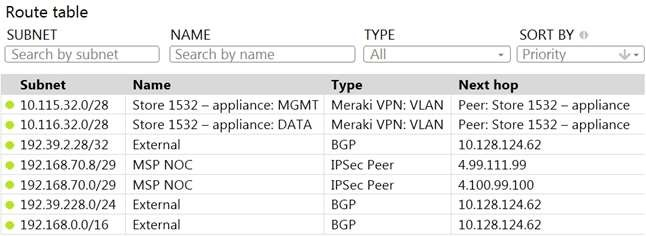
A packet arrives on the VPN concentrator with source IP 10.168.70.3 and destined for IP 10.116.32.4.
What is the next hop for the packet, based on this concentrator routing table?
Answer : D
This can be determined by looking at the concentrator routing table and finding the entry for the destination IP 10.116.32.4. The next hop for this entry is the Auto VPN peer ''Store 1532 -- appliance''.
This question is related to the topic ofImplementing Dynamic Routing Protocolsin the Engineering Cisco Meraki Solutions (ECMS) official training documentation. You can find more information about this topic in theECMS v2.2 Course Overviewor theECMS1 v2.1 Course Overview.
Question 3
Which VLAN is used to source pings across the site-to-site VPN when using the MX Live tools?
Answer : C
See Behavior - Firmware MX 15.11 or Lower section For MXs running firmware MX15.11 or below, the source IP that MX uses while pinging a destination is the MX IP of highest VLAN ID. If the destination is across a VPN, the MX uses the MX IP of highest VLAN ID participating in VPN. For MXs running firmware MX 15.12+, additional ping options have been added to the live tool. The ping tool now has a drop down to select the source IP address for pinging destinations from the MX. https://documentation.meraki.com/General_Administration/Tools_and_Troubleshooting/Using_the_Ping_Live_Tool
Question 4
What are two roles of the network and device tags in a Dashboard? (Choose two.)
Answer : A, C
See Permissions by Network Tag section To simplify the assignment of network-level permissions in an organization with many networks, permissions can be granted to users for a given network tag. https://documentation.meraki.com/General_Administration/Managing_Dashboard_Access/Managing_Dashboard_Administrators_and_Permissions
The Organization > Configure > Manage Tags page allows Administrators to configure a combination of Network and Device specific tags to create Summary Reports filtered for specific devices across multiple networks. https://documentation.meraki.com/General_Administration/Organizations_and_Networks/Organization_Menu/Manage_Tags
Question 5
What are two methods of targeting and applying management profiles to System Manager clients? (Choose two.)
Answer : B, D
The correct answer is B and D. These are the two methods of targeting and applying management profiles to System Manager clients, according to the [System Manager: Getting Started] article. The article explains that:
Defining the scope: This method allows you to target devices based on their network, tag, or owner. You can define the scope of a profile from the Systems Manager > Manage > Settings page or from the Systems Manager > Monitor > Overview page.
Using device tags: This method allows you to target devices based on their attributes, such as OS, model, location, or user. You can use device tags to create dynamic groups of devices that share common characteristics. You can apply device tags from the Systems Manager > Monitor > Devices page or from the Systems Manager > Manage > Tags page.
Question 6
Refer to the exhibit.
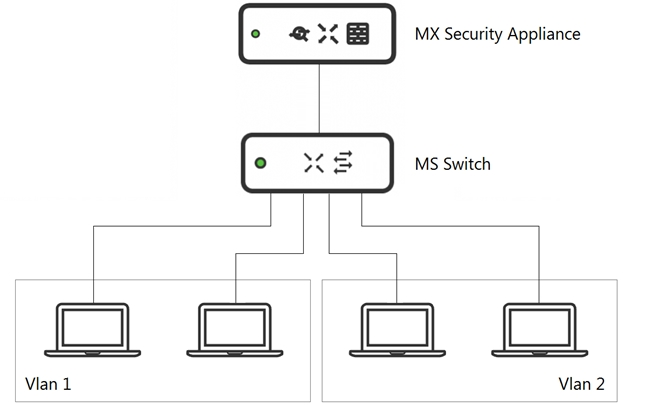
What is an advantage of implementing inter-VLAN routing on an MX Security Appliance rather than performing inter-VLAN routing on an MS Series Switch?
Answer : C
Question 7
What is the best practice Systems Manager enrollment method when deploying corporate-owned iOS devices?
Answer : D
iOS devices that are using Apple's Device Enrollment Program (DEP) can be supervised and enrolled over-the-air anytime they are factory reset. DEP is the best way to permanently force your devices to be owned and managed by your organization, and it is important to assign your DEP settings properly before deployment. https://documentation.meraki.com/SM/Device_Enrollment/Enrolling_and_Supervising_iOS_Devices_using_Apple_Configurator_2.5_or_Later#:~:text=DEP%20is%20the%20best%20way,DEP%20settings%20properly%20before%20deployment.
 All Official Question Types