Page: 1
/ 14
Total 40 questions
Cisco Certified Support Technician (CCST) Networking CCST-Networking CCST Exam Questions
Question 1
A Cisco switch is not accessible from the network. You need to view its running configuration.
Which out-of-band method can you use to access it?
Answer : B
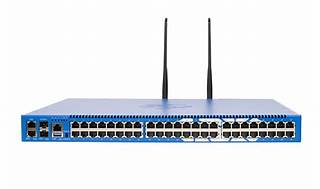
Out-of-band (OOB) network interface configuration guidelines
Out of band management configuration
=========================
If you have any more questions or need further assistance, feel free to ask!
Question 2
Examine the following output:
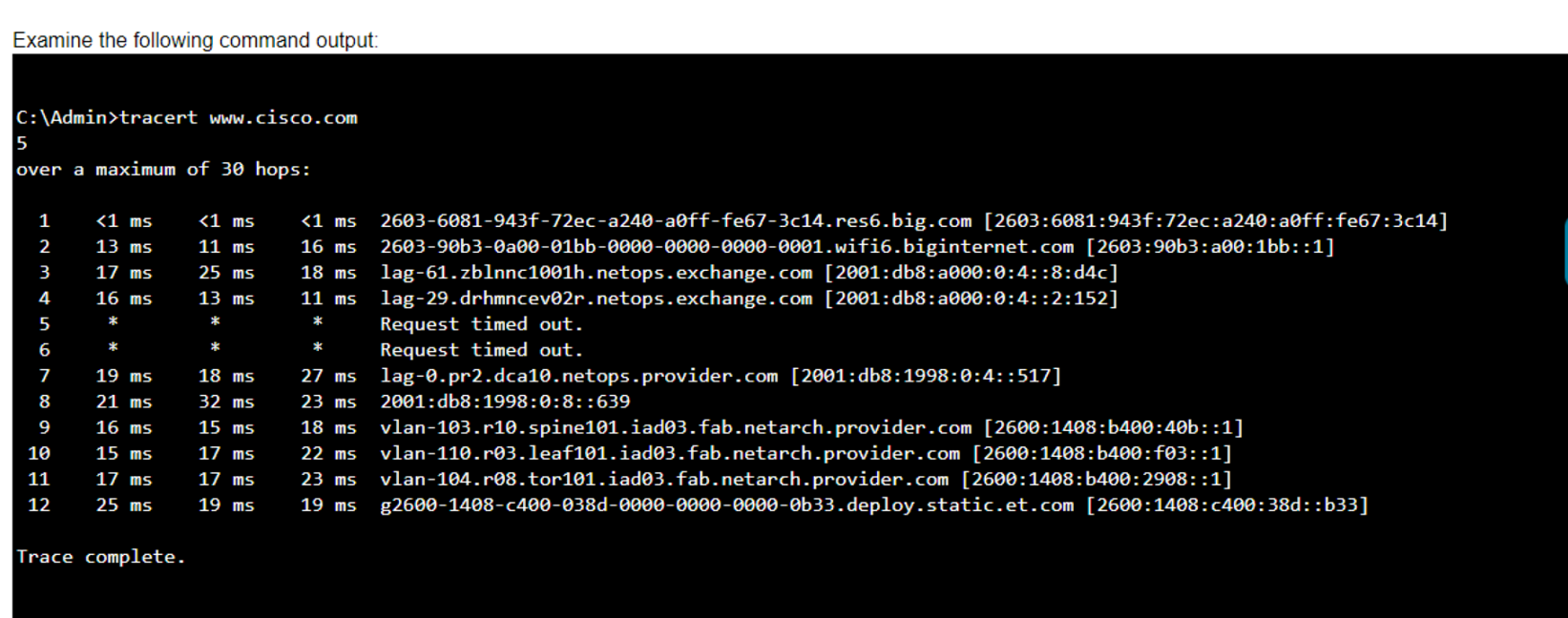
Which two conclusions can you make from the output of the tracert command? (Choose 2.)
Note: You will receive partial credit for each correct answer.
Answer : A, C
* Statement A: 'The trace successfully reached the www.cisco.com server.' This is true as indicated by the 'Trace complete' message at the end, showing that the trace has reached its destination.
* Statement C: 'The IPv6 address associated with the www.cisco.com server is 2600:1408:c400:38d::b33.' This is true because the final hop in the trace, which is the destination, has this IPv6 address.
* Statement B: 'The trace failed after the fourth hop.' This is incorrect as the trace continues beyond the fourth hop, despite some intermediate timeouts.
* Statement D: 'The routers at hops 5 and 6 are offline.' This is not necessarily true. The routers might be configured to not respond to traceroute requests.
* Statement E: 'The device sending the trace has IPv6 address 2600:1408:c400:38d::b33.' This is incorrect; this address belongs to the destination server, not the sender.
* Understanding Traceroute: Traceroute Guide
Question 3
Which two pieces of information should you include when you initially create a support ticket? (Choose 2.)
Answer : A, C
Statement A: 'A detailed description of the fault.' This is essential for support staff to understand the nature of the problem and begin troubleshooting effectively.
Statement C: 'A description of the conditions when the fault occurs.' This helps in reproducing the issue and identifying patterns that might indicate the cause of the fault.
Statement B: 'Details about the computers connected to the network.' While useful, this is not as immediately critical as understanding the fault itself and the conditions under which it occurs.
Statement D: 'The actions taken to resolve the fault.' This is important but typically follows the initial report.
Statement E: 'The description of the top-down fault-finding procedure.' This is more of a troubleshooting methodology than information typically included in an initial support ticket.
Best Practices for Submitting Support Tickets: Support Ticket Guidelines
Question 4
Which protocol allows you to securely upload files to another computer on the internet?
Answer : A
SFTP, or Secure File Transfer Protocol, is a protocol that allows for secure file transfer capabilities between networked hosts. It is a secure extension of the File Transfer Protocol (FTP). SFTP encrypts both commands and data, preventing passwords and sensitive information from being transmitted openly over the network. It is typically used for secure file transfers over the internet and is built on the Secure Shell (SSH) protocol1.
* What Is SFTP? (Secure File Transfer Protocol)
* How to Use SFTP to Safely Transfer Files: A Step-by-Step Guide
* Secure File Transfers: Best Practices, Protocols And Tools
The Secure File Transfer Protocol (SFTP) is a secure version of the File Transfer Protocol (FTP) that uses SSH (Secure Shell) to encrypt all commands and data. This ensures that sensitive information, such as usernames, passwords, and files being transferred, are securely transmitted over the network.
* ICMP (Internet Control Message Protocol) is used for network diagnostics and is not designed for file transfer.
* NTP (Network Time Protocol) is used to synchronize clocks between computer systems and is not related to file transfer.
* HTTP (HyperText Transfer Protocol) is used for transmitting web pages over the internet and does not inherently provide secure file transfer capabilities.
Thus, the correct protocol that allows secure uploading of files to another computer on the internet is SFTP.
* Cisco Learning Network
* SFTP Overview (Cisco)
Question 5
You want to store files that will be accessible by every user on your network.
Which endpoint device do you need?
Answer : B
Understanding Servers and Their Functions
A server is a computer designed to process requests and deliver data to other computers over a local network or the internet. In this case, to store files that will be accessible by every user on the network, a file server is the appropriate endpoint device. It provides a centralized location for storing and managing files, allowing users to access and share files easily.
A . Access point: Provides wireless connectivity to a network.
C . Hub: A basic networking device that connects multiple Ethernet devices together, making them act as a single network segment.
D . Switch: A networking device that connects devices on a computer network by using packet switching to forward data to the destination device.
Thus, the correct answer is B. Server.
File Server Overview (Cisco)
Server Roles in Networking (Cisco)
Question 6
A local company requires two networks in two new buildings. The addresses used in these networks must be in the private network range.
Which two address ranges should the company use? (Choose 2.)
Note: You will receive partial credit for each correct selection.
Answer : A, D
The private IP address ranges that are set aside specifically for use within private networks and not routable on the internet are as follows:
Class A: 10.0.0.0 to 10.255.255.255
Class B: 172.16.0.0 to 172.31.255.255
Class C: 192.168.0.0 to 192.168.255.255
Given the options: A. 172.16.0.0 to 172.31.255.255 falls within the Class B private range. B. 192.16.0.0 to 192.16.255.255 is not a recognized private IP range. C. 11.0.0.0 to 11.255.255.255 is not a recognized private IP range. D. 192.168.0.0 to 192.168.255.255 falls within the Class C private range.
Therefore, the correct selections that the company should use for their private networks are A and D.
Reserved IP addresses on Wikipedia
Private IP Addresses in Networking - GeeksforGeeks
Understanding Private IP Ranges, Uses, Benefits, and Warnings
Question 7
What is the most compressed valid format of the IPv6 address 2001 :0db8:0000:0016:0000:001b: 2000:0056?
Answer : D
IPv6 addresses can be compressed by removing leading zeros and replacing consecutive groups of zeros with a double colon (::). Here's how to compress the address 2001:0db8:0000:0016:0000:001b:2000:0056:
Remove leading zeros from each segment:
2001:db8:0000:0016:0000:001b:2000:0056 becomes 2001:db8:0:16:0:1b:2000:56
Replace the longest sequence of consecutive zeros with a double colon (::). In this case, the two consecutive zeros between the 16 and 1b:
2001:db8:0:16::1b:2000:56
Thus, the most compressed valid format of the IPv6 address is 2001:db8:0:16::1b:2000:56.
Cisco Learning Network
IPv6 Addressing (Cisco)
 All Official Question Types