Page: 1
/ 14
Total 227 questions
Citrix Virtual Apps and Desktops 7 Administration 1Y0-205 Exam Questions
Question 1
Scenario: A Citrix Administrator is configuring the Citrix Workspace app to allow users to access their applications and desktops. Management requires that users can log on to the environment from any device without having to remember the server address.
What should the administrator do to meet these requirements?
Answer : D
According to the Citrix Virtual Apps and Desktops 7 Deployment and Administration course, one of the methods to configure the Citrix Workspace app is to use a Group Policy Template File. This file contains the settings that can be applied to the Citrix Workspace app through Active Directory Group Policy.This method allows the administrator to specify the server address and other settings for the users, so they do not have to remember or enter them manually1
1:2- Configuring Citrix Workspace app using Group Policy Template File.
Question 2
A Citrix Administrator has executed the commands in the screenshot on the Citrix ADC using the command-line interface.
Click on the 'Exhibit' button to view the screenshot of the command-line interface.
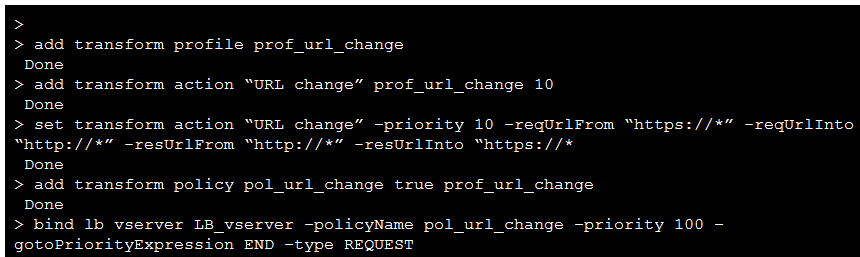
Which two replacements will be the outcome of executing these commands? (Choose two.)
Answer : A, C
Question 3
Scenario: A Citrix Administrator has configured an Authentication, Authorization, and Auditing (AAA) action policy to allow users access through the Citrix ADC. The Administrator bound the policy to a specific vServer.
Which policy expression will allow all users access through the vServer?
Answer : D
The ns_allow expression always evaluates to true, which means it allows all users access through the vServer. The ns_disallow and ns_false expressions always evaluate to false, which means they deny all users access.The ns_true expression is not a valid policy expression1
1:Citrix ADC 13.0 - Policy Expressions
Question 4
Which Front-End Optimization (FEO) action can a Citrix Administrator use to achieve the results shown in the screenshots?
Click the Exhibit button to view the screenshots.
Answer : B
Inline CSS is a FEO action that replaces external CSS files with inline CSS code in the HTML document. This reduces the number of HTTP requests and improves the page load time. The screenshots show that the HTML code in the second snippet has no external CSS file linked, unlike the first snippet. Therefore, the correct answer is B.Inline CSS12.
Some additional information:
FEO stands for Front-End Optimization, which is a feature of Citrix Application Delivery Management (ADM) that optimizes web pages for faster delivery and better user experience3.
FEO actions are rules that modify the HTML, CSS, JavaScript, and images of a web page to improve its performance.FEO actions can be applied globally or to specific web pages based on policies4.
Other FEO actions include Truncate CSS, which removes unused CSS selectors and properties; Move CSS to head, which moves the CSS code to the head section of the HTML document; and Rearrange CSS, which reorders the CSS code to avoid rendering delays4.
Question 5
Scenario: A Citrix Administrator needs to deploy Citrix Virtual Apps. Project requirements dictate that management and maintenance should be minimized for the administrator, while still maintaining control of the Virtual Delivery Agent (VDA) machines.
Which hosting platform should the administrator choose to meet these requirements?
Answer : D
Citrix Cloud is the hosting platform that minimizes management and maintenance for administrators while maintaining control of the VDA machines1.
Question 6
Scenario: The Director of network security in a financial organization wants to protect the enterprise network from any external malware threats. To do this, the director needs to gain visibility into otherwise-bypassed traffic and control access to malicious web sites. The director is required to do the following:
Intercept and examine all the traffic, including SSL/TLS (encrypted traffic), coming in, and going out of the enterprise network.
Block access to URLs identified as serving harmful or insecure content.
Identify users (employees) in the enterprise who are accessing malicious websites.
Which Citrix ADC deployment mode should a Citrix Administrator use to achieve this requirement?
Answer : B
According to the Citrix Secure Web Gateway 12.1 documentation1, Citrix Secure Web Gateway (SWG) is a cloud-delivered service that provides secure access to web and SaaS applications, globally. It provides a complete stack of security capabilities, such as Secure Web Gateway, Cloud Access Security Broker, Malware Protection with Sandboxing, Intrusion Prevention and Detection Systems, and Data Loss Prevention. Citrix SWG can intercept and inspect all the traffic, including SSL/TLS, coming in and going out of the enterprise network. It can also block access to URLs identified as serving harmful or insecure content, and identify users who are accessing malicious websites. Citrix SWG can be deployed as a proxy on a Citrix ADC appliance at the edge of the network. The other options are not relevant for this scenario, as they do not provide the same level of security and visibility as Citrix SWG.
Question 7
Desktops]
Which tool should a Citrix Administrator use to monitor the overall daily performance of a Citrix Virtual Apps and Desktops Site?
Answer : C
Citrix Director is the tool designed for monitoring the overall daily performance of a Citrix Virtual Apps and Desktops Site.It provides administrators with insights into the environment's operations, allowing for proactive management and troubleshooting
 All Official Question Types