Page: 1
/ 14
Total 45 questions
Dell EMC Dell SONiC Deploy D-SNC-DY-00 Exam Questions
Question 1
What are three characteristics of VLAN translation?
Answer : A, B, E
VLAN translation is not supported on MC-LAG port channel interfaces (A): This is a restriction commonly seen in network configurations involving Multi-Chassis Link Aggregation (MC-LAG) where VLAN translation capabilities are not applied.
Trunk or access ports can be configured as members of any VLANs that are not used as an SVLAN (B): This ensures that the VLAN configuration on trunk or access ports is flexible and does not overlap with Service VLANs (SVLANs).
SVLAN configuration for both Q-in-Q VLAN tunneling and VLAN translation is possible on the same interface (E): This allows for complex VLAN tagging and translation configurations to be applied to the same interface, supporting advanced networking scenarios.
Dell Technologies SONiC documentation
Dell Networking Configuration Guide
Question 2
Which two elements must be included in the show mclag interface x x command?
Answer : A, C
The show mclag interface command provides information about the multi-chassis link aggregation (MC-LAG) configuration. Essential elements that must be included are the peer-link port channel number and the MC-LAG port channel number. These parameters are critical for identifying the interface and its associated link aggregation settings.
Dell SONiC Command Reference Guide
Dell Technologies InfoHub
Question 3
How many port channels can be assigned to a single port?
Answer : D
According to the Dell SONiC documentation, a single physical port can be a member of only one port channel at a time. This restriction ensures the consistency and integrity of link aggregation configurations.
Dell Networking SONiC: How to Configure Port Channels
Dell Technologies InfoHub
Question 4
Refer to the exhibit.
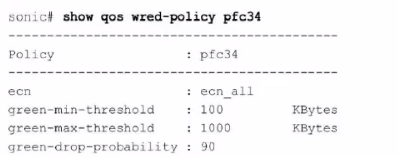
What can be determined from this show command?
Answer : B
The output of the command show qos wred-policy pfc34 shows the ECN (Explicit Congestion Notification) configuration for the policy pfc34. The line ecn: ecn_all indicates that ECN is enabled for all traffic classes (all DSCP values). Additionally, the green-min-threshold, green-max-threshold, and green-drop-probability settings are shown, but there is no indication of a 10% probability for marking traffic as congested. Therefore, the correct answer is B.
Dell Enterprise SONiC documentation
Dell Technologies InfoHub
Question 5
Which three actions are required to route traffic sourced from voice servers to a dedicated Internet link''
Answer : B, C, D
To route traffic from voice servers to a dedicated Internet link, the following steps are necessary:
Create an ACL that selects IPs of voice servers (B): This ACL will match the traffic coming from the specified IP addresses of the voice servers.
Create a policy-map and attach the configured class-map and set the next-hop IP (D): The policy-map will use the class-map to identify the voice server traffic and then set the next-hop IP for routing.
Attach a policy to the egress interface (C): The policy-map must be applied to the egress interface to ensure that the traffic is routed correctly.
Dell SONiC QoS Configuration Guide
Dell Technologies InfoHub
Feel free to refer to the Dell SONiC documentation and Dell Technologies InfoHub for more detailed explanations and additional context.
Question 6
What does show interface breakout port slot/slot command display?
Answer : B
The show interface breakout port slot/slot command displays the breakout modes available for the specified port. Breakout modes determine how a single high-speed port can be split into multiple lower-speed ports, providing flexibility in network port configurations.
Dell Technologies SONiC Command Reference Guide
Port Breakout Configuration Guide
Question 7
An administrator obtains the following CLI output:
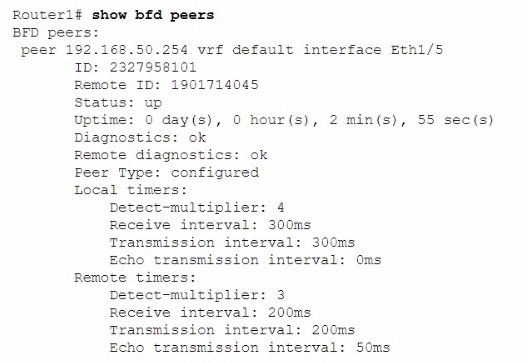
How much time does the local system take to detect remote failures without receiving packets?
Answer : B
The local timers in the BFD (Bidirectional Forwarding Detection) configuration show a detect multiplier of 4 and a receive interval of 300ms. The time taken to detect remote failures is calculated as detect multiplier receive interval = 4 300ms = 1200ms.
Dell Technologies SONiC documentation
BFD Configuration Guide
 All Official Question Types