Page: 1
/ 14
Total 55 questions
Dell EMC Dell XtremIO Maintenance Achievement D-XTR-MN-A-24 Exam Questions
Question 1
What is a feature of the XtremlO storage array?
Answer : A
A key feature of the XtremIO storage array is inline compression. This feature allows data to be compressed in real-time as it is written to the storage system, which helps to reduce storage footprint and improve storage efficiency without impacting performance.
Question 2
How much virtual hard drive space is recommended when deploying a virtual XMS?
Answer : B
When deploying a virtual XtremIO Management Server (XMS), it is recommended to allocate a virtual hard drive space of 200 GB. This recommendation is based on the requirements for the operating system, the XMS application, and additional space for updates, logs, and other system files that may be generated during operation1.
The deployment process would typically involve:
Preparing a virtual environment that meets the minimum hardware specifications.
Allocating the recommended virtual hard drive space of 200 GB to ensure adequate room for the XMS application and associated data.
Proceeding with the installation of the XMS application on the prepared virtual machine.
It is important to follow the official Dell XtremIO documentation to ensure that the virtual environment is correctly configured to support the XMS application2.
Question 3
Which ports need to be open between the XMS and X1-SC1 to successfully operate Technician Advisor on an XtremIO X2?
Answer : C
To successfully operate Technician Advisor on an XtremIO X2, TCP ports 80 and 443 need to be open between the XMS (XtremIO Management Server) and X1-SC1 (Storage Controller). These ports are used for HTTP and HTTPS communication, respectively, allowing for secure management and operation of the storage system.
Question 4
What is recommended for uploading the XtremApp to the XMS?
Answer : C
For uploading the XtremApp to the XtremIO Management Server (XMS), the recommended tool is WinSCP. WinSCP is a popular SFTP client and FTP client for Microsoft Windows that allows for secure file transfer between a local and a remote computer1. It is particularly useful for uploading files like XtremApp due to its graphical user interface, which simplifies the process of transferring files.
The steps for uploading the XtremApp to the XMS using WinSCP are as follows:
Download and install WinSCP on your local machine.
Open WinSCP and enter the XMS's hostname or IP address, as well as the username and password.
Navigate to the XtremApp file on your local machine within the WinSCP interface.
Drag and drop the XtremApp file to the desired directory on the XMS.
Verify that the upload was successful by checking the file size and timestamp on the XMS.
This method is recommended in the Official Dell XtremIO Maintenance Achievement document as it provides a secure and reliable way to manage files on the XMS1.
=========================
Question 5
Refer to the exhibit.
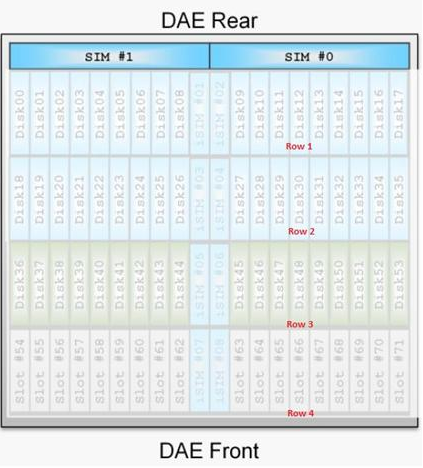
Based on the exhibit, which rows of drives are used for DPG-2 in an XtremIO-X2
DAE?
Answer : B
In Dell XtremIO X2 arrays, the Disk Protection Groups (DPGs) are organized in such a way that each DPG spans multiple rows of drives. Specifically, DPG-2 in an XtremIO-X2 DAE (Disk Array Enclosure) uses the drives in Row 1 and Row 2. This configuration is designed to ensure redundancy and fault tolerance. The drives in these rows collectively form the DPG, which is responsible for data protection and performance optimization.
Question 6
How many drives can be lost from a full data protection group before a data loss occurs on an XtremIO X1?
Answer : B
In an XtremIO X1 system, a full data protection group (DPG) can tolerate the loss of up to 5 drives before a data loss occurs. The XtremIO architecture ensures high availability and redundancy, but losing more than 5 drives within a DPG exceeds the system's ability to protect data, leading to potential data loss.
Question 7
Which port is used to connect to the Storage Controller (SC) to service an XtremIO X2 with the Technician Advisor tool?
Answer : D
To service an XtremIO X2 with the Technician Advisor tool, the connection is made through the dedicated Management port located on the back of the Storage Controller (SC). This port is specifically designed for management tasks and allows service technicians to access the system for diagnostics and configuration using the Technician Advisor tool1.
The process typically involves:
Locating the dedicated Management port on the back of the SC.
Connecting a compatible cable from the technician's device to the Management port.
Using the Technician Advisor tool to perform the necessary service tasks.
This information is outlined in the Official Dell XtremIO Maintenance Achievement document, which provides detailed instructions for servicing and maintaining XtremIO X2 storage systems1.
=========================
 All Official Question Types