Page: 1
/ 14
Total 61 questions
Dell PowerStore Maintenance Achievement D-PST-MN-A-24 Exam Questions
Question 1
What is the alert severity if the license expiration date is within a week?
Answer : D
When the license expiration date is within a week, Dell PowerStore generates a warning-level alert. This alert severity level is used to indicate that action should be taken soon to prevent potential service disruptions or limitations on system functionality. A warning alert is not as severe as a major alert, which would indicate immediate attention is required, but it is more critical than an informational alert, which is typically used for general notifications without immediate impact.
The warning alert serves as a proactive reminder to renew or update the license to ensure continuous operation of the PowerStore system. It is important to address these alerts promptly to maintain access to all features and avoid any limitations on system management operations1.
For more information on alert severities and license management in Dell PowerStore, administrators can refer to the PowerStore documentation on License State Alerts and the PowerStore Manager Overview, which provide detailed explanations of the different alert levels and the steps to manage and resolve licensing issues23. Following the guidelines in these documents will help ensure that the storage system remains fully operational and compliant with licensing requirements.
Question 2
How is a defective embedded module displayed in Dell EMC PowerStore Manager?
Answer : B
In Dell EMC PowerStore Manager, a defective embedded module is displayed as orange with a faulted state. This color coding is used to indicate that there is a fault with the embedded module. The PowerStore Manager provides a visual representation of the system's health and status, and the color orange is typically associated with a warning or an issue that needs attention.
The procedure for identifying and replacing a faulted embedded module involves using the PowerStore Manager to locate the faulted component. Once identified, the module displays an orange LED to indicate its faulted state. This is part of the system's design to help administrators quickly and easily identify components that require attention1.
For detailed instructions on replacing a faulted embedded module or understanding the LED states for troubleshooting, you can refer to the PowerStore documentation provided by Dell, which includes comprehensive guides on handling such scenarios2.
Question 3
What describes Dell EMC PowerStore heat dissipation?
Answer : A
Heat dissipation in Dell EMC PowerStore systems is typically related to the power and cooling requirements of the system, which are influenced by the system's configuration and components. Generally, lower model numbered systems, which have less processing power and storage capacity, will have lower heat dissipation specifications compared to higher model numbered systems that are more powerful and have greater storage capacity1.
The heat dissipation specification is an important factor in data center planning as it affects the environmental control requirements such as cooling and airflow. When planning for the installation of PowerStore systems, it is crucial to consider the heat output of the systems to ensure that the data center environment can maintain the optimal temperature for reliable operation.
For detailed specifications on heat dissipation for specific PowerStore models, one should refer to the official Dell EMC PowerStore Spec Sheets, which provide comprehensive information on the electrical and thermal characteristics of each model1. These documents are essential for understanding the power consumption and cooling requirements of PowerStore systems. Following the guidelines provided in these documents helps ensure that the systems are deployed in an environment that can support their thermal management needs.
Question 4
What describes the SAS cabling when adding an expansion enclosure to a Dell EMC PowerStore, for each node and expansion enclosure side?
Answer : D
The correct description of the SAS cabling when adding an expansion enclosure to a Dell EMC PowerStore, for each node and expansion enclosure side, is Option D: SAS cabling goes from existing A ports to new B ports. At the last enclosure, SAS cabling returns from the A ports to the alternate node's B ports.
When adding a SAS expansion enclosure to a Dell EMC PowerStore system, the cabling must be done in a specific manner to ensure proper connectivity and performance.
The SAS cabling should start from the existing A ports on the base enclosure and connect to the new B ports on the expansion enclosure1.
At the last expansion enclosure in the chain, the SAS cabling should return from the A ports back to the B ports on the alternate node1.
This cabling method ensures that each node is connected to each expansion enclosure and that the enclosures are daisy-chained correctly for optimal performance and redundancy1.
For detailed cabling instructions and diagrams, it is recommended to consult the Dell PowerStore Installation and Service Guide or contact Dell EMC support for assistance.
Question 5
What does the command "svc_journalctl -f -g "st_io_monitor""do?
Answer : D
The command svc_journalctl -f -g 'st_io_monitor' is used within the Dell PowerStore environment to retrieve log messages that are associated with the specified error, in this case, ''st_io_monitor'', and to monitor for their re-occurrence. The -f flag is typically used to follow the log, meaning it will continue to output new log messages as they are appended to the journal. The -g flag is used to filter the log output based on a specific pattern1.
This command is part of the suite of service scripts provided by Dell for system maintenance and troubleshooting. It enables service technicians and system administrators to view log messages from the system journal in a consistent and easy-to-read format, which is crucial for diagnosing and resolving issues1.
For more detailed information on using this command and understanding the system journal logs, users should refer to the Dell PowerStore Service Scripts Guide or contact Dell Support for technical assistance1. It's important to use these commands as per the guidelines provided in the official documentation to ensure proper system maintenance and to avoid any unintended consequences.
Question 6
Refer to the exhibit.
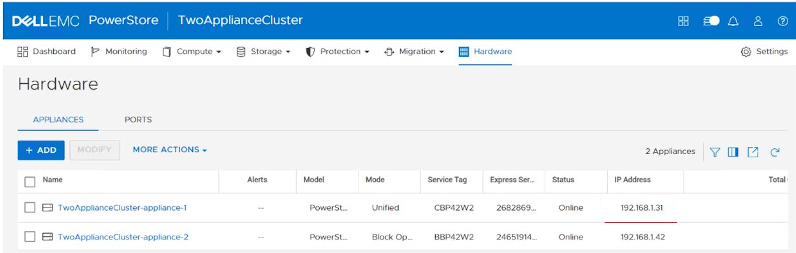
Which column indicates the primary appliance?
Answer : B
In the Dell EMC PowerStore system, the primary appliance is typically indicated by the 'Mode' column within the system's user interface. The 'Mode' column shows the operational mode of the appliance, which can include states such as 'Primary', 'Secondary', or 'Standby'. The primary appliance is the one that is actively servicing workloads and managing operations within the PowerStore cluster1.
The 'Service Tag' column represents the unique identifier for each physical appliance, the 'Model' column indicates the specific model of the appliance, and the 'IP Address' column shows the network address assigned to the appliance. While these columns provide important information, they do not indicate the role of the appliance within the cluster.
For more detailed information on identifying the primary appliance and understanding the role of each appliance in a PowerStore cluster, users can refer to the Dell PowerStore Clustering and High Availability documentation1. This documentation provides insights into the clustering architecture of PowerStore and how the primary appliance is determined during the initial configuration process.
Question 7
Which component is an FRU?
Answer : D
A Field Replaceable Unit (FRU) is a component that can be replaced by the user or technician without having to send the entire product or system to a repair facility. Dell's Customer Replaceable Unit (CRU) program allows customers to replace designated hardware components, which are typically considered as FRUs1.
In the context of Dell PowerStore Maintenance, the Battery Backup Unit (BBU) is considered an FRU because it is designed to be easily replaced in the field. The BBU is critical for maintaining power to the system in the event of a power failure, ensuring that data is not lost and the system can be shut down gracefully.
The other components listed, such as DIMMs, Embedded IO Modules, and Nodes, may not be as easily replaceable by the customer or may require more technical expertise or special tools. Therefore, they are not typically classified as FRUs within the Dell PowerStore ecosystem.
For detailed procedures on replacing the BBU or any other FRU components, it is recommended to refer to the official Dell PowerStore Maintenance documents and follow the guidelines provided for safe and effective replacement. This ensures that the system integrity is maintained and any warranty or support agreements remain valid.
 All Official Question Types