Page: 1
/ 14
Total 60 questions
Dell VPLEX Deploy Achievement D-VPX-DY-A-24 Exam Questions
Question 1
LUNs are being provisioned from active/passive arrays to VPLEX. What is the path requirement for each VPLEX director when connecting to this type of array?
Answer : D
When provisioning LUNs from active/passive arrays to VPLEX, it is essential that each VPLEX director has at least two paths to both the active and passive controllers of each array. This requirement ensures high availability and redundancy for the storage volumes being managed by VPLEX1.
Active/Passive Arrays: Active/passive arrays have one controller actively serving I/O (active) and another on standby (passive). The VPLEX system must have paths to both controllers to maintain access to the LUNs in case the active controller fails1.
Path Redundancy: Having at least two paths to both controllers from each VPLEX director provides redundancy. If one path fails, the other can continue to serve I/O, preventing disruption to the host applications1.
VPLEX Configuration: In the VPLEX configuration, paths are zoned and masked to ensure that the VPLEX directors can access the LUNs on the storage arrays. Proper zoning and masking are critical for the paths to function correctly1.
Failover Capability: The dual-path configuration allows VPLEX to perform an automatic failover to the passive controller if the active controller becomes unavailable, ensuring continuous data availability1.
Best Practices: Following the path requirement as per Dell EMC's best practices ensures that the VPLEX system can provide the expected level of service and data protection for the provisioned LUNs1.
In summary, the path requirement for each VPLEX director when connecting to active/passive arrays is to have at least two paths to both the active and passive controllers of each array, providing the necessary redundancy and failover capabilities.
Question 2
What are the two common use cases of the VPLEX Mobility feature?
Answer : D
The VPLEX Mobility feature is designed to address various operational needs in a data center environment. Two of the most common use cases for this feature are Tech Refresh and Workload Rebalance.
Tech Refresh: The Tech Refresh use case involves using VPLEX to migrate data from older storage arrays to newer ones without disrupting the applications. This is crucial for organizations that need to update their storage infrastructure without downtime1.
Workload Rebalance: Workload Rebalance refers to the ability to move workloads across different storage systems to balance performance and capacity needs. VPLEX enables this by allowing data to be moved non-disruptively, ensuring continuous application availability1.
Operational Flexibility: VPLEX Mobility provides operational flexibility by enabling data to be moved within the same data center, across a campus, or within a geographical region. This capability is essential for dynamic environments where workload demands can change rapidly1.
Enhanced Resource Utilization: By leveraging VPLEX Mobility for Tech Refresh and Workload Rebalance, organizations can optimize resource utilization, reduce operational costs, and improve overall system performance1.
Best Practices: It is recommended to follow Dell's best practices when using VPLEX Mobility features. This includes planning migrations during low-activity periods and ensuring that all systems are properly zoned and configured1.
In summary, the two common use cases of the VPLEX Mobility feature are Tech Refresh, which allows for seamless data migrations during technology upgrades, and Workload Rebalance, which facilitates the dynamic allocation of resources to meet changing workload demands.
Question 3
A VPLEX Metro cluster is being installed for a company that is planning to create distributed volumes with 200 TB of storage. Based on this requirement, and consistent with
EMC best practices, what should be the minimum size for logging volumes at each cluster?
Answer : A
When configuring a VPLEX Metro cluster, especially for a company planning to create distributed volumes with a large amount of storage like 200 TB, it is essential to adhere to EMC best practices for the size of logging volumes.
Purpose of Logging Volumes: Logging volumes in VPLEX are used to store write logs that ensure data integrity and consistency across distributed volumes. These logs play a critical role during recovery processes1.
Size Considerations: The size of the logging volumes should be proportional to the amount of active data being written to ensure that all write operations are captured in the logs. For 200 TB of distributed storage, a minimum size of 10 GB for each logging volume is recommended to handle the logging requirements1.
Configuration: The logging volumes should be configured on each cluster to provide redundancy and high availability. This means that both clusters in a VPLEX Metro configuration should have logging volumes of at least the minimum recommended size1.
Best Practices: EMC best practices suggest that the logging volume should be sized appropriately to support the operational workload and to ensure that there is sufficient space to capture all write operations without any loss of data1.
Verification and Monitoring: After setting up the logging volumes, it is important to monitor their utilization to ensure they are functioning correctly and to adjust their size if necessary based on the actual workload1.
In summary, consistent with EMC best practices, the minimum size for logging volumes at each cluster in a VPLEX Metro cluster being installed for creating distributed volumes with 200 TB of storage should be 10 GB. This size ensures that the logging volumes can adequately support the write logging requirements for the amount of storage being used.
=========================
Question 4
Refer to the exhibit.
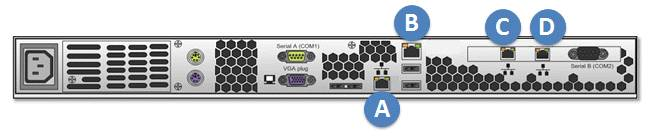
A storage administrator is experiencing an unplanned site outage. After recovery of the network, they are still unable to access the management server.
Which port on the back of the management server can the administrator connect to with a hardcoded IP address to access the VPLEX cluster and troubleshoot the issue?
Answer : B
In the event of an unplanned site outage and subsequent recovery, if a storage administrator is unable to access the management server, they can connect to a specific port on the back of the management server with a hardcoded IP address to regain access to the VPLEX cluster and begin troubleshooting.
Identify the Management Port: The management server typically has a dedicated port that can be used for direct access in case of network issues. This port is designed to accept a hardcoded IP address for such scenarios1.
Connect to the Management Port: The administrator should use an Ethernet cable to connect a laptop or a computer directly to the management port, which is usually labeled and can be identified based on the server's hardware manual or documentation1.
Configure the Hardcoded IP Address: On the connected device, the administrator needs to configure a static IP address that is in the same subnet as the management server's default IP range1.
Access the VPLEX CLI: Once the connection is established, the administrator can use SSH or a similar protocol to access the VPLEX Command Line Interface (CLI) through the hardcoded IP address1.
Troubleshoot the Issue: With access to the VPLEX CLI, the administrator can now run diagnostic commands, check the system status, and troubleshoot the connectivity issue1.
In this scenario, the correct port to connect to is labeled 'A' on the back of the management server. This port is reserved for such direct access and allows the administrator to bypass the network to troubleshoot and resolve the issue.
Question 5
What is required to add a RecoverPoint cluster to VPLEX?
Answer : B
To add a RecoverPoint cluster to VPLEX, the essential requirement is the RecoverPoint cluster's Management IP address. This IP address is used to manage and integrate the RecoverPoint cluster with the VPLEX system.
RecoverPoint Cluster Installation: The installation process for a RecoverPoint cluster involves preparing the physical and virtual RecoverPoint Appliances (RPAs) and connecting them using the Deployment Manager1.
Management IP Address: The Management IP address is crucial as it allows the VPLEX system to communicate with the RecoverPoint cluster for management and operational tasks1.
Integration Process: The integration of RecoverPoint with VPLEX includes configuring the RecoverPoint system within the VPLEX environment, which requires the Management IP address to establish a connection between the two systems1.
Configuration Steps: The steps to add a RecoverPoint cluster to VPLEX involve accessing the VPLEX Management Console, entering the RecoverPoint cluster's Management IP address, and following the guided setup to complete the integration1.
Best Practices: It is recommended to follow the best practices and guidelines provided in the Dell VPLEX Deploy Achievement documents and the RecoverPoint deployment guides to ensure a successful integration of the RecoverPoint cluster with VPLEX1.
In summary, the verified answer for what is required to add a RecoverPoint cluster to VPLEX is the RecoverPoint cluster's Management IP address. This address is used to manage the cluster and integrate it with the VPLEX system for enhanced data protection and disaster recovery capabilities.
Question 6
How much cache is available in a VPLEX VS2 dual engine setup?
Answer : A
In a VPLEX VS2 dual engine setup, each engine is fixed at 72GB of cache, with 36GB per director. Since a dual engine setup contains two engines, the total available cache would be:
72\ GB\ (per\ engine) \times 2\ (engines) = 144\ GB72GB(perengine)2(engines)=144GB
However, as each engine contains two directors, and each director has 36GB of cache, the total cache available in a dual engine setup would be:
36\ GB\ (per\ director) \times 4\ (directors) = 144\ GB36GB(perdirector)4(directors)=144GB
Therefore, the total cache available in a VPLEX VS2 dual engine setup is 144 GB1.
Question 7
A database administrator would like to have access to the diagnostic files from the shell, but has no shell access. How can they gain access to the files?
Answer : A
For a database administrator who needs access to diagnostic files from the VPLEX system but does not have shell access, the recommended method is to use Secure Copy Protocol (SCP) to copy the files. SCP is a secure file transfer protocol that allows files to be copied over a network.
Access the Management Server: First, the administrator must access the VPLEX management server for the cluster from which they need to collect the logs1.
SSH to the Director: Using SSH, the administrator logs in as root to the director from which the logs need to be collected1.
Navigate to Log Directory: Change the directory to /var/log on the director to access the log files1.
Create a Tarball of Logs: Use the tar command to create a compressed archive (tarball) of the log files1.
Copy the Tarball Using SCP: Use SCP to copy the tarball to the management server's /tmp directory. The administrator will be prompted for the service account password before the file can be transferred1.
Access the Files: Once the files are on the management server, the database administrator can download them from the /tmp directory using SCP from their workstation1.
This process allows the database administrator to obtain the necessary diagnostic files without having direct shell access to the VPLEX system.
 All Official Question Types