Page: 1
/ 14
Total 63 questions
Dell XtremIO Deploy Achievement D-XTR-DY-A-24 Exam Questions
Question 1
Which XMCLI command is used to verify the encryption capability of the DAE drives?
Answer : D
The XMCLI command used to verify the encryption capability of the DAE (Disk Array Enclosure) drives in an XtremIO system is show-daes. This command provides detailed information about the DAEs, including their encryption status. The encryption capability is an important security feature that ensures data at rest is protected from unauthorized access. When you run the show-daes command, it will list all the DAEs and their properties, including whether they are encrypted1.
Question 2
Refer to the exhibit.
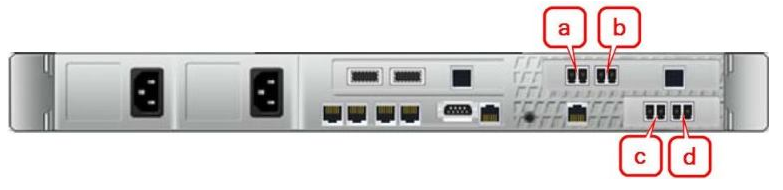
Based on the exhibit, which ports are used for FC2 and iSCSI 1 connections?
Answer : D
The image provided shows the back panel of a network device, with ports labeled 'a', 'b', 'c', and 'd'. The ports 'b' and 'd' are indicated to be used for FC2 (Fibre Channel 2) and iSCSI 1 connections, respectively. This is inferred from the color coding and labeling typical in network hardware, which helps distinguish between different types of connections. While the Official Dell XtremIO Deploy Achievement documents would provide definitive information, standard network design practices suggest that the correct answer is D. b and d, for FC2 and iSCSI 1 connections respectively.
Question 3
A four X-Brick XtremlO X1 cluster was installed in a customer's data center. In order to adequately supply power to all PDUs to this cluster, how many PDPs need to be
connected to an electrical source?
Answer : C
For a four X-Brick XtremIO X1 cluster, the total number of Power Distribution Panels (PDPs) that need to be connected to an electrical source is eight. This is based on the standard configuration for a four X-Brick cluster, which typically includes two power supplies per X-Brick and additional power supplies for the InfiniBand switches and other components1.
The process for connecting PDPs involves:
Identifying Power Requirements: Determine the power requirements for each component of the XtremIO X1 cluster, including X-Bricks and InfiniBand switches.
Allocating PDPs: Allocate the necessary number of PDPs based on the power requirements identified.
Connecting to Electrical Source: Connect each PDP to the electrical source, ensuring that the power distribution is balanced and meets the cluster's needs.
Verifying Power Supply: After connecting, verify that all components are receiving adequate power for operation.
Ensuring Redundancy: Ensure that there is redundancy in the power supply to protect against failures.
Question 4
What is the recommended way to check connectivity of DAE controllers, IB switches, IPMI, and BBU on an XtremIO X1 multi X-Brick after software installation and before cluster
creation?
Answer : D
The recommended way to check the connectivity of DAE controllers, IB switches, IPMI, and BBU on an XtremIO X1 multi X-Brick after software installation and before cluster creation is to use the XMCLI (XtremIO Management Command Line Interface). The XMCLI provides commands to test connectivity and confirm that all components are healthy and connected within the cluster. Here are the steps:
Access XMCLI: Log into the XtremIO Management Server (XMS) and access the XMCLI.
Run Connectivity Tests: Use the test-xms-storage-controller-connectivity command to check the connectivity of the storage controllers. Similar commands are available for other components1.
Review Test Results: Analyze the output of the commands to ensure that there is no packet loss and that the response times are within acceptable limits.
Troubleshoot if Necessary: If any connectivity issues are detected, use the XMCLI to troubleshoot and resolve them before proceeding with the cluster creation.
Document the Process: Keep a record of the connectivity checks and any actions taken to resolve issues as part of the installation documentation.
Question 5
What is the maximum number of volumes allowed in an XtremIO Consistency Group?
Answer : B
The Dell XtremIO Deploy Achievement documents specify different numbers for the maximum volumes in various contexts. However, for the XtremIO Consistency Group, the supported and QA certified number of volumes is 512. This is based on the authoritative information provided in the official release notes and support documents from Dell. It's important to note that while there may be higher numbers mentioned in some technical documents or API responses, such as 60000 or 32000, these are either not recommended or pertain to different aspects of the XtremIO system, not specifically to the Consistency Group1.
Question 6
During the installation of an XtremlO cluster, you configure the ESRS server using a FQDN for Connect Home. During the test, you discover that the XtremlO cluster fails to connect home. What is a possible cause for this issue?
Answer : D
Question 7
You are connecting a VMware cluster to an XtremlO array. The host will be connected to the array using QLogic Fibre Channel HBAs. Based on best practices, what is the recommended value for the Execution Throttle?
Answer : D
When connecting a VMware cluster to an XtremIO array using QLogic Fibre Channel Host Bus Adapters (HBAs), the recommended value for the Execution Throttle is typically set to 4096. This setting controls the maximum number of outstanding I/O operations that can be sent to a Fibre Channel port.
Here's how to apply this setting:
Access HBA Settings: Log into the VMware host and access the settings for the QLogic Fibre Channel HBA.
Locate Execution Throttle: Find the parameter for the Execution Throttle within the HBA settings.
Set Value: Change the value of the Execution Throttle to 4096. This is the recommended setting to balance performance and resource utilization.
Save and Apply: Save the changes and apply them to the HBA. A reboot of the host may be required for the changes to take effect.
Verify Configuration: After the host is back online, verify that the new Execution Throttle setting is active and functioning as expected.
Monitor Performance: Monitor the performance of the host and the storage array to ensure that there are no adverse effects from the change.
Consult Official Documentation: For the most accurate and detailed instructions, always refer to the official Dell XtremIO Deploy Achievement document1. This document will provide the authoritative guidance on HBA settings and best practices for connecting to an XtremIO array.
It's important to note that while the value of 4096 is a common recommendation, the optimal setting may vary based on the specific environment and workload. Therefore, it's essential to refer to the latest Dell XtremIO documentation and possibly consult with Dell support for the most current and tailored advice.
 All Official Question Types