Page: 1
/ 14
Total 65 questions
F5 Networks BIG-IP Administration Support and Troubleshooting F5CAB5 Exam Questions
Question 1
Users report that traffic is negatively affected every time a BIG-IP device fails over. The traffic becomes stabilized after a few minutes. What should the BIG-IP Administrator do to reduce the impact of future failovers?
Answer : C
When traffic 'stabilizes after a few minutes' following a failover, it points to a network-level performance issue involving ARP cache on upstream routers and switches. Each BIG-IP interface has a unique hardware MAC address. During failover, the Standby device takes over the floating IP address, but the upstream switch still associates that IP with the MAC of the now-offline device. Traffic is lost until the switch learns the new MAC or its ARP entry expires. 'MAC Masquerading' solves this by creating a shared, virtual MAC address for the floating traffic group. This virtual MAC is used by whichever device is currently active. Because the MAC address for the virtual server IP never changes from the perspective of the network, the upstream devices do not need to update their ARP tables. This troubleshooting solution eliminates the delay associated with failover, providing a seamless transition and ensuring that application traffic flow is not disrupted when the BIG-IP HA state changes.
Question 2
Which two methods should the BIG-IP Administrator troubleshoot a Pool-member that's been marked "DOWN" by its Health Monitor? (Pick the 2 correct responses below)
Answer : A, C
When a health monitor marks a member 'Down,' the goal is to determine if the issue is at the network level or the application level.
Monitor Logging (Option A): In the Pool Member configuration, an administrator can enable 'Monitor Logging'. This generates a detailed text file in /var/log/monitors/ that shows the exact 'Send' string sent by the BIG-IP and the exact 'Receive' string (or lack thereof) returned by the server.
TCPdump (Option C): This is the most definitive way to see if the monitor traffic is even leaving the BIG-IP and if the server is responding with a TCP RST (reset) or an ICMP unreachable message. A command such as tcpdump -ni <vlan> host <member_ip> and port <member_port> is standard for this task.
Why not others? While the routing table (Option B) is useful for general connectivity, if other members in the same subnet are 'Up,' the routing is likely fine. Statistics (Option D) show that it is down but rarely why it is down at a protocol level.
Question 3
Without decrypting, what portion of an HTTPS session is visible with a packet capture? (Choose one answer)
Answer : B
In an HTTPS session, the application-layer payload---including HTTP request headers, response headers, cookies, and body content---is encrypted using SSL/TLS. Without decrypting the traffic (for example, without SSL offloading on BIG-IP or access to the private keys), a packet capture cannot reveal any HTTP-level details.
However,network-layer and transport-layer information remains visible, even when encryption is used. This includes source and destination IP addresses, source and destination ports, TCP flags, sequence numbers, and TLS handshake metadata. Therefore, thesource IP address (Option B)is visible in a packet capture of HTTPS traffic without decryption.
Options A, C, and D are incorrect because HTTP headers and cookies are part of the encrypted payload once HTTPS is established. BIG-IP troubleshooting documentation emphasizes this distinction when analyzing encrypted traffic flows using tcpdump, as administrators must rely on IP, port, and timing information unless SSL inspection or decryption is configured.
Question 4
Without decrypting, what portion of an HTTPS session is visible with a packet capture?
Answer : B
When analyzing HTTPS traffic using tools like tcpdump without access to the SSL private keys for decryption, only the Layer 2 through Layer 4 information remains visible.
Visible Information: You can see the Source and Destination IP addresses, TCP ports, and the TLS handshake headers (such as the Server Name Indication/SNI in the Client Hello).
Encrypted Information: Once the encrypted tunnel is established, all Layer 7 data is masked. This includes HTTP Request/Response Headers (Option A and D) and Cookies (Option C).
Troubleshooting Note: To see the headers or cookies, an administrator must either perform the packet capture on the 'server-side' of the BIG-IP (if it is performing SSL Offload) or use a tool like Wireshark with the appropriate SSL keys loaded.
Question 5
A BIG-IP Administrator plans to upgrade a BIG-IP device to the latest TMOS version.
Which two tools could the administrator leverage to verify known issues for the target versions? (Choose two answers)
Answer : B, D
Before upgrading a BIG-IP system to a newer TMOS version, it is critical to review known issues to avoid introducing instability or regressions.F5 Bug Tracker (Option B)is a primary resource for this purpose. It allows administrators to search for documented software defects by TMOS version, module, symptom, or bug ID. Using Bug Tracker, an administrator can identify unresolvedissues, fixed bugs, and behavioral changes that may affect their specific deployment, such as traffic handling, high availability, or module-specific functionality. This directly supports proactive troubleshooting and informed upgrade planning.
F5 iHealth (Option D)is another essential tool used during upgrade preparation. iHealth analyzes uploaded UCS or QKView files and correlates the device configuration and software version with F5's known issues database. It provides actionable reports highlighting critical defects, upgrade risks, interoperability concerns, and recommended target versions. iHealth is especially valuable because it contextualizes known issues based on the actual configuration running on the device.
The other options are not appropriate for verifying known software issues.F5 End User Diagnostics (Option A)is a client-side troubleshooting tool,F5 University (Option C)is a training platform, andF5 Downloads (Option E)is primarily used to obtain software images and release notes, not to analyze known defects in depth.
Question 6
The BIG-IP is experiencing issues with data plane resources. Which traffic processing would be most impacted?
Answer : C
The BIG-IP architecture is divided into two distinct planes: the Control Plane (Management) and the Data Plane (Traffic Management Microkernel - TMM).
Data Plane (TMM): This plane is responsible for the actual processing of application traffic, including load balancing, SSL offloading, and session management for modules like APM (Access Policy Manager). If data plane resources (CPU/Memory allocated to TMM) are exhausted, active user sessions and traffic throughput are directly degraded.
APM Sessions: Because APM sessions are managed within the TMM process to ensure high-speed access control and tunneling, they are a primary 'Data Plane' function.
Control Plane Functions: Options A, B, and D (MCPD, Configuration Utility/GUI, and iControl) all reside in the Control Plane (running on the Linux host OS). While a total system hang affects both, a specific 'data plane resource issue' is designed to isolate and impact the traffic-handling services like APM while the management GUI might remain responsive.
Question 7
Refer to the exhibit.
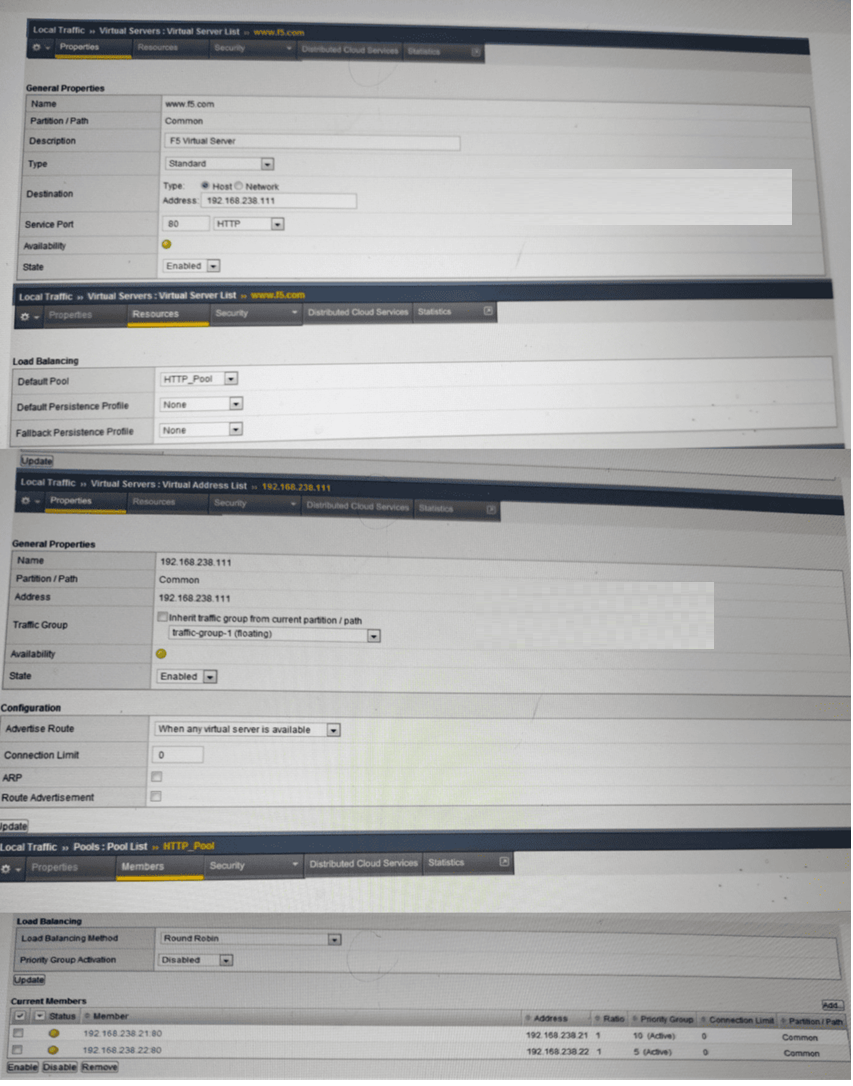
An LTM device has a virtual server mapped to www.f5.com . Users report that when they connect to www.f5.com they are unable to receive content. What is the likely cause of the issue? (Choose one answer)
Answer : B
Based on the configuration screens provided in the exhibit, the primary reason for the connectivity failure is the disabled ARP setting on the Virtual Address.
Virtual Address ARP Setting: In a standard BIG-IP deployment, the Address Resolution Protocol (ARP) must be enabled for the Virtual Address (192.168.238.111 in this case). When enabled, the BIG-IP system responds to ARP requests from the local network gateway or adjacent devices for that specific IP address.
Exhibit Analysis: Looking at the 'Virtual Address List >> 192.168.238.111' properties section, the ARP checkbox is unselected (unchecked). Because ARP is disabled, the upstream router or client cannot resolve the MAC address for 192.168.238.111, and the traffic never reaches the BIG-IP LTM.
Availability Indicators: Note the yellow circle (status indicator) on both the Virtual Server and the Pool Members. In F5 BIG-IP, a yellow status typically indicates that the object is 'Available' (Enabled) but its monitors are not currently identifying it as 'Up' (which would be a green circle), or it is in a 'Monitor Unknown' state. However, even if a pool is available, the traffic must first reach the Virtual Server, which is prevented here by the lack of ARP.
Incorrect Options Analysis:
Priority Group Activation (A): The exhibit shows this is 'Disabled'. While this affects how load balancing picks members between groups, it does not prevent all content from being received; the system would simply use all members in the pool.
Route Advertising (C): While 'Route Advertisement' is also unchecked, this is generally only required if the BIG-IP needs to dynamically propagate the Virtual Address route via protocols like BGP or OSPF. For local segment connectivity, ARP is the fundamental requirement.
Pool Failing Health Check (D): While the yellow status suggests the health checks aren't 'Green' (Successful), the critical misconfiguration shown is at the network layer (ARP), which blocks traffic before health checks or load balancing even come into play for the user session.
 All Official Question Types