Page: 1
/ 14
Total 66 questions
Fortinet NSE 5 - FortiAnalyzer 7.6 Analyst FCP_FAZ_AN-7.6 Exam Questions
Question 1
Exhibit.
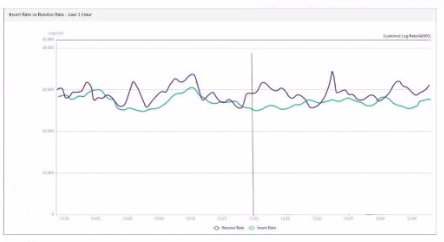
What does the data point at 12:20 indicate?
Answer : A
Question 2
Which statement regarding macros on FortiAnalyzer is true?
Answer : B
Macros in FortiAnalyzer are used to streamline reporting tasks by automating data extraction and report generation. Here's a breakdown of each option to determine the correct answer:
Option A - Macros are Predefined Templates for Reports and Cannot be Customized:
This statement is incorrect. Macros in FortiAnalyzer are not simply fixed templates; they allow for customization to tailor data extraction and reporting based on specific needs and configurations.
Conclusion: Incorrect.
Option B - Macros are Useful in Generating Excel Log Files Automatically Based on the Report Settings:
This statement is accurate. Macros in FortiAnalyzer can be configured to automate the generation of reports, including outputting log data to Excel format based on predefined report settings. This makes them especially useful for scheduled reporting and data analysis.
Conclusion: Correct.
Option C - Macros are ADOM-Specific and Each ADOM Type Has Unique Macros Relevant to that ADOM:
Macros are not limited to specific ADOMs, nor are they ADOM-specific. Macros can be applied across various ADOMs based on report configurations but are not inherently tied to or unique for each ADOM type.
Conclusion: Incorrect.
Option D - Macros are Supported Only on the FortiGate ADOMs:
This is not true. Macros in FortiAnalyzer are not restricted to FortiGate ADOMs; they can be utilized across different ADOMs that FortiAnalyzer manages.
Conclusion: Incorrect.
Conclusion:
Correct Answe r: B. Macros are useful in generating excel log files automatically based on the report settings.
This answer correctly describes the functionality of macros in FortiAnalyzer, emphasizing their role in automating report generation, especially for Excel log files.
FortiAnalyzer 7.4.1 documentation on macros and report generation functionalities.
Question 3
As part of your analysis, you discover that an incident is a false positive.
You change the incident status to Closed: False Positive.
Which statement about your update is true?
Answer : A
When an incident in FortiAnalyzer is identified as a false positive and its status is updated to 'Closed: False Positive,' certain records and logs are updated to reflect this change.
Option A - The Audit History Log Will Be Updated:
FortiAnalyzer maintains an audit history log that records changes to incidents, including updates to their status. When an incident status is marked as 'Closed: False Positive,' this action is logged in the audit history to ensure traceability of changes. This log provides accountability and a record of how incidents have been handled over time.
Conclusion: Correct.
Option B - The Corresponding Event Will Be Marked as Mitigated:
Changing an incident to 'Closed: False Positive' does not affect the status of the original event itself. Marking an incident as a false positive signifies that it does not represent a real threat, but it does not imply that the event has been mitigated.
Conclusion: Incorrect.
Option C - The Incident Will Be Deleted:
Marking an incident as 'Closed: False Positive' does not delete the incident from FortiAnalyzer. Instead, it updates the status to reflect that it is not a real threat, allowing for historical analysis and preventing similar false positives in the future. Deletion would typically only occur manually or by a different administrative action.
Conclusion: Incorrect.
Option D - The Incident Number Will Be Changed:
The incident number is a unique identifier and does not change when the status of the incident is updated. This identifier remains constant throughout the incident's lifecycle for tracking and reference purposes.
Conclusion: Incorrect.
Conclusion:
Correct Answe r: A. The audit history log will be updated.
This is the most accurate answer, as the update to 'Closed: False Positive' is recorded in FortiAnalyzer's audit history log for accountability and tracking purposes.
FortiAnalyzer 7.4.1 documentation on incident management and audit history logging.
Question 4
You need to move reports between two ADOMs.
Which two statements are true? (Choose two.)
Answer : A, C
Comprehensive and Detailed Explanation From Exact Extract of knowledge of FortiAnalyzer 7.6 Study guide documents:
FortiAnalyzer supports moving reporting content across ADOMs by importing/exporting reporting objects, but it enforces ADOM compatibility. The study guide states: ''You can, however, import and export reports and charts ... into different ADOMs ...'' and explicitly requires that ''Both ADOMs must be of the same type.'' This directly validates statement A.
For report dependencies, the study guide clarifies how datasets are handled during transfer. While ''You can't export templates and datasets,'' it also explains that when you export a chart, ''the associated dataset is exported with it, so when you import an exported chart, the associated dataset is imported as well.'' Since reports are composed of charts (and charts depend on datasets), moving a report between ADOMs entails moving its charts; when those charts are exported/imported, their datasets come with them. This supports statement C based on the documented chartdataset import/export behavior.
Statement D is not required because the study guide explicitly indicates you can ''export and import reports'' directly, and additionally notes that on import ''you can save the layout of the report as a template'' (optional, not a prerequisite).
Question 5
What is the purpose of using data selectors when configuring event handlers?
Answer : C
Question 6
Exhibit.

Which statement about the event displayed is correct?
Answer : C
Question 7
Which statement about SQL SELECT queries is true?
Answer : D
Option A - Purging Log Entries:
A SELECT query in SQL is used to retrieve data from a database and does not have the capability to delete or purge log entries. Purging logs typically requires a DELETE or TRUNCATE command.
Conclusion: Incorrect.
Option B - WHERE Clause Requirement:
In SQL, a SELECT query does not require a WHERE clause. The WHERE clause is optional and is used only when filtering results. A SELECT query can be executed without it, meaning this statement is false.
Conclusion: Incorrect.
Option C - Displaying Database Schema:
A SELECT query retrieves data from specified tables, but it is not used to display the structure or schema of the database. Commands like DESCRIBE, SHOW TABLES, or SHOW COLUMNS are typically used to view schema information.
Conclusion: Incorrect.
Option D - Usage in Macros:
FortiAnalyzer and similar systems often use macros for automated functions or specific query-based tasks. SELECT queries are typically not included in macros because macros focus on procedural or repetitive actions, rather than simple data retrieval.
Conclusion: Correct.
Conclusion:
Correct Answe r: D. They are not used in macros.
This aligns with typical SQL usage and the specific functionalities of FortiAnalyzer.
FortiAnalyzer 7.4.1 documentation on SQL queries, database operations, and macro usage.
 All Official Question Types