Page: 1
/ 14
Total 68 questions
Fortinet NSE 6 - FortiClient EMS 7.4 Administrator FCP_FCT_AD-7.4 Exam Questions
Question 1
A new chrome book is connected in a school's network.
Which component can the EMS administrator use to manage the FortiClient web filter extension installed on the Google Chromebook endpoint?
Answer : D
For managing the FortiClient web filter extension installed on the Google Chromebook endpoint, the EMS administrator can use the following component:
FortiClient EMS (Enterprise Management Server) is designed to manage and control multiple FortiClient installations across various endpoints.
EMS provides centralized management for endpoint policies, including web filtering configurations.
The EMS administrator can configure and enforce web filter policies on Chromebooks through the EMS console.
Therefore, FortiClient EMS is the correct component for managing the web filter extension on Google Chromebook endpoints.
Reference
FortiClient EMS 7.2 Study Guide, Chromebook Management Section
Fortinet Documentation on FortiClient EMS and Web Filtering for Chromebooks
Question 2
An administrator needs to connect FortiClient EMS as a fabric connector to FortiGate What is the prerequisite to get FortiClient EMS lo connect to FortiGate successfully?
Answer : A
Connecting FortiClient EMS to FortiGate:
The administrator needs to establish a connection between FortiClient EMS and FortiGate as a fabric connector.
Prerequisites for Connection:
A key prerequisite is the import and verification of the FortiClient EMS tool CA certificate on FortiGate to ensure a trusted connection.
Conclusion:
The correct prerequisite for a successful connection is to import and verify the FortiClient EMS tool CA certificate on FortiGate.
FortiClient EMS and FortiGate connection and certificate management documentation from the study guides.
Question 3
An administrator configures ZTNA configuration on the FortiGate. Which statement is true about the firewall policy?
Answer : A
'The firewall policy matches and redirects client requests to the access proxy VIP' https://docs.fortinet.com/document/fortigate/7.0.0/new-features/194961/basic-ztna-configuration
Question 4
An administrator is required to maintain a software vulnerability on the endpoints, without showing the feature on the FortiClient. What must the administrator do to achieve this requirement?
Answer : C
Requirement Analysis:
The administrator needs to maintain a software vulnerability scan on endpoints without showing the feature on FortiClient.
Evaluating Options:
Disabling the feature in the deployment package or endpoint profile would remove the functionality entirely, which is not desired.
Using the default endpoint profile may not meet the specific requirement of hiding the feature.
Clicking the hide icon on the vulnerability scan profile assigned to the endpoint will keep the feature active but hidden from the user's view.
Conclusion:
The correct action is to click the hide icon on the vulnerability scan profile assigned to the endpoint (C).
FortiClient EMS feature configuration and management documentation from the study guides.
Question 5
Which two third-party tools can an administrator use to deploy FortiClient? (Choose two.)
Answer : B, C
Administrators can use several third-party tools to deploy FortiClient:
Microsoft SCCM (System Center Configuration Manager): SCCM is a robust tool used for deploying software across large numbers of Windows-based systems. It supports deployment of FortiClient through its software distribution capabilities.
Microsoft Active Directory GPO (Group Policy Object): GPOs are used to manage user and computer settings in an Active Directory environment. Administrators can deploy FortiClient to multiple machines using GPO software installation settings.
These tools provide centralized and scalable methods for deploying FortiClient across numerous endpoints in an enterprise environment.
Reference
FortiClient EMS 7.2 Study Guide, FortiClient Deployment Section
Fortinet Documentation on FortiClient Deployment using SCCM and GPO
Question 6
Refer to the exhibit, which shows the endpoint summary information on FortiClient EMS.
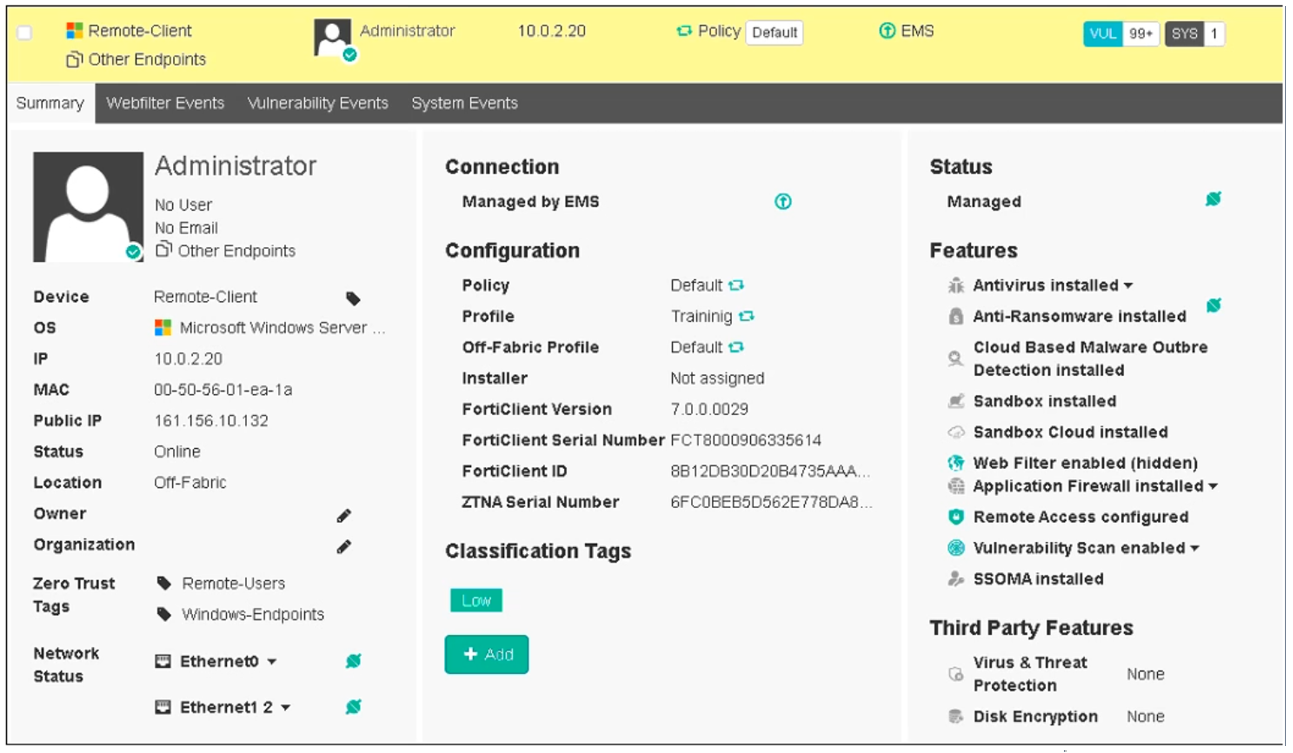
What two conclusions can you make based on the Remote-Client status shown above? (Choose two.)
Answer : B, D
Based on the Remote-Client status shown in the exhibit:
Endpoint Policy: The 'Policy' field shows 'Default,' indicating that the endpoint has been assigned the Default endpoint policy.
Connection Status: The 'Location' field shows 'Off-Fabric,' meaning that the endpoint is currently off the corporate network (off-net).
Therefore, the two conclusions that can be made are:
The endpoint has been assigned the Default endpoint policy.
The endpoint is currently off-net.
Reference
FortiClient EMS 7.2 Study Guide, Endpoint Summary Information Section
Fortinet Documentation on Endpoint Policies and Status Indicators
Question 7
Refer to the exhibit.
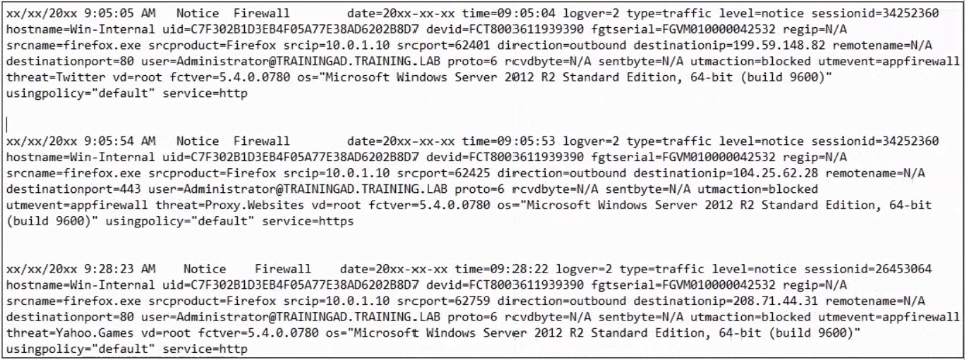
Based on the FortiClient logs shown in the exhibit which application is blocked by the application firewall?
Answer : D
Based on the FortiClient logs shown in the exhibit:
The first log entry shows the application 'firefox.exe' trying to access a destination IP, with the threat identified as 'Twitter.'
The action taken by the application firewall is 'blocked' with the event type 'appfirewall.'
This indicates that the application firewall has blocked access to Twitter.
Reference
FortiClient EMS 7.2 Study Guide, Application Firewall Logs Section
Fortinet Documentation on Interpreting FortiClient Logs
 All Official Question Types