Page: 1
/ 14
Total 35 questions
Fortinet FCP - AWS Cloud Security 7.4 Administrator FCP_WCS_AD-7.4 Exam Questions
Question 1
You are troubleshooting network connectivity issues between two VMs deployed in AWS.
One VM is a FortiGate located on subnet "LAN" that is part of the VPC "Encryption". The other VM is a Windows server located on the subnet "servers" which is also in the "Encryption" VPC. You are unable to ping the Windows server from FortiGate.
What are two reasons for this? (Choose two.)
Answer : A, D
Windows Firewall Blocking Traffic:
The firewall on the Windows VM might be configured to block incoming ICMP traffic (ping requests). By default, Windows Firewall is set to block ICMP traffic, which could be a reason for the connectivity issue (Option A).
Security Group Configuration:
AWS Security Groups act as virtual firewalls for instances. If there is no rule allowing ICMP traffic in the security group attached to the Windows server, the ping requests from FortiGate will be blocked. An inbound allow ICMP rule must be added to the security group to permit this traffic (Option D).
Other Options Analysis:
Option B is incorrect because the default AWS Network Access Control List (NACL) allows all inbound and outbound traffic.
Option C is incorrect as AWS does allow ICMP traffic between subnets if properly configured with Security Groups and NACLs.
AWS Security Groups: AWS Security Groups
Windows Firewall Configuration: Windows Firewall
Question 2
An organization has created a VPC with two subnets and deployed a FortiGate-VM (VM04/c4.xlarge) in AWS.
The EC2 instance is initially configured with two Elastic Network Interfaces (ENIs). The primary ENI is configured on the public subnet, and the secondary ENI is configured on the private subnet. To provide internet access for the FortiGate-VM, they now want to associate an EIP to its primary ENI, but the assignment is failing.
Which action would allow the EIP assignment to be successful?
Answer : C
Internet Gateway Requirement:
For an Elastic IP (EIP) to be assigned to an instance's primary ENI, the VPC must have an Internet Gateway (IGW) attached. The IGW enables the VPC to communicate with the internet, allowing the EIP to function properly (Option C).
Process of Assigning EIP:
Once the Internet Gateway is attached to the VPC, the EIP can be successfully assigned to the primary ENI of the FortiGate VM, providing it with internet access.
Other Options Analysis:
Option A is incorrect because the primary ENI is already in a public subnet.
Option B is not necessary and may not solve the issue without an attached Internet Gateway.
Option D is partially correct about the routing table but does not address the primary issue of needing an Internet Gateway.
AWS Elastic IP Documentation: Elastic IP
AWS Internet Gateway: Internet Gateway
Question 3
An AWS administrator is designing internet connectivity for an organization's virtual public cloud (VPC). The organization has web servers with private addresses that must be reachable from the internet. The web servers must be highly available.
Which two configurations can you use to ensure the web servers are highly available and reachable from the internet? (Choose two.)
Answer : A, D
Network Load Balancer:
Deploying a network load balancer ensures that incoming traffic is distributed across multiple web servers, providing high availability and redundancy. This setup helps in managing traffic efficiently and maintaining service uptime even if some servers fail (Option A).
Multiple Availability Zones:
Deploying web servers in multiple availability zones (AZs) enhances fault tolerance and availability. If one AZ goes down, servers in other AZs can continue to handle the traffic, ensuring the web application remains accessible (Option D).
Other Options Analysis:
Option B is incorrect because NAT Gateways are used to provide internet access to instances in private subnets, not to make private addresses reachable from the internet.
Option C is not sufficient on its own for high availability. Adding a route to the default VPC route table forwarding traffic to the internet gateway makes the VPC internet-accessible but does not ensure high availability.
AWS High Availability and Fault Tolerance: AWS High Availability
AWS Network Load Balancer: Network Load Balancer
Question 4
Refer to the exhibit.
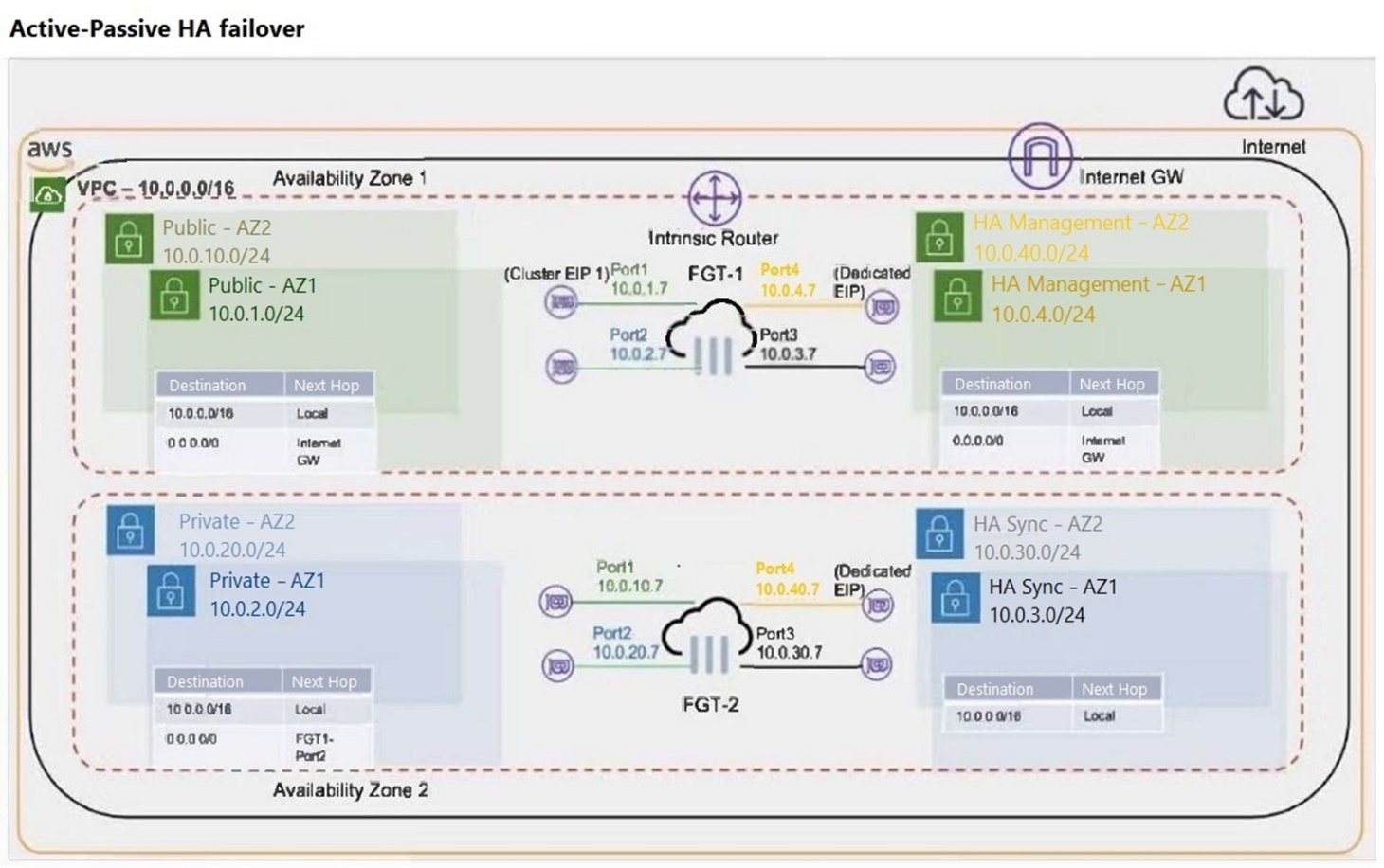
What occurs during a failover for an active-passive (A-P) cluster that is deployed in two different availability zones? (Choose two.)
Answer : A, B
Cluster Elastic IP Address (EIP) Movement:
During a failover in an active-passive (A-P) cluster, the Elastic IP (EIP) associated with the active FortiGate instance (FGT-1) needs to be moved to the passive instance (FGT-2), which becomes the new active instance. This ensures that the traffic directed to the EIP is now handled by FGT-2 (Option A).
Secondary IP Address Movement:
The secondary IP address on Port2 of the current active instance (FGT-1) is moved to the same port on the new active instance (FGT-2). This step is crucial to ensure seamless network traffic redirection and connectivity for the services relying on that IP address (Option B).
Other Options Analysis:
Option C is incorrect because the static route modification mentioned is not directly related to the failover process described.
Option D is incorrect because no additional route needs to be added to the HA Sync AZ2 subnet route table to forward traffic to the Internet Gateway during a failover.
FortiGate HA Configuration Guide: FortiGate HA
AWS Elastic IP Documentation: Elastic IP
Question 5
Refer to the exhibit.
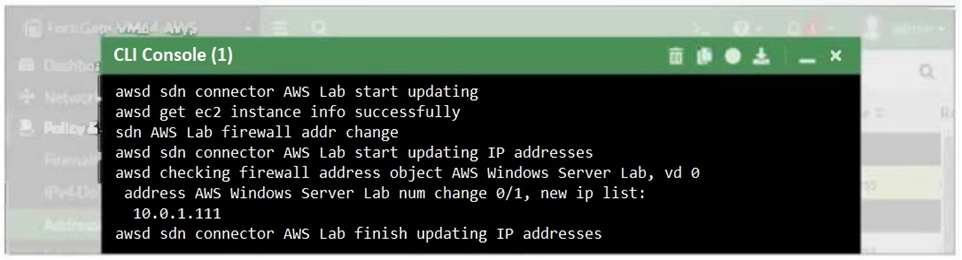
What two conclusions can you draw from the FortiGate debug output? (Choose two.)
Answer : A, C
Dynamic Address Object Update:
The debug output shows that the IP address of the AWS Windows Server Lab has been updated automatically, indicating that the dynamic address object feature is working as intended. This allows FortiGate to adapt to changes in the IP addresses of AWS instances dynamically (Option A).
SDN Connector Configuration:
The messages in the debug output confirm that the SDN connector is able to retrieve instance information and update the firewall address objects successfully. This implies that the SDN connector is correctly configured and has the necessary permissions (Option C).
Manual Change and Permissions:
Option B is incorrect because while the address object could theoretically be changed manually, this is not inferred from the debug output.
Option D is incorrect because the debug output does not indicate that the AWS user account must have full administrative rights. The required permissions are typically more scoped to specific actions related to SDN.
FortiGate AWS Integration Guide: FortiGate on AWS
AWS IAM Policies for SDN: AWS IAM Policies
Question 6
Refer to the exhibit.
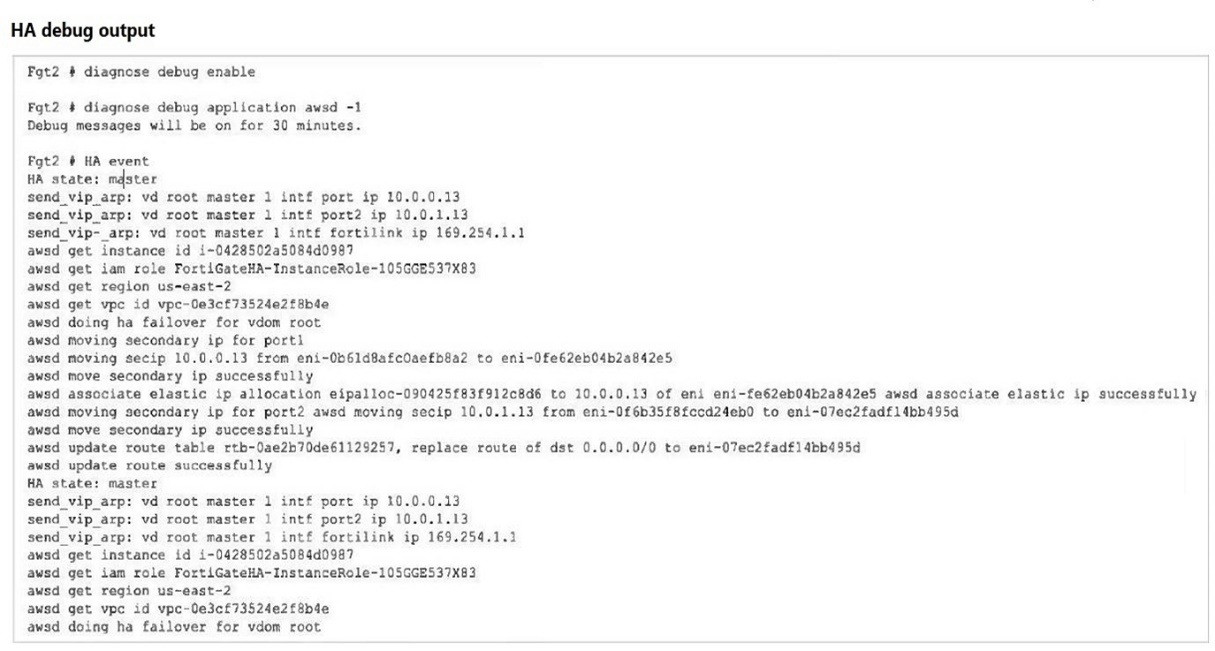
You deployed an active-passive FortiGate HA cluster using a CloudFormation template on an existing VPC. Now you want to test active-passive FortiGate HA failover by running a debug so you can see the API calls to change the Elastic and secondary IP addresses.
Which statement is correct about the output of the debug?
Answer : B
HA Event and Failover:
The debug output indicates that a failover event occurred and the secondary instance (Fgt2) is now taking over as the master.
Elastic IP Association:
The debug output shows the process of moving the Elastic IP (eipalloc-090425f83f912c8d6) to the new master instance. This involves associating the Elastic IP with the appropriate network interface (eni) of the new master.
Specific IP Address Association:
The Elastic IP is specifically associated with port1 of Fgt2. The message 'associate elastic ip eipalloc-090425f83f912c8d6 to 10.0.0.13 of eni eni-0f6b35f8fccd24eb0' indicates that the Elastic IP is now linked to the primary IP address (10.0.0.13) on port1 of the new master.
Other Options Analysis:
Option A is incorrect because the routing table update details are not explicitly stated.
Option C is incorrect because the IP address association mentioned relates to an Elastic IP, not eni-0b61d8afc0aefb8a2.
Option D is incorrect because it specifically mentions port2 for the Elastic IP association, which is not indicated in the debug output.
FortiGate HA Configuration Guide: FortiGate HA
AWS Elastic IP Documentation: Elastic IP
Question 7
A customer has deployed FortiGate Cloud-Native Firewall (CNF).
Which two statements are correct about policy sets? (Choose two.)
Answer : A, C
Implicit Deny Rule:
Similar to traditional firewall rule sets, FortiGate Cloud-Native Firewall (CNF) includes an implicit deny rule at the bottom of each policy set. This means any traffic that does not match an existing rule in the policy set is automatically denied (Option A).
Policy Set Creation:
When a new CNF instance is deployed, a new policy set is created specifically for that instance. This ensures that each CNF instance can have a tailored set of security policies based on the specific needs of the deployment (Option C).
Other Options Analysis:
Option B is incorrect because policy sets do not require manual synchronization; they are applied automatically once configured.
Option D is incorrect as a single CNF instance operates with a single policy set at a time.
FortiGate CNF Documentation: FortiGate CNF
Firewall Policy Best Practices: Fortinet Policies
 All Official Question Types