Page: 1
/ 14
Total 40 questions
Fortinet NSE 6 - LAN Edge 7.6 Architect FCSS_LED_AR-7.6 Exam Questions
Question 1
APs have been manually configured to connect to FortiGate over an IPsec network, and FortiGate successfully detects and authorizes them. However, the APs remain unmanaged because FortiGate is unable to establish a CAPWAP tunnel with them.
What configuration change can resolve this issue and enable FortiGate to establish the CAPWAP tunnel over the IPsec connection?
Answer : B
When FortiAPs connect to FortiGate overIPsec tunnels, this is treated similarly to WAN/MPLS deployments.
In these scenarios, FortiGate must know that CAPWAP must traverse anon-L2transport.
FortiAP profiles include:
set mpls-connection enable
This setting is required so that:
FortiGate can encapsulate CAPWAP inside the transport tunnel
Remote FortiAPs can establish CAPWAP even when behind routed/IPsec networks
Without this option, the FortiGate detects the AP butcannot bring CAPWAP UP, leaving the AP in ''discovered/unauthorized'' or ''offline'' state.
Why others are wrong
A . Static route Discovery already succeeds, so routing is not the issue.
C . Reduce MTU Sometimes useful for IPsec, but not required for CAPWAP establishment.
D . Firmware upgrade Firmware mismatch would show ''Managed (upgrade required),'' not CAPWAP tunnel failure.
Therefore,set mpls-connection enableis the required fix.
Question 2
You are troubleshooting a Syslog-based single sign-on (SSO) issue on FortiAuthenticator, where user authentication is not being correctly mapped from the syslog messages. You need a tool to diagnose the issue and understand the logs to resolve it quickly.
Which tool in FortiAuthenticator can you use to troubleshoot and diagnose a Syslog SSO issue?
Answer : D
Context: You're troubleshootingSyslog-based SSOonFortiAuthenticator:
Devices (typically firewalls, WLAN controllers, VPN gateways) sendsyslog messagescontaining usernames, IPs, login/logout events.
FortiAuthenticator parses those logs usingSyslog SSO rulesand injects logon sessions intoFSSOfor FortiGate.
When users are not mapping correctly, you need to see:
Did the syslog message arrive?
Which matching rule (if any) caught it?
What username and IP were extracted?
Why was a message ignored or rejected?
FortiAuthenticator has a dedicated debug area for this:
Debug logs Single Sign-On Syslog SSO
This view shows:
Raw syslog lines received
Thematching ruleapplied (or ''no match'')
Parsed fields (username, IP, group)
Any parsing errors
This is exactly the tool designed totroubleshoot and diagnose Syslog SSO issues.
Why the other options are not the best for this issue
A . Debug logs > Remote Servers > Syslog Viewer
Lets you see syslog traffic in general, but doesnotshow how SSO rules are applied or why they fail. Good for connectivity checks, not SSO logic.
B . Parsing Test Tool
Useful totestpatterns and rules manually by pasting sample log lines, but it doesn't show live traffic or running SSO sessions.
C . Debug logs > SSO Sessions page
Shows existing SSO sessions (who is logged in), but notwhya particular syslog message did not create a session.
Question 3
Which FortiGuard licenses are required for FortiLink device detection to enable device identification and vulnerability detection?
Answer : D
FortiLink device detection relies on FortiGate'sDevice IdentificationandIoT Detectioncapabilities to classify devices connected to FortiSwitch ports.
To enabledevice identificationandvulnerability detectionfor IoT/endpoint devices in LAN Edge deployments, FortiGate must subscribe to the correct FortiGuard services.
1. Required FortiGuard License for Device Identification (IoT Detection)
The FortiOS documentation clearly states:
''IoT detection service... requires anAttack Surface Security Rating service licenseto download the IoT signature package.''
Additionally:
''The following settings are required for IoT device detection:
A validAttack Surface Security Rating service licenseto download the IoT signature package.''
This service provides:
IoT signature package
IoT device classification
Device behavior profiling
This makesAttack Surface Securitymandatory for FortiLink device detection.
2. Required FortiGuard License for Device Vulnerability Detection
FortiOS further clarifies that IoT vulnerabilities require theIoT Detection license, which is included under the same Attack Surface service entitlement:
''To detect IoT vulnerabilities the FortiGate must have a validIoT Definitions license...''
The IoT Definitions license comeswith the Attack Surface Security Rating serviceand is used for:
Scanning connected devices
Identifying IoT/endpoint vulnerabilities
Reporting vulnerability severity
Enabling NAC-based remediation (VLAN steering, port isolation)
In LAN Edge Architect, this license combination is emphasized as a foundational requirement for:
FortiSwitch NAC
FortiLink device profiling
Automated quarantine actions
IoT device classification
Vulnerability-based segmentation
3. Why the Correct Answer Is Option D
OptionDlists:
FortiGuard Attack Surface Security
FortiGuard IoT Detection
These are exactly the services required per FortiOS 7.4.1:
Attack Surface Security Rating provides IoT signature package + vulnerability data
IoT Detection (Definitions) enables actual device-type and vulnerability identification
Together they powerFortiLink Device DetectionandIoT Vulnerability Detection, which are essential LAN Edge security functions.
4. Why Other Options Are Incorrect
A . Vulnerability Management + Endpoint Protection
Not used for FortiLink device detection; Endpoint detection relies on IoT service, not FortiClient.
B . Threat Intelligence + IoT Detection
Threat Intelligence (ThreatIntel DB) is used for FAZ IOC, not LAN Edge device detection.
C . Threat Intelligence + Endpoint Protection
Same issue---does not provide IoT device classification or vulnerability scanning.
LAN Edge 7.6 Architect Context Summary
In LAN Edge designs:
FortiGate acts as the controller for FortiSwitch via FortiLink.
Device detection is done at the FortiGate level using NAC/IoT signature capabilities.
Vulnerability detection enables dynamic segmentation decisions (e.g., move device to quarantine VLAN).
To support this, two licenses aremandatory:
Attack Surface Security(includes Security Rating + IoT Detection DB)
IoT Detection(part of the same entitlement, but explicitly required for vulnerability detection)
Thus the verified answer aligns perfectly with LAN Edge operational requirements and Fortinet documentation.
Question 4
Your office wants to set up a Wi-Fi network for visitors. Your company would like to require them to log in for (racking purposes. Which two types of captive portals could be enabled on an interface? (Choose two.)
Answer : A, E
A FortiGate interface can operate with different types of captive portal modes.
The available portal types that require user interaction or login include:
A. Terms Acknowledgment Without Authentication
Forces users to accept terms before accessing the network
No credentials required
Still considered a captive portalCommon in guest Wi-Fi.
E. Authentication
Requires username/password
Supports local users, RADIUS, LDAP, OAuth, etc.
Why the other options are incorrect
B. Email Notification Only
Not a valid captive portal mode on FortiGate.
C. Disclaimer + Authentication
This is not a selectable mode; disclaimers are part of the captive portal customization but not a standalone option.
D. Guest Pass Access
Guest pass authentication exists onFortiAuthenticator, not as a direct portal type on FortiGate.
Question 5
Refer to the exhibits.
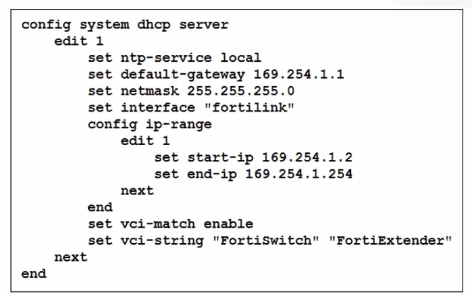
You've configured the FortiLink interface, and the DHCP server is enabled by default. The resulting DHCP server settings are shown in the exhibit. What is the role of the vci-string setting in this configuration?
Answer : C
The DHCP configuration shows:
set vci-match enable
set vci-string 'FortiSwitch' 'FortiExtender'
What this means
VCI = Vendor Class Identifier (DHCP option 60)
When vci-match is enabled, the DHCP server will only respond to DHCP requests from clients whose VCI string matches the configured vendor identifiers.
FortiSwitch and FortiExtender both send DHCP option 60 with:
'FortiSwitch'
'FortiExtender'
This is used in FortiLink deployments so only these devices receive IP addresses on the FortiLink network.
Therefore:
C . To connect, devices must match the VCI string; otherwise, they will not receive an IP address.
Correct.
This perfectly matches FortiGate FortiLink DHCP behavior.
Summary of incorrect options
A --- Ignore FortiSwitch/FortiExtender
Opposite behavior.
B --- Restrict based on hostname
VCI does NOT check hostname.
D --- Reserve IPs
No reservation occurs; it's filtering, not reserving.
Question 6
Refer to the exhibits.
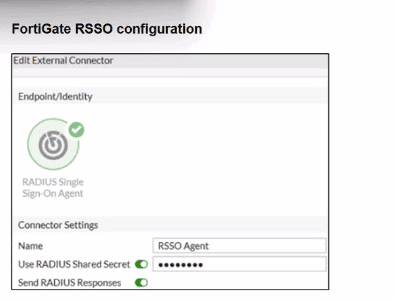
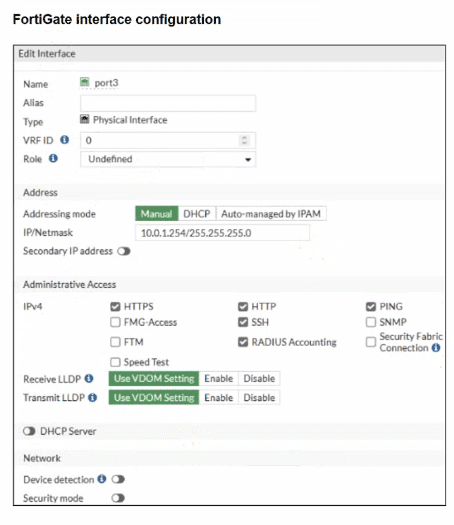
Examine the FortiGate RSSO configuration shown in the exhibit.
FortiGate is set up to use RSSO for user authentication. It is currently receiving RADIUS accounting messages through port3. The incoming RADIUS accounting messages contain the username in the User-Name attribute and group membership in the Class attribute. You must ensure that the users are authenticated through these RADIUS accounting messages and accurately mapped to their respective RSSO user groups.
Which three critical configurations must you implement on the FortiGate device? (Choose three.)
Answer : A, D, E
The problem states:
FortiGate receivesRADIUS accounting messagesonport3.
User-Nameattribute contains the username.
Classattribute contains the group membership.
Goal: authenticate users through RSSO and map them to the correct user groups.
To achieve this, three critical components must be configured:
A. RADIUS Attribute Value in the RSSO group must match the Class attribute
This is mandatory because:
RSSO user groups on FortiGate match users based onthe value inside the RADIUS attribute(usually Class).
For group assignment to work, FortiGate must compare:
RSSO User Group RADIUS Class Attribute Value
This isexactly how FortiGate maps RSSO users to groups.
D. RSSO agent's sso-attribute must be set to Class
Thesso-attributedefineswhich RADIUS attribute contains the group information.
Because group membership is carried in:
Class attribute
You must configure:
config user radius
set sso-attribute Class
end
This tells FortiGate:
'Use the Class attribute to derive user group membership.'
E. rsso-endpoint-attribute must be set to User-Name
This identifieswhich RADIUS attributecarries the actualusername.
In this scenario:
RADIUS accounting messages contain the username inUser-Name.
So the correct setting is:
config user radius
set rsso-endpoint-attribute User-Name
end
This ensures the RSSO user object uses the correct username.
Incorrect Options Explained
B . Assign RSSO user groups to all firewall policies
Not required.
You only assign them to policies where RSSO authentication is used.
C . Device detection and Security Fabric Connection should be enabled on port3
Totally irrelevant to RSSO.
RSSO only needs RADIUS accounting, not device detection or Fabric services.
Question 7
Refer to the exhibits.
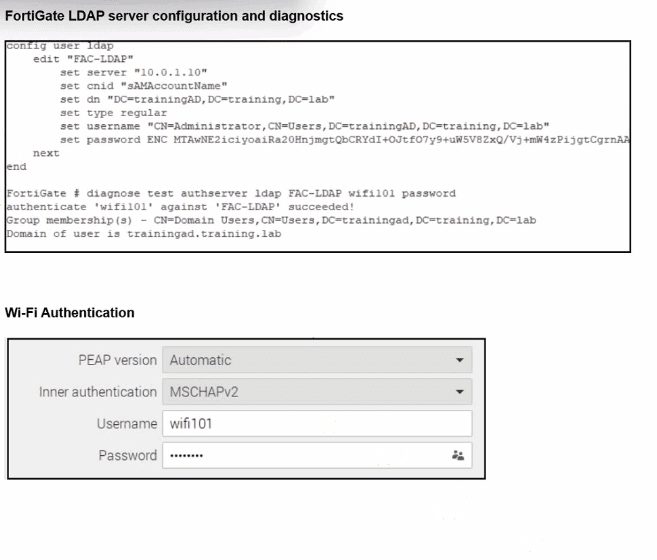
An LDAP server has been successfully configured on FortiGate. which forwards LDAP authentication requests to a Windows Active Directory (AD) server. Wireless users report that they are unable to authenticate. Upon troubleshooting, you find that authentication fails when using MSCHAPv2.
What is the most likely reason for this issue?
Answer : D
From the exhibit, LDAP on FortiGate is correctly configured and tested:
diagnose test authserver ldap FAC-LDAP wifi101 password
authenticate 'wifi101' against 'FAC-LDAP' succeeded!
Group membership(s) - CN=Domain Users,...
So:
LDAP connectivity works
Bind DN, DN, CNID, and credentials are correct(so optionCis eliminated).
Firewall policies do not affect the802.1X / Wi-Fi authentication stepitself, soAis not the root cause.
Nothing in the scenario indicates that AD is enforcing LDAPS-only; the LDAP test already succeeds using the configured parameters, soBis also excluded.
The Wi-Fi supplicant is configured forPEAP with inner authentication = MSCHAPv2.
MSCHAPv2 is achallenge--response mechanism designed for RADIUS, not for LDAP simple bind. FortiGate's LDAP implementation uses asimple bind (username/password) over LDAP or LDAPS, and it doesnotimplement MSCHAPv2 against LDAP backends.
In Fortinet's design, if you needPEAP-MSCHAPv2 with Active Directory, you must use:
ARADIUS server(such as Windows NPS or FortiAuthenticator), and
Have FortiGate use RADIUS,notLDAP, as the authentication backend for 802.1X / Wi-Fi users.
Because FortiGate cannot process MSCHAPv2 exchanges directly against an LDAP server, authentication fails when the inner method is MSCHAPv2, even though LDAP works when tested with a simple bind from the CLI.
 All Official Question Types