Page: 1
/ 14
Total 68 questions
Fortinet FCSS - SD-WAN 7.4 Architect FCSS_SDW_AR-7.4 Exam Questions
Question 1
The FortiGate devices are managed by ForliManager, and are configured for direct internet access (DIA). You confirm that DIA is working as expected for each branch, and check the SD-WAN zone configuration and firewall policies shown in the exhibits.
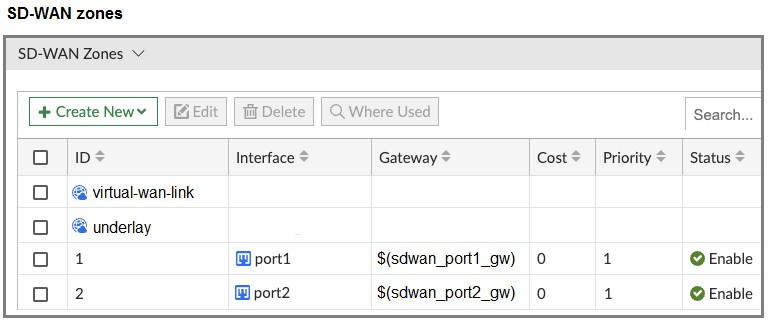

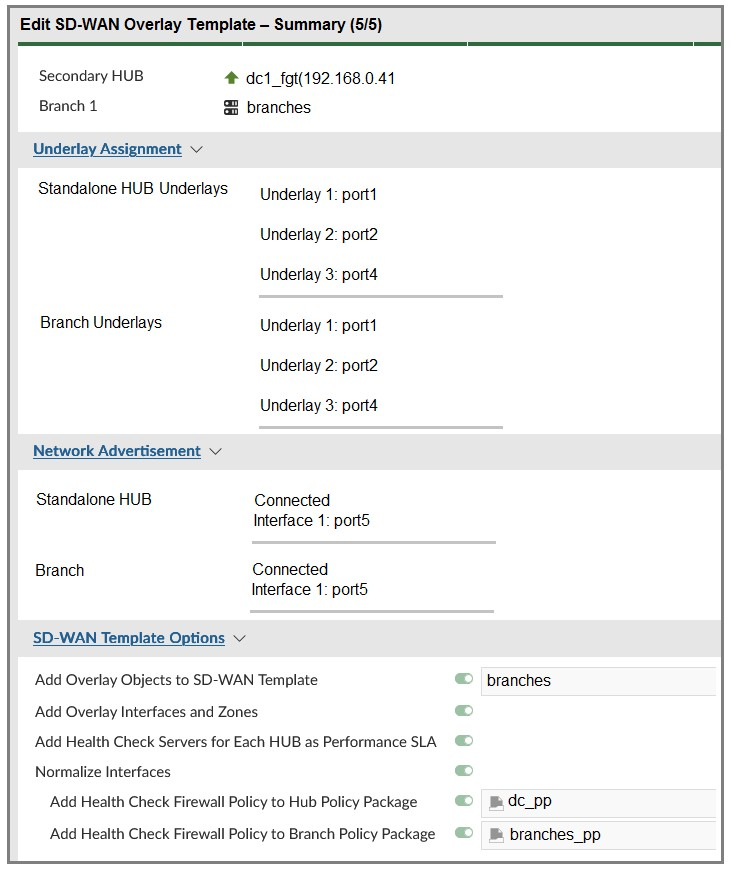
Then, you use the SD-WAN overlay template to configure the IPsec overlay tunnels. You create the associated SD-WAN rules to connect existing branches to the company hub device and apply the changes on the branches.
After those changes, users complain that they lost internet access. DIA is no longer working.
Based on the exhibit, which statement best describes the possible root cause of this issue?
Answer : A
The SD-WAN overlay template defines a zone for each underlay interface and moves the interfaces into those zones. This statement perfectly describes the likely sequence of events. The template, when applied, re-organizes the interfaces and zones, causing the existing firewall policy that relies on the old zone configuration to fail. This is the most plausible root cause.
Question 2
Refer to the exhibit.
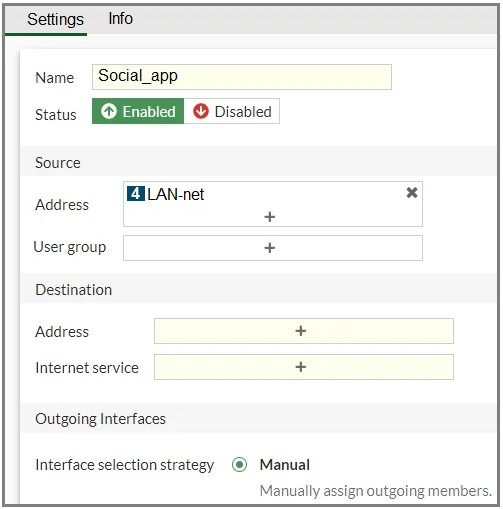
You configure SD-WAN on a standalone FortiGate device. You want to create an SD-WAN rule that steers Facebook and Linkedin traffic through the less costly internet link. The FortiGate GUI page appears as shown in the exhibit.
What should you do to set Facebook and LinkedIn as destinations?
Answer : B
In an SD-WAN rule, you can steer application traffic by using Internet Service Database (ISDB) entries. Facebook and LinkedIn are predefined ISDB objects in FortiGate, so the correct way is to select them in the Internet service field under Destination. This ensures that all traffic to these applications is matched and routed through the chosen (less costly) link.
Question 3
Refer to the exhibit.
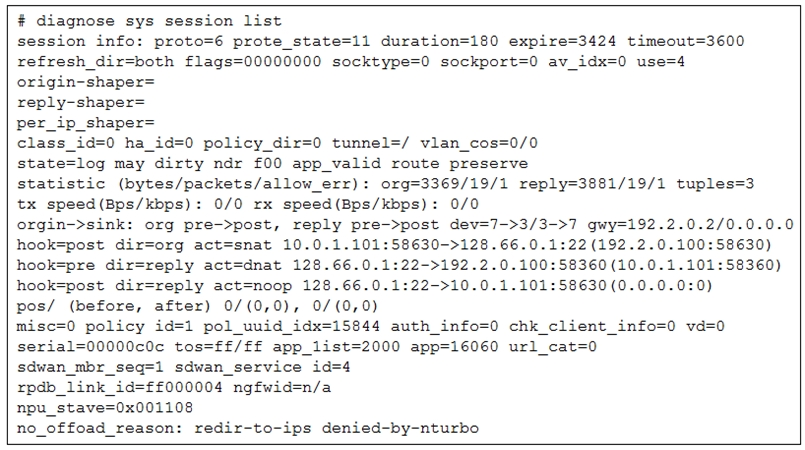
The administrator configured the SD-WAN rule ID 4 with two members (port1 and port2) and strategy lowest cost (SLA).
What are the two characteristics of the session shown in the exhibit? (Choose two.)
Answer : A, D
The line sdwan_mbr_seq=1 sdwan_service_id=4 indicates that this session is part of an SD-WAN rule. sdwan_service_id=4 confirms that the session is being handled by SD-WAN rule ID 4. This directly links the flow to the SD-WAN configuration.
The line no_offload_reason: redir-to-ips denied-by-nturbo shows that the session is not offloaded to the NPU (Network Processing Unit) and is being processed by the main CPU. A session that is not offloaded can be re-evaluated. If the outgoing interface (the one currently being used) goes down, the FortiGate will re-evaluate the session against the SD-WAN rules to find a new active member to steer the traffic through. This is a fundamental behavior of SD-WAN, which ensures network resilience.
Question 4
Which three factors about SLA targets and SD-WAN rules should you consider when configuring SD-WAN rules? (Choose three.)
Answer : B, C, E
The use of SLA targets is specific to certain SD-WAN strategies. The 'Lowest Cost (SLA)' and 'Maximize Bandwidth (SLA)' strategies are explicitly designed to use the configured SLA targets to make routing decisions. The 'Best Quality' strategy uses performance metrics but does not necessarily require or reference SLA targets in the same way, while 'Manual' does not use metrics at all for path selection.
This is a core function of SD-WAN rules with SLA targets. The purpose of configuring an SLA target with specific thresholds for latency, jitter, and packet loss is to define what is considered 'acceptable' performance for an application. SD-WAN rules then use these targets to check if the members (interfaces) meet these requirements before a flow is steered over them, ensuring that a preferred path still offers a good user experience.
FortiGate allows for a single SD-WAN rule to reference multiple, different performance SLAs. This is crucial for complex deployments where a single SD-WAN rule needs to handle traffic for multiple applications that have distinct performance requirements. For example, a single rule might direct VoIP traffic based on one performance SLA with strict latency/jitter targets, while simultaneously handling general web traffic using another performance SLA with more lenient requirements.
Question 5
Refer to the exhibit, which shows the SD-WAN rule status and configuration.
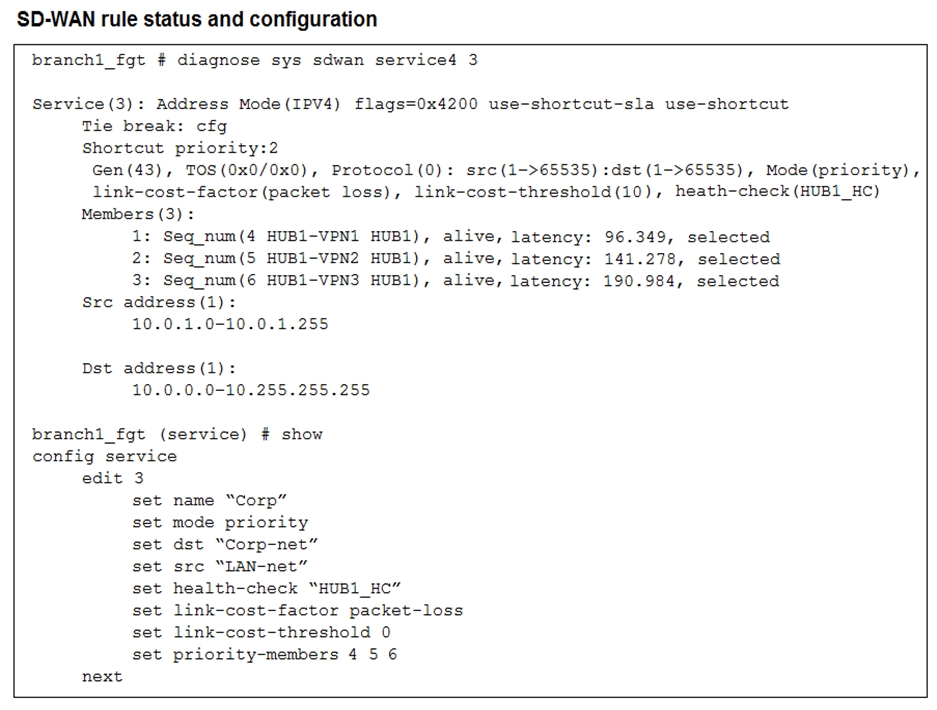
Based on the exhibit, which change in the measured latency will first make HUB1-VPN3 the new preferred member?
Answer : D
The rule is in priority mode with HUB1-VPN1 (seq 4) as the first preferred member, HUB1-VPN2 second, and HUB1-VPN3 third. Latency itself does not cause HUB1-VPN3 to become preferred unless a higher-priority member fails SLA. If HUB1-VPN1's latency exceeds the SLA threshold (here simulated by latency reaching 200 ms), FortiGate stops using it and moves down the priority list. That is when HUB1-VPN3 could become the active path.
Question 6
You are tasked with configuring ADVPN 2.0 on an SD-WAN topology already configured for ADVPN. What should you do to implement ADVPN 2.0 in this scenario?
Answer : A
Question 7
Your FortiGate is in production. To optimize WAN link use and improve redundancy, you enable and configure SD-WAN.
What must you do as part of this configuration update process?
Answer : A
When you enable SD-WAN and add interfaces as SD-WAN members, those interfaces are no longer referenced directly in routing. You must replace routing configuration references (e.g., static routes, policy routes) with the SD-WAN zone. Firewall policies, however, can still point to the SD-WAN zone without requiring replacement of individual member interfaces.
 All Official Question Types