Page: 1
/ 14
Total 87 questions
Fortinet NSE 4 - FortiOS 7.6 Administrator NSE4_FGT_AD-7.6 Exam Questions
Question 1
Refer to the exhibits.
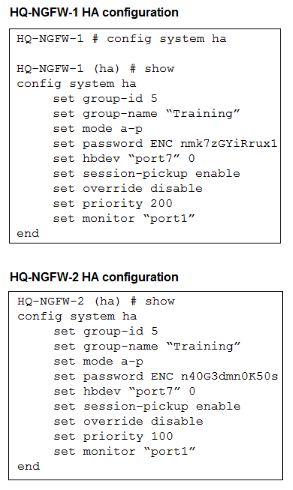
An administrator configured both members of an HA cluster at the same time. After one week of monitoring, the administrator wants to verify the HA failover performance. How can the administrator force a failover? (Choose one answer)
Answer : A
''This slide shows the order when the HA override setting is disabled, which is the default behavior.''
''1. The cluster compares the number of monitored interfaces that have a status of up. The member with the most available monitored interfaces becomes the primary.
2. The cluster compares the HA uptime of each member. The member with the highest HA uptime, by at least five minutes, becomes the primary.
3. The member with the highest priority becomes the primary.''
''When HA override is disabled, the HA uptime has precedence over the priority setting. This means that if you must manually fail over to a secondary device, you can do so by reducing the HA uptime of the primary FortiGate. You can do this by running the diagnose sys ha reset-uptime command on the primary FortiGate, which resets its HA uptime to 0.''
Technical Deep Dive:
The correct answer is A.
Both HA members are configured with set override disable, so FGCP does not prefer the higher-priority unit first. With override disabled, the election order is based on monitored interfaces, then HA uptime, then priority, and finally serial number. Since the cluster has been running for one week, the secondary unit will have a much higher HA uptime than a unit whose uptime is reset to zero. Therefore, if the administrator runs diagnose sys ha reset-uptime on the current primary HQ-NGFW-1, FGCP re-evaluates election and the other member can take over.
Option B is wrong because enabling override only on HQ-NGFW-2 does not by itself force an immediate clean failover in this scenario and also changes election behavior rather than performing the documented manual failover action. Option C is wrong because with override disabled, priority does not beat HA uptime. Option D can simulate a link failover, but the study guide's documented manual failover method for this exact override-disabled condition is to reset the primary's HA uptime.
Relevant CLI:
diagnose sys ha reset-uptime
get system ha status
diagnose sys ha status
This is the clean exam-aligned method to trigger a controlled HA role change.
Question 2
Refer to the exhibit.
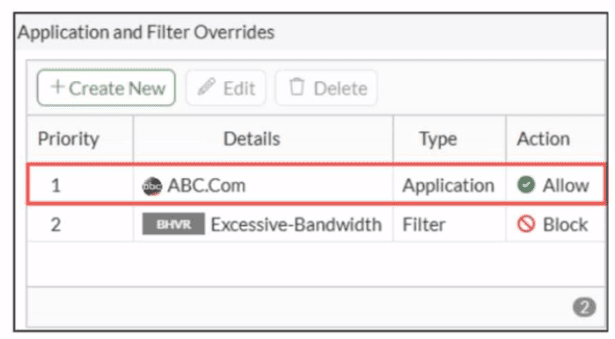
An administrator has configured an Application Overrides for the ABC.Com application signature and set the Action to Allow This application control profile is then applied to a firewall policy that is scanning all outbound traffic. Logging is enabled in the firewall policy. To test the configuration, the administrator accessed the ABC.Com web site several times.
Why are there no logs generated under security logs for ABC.Com?
Answer : D
In FortiOS 7.6 Application Control, security logs are generated primarily for actions such as Block or Monitor, not for Allow actions.
What is happening in the exhibit
An Application Override is configured for ABC.Com
Type: Application
Action: Allow
The application control profile is applied to a firewall policy
Logging is enabled on the firewall policy
Traffic to ABC.Com is successfully allowed
However, no security logs appear for ABC.Com.
Why no logs are generated
In FortiOS 7.6:
Application Control logs are written to Security Logs when:
An application is Blocked
An application is Monitored
When an application action is set to Allow:
The traffic is permitted silently
No application control security log is generated
Even if policy logging is enabled
This is expected and documented behavior.
To generate logs for allowed applications, the action must be set to Monitor, not Allow.
Why the other options are incorrect
A . ABC.Com is hitting the category Excessive-BandwidthIncorrect. ABC.Com has a higher-priority explicit override (priority 1), so it is not evaluated against the Excessive-Bandwidth filter.
B . The ABC.Com Type is set as Application instead of FilterIncorrect. Application-type overrides are valid and commonly used; this does not suppress logging.
C . The ABC.Com must be configured as a web filter profileIncorrect. This traffic is being evaluated by Application Control, not Web Filter.
Question 3
An administrator has configured a dialup IPsec VPN on FortiGate with add-route enabled. However, the static route is not showing in the routing table. Which two statements about this scenario are correct? (Choose two.)
Answer : B, C
With a dialup IPsec VPN on FortiGate, when add-route is enabled, FortiGate will only install the corresponding route when it has enough negotiated information from the tunnel. In FortiOS 7.6, that means the route is tied to the Phase 2 (Quick Mode) selectors and is created dynamically when the IPsec SA is actually up.
B . The administrator must ensure phase 2 is successfully established
This is required. FortiGate does not install the add-route route just because Phase 1 exists or because the configuration is present. The route is added when the tunnel is effectively usable, which requires Phase 2 (IPsec SA) to be up. If Phase 2 is not established, there is no active SA and FortiGate will not inject the related route into the routing table.
So, if the static route is not showing, one correct explanation is that Phase 2 is not up.
C . The administrator must define the remote network correctly in the phase 2 selectors
This is also required. For dialup tunnels, FortiGate derives what route to add from the remote subnet(s) defined in the Phase 2 selector (proxy ID). If the remote network in Phase 2 is missing, incorrect, or too broad/too narrow in a way that prevents negotiation, the tunnel either won't come up (so no route), or the route that would be installed won't match what the administrator expects.
So, another correct explanation is that the Phase 2 remote network is not correctly defined, preventing the correct route from being created.
Why the other options are incorrect
A . Policy route instead of a static route
Add-route does not require policy routes. It is specifically a feature that injects a route (route-table entry) associated with the IPsec tunnel/SA and the Phase 2 selector networks.
D . Enable a dynamic routing protocol
Dynamic routing protocols (OSPF/BGP/RIP) are not required for add-route. Add-route is independent of dynamic routing and works by installing routes locally based on the negotiated selectors.
Question 4
What is the primary FortiGate election process when the HA override setting is enabled? (Choose one answer)
Answer : A
According to the FortiOS 7.6 Study Guide and technical documentation regarding High Availability (HA), the FortiGate Clustering Protocol (FGCP) uses a specific set of rules to elect the primary unit in a cluster. By default, the election order follows: Connected Monitored Ports > HA Uptime > Priority > Serial Number.
However, when the HA override setting is enabled, the election logic is modified to prioritize the administrator-defined priority value over the uptime of the cluster members. In this specific configuration, the election process follows this sequence:
Connected monitored ports: The unit with the most functioning monitored interfaces is preferred.
Priority: The unit with the highest manually configured priority value (e.g., 255) is selected next.
HA uptime: If monitored ports and priority are equal, the unit that has been up in the HA cluster the longest is chosen.
FortiGate serial number: As a final tie-breaker, the unit with the higher serial number is elected.1
Statement A is correct because it reflects the shift where Priority is evaluated immediately after monitored ports, overriding the standard uptime advantage. Statements B and D are incorrect because the FGCP uses HA uptime, not system uptime, for its calculations.
Question 5
Refer to the exhibit to view the firewall policy.
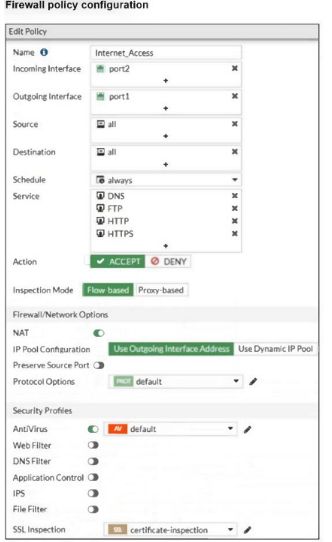
Why would the firewall policy not block a well-known virus, for example EICAR? (Choose one answer)
Answer : D
''The only security features you can apply using SSL certificate inspection mode are web filtering and application control... Note that while offering some level of security, certificate inspection does not allow FortiGate to inspect the flow of encrypted data.''
''To perform SSL inspection on traffic flowing through the FortiGate device, you must allow the traffic with a firewall policy and apply an SSL inspection profile to the policy... For antivirus or IPS control, you should use a deep-inspection profile.''
''When you use deep inspection, FortiGate impersonates the recipient of the originating SSL session, and then decrypts and inspects the content to find threats and block them. It then re-encrypts the content and sends it to the real recipient.''
Technical Deep Dive:
The exhibit shows that the policy is allowing HTTPS and the SSL/SSH inspection profile is certificate-inspection, not deep-inspection. That is the key issue. With certificate inspection, FortiGate can inspect only SSL metadata such as the certificate and SNI/hostname context; it cannot decrypt the HTTPS payload itself. Because EICAR is detected by antivirus through payload inspection, FortiGate must see the file contents. Without deep SSL inspection, the antivirus engine never gets the decrypted payload, so the file can pass even though the antivirus profile is attached.
Option A is incorrect because FortiGate firewall policies often use ACCEPT + security profile enforcement; the session can still be blocked by antivirus after policy match. Option B is incorrect because web filter is not required for antivirus detection. Option C is incorrect because the real requirement is deep SSL inspection, not specifically proxy-based mode; full SSL inspection is the deciding factor here.
In practice, to block EICAR over HTTPS, you would apply a deep-inspection SSL profile to the policy, for example:
config firewall policy
edit
set inspection-mode flow
set av-profile 'default'
set ssl-ssh-profile 'deep-inspection'
next
end
On real hardware, this also matters for performance design. Simple firewall/NAT sessions are often NP fast-pathed, but once you enable deep SSL inspection and content scanning, traffic is typically handed to CPU/WAD/content-inspection path for decryption and scanning, so throughput is lower than certificate-inspection or no-inspection.
Question 6
Which three methods are used by the collector agent for AD polling? (Choose three answers)
Answer : A, B, C
''As previously stated, collector agent-based polling mode has three methods (or options) for collecting login information. The order on the slide from left to right shows most recommend to least recommended:
* WMI ...
* WinSecLog ...
* NetAPI ...''
Technical Deep Dive:
The correct three AD polling methods are WMI, WinSecLog, and NetAPI. These are the collector-agent polling options FortiGate FSSO uses against Windows domain controllers. WMI is generally the most efficient because the DC returns requested login events directly. WinSecLog polls Windows Security Event Logs and is typically more reliable than NetAPI for not missing recorded logons. NetAPI can be faster, but it is more prone to missing events under load because it depends on temporary session information rather than persistent security logs.
Why the other options are wrong:
DNS reverse lookup is not one of the three AD polling methods. DNS is used by FSSO to resolve workstation names to IP addresses and to track IP changes, but it is not itself a polling method for collecting AD logon events. FSSO REST API is also not one of the documented collector-agent AD polling methods in the study guide.
From an operational standpoint, FSSO login collection and workstation verification are separate functions. The collector agent may still rely on DNS and workstation checks after a login is learned, but the actual AD polling methods remain only WMI, WinSecLog, and NetAPI. On a FortiGate, when troubleshooting FSSO behavior, you would typically validate the collector feed and user cache with commands such as:
diagnose debug authd fsso list
diagnose debug authd fsso server-status
Those commands help confirm whether the users gathered by the collector through one of those three polling methods are reaching FortiGate correctly.
Question 7
An administrator wants to address shadow IT visibility challenges and prevent users from sending sensitive files outside the organization without proper approval. Which FortiSASE method should the administrator implement to achieve these goals? (Choose one answer)
Answer : C
''FortiSASE provides secure access to remote users for the following use cases:
* SIA enables secure web browsing for remote users to protect from known and unknown threats
* SPA enables explicit application access under a zero-trust access or with SD-WAN integration to ensure secure application access
* SSA addresses shadow IT visibility challenges and safeguards data loss prevention''
''FortiCASB provides cloud-based and API-based features to enable deep inspection of SaaS applications to enable detailed monitoring, analysis, and reporting features... Data loss prevention (DLP) helps to identify, monitor, and protect organizational data at rest and in motion.''
Technical Deep Dive:
The correct answer is C. Secure SaaS access (SSA).
The question gives two very specific requirements:
Shadow IT visibility
Prevent sensitive files from leaving the organization without approval
The study guide maps both directly to SSA. In FortiSASE, SSA aligns with SaaS governance and CASB-style controls. That is the right architecture when you need visibility into sanctioned and unsanctioned SaaS usage, plus DLP controls for uploads, sharing, and file movement.
Why the other options are wrong:
SIA focuses on securing internet browsing and remote web traffic.
SPA is for explicit zero-trust access to private applications.
SSD-WAN is not the FortiSASE method for SaaS visibility/DLP control.
In practice, SSA is the choice because it combines SaaS visibility, activity monitoring, and DLP-style enforcement. That lets an administrator detect shadow SaaS usage and apply controls such as blocking uploads, monitoring sharing events, or restricting file transfers based on policy. This is a CASB-oriented use case, not just generic web security.
 All Official Question Types