Page: 1
/ 14
Total 111 questions
Fortinet NSE 5 - FortiSwitch 7.6 Administrator NSE5_FSW_AD-7.6 Exam Questions
Question 1
To enhance service in emergency situations, to which LLDP-MED Type-Length-Values does Forti-Switch advertise to IP phones?
Answer : C
Location (C): FortiSwitch uses LLDP-MED (Link Layer Discovery Protocol - Media Endpoint Discovery) to advertise various attributes to IP phones, among which 'Location' is crucial in emergency situations. This information helps emergency responders to determine the physical location of the calling device, which is vital for prompt response in critical situations.
Question 2
FortiGate is unable to establish a tunnel with the FortiSwitch device it is supposed to manage Based on the debug output shown in the exhibit, what is the reason for the failure?
Answer : C
The issue described pertains to the establishment of a tunnel (likely a CAPWAP tunnel for management purposes between FortiGate and FortiSwitch).Based on typical error analysis in tunnel setup scenarios:
The CAPWAP tunnel failed to come up due to a mismatch in time (Option C): This answer is plausible because time synchronization is crucial for security protocols that underpin tunnel establishments, such as DTLS (Datagram Transport Layer Security) used within CAPWAP tunnels. If the clocks on FortiGate and FortiSwitch are significantly out of sync, the security handshake (which can include timestamp validation) could fail, preventing the tunnel from coming up.
Fortinet's technical documentation typically outlines the importance of time synchronization for secure communications. In CAPWAP/DLTS scenarios, precise time matching is crucial to ensure that the cryptographic parameters align correctly during the handshake process.
Question 3
What happens if FortiSwitch fails to discover either FortiEdge Cloud or a FortiGate with FortiLink?
Answer : B
According to theFortiSwitchOS 7.6 Administration Guideregarding the 'Discovery and Management' lifecycle, a FortiSwitch is designed with a specific boot-up and discovery sequence to determine its management mode. By default, a factory-reset FortiSwitch or a new unit out of the box is configured to search for a management entity. This process typically involves looking for aFortiGateviaFortiLink(using DHCP options or LLDP) or attempting to connect toFortiEdge Cloud(formerly FortiLAN Cloud) if cloud management is enabled.
The documentation states that if the FortiSwitch is unable to establish a connection with a FortiGate (FortiLink mode) or successfully register and authenticate with the FortiEdge Cloud, the device does not enter a 'failed' state requiring hardware intervention. Instead, itremains in local management mode. In this state, the switch operates as a standalone Layer 2/3 switch. The administrator can access the device's local Graphical User Interface (GUI) or Command Line Interface (CLI) directly using the default credentials.
While in local management mode, the switch retains its ability to be manually configured for all standard switching features, such as VLAN tagging, Spanning Tree Protocol (STP), and link aggregation. If a management controller (FortiGate or Cloud) becomes available later, the switch can be transitioned into managed mode, which typically involves the controller pushing a new configuration and potentially overwriting local settings. Therefore, the failure to discover a controller simply results in the switch defaulting to its standalone, locally managed operational state.
Question 4
Refer to the configuration:
Which two conditions does FortiSwitch need to meet to successfully configure the options shown in the exhibit above? (Choose two.)
Answer : A, B
Question 5
Exhibit.
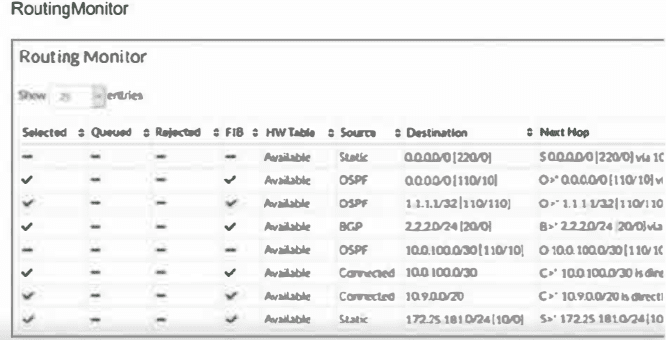
Two routes are not installed in the forwarding information base (FIB) as shown in the exnibit. Which two statements about these two route entries are true? (Choose two.)
Answer : A, B
From the exhibit and the details given about the routes not installed in the FIB:
These two routes have a higher administrative distance value available to the destination networks (Option A): Administrative distance is a measure used by routers to select the best path when there are two or more different routes to the same destination from two different routing protocols. A higher administrative distance means that the route is considered less trustworthy, thus not selected for the FIB unless the more preferred routes fail.
These two routes will become primary, if the best routes are removed (Option B): In routing, if the currently installed routes (which are considered the best due to reasons like lower administrative distance) are removed or become unavailable, the next best routes based on administrative distance will be used. This behavior ensures redundancy and maintains network connectivity in diverse scenarios.
This approach is aligned with standard routing protocol behavior as documented in networking protocols and Fortinet's routing mechanisms which prioritize routes based on administrative distance and other metrics to maintain efficient and reliable network routing.
Question 6
Which statement about the configuration of VLANs on a managed FortiSwitch port is true?
Answer : C
The native VLAN is implicitly part of the allowed VLAN on the port (C): On a managed FortiSwitch port, the native VLAN, which is the VLAN assigned to untagged traffic, is implicitly included in the list of allowed VLANs. This means it does not need to be explicitly specified when configuring VLAN settings on the port. This configuration simplifies VLAN management and ensures that untagged traffic is handled correctly without additional configuration steps.
Question 7
Refer to the exhibit.
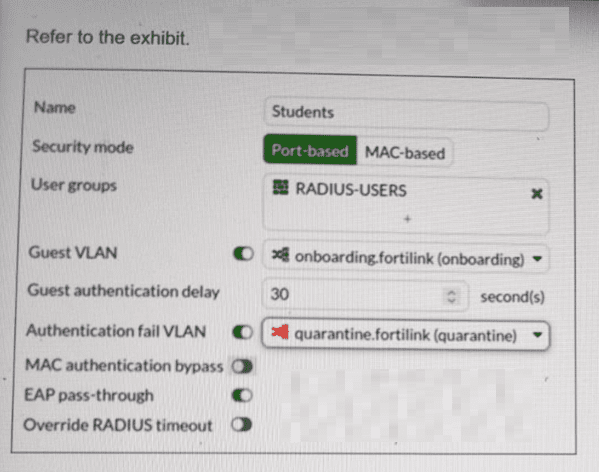
FortiSwitch 802.1X port security configuration is shown. A user connects their laptop to the port and attempts to authenticate using 802.1X, but enters the wrong credentials multiple times. What will the result to the device be? (Choose one answer)
Answer : A
According to theFortiSwitchOS 7.6 Administration Guideand theFortiSwitch 7.6 Study Guide, 802.1X port security allows administrators to define specific actions based on the outcome of an authentication attempt. The configuration exhibit shows a security policy named 'Students' with two specialized VLAN assignments enabled: aGuest VLANand anAuthentication fail VLAN.
In FortiSwitchOS 7.6, these two settings serve distinct purposes based on the client's behavior:
Guest VLAN (Option C):This is used when a connected device doesnothave an 802.1X supplicant (software) or does not respond to EAP (Extensible Authentication Protocol) requests within the specified 'Guest authentication delay'. In this scenario, the device is moved to the 'onboarding' VLAN to allow for basic network access or software downloads.
Authentication fail VLAN (Option A):This is triggered specifically when a devicedoesattempt to authenticate via 802.1X but the authentication server (RADIUS) returns anAccess-Rejectmessage, typically due toincorrect credentials.
As stated in the scenario, the userattemptsto authenticate but enters thewrong credentials. According to the policy shown in the exhibit, theAuthentication fail VLANis enabled and set to'quarantine.fortilink (quarantine)'. Therefore, the FortiSwitch will logically move the port's traffic into the quarantine VLAN, isolating the user from the production network due to the failed login attempt. Option B is incorrect as there is no 'shutdown' action configured, and Option D refers to a default state that is overridden by the explicit failure policy.
 All Official Question Types