Page: 1
/ 14
Total 36 questions
Fortinet NSE 5 - FortiSASE and SD-WAN 7.6 Core Administrator NSE5_SSE_AD-7.6 Exam Questions
Question 1
Which three FortiSASE use cases are possible? (Choose three answers)
Answer : A, B, C
According to the FortiSASE 7.6 Architecture Guide and the FCP - FortiSASE 24/25 Administrator study materials, the FortiSASE solution is structured around three primary pillars or 'use cases' that address the security requirements of a modern distributed workforce.
Secure Internet Access (SIA) (Option A): This use case focus on protecting remote users as they browse the public internet. It utilizes a full cloud-delivered security stack including Web Filtering, DNS Filtering, Anti-Malware, and Intrusion Prevention (IPS) to ensure that users are protected from web-based threats regardless of their physical location.
Secure SaaS Access (SSA) (Option B): This use case addresses the security of cloud-based applications (like Microsoft 365, Salesforce, and Dropbox). It leverages Inline-CASB (Cloud Access Security Broker) to identify and control 'Shadow IT'---unauthorized cloud applications used by employees---and applies Data Loss Prevention (DLP) to prevent sensitive information from being leaked into unsanctioned SaaS platforms.
Secure Private Access (SPA) (Option C): This use case provides secure, granular access to private applications hosted in on-premises data centers or private clouds. It can be achieved through two main methods: ZTNA (Zero Trust Network Access), which provides session-specific access based on identity and device posture, or through SD-WAN integration, where the FortiSASE cloud acts as a spoke connecting to a corporate SD-WAN Hub.
Why other options are incorrect:
Secure VPN Access (SVA) (Option D): While SASE uses VPN technology (SSL or IPsec) as a transport for the Endpoint mode, 'SVA' is not a formal curriculum-defined use case. The SASE framework is intended to evolve beyond traditional 'Secure VPN Access' into the SIA and SPA models.
Secure Browser Access (SBA) (Option E): Although FortiSASE offers Remote Browser Isolation (RBI), it is considered a feature or a component of the broader Secure Internet Access (SIA) use case rather than a separate, standalone use case in the core administrator curriculum.
Question 2
You want FortiGate to use SD-WAN rules to steer ping local-out traffic. Which two constraints should you consider? (Choose two.)
Answer : A, B
In the SD-WAN 7.6 Core Administrator curriculum, steering 'local-out' traffic (traffic generated by the FortiGate itself, such as DNS queries, FortiGuard updates, or diagnostic pings) requires specific configuration because this traffic follows a different path than 'forward' traffic.
Individual Configuration (Option A): By default, local-out traffic bypasses the SD-WAN engine and uses the standard system routing table (RIB/FIB). To use SD-WAN rules for specific features like DNS or RADIUS, you must individually enable the sdwan interface-select-method within that feature's configuration (e.g., config system dns or config user radius).
Default Steerable Traffic (Option B): In FortiOS 7.6, while most local-out traffic is excluded from SD-WAN by default, the system is designed so that when SD-WAN is active, it primarily considers SD-WAN rules for specific diagnostic local-out traffic---specifically ping and traceroute---to allow administrators to verify path quality using the same logic as user traffic.
Why other options are incorrect:
Option C: Local-out traffic can be steered using any SD-WAN strategy (Manual, Best Quality, etc.), provided the interface-selection-method is set to sdwan.
Question 3
Which two statements about configuring a steering bypass destination in FortiSASE are correct? (Choose two.)
Answer : B, C
According to the FortiSASE 7.6 Feature Administration Guide, steering bypass destinations (also known as split tunneling) allow administrators to optimize bandwidth by redirecting specific trusted traffic away from the SASE tunnel to the endpoint's local physical interface.
Destination Types (Option C): When creating a bypass destination, administrators can select from four distinct types: Infrastructure (pre-defined apps like Zoom/O365), FQDN (specific domains), Local Application (identifying processes on the laptop), or Subnet (specific IP ranges).
Apply Condition (Option B): The 'Apply' condition is a flexible setting that allows the administrator to choose when the bypass is active. It can be applied to endpoints that are On-net (inside the office), Off-net (remote), or Both. This ensures that if a user is in the office, they don't use the SASE tunnel for local resources, but if they are home, they might still bypass high-bandwidth sites like YouTube to preserve tunnel capacity.
Why other options are incorrect:
Option A: Subnet is one of four types and is not the only type supporting these conditions.
Option D: The system explicitly supports 'Both' to ensure consistency across network transitions.
Question 4
You are configuring SD-WAN to load balance network traffic. Which two facts should you consider when setting up SD-WAN? (Choose two.)
Answer : A, D
According to the SD-WAN 7.6 Core Administrator study guide and the FortiOS 7.6 Administration Guide, configuring load balancing within SD-WAN rules requires an understanding of how the engine selects and distributes sessions across multiple links.
SLA Target Logic (Option A): In FortiOS 7.6, the Lowest Cost (SLA) strategy has been enhanced. When the load-balance option is enabled for this strategy, the FortiGate does not just pick a single 'best' link; it identifies all member interfaces that currently meet the configured SLA target (e.g., latency < 100ms). It then load balances the traffic across all those healthy links to maximize resource utilization.
Hash Modes (Option D): When an SD-WAN rule is configured for load balancing (valid for Manual and Lowest Cost (SLA) strategies in 7.6), the administrator must define a hash mode to determine how sessions are distributed. While 'outsessions' in the question is a common exam-variant typo for outbandwidth (or sessions-based hashing), the core principle remains: you can select the specific load-balancing algorithm (e.g., source-ip, round-robin, or bandwidth-based) for all strategies where load-balancing is enabled.
Why other options are incorrect:
Option B and C: These options are too restrictive. In FortiOS 7.6, load balancing is not limited to only 'manual and best quality' or 'manual and lowest cost' in a singular way. The documentation highlights that Manual and Lowest Cost (SLA) are the primary strategies that support the explicit load-balance toggle to steer traffic through multiple healthy members simultaneously.
Question 5
Refer to the exhibits.
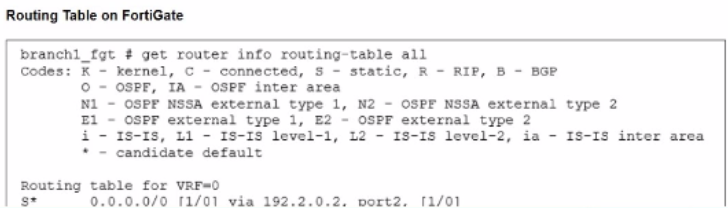
The administrator increases the member priority on port2 to 20. Upon configuration changes and the receipt of new packets, which two actions does FortiGate perform on existing sessions established over port2? (Choose two.)
Answer : A, E
Question 6
Refer to the exhibits.
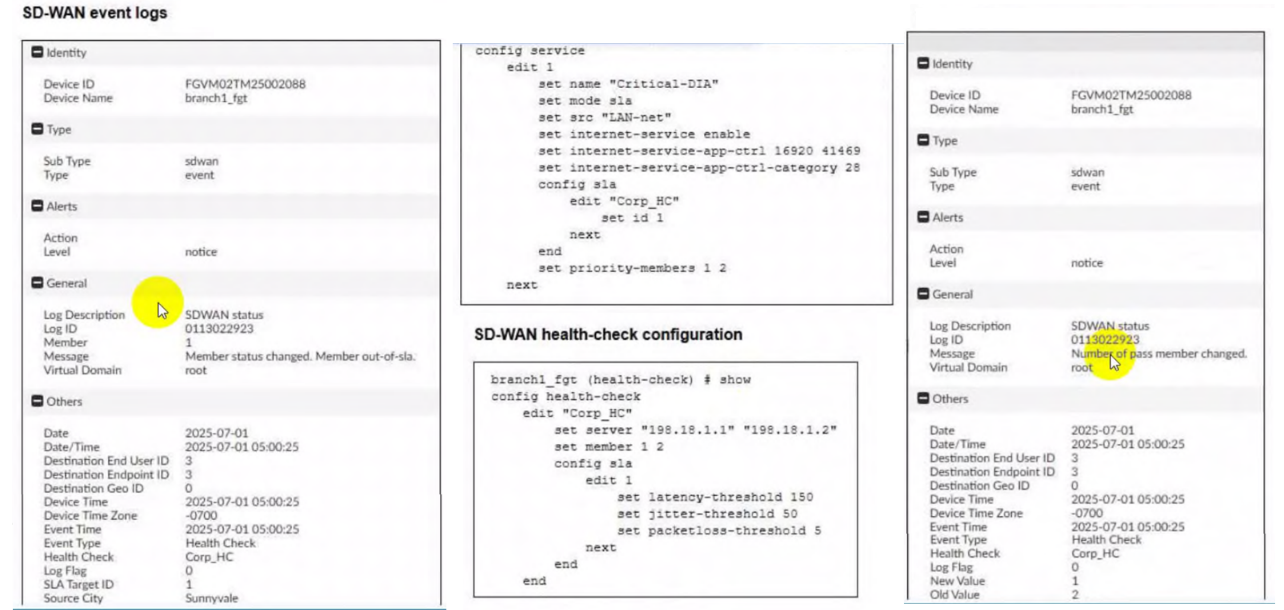
Two SD-WAN event logs, the member status, the SD-WAN rule configuration, and the health-check configuration for a FortiGate device are shown. Immediately after the log messages are displayed, how will the FortiGate steer the traffic based on the information shown in the exhibits? (Choose one answer)
Answer : C
According to the SD-WAN 7.6 Core Administrator curriculum and the provided exhibits, the traffic steering decision is determined by the interaction between the Lowest Cost (SLA) strategy and the link health status reported in the event logs.
Rule Strategy (Lowest Cost SLA): The SD-WAN rule configuration for ID 1 (named Critical-DIA) is set to mode sla. In this mode, the FortiGate will only steer traffic through member interfaces that satisfy the assigned Performance SLA targets.
Member Preference: The rule defines priority-members 1 2. This means that under normal conditions (where both links are healthy), Member 1 (port1) is the preferred interface because it is listed first.
Event Log Analysis:
The first log message explicitly states: 'Member status changed. Member out-of-sla.' for Member 1. This indicates that port1 has exceeded one of the thresholds (latency, jitter, or packet loss) defined in the Corp_HC health check.
The second log confirms: 'Number of pass member changed. New Value: 1, Old Value: 2'. This verifies that while there were previously two links passing the SLA, now only one link (Member 2/port2) remains in a passing state.
Steering Decision: Because the rule strategy is mode sla and the primary preferred member (port1) is now out-of-sla, the FortiGate immediately disqualifies Member 1 from the selection pool for this specific rule. It then moves to the next available member in the priority list that does satisfy the SLA, which is Member 2 (port2).
Why other options are incorrect:
Option A: FortiGate will not load balance or choose between both links because port1 is currently ineligible due to the SLA failure.
Option B: Steering to port1 would violate the 'Lowest Cost (SLA)' rule logic, as that link is no longer meeting the required health standards.
Option D: FortiGate does not 'skip' the rule unless no members meet the SLA and there is no fallback configured; in this scenario, port2 is still passing and available.
Question 7
A FortiGate device is in production. To optimize WAN link use and improve redundancy, you enable and configure SD-WAN.
What must you do as part of this configuration update process? (Choose one answer)
Answer : A
According to the SD-WAN 7.6 Core Administrator study guide and the FortiOS 7.6 Administration Guide, when you are migrating a production FortiGate to use SD-WAN, the most critical step involves reconfiguring how traffic is permitted and routed.
Reference Removal Requirement: Before an interface (such as wan1 or wan2) can be added as an SD-WAN member, it must be 'unreferenced' in most parts of the FortiGate configuration. Specifically, if an interface is currently being used in an active Firewall Policy, the system will prevent you from adding it to the SD-WAN bundle.
Firewall Policy Migration (Option A): In a production environment, you must replace the references to the physical interfaces in your firewall policies with the new SD-WAN virtual interface (or an SD-WAN Zone). For example, if your previous policy allowed traffic from internal to wan1, you must update that policy so the Outgoing Interface is now SD-WAN. This allows the SD-WAN engine to take over the traffic and apply its steering rules.
Modern Tools: While this used to be a purely manual process, FortiOS 7.x includes an Interface Migration Wizard (found under Network > Interfaces). This tool automates the 'search and replace' function, moving all existing policy and routing references from the physical port to the SD-WAN object to ensure minimal downtime.
Why other options are incorrect:
Option B: While you do need to update your routing (e.g., creating a static route for 0.0.0.0/0 pointing to the SD-WAN interface), the curriculum specifically emphasizes the replacement of references in firewall policies as the primary administrative hurdle, as policies are often more numerous and complex than the single static route required for SD-WAN.
Option C: You do not need to disable the interface. It must be up and configured, just removed from other configuration references so it can be 'absorbed' into the SD-WAN bundle.
Option D: SD-WAN is a base feature of FortiOS and does not require a separate license or a reboot to enable.
 All Official Question Types