Page: 1
/ 14
Total 65 questions
Fortinet NSE 6 - FortiManager 7.6 Administrator NSE6_FMG_AD-7.6 Exam Questions
Question 1
Refer to the exhibits.
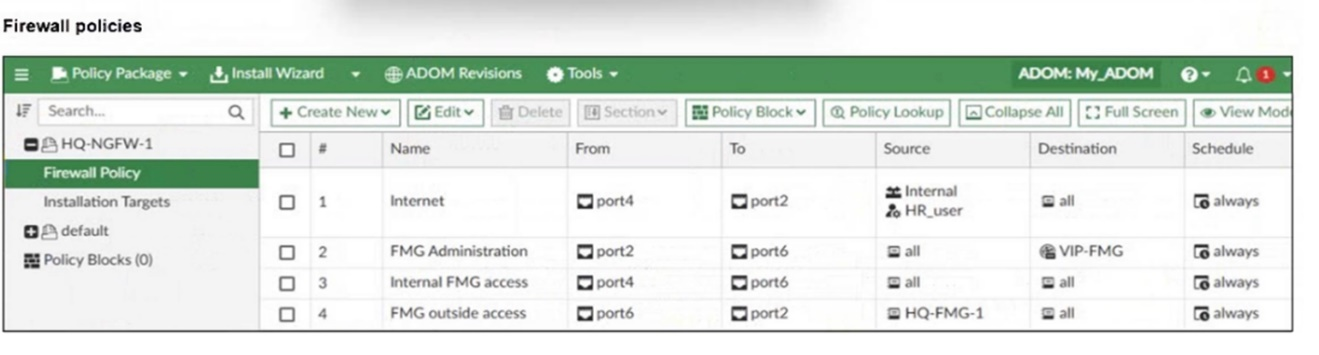

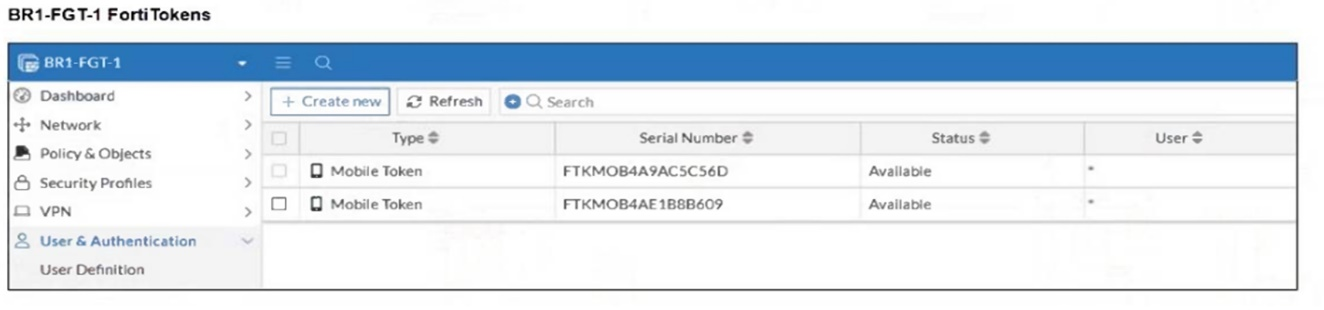
An administrator needs to push a FortiToken Mobile to assign it to HR_user in the HQ-NGFW-1.
However, when installing the policy package, they receive the following error message:
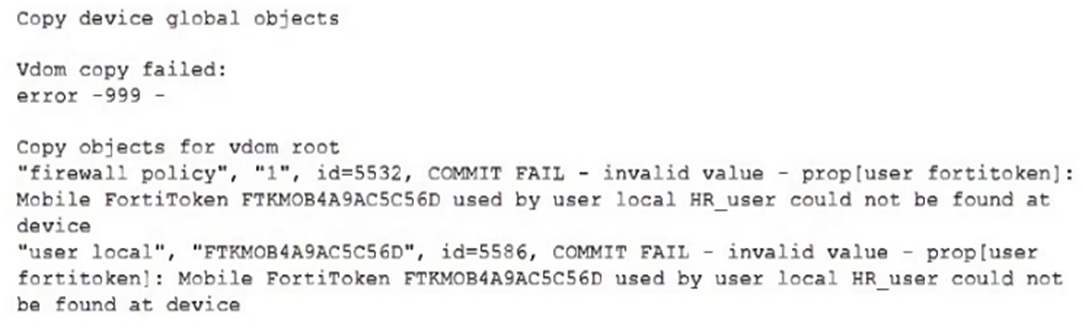
Why is the administrator not able to install the FortiToken on the HQ-NGFW-1 firewall?
Answer : B
The error occurs because the FortiToken used (FTKM0B4A9AC5C56D) must already exist and be registered on the FortiGate device HQ-NGFW-1. FortiManager cannot push or create new FortiTokens on the device; the token must be valid and present on the FortiGate before it can be assigned to a user.
Question 2
After correcting a policy package configuration issue, you want to prevent administrators from repeating the mistake that caused the issue.
Which FortiManager approach best meets this need?
Answer : D
Enabling a workflow with approval ensures that any policy package changes must be reviewed and approved before installation, preventing administrators from repeating configuration mistakes and enforcing change control.
Question 3
An administrator has a FortiGate-HQ device with VDOMs---root, HR and Facilities, currently managed under the FortiManager ADOM---Site1. They try to move VDOM HR to the FortiManager ADOM---Site2, but it does not work.
Why is the administrator not able to move FortiGate-HQ VDOM HR to FortiManager ADOM---Site2?
Answer : C
Question 4
Refer to the exhibit.
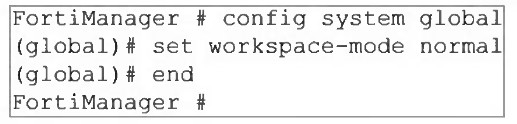
What are two results from the configuration shown in the exhibit? (Choose two.)
Answer : A, C
The command set workspace-mode normal enables Workspace (ALL ADOMs). The study guide states that in this mode ''All ADOMs can be locked'' and workspace mode lets administrators lock ADOMs, devices, policy packages, and objects. The lab guide then gives the exact behavior for ungraceful session closure: ''If a session is not closed gracefully ... FortiManager does not close the administrator session until it times out or the session is deleted. Until this time, the ADOM remains in a locked state.'' That directly proves A.
C is also verified by the lab guide statement: ''If an administrator locked one or more ADOMs, and then logs out of FortiManager, all of those ADOMs are unlocked.'' The phrase ''one or more ADOMs'' confirms the same administrator can lock multiple ADOMs at once.
D is a workflow mode approval concept, not workspace normal.
Question 5
Company policy dictates that any time a change is made to a policy package on FortiManager an ADOM revision is created before the change installed, and that revision is held for a minimum of 90days.
Over the past three months, each installed change has resulted in several unused policies and duplicate objects.
The FortiManager administrator plans to upgrade the FortiGate devices and then upgrade the FortiManager ADOM from version 7.4 to 7.6.
Which action can the administrator take to avoid slow ADOM upgrades?
Answer : D
Limiting ADOM revisions reduces the number of stored historical configurations, which helps avoid performance degradation and slow ADOM upgrades caused by a large volume of revisions.
Question 6
Refer to the exhibits.
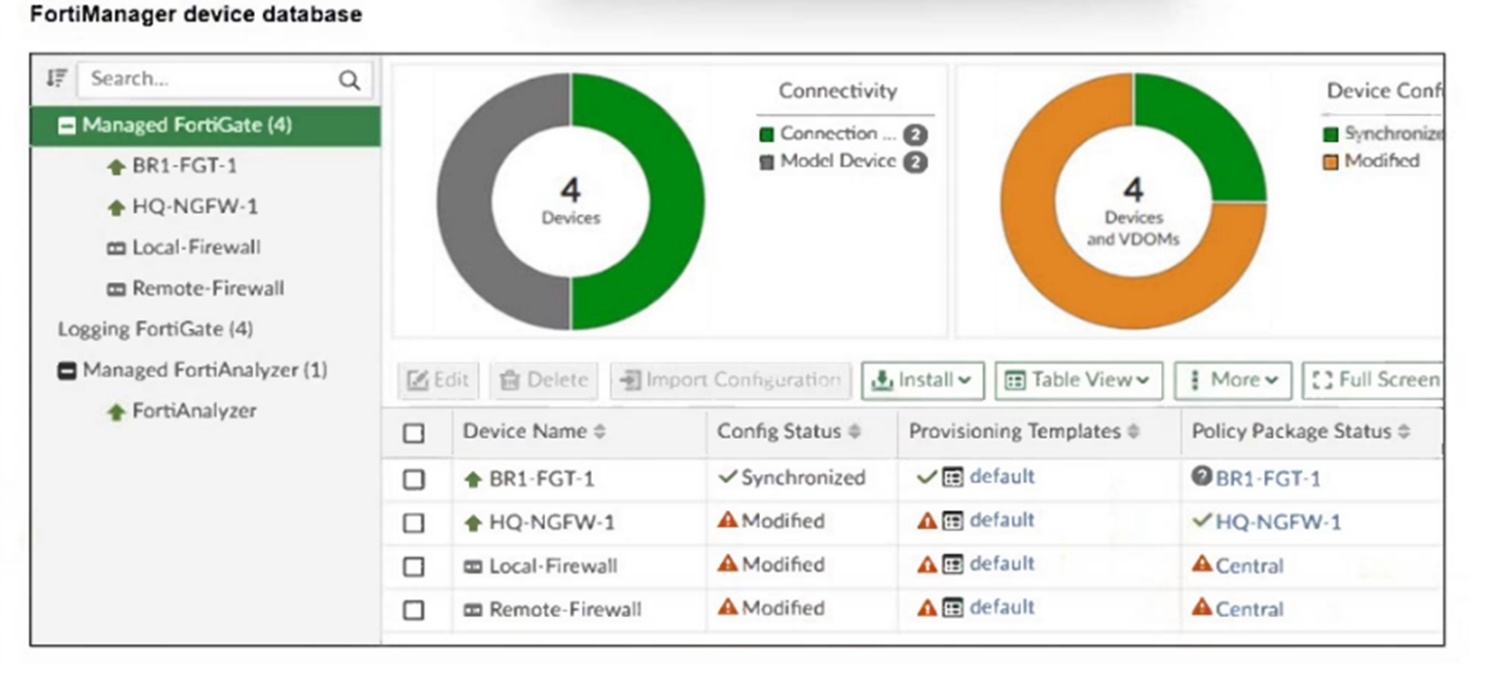
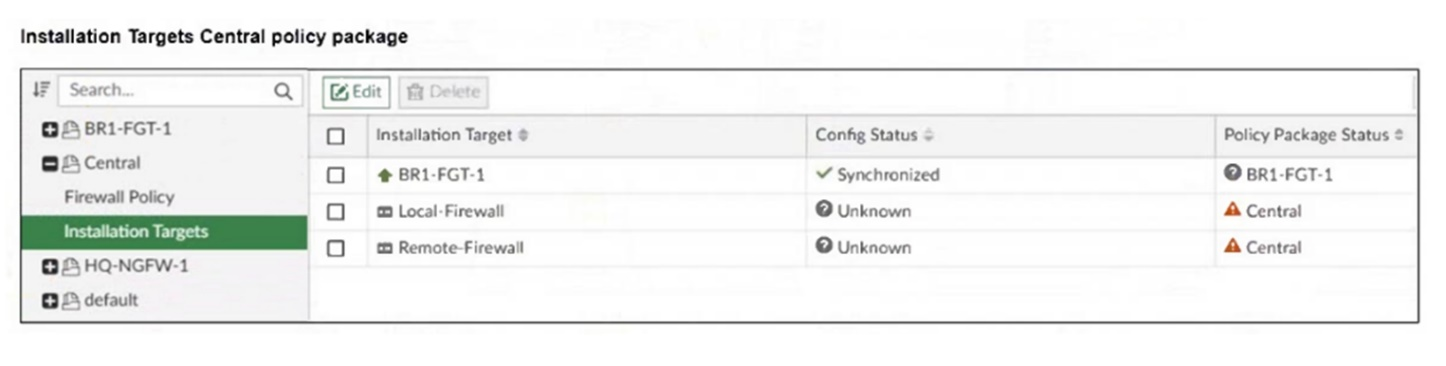
An administrator has been asked to install the same policies from a central policy package onto the BR1-FGT-1 firewall.
The administrator added BR1-FGT-1 as a target in the central policy package installation.
What should the administrator do when reinstalling the central policy package on the BR1-FGT-1 firewall?
Answer : C
Using the Install Wizard is the recommended method to reinstall the central policy package on the BR1-FGT-1 firewall, ensuring all settings, installation targets, and dependencies are correctly processed during installation.
Question 7
An administrator must create a policy and install it on a FortiGate device within an ADOM in backup mode.
How can the administrator perform this task?
Answer : D
In backup mode, FortiManager does not directly manage policy installation via the usual ADOM policy packages; instead, administrators use FortiManager scripts to push configuration changes, including policies, to FortiGate devices.
 All Official Question Types