Page: 1
/ 14
Total 57 questions
Fortinet NSE 6 - FortiNAC 7.2 NSE6_FNC-7.2 Exam Questions
Question 1
Where are logical network values defined?
Answer : A
In FortiNAC, logical networks are an integral part of device management and network segmentation. These logical networks are defined and appear within the model configuration of each infrastructure device that is modeled in the topology tree. The configuration allows for the assignment of unique names and, optionally, descriptions to each logical network, thereby clarifying their purpose or use within the network infrastructure.
Question 2
Which two methods can be used to gather a list of installed applications and application details from a host? (Choose two.)
Answer : A, C
To gather a list of installed applications and application details from a host, two methods can be used:
Agent technology: FortiNAC uses agent technology to collect all installed applications on an endpoint.
Integration with MDMs (Mobile Device Management systems): MDMs that support application gathering can be integrated with FortiNAC to collect application information.
Reference
FortiNAC 7.2 Study Guide, page 302
Question 3
In a wireless integration, what method does FortiNAC use to obtain connecting MAC address information?
Answer : B
In a wireless integration, FortiNAC uses RADIUS to obtain connecting MAC address information. This includes RADIUS requests to FortiNAC and subsequent RADIUS responses from FortiNAC to the requesting device
Question 4
Which two are required for endpoint compliance monitors? (Choose two.}
Answer : A, C
Question 5
When FortiNAC passes a firewall tag to FortiGate, what determines the value that is passed?
Answer : B
Question 6
Refer to the exhibit, and then answer the question below.
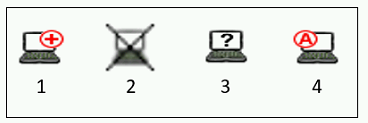
Which host is rogue?
Answer : B
Question 7
What causes a host's state to change to "at risk"?
Answer : A
Failure -- Indicates that the host has failed the scan. This option can also be set manually. When the status is set to Failure the host is marked 'At Risk' for the selected scan.
p. 244 of the Study Guide, 'A state of at-risk indicates the host has failed a scan. This could be a compliance scan or an administrative scan.'
 All Official Question Types