Page: 1
/ 14
Total 60 questions
Fortinet NSE 6 - FortiNAC-F 7.6 Administrator NSE6_FNC_AD-7.6 Exam Questions
Question 1
When creating a user or host profile, which three criteria can you apply? (Choose three.)
Answer : A, B, E
TheUser/Host Profileis the primary mechanism in FortiNAC-F for identifying and categorizing endpoints to determine their level of network access. According to theFortiNAC-F Administration Guide, a profile is built using a combination of criteria that define 'Who' is connecting, 'What' device they are using, and 'Where' they are located on the network.
The three main categories of criteria available in the configuration are:
Host or User Attributes (B):This includes specific details such as the host's operating system, the user's role (e.g., Employee, Contractor), or custom attributes assigned to the record.
Host or User Group Memberships (A):Profiles can be configured to match endpoints that are members of specific internal FortiNAC groups or synchronized directory groups (like LDAP or Active Directory groups). This allows for broad policy application based on organizational structure.
Location (E):The 'Where' component allows administrators to restrict a profile match to specific physical or logical areas of the network, such as a particular switch, a group of ports, or a specific SSID.
Criteria like an 'applied access policy' (D) are theoutcomeof a profile match rather than a criterion used to define the profile itself. Similarly, the 'Adapter current VLAN' (C) is a dynamic state that changes based on enforcement and is not a standard static identifier used for profile matching.
'User/Host Profiles are used to identify the hosts and users to which a policy will apply. Profiles are created by selecting various criteria in theWho/What(Attributes and Groups) andWhere(Locations) sections. Attributes can include Host Role, User Role, and OS. Group memberships allow matching based on internal or directory-based groups. Location criteria allow for filtering based on the device or port where the host is connected.' ---FortiNAC-F Administration Guide: User/Host Profile Configuration.
Question 2
An administrator wants to use FortiNAC-F to prevent internal engineers from accessing specific websites as defined in web filter categories on FortiGate. In addition to a security trigger and associated action, which configuration must also be defined on FortiNAC-F?
Answer : C
The correct answer is C. FortiNAC-F security automation does not rely only on a trigger and action. After a security alert is received and the security trigger is satisfied, FortiNAC-F can also evaluate an associated user/host profile before generating the security alarm and executing the action. The study guide explains that user/host profiles are the same profiles used by security policies and are used in security rules to leverage ''who, what, where, and when'' visibility information. This is exactly what the question requires: the rule must apply specifically to internal engineers, not every user who triggers the FortiGate web-filter category event.
A compliance policy is wrong because compliance policies evaluate endpoint health, posture, scans, or agent results; they do not scope FortiGate web-filter-triggered automation to a user population. A firewall policy is configured on FortiGate, not as the FortiNAC-F-side matching condition in the security rule. A profiling method is also wrong because profiling methods classify rogue or unknown devices, such as printers, cameras, or phones; they do not identify internal engineers for a security automation workflow. The user/host profile is the correct FortiNAC-F object because it lets the same FortiGate security trigger produce a different response depending on the matched user, host, group, location, or ownership context.
Question 3
While discovering network infrastructure devices, a switch appears in the inventory topology with a question mark (?) on the icon. What would cause this?
Answer : B
In FortiNAC-F, theInventory topologyuses specific icons to represent the status and model of discovered network infrastructure. When a switch or other network device is discovered via SNMP, FortiNAC-F retrieves itsSystem ObjectID (sysObjectID)to identify the specific make and model. This OID is then compared against the internal database of supported device mappings.
Aquestion mark (?)icon appearing on a discovered switch indicates that while the discovery process successfully communicated with the device (meaning SNMP credentials were correct), theSNMP ObjectID is not recognizedor mapped in the current version of FortiNAC-F. This essentially means the device is 'unsupported' by the current software out-of-the-box. Because the OID is unknown, FortiNAC-F does not know which CLI or SNMP command set to use for critical functions like L2 polling (host visibility) or VLAN switching (enforcement). To resolve this, an administrator can manually 'Set Device Mapping' to a similar existing model or a 'Generic SNMP Device' if only basic L3 visibility is required.
'Discovered devices displaying a'?' iconindicate the currently running version does not have a mapping for that device'sSystem OID(device is not supported). Device mappings are used to manage the device by performing functions such as L2/L3 Polling, Reading, and Switching VLANs.' ---Fortinet Technical Tip: Options for devices unable to be modeled in Inventory.
Question 4
Refer to the exhibit.
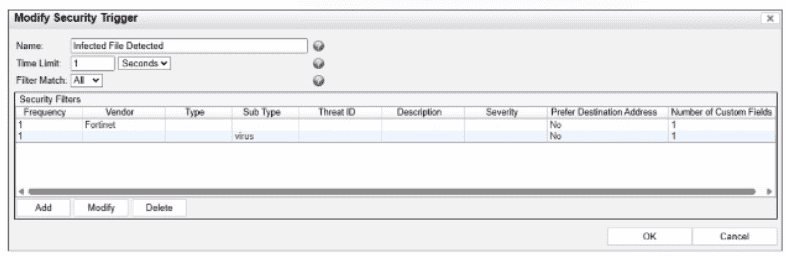
What would FortiNAC-F generate if only one of the security fitters is satisfied?
Answer : D
In FortiNAC-F,Security Triggersare used to identify specific security-related activities based on incoming data such as Syslog messages or SNMP traps from external security devices (like a FortiGate or an IDS). These triggers act as a filtering mechanism to determine if an incoming notification should be escalated from a standard system event to aSecurity Event.
According to theFortiNAC-F Administrator Guideand relevant training materials for versions 7.2 and 7.4, theFilter Matchsetting is the critical logic gate for this process. As seen in the exhibit, the 'Filter Match' configuration is set to'All'. This means that for the Security Trigger named 'Infected File Detected' to 'fire' and generate a Security Event or a subsequent Security Alarm,every single filterlisted in the Security Filters table must be satisfied simultaneously by the incoming data.
In the provided exhibit, there are two filters: one looking for the Vendor'Fortinet'and another looking for the Sub Type'virus'. If only one of these filters is satisfied (for example, a message from Fortinet that does not contain the 'virus' subtype), the logic for the Security Trigger is not met. Consequently, FortiNAC-F does not escalate the notification. Instead, it processes theincoming data as aNormal Event, which is recorded in the Event Log but does not trigger the automated security response workflows associated with security alarms.
'The Filter Match option defines the logic used when multiple filters are defined. If'All'is selected, then all filter criteria must be met in order for the trigger to fire and aSecurity Eventto be generated. If the criteria are not met, the incoming data is processed as anormal event. If'Any'is selected, the trigger fires if at least one of the filters matches.' ---FortiNAC-F Administration Guide: Security Triggers Section.
Question 5
How can an administrator configure FortiNAC-F to normalize incoming syslog event levels across vendors?
Answer : A
FortiNAC-F serves as a central manager for security events originating from a diverse ecosystem of third-party security appliances, such as FortiGate, Check Point, and Cisco. Each vendor utilizes its own internal scale forseverity levelswithin syslog messages (e.g., Check Point uses a 1--5 scale, while others may use 0--7). To provide a consistent response regardless of the source, FortiNAC-F usesSeverity Mappingsto normalize these incoming values.
According to theFortiNAC-F Administration Guide, severity mappings allow the administrator to translate vendor-specific threat levels into standardizedFortiNAC Security Levels(such as High, Medium, or Low Violation). When a syslog message arrives, the parser extracts the vendor's severity code, and the system immediately references theSecurity Event Severity Level Mappingstable to determine how that event should be categorized internally. This normalization is vital because it allows a singleSecurity Alarmto be configured to respond to any 'High Violation' event, whether it was reported as a 'Critical' by one vendor or a 'Level 5' by another. Without these mappings, the administrator would have to create separate, redundant security rules for every vendor to account for their different naming conventions and numerical scales.
'Each vendor defines its own severity levels for syslog messages. The following table shows the equivalent FortiNAC security level... To normalize these events, configure theSeverity Level Mappingsfound in the device integration guides. This allows FortiNAC to generate a consistent security event that can then trigger an alarm regardless of the reporting vendor's specific terminology.' ---FortiNAC-F Administration Guide: Vendor Severity Levels and Syslog Management.
Question 6
An administrator wants each department to create and manage its own contractor accounts but not be able to manage contractor accounts for other departments. What must the administrator configure to limit the sponsor's capabilities?
Answer : D
The correct answer is D. FortiNAC-F limits what a sponsor can create and manage through the administrator profile assigned to that sponsor. The study guide explains that sponsors can be restricted to specific guest or contractor templates and that the Manage Guests settings in the admin profile define whether the sponsor can manage all accounts, no accounts, or only accounts they created. It also states that allowed templates are defined in the admin profile, meaning each department can be given access only to its own contractor template.
The contractor template defines account fields, role values, authentication method, account duration, and related account properties, but it does not by itself restrict what a sponsor can manage. Portal settings control how users interact with the captive portal or kiosk page, not sponsor administrative scope. A user/host profile is used for matching users or hosts in policy decisions; it does not delegate sponsor permissions. For departmental separation, the administrator must create sponsor-specific administrative profiles that allow only the appropriate templates and account-management scope.
Question 7
A network administrator is troubleshooting a network access issue for a specific host. The administrator suspects the host is being assigned a different network access policy than expected.
Where would the administrator look to identify which network access policy, if any, is being applied to a particular host?
Answer : C
When troubleshooting network access in FortiNAC-F, it is often necessary to verify exactly why a host has been granted a specific level of access. Since FortiNAC-F evaluates policies from the top down and assigns access based on the first match, an administrator needs a clear way to see the results of this evaluation for a specific live endpoint.
ThePolicy Details (C)view is the designated tool for this purpose. By navigating to theHosts > Hosts(or Adapter View) in the Administration UI, an administrator can search for the specific MAC address or IP of the host in question. Right-clicking on the host record reveals a context menu from whichPolicy Detailscan be selected. This view provides a real-time 'look' into the policy engine's decision for that specific host, showing theNetwork Access Policythat was matched, theUser/Host Profilethat triggered the match, and the resultingNetwork Access Configuration(VLAN/ACL) currently applied.
WhilePolicy Logs (A)provide a historical record of all policy transitions across the system, they are often too high-volume to efficiently find a single host's current state. TheConnections view (B)shows the physical port and basic status but lacks the granular policy logic breakdown. ThePort Properties (D)view shows the configuration of the switch interface itself, which is only one component of the final access determination.
'To identify which policy is currently applied to a specific endpoint, use thePolicy Detailsview. Navigate toHosts > Hosts, select the host, right-click and choosePolicy Details. This window displays the specificNetwork Access Policy, User/Host Profile, and Network Access Configuration currently in effect for that host record.' ---FortiNAC-F Administration Guide: Policy Details and Troubleshooting.
 All Official Question Types