Page: 1
/ 14
Total 48 questions
Fortinet NSE 6 - FortiSIEM 7.4 Analyst NSE6_FSM_AN-7.4 Exam Questions
Question 1
Refer to the exhibit.
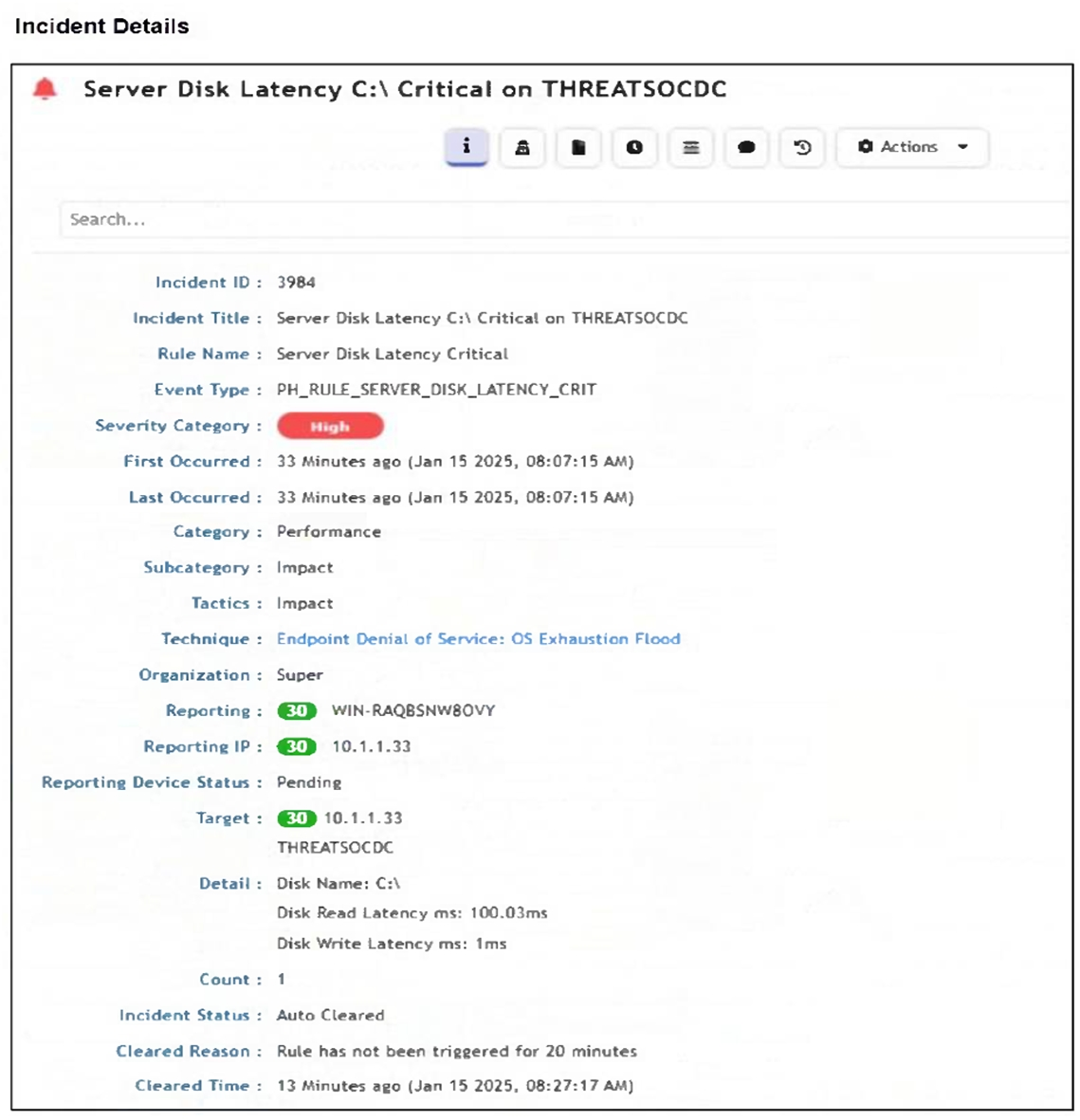
How was this incident cleared?
Answer : C
The Incident Status shows 'Auto Cleared', and the Cleared Reason states: 'Rule has not been triggered for 20 minutes.' This indicates that the incident was automatically cleared by the rule logic after a defined period of inactivity.
The correct answer is C because the exhibit shows the incident status as Auto Cleared and the cleared reason indicates that the rule condition was no longer being triggered. The Study Guide explains that FortiSIEM supports clear conditions and auto-clearing behavior at the rule level. It states that if a time-based clear condition is configured, FortiSIEM can auto-clear the incident after the last occurrence if the trigger condition no longer exists. It also explains pattern-based clear behavior: FortiSIEM evaluates clear-condition subpatterns and compares attributes from the clear condition with the original incident attributes. If the configured attributes match, the incident status is set to auto cleared. In the exhibit, the cleared reason says the rule has not been triggered for a defined number of minutes. That is not a manual action by the analyst and not an endpoint-generated all-clear signal. It is FortiSIEM's rule-based clearing logic. Option B is also wrong because the exhibit shows a specific rule inactivity period, not a generic 24-hour timeout.
Question 2
You want to create a rule with multiple subpatterns but trigger an incident only if three different subpatterns are matched over a 24-hour period.
Where must you define the time period that the rule uses to evaluate all the subpatterns? (Choose one answer)
Answer : C
The time period must be defined under the Define Condition tab of the rule. The FortiSIEM Study Guide states that a rule has three components: General, Condition, and Action. The General section defines the overall purpose and scope of the rule, the Condition section specifies which conditions trigger the rule, and the Action section configures what happens after the rule is triggered. The Study Guide further explains that on the Define Condition page, FortiSIEM specifies ''the conditions---event attributes and thresholds---that will trigger the rule and create an incident,'' including ''the time window'' within which the subpatterns must match for the rule condition to be satisfied. It also states that when there is more than one subpattern, you must define the logic between subpatterns and their relationships or constraints.
For a 24-hour multiple-subpattern rule, the guide gives an example using an 86400-second time window, which equals 24 hours, and shows it under Resource > Rules > Define Condition. Therefore, the time period is not configured inside each individual subpattern, not under General, and not under Define Action.
Question 3
What can you use to send data to FortiSIEM for user and entity behavior analytics (UEBA)?
Answer : A
The correct answer is A. FortiSIEM agent. The FortiSIEM Study Guide identifies FortiSIEM agents as the component responsible for ''file, log monitoring, and UEBA.'' It also explains that FortiSIEM agents can be installed on endpoints or servers to provide data collection functions that native syslog may not provide. For Windows systems specifically, the guide states that Windows servers do not natively send syslog messages and that a FortiSIEM Windows agent can be installed to perform that function. The FortiSIEM 7.4 User Guide also confirms that FortiInsight UEBA functionality runs as an integrated module within the FortiSIEM Windows Agent in newer releases. SSH and SNMP are access or monitoring protocols; they can support discovery or performance monitoring, but they are not the UEBA data-sending component. A FortiSIEM worker performs analysis and search functions inside the FortiSIEM architecture; it is not installed on endpoints to collect UEBA telemetry. Therefore, the FortiSIEM agent is the correct mechanism for sending UEBA-relevant endpoint data to FortiSIEM.
Question 4
Refer to the exhibit.
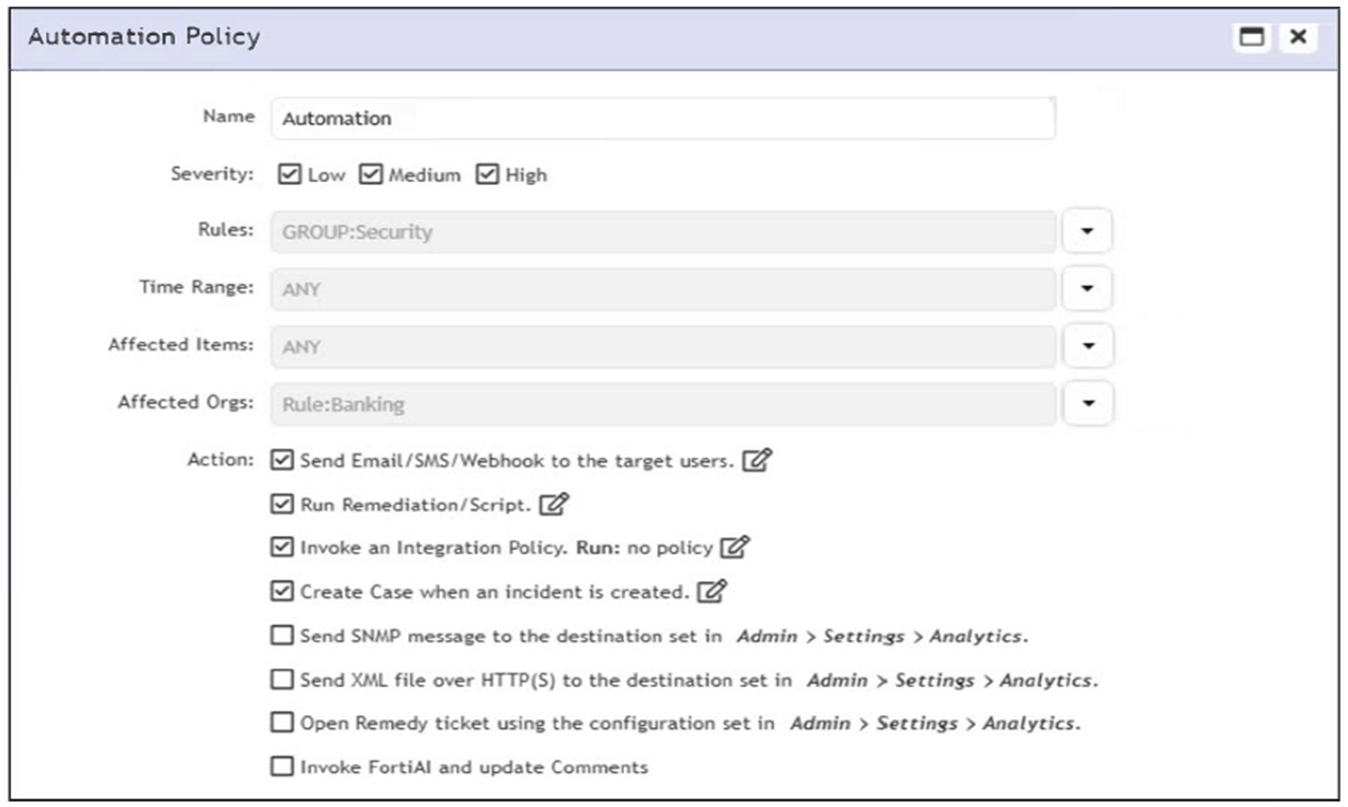
According to the automation policy configuration shown in the exhibit, what happens if an associated rule triggers?
Answer : B
When an associated rule triggers, FortiSIEM performs all selected actions in the automation policy. In this case, it will send an email/SMS/webhook, run the remediation script, invoke the integration policy (even if none is currently defined), and create a case. All checked actions are executed.
The correct answer is B because FortiSIEM automation policies are designed to execute the actions selected in the policy when the policy criteria match. The FortiSIEM Study Guide states that automation policy actions define what occurs when policy criteria match. It lists possible automation actions such as sending an alert, invoking an integration policy, sending SNMP or HTTPS XML notifications, opening a remedy ticket or creating a FortiSIEM case, sending email or SMS, and running a remediation script. The same Study Guide explains that users can configure ''any combination of actions.'' Therefore, there is no single-action precedence rule where remediation overrides all other selected actions or email runs only because it appears first. If multiple action checkboxes are selected, FortiSIEM executes the configured selected actions according to the automation policy. In the exhibit, multiple actions are selected, including email/SMS/webhook, remediation/script, integration policy, and case creation. Option C is incorrect because the absence of a defined integration policy does not make FortiSIEM ignore the other selected actions. The policy runs the selected configured actions.
Question 5
Refer to the exhibits.
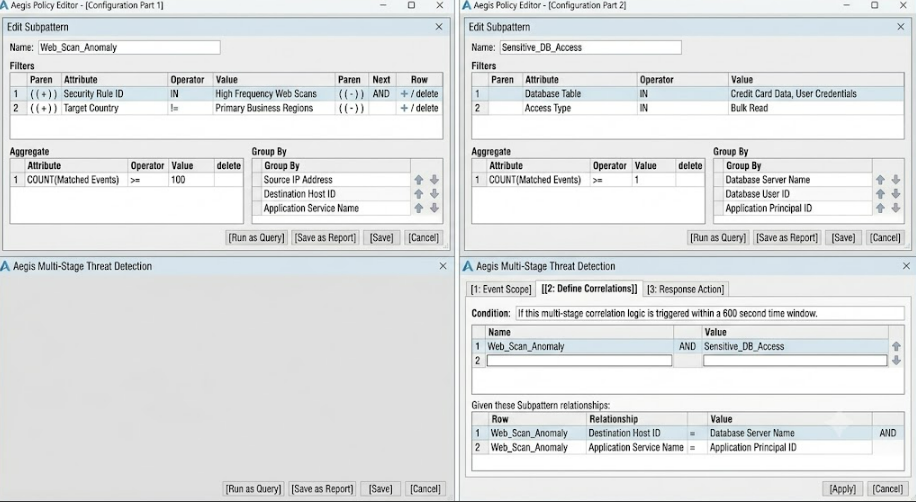
You are troubleshooting why the rule shown in the exhibit is generating incidents for successful Remote Desktop Protocol (RDP) connections with correct logins. It should only be triggering when a person fails to log in three or more times to the target device when connecting with RDP.
What is causing the rule to be triggered by correct login events? (Choose one answer)
Answer : B
The rule is triggering on successful RDP connection events because the Next operator between the two subpatterns is set to OR. The FortiSIEM Study Guide explains that multiple subpattern rules are used when patterns must occur within a specific time period or when one of several patterns proves that an incident condition exists. It lists the OR operator as: ''Subpattern X OR Subpattern Y occurred within the Time Window.'' The same Study Guide further explains that if multiple patterns are used, FortiSIEM requires a next operator, and in the OR example, ''an event that matches either'' subpattern will trigger. It also states that because the next operator is OR, the constraint between the two subpatterns is not enforced.
In the exhibit, Subpattern 1 matches RDP traffic on TCP/UDP port 3389 from FortiGate traffic-forward events, while Subpattern 2 matches logon failure events with COUNT(Matched Events) >= 3. Because the rule uses OR, FortiSIEM can trigger when only the RDP connection subpattern matches, even if the failed-logon subpattern does not match. The correct logic should require both subpatterns to match with the intended relationship constraints, not either subpattern independently.
Question 6
Refer to the exhibit.
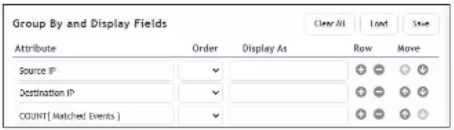
What will FortiSIEM display if you apply the Group By and Display Fields configuration to a list of allowed firewall connections?
Answer : B
The correct answer is B because the configuration groups results by Source IP and Destination IP, while using COUNT(Matched Events) as a display/aggregate value. FortiSIEM's grouping logic combines events only when the selected Group By attributes match. The Study Guide explains that Group By attributes determine how matching events are placed into rows, and that when multiple events share the same grouped values, ''they are grouped together in one row.'' The count column then tracks the number of events represented by that row. In the exhibit, Source IP and Destination IP are the grouping fields, so FortiSIEM displays each unique connection pair once. The count shows how many matching allowed firewall connection events were seen for each pair. Option A is not correct because the exhibit does not show sorting by destination IP hit count. Option C ignores the source and destination grouping. Option D would require grouping by source IP alone or by distinct destination counts per source, which is not the shown configuration.
Question 7
Refer to the exhibit.
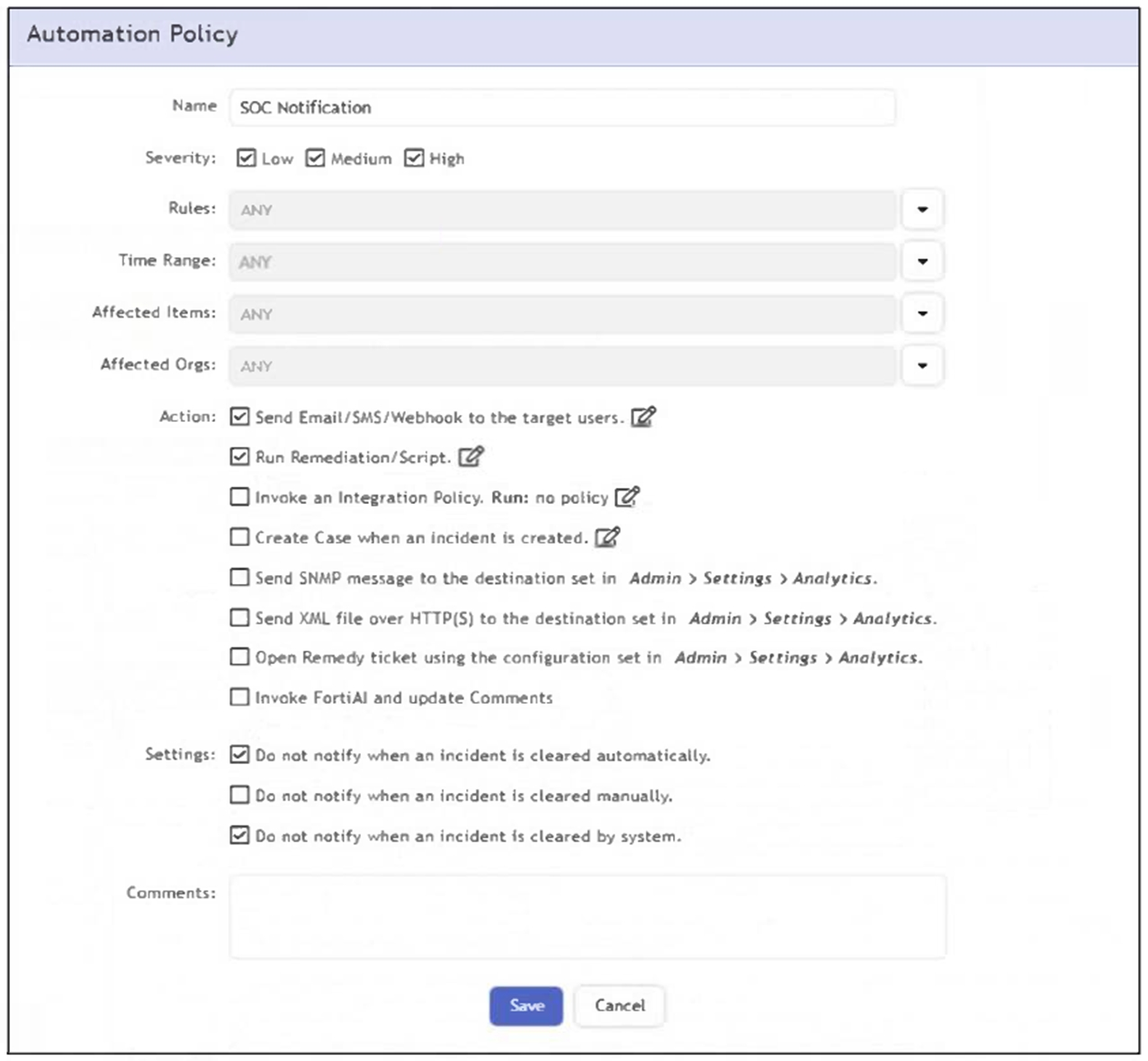
What happens when an analyst clears an incident generated by a rule containing the automation policy shown in the exhibit?
Answer : B
The correct answer is B because the automation policy shown has the email/SMS/webhook notification action enabled, and the setting that suppresses notification for manual incident clearing is not selected. The FortiSIEM Study Guide explains that automation policies define actions taken when incident-related policy criteria match. It states that notification policies are defined by criteria such as severity, associated rules, time range, affected items, and actions. The guide also states that FortiSIEM can send email notifications and SMS messages to individuals or groups as part of an automation policy. In the exhibit, the options Do not notify when an incident is cleared automatically and Do not notify when an incident is cleared by system are selected, but Do not notify when an incident is cleared manually is not selected. Because the analyst clears the incident manually, the suppression condition does not apply. Therefore, FortiSIEM sends the configured email notification to the target user, identified in the question as the SOC manager.
 All Official Question Types