Page: 1
/ 14
Total 44 questions
Fortinet NSE 6 - FortiSOAR 7.3 Administrator NSE6_FSR-7.3 Exam Questions
Question 1
What two permissions must you assign to a user to allow the purge of audit logs for all users? (Choose two answers)
Answer : A, B
Comprehensive and Detailed Explanation From FortiSOAR 7.3 Exact Extract study guide:
According to the FortiSOAR 7.3 Administration Guide under the 'Audit Logs' and 'Role-Based Access Control (RBAC)' sections, managing the lifecycle of system logs requires elevated administrative privileges.
To perform a manual purge of audit logs, the system validates permissions across two specific areas:
Audit Log Activities Module: The user must have Delete permissions on this specific module because it is the repository where the actual log records are stored. Without 'Delete' rights here, the application cannot remove the database entries.
Security Module: Because the purging of audit logs is a sensitive security operation that affects the system's accountability trail, FortiSOAR requires the Delete permission on the Security module. This acts as a secondary administrative guardrail to ensure only authorized security administrators can permanently remove audit trails.
Permissions on the People or Users modules (Options C and D) are used for managing user profiles and account attributes, but they do not grant the authority to manipulate system-level audit databases.
Question 2
Which three features are installed with the FortiSOAR Incidence Response Content Pack? (Choose three answers)
Answer : B, C, D
Comprehensive and Detailed Explanation From FortiSOAR 7.3 Exact Extract study guide:
The FortiSOAR Incidence Response Content Pack (which is essentially the predecessor or foundational component of the SOAR Framework Solution Pack in version 7.3) is designed to provide users with an immediate, functional environment. According to the FortiSOAR 7.3 Administration Guide and Content Hub documentation:
Sample Alerts and Incidents (C): The content pack includes a set of demo records.3 Upon installation and clicking the 'Demo IR Records' button, the system populates the Alerts and Incidents modules with pre-configured samples, including associated indicators and assets, to demonstrate how records are handled.4
System Playbooks (D): It installs a comprehensive collection of 'out-of-the-box' (OOB) playbooks. These include system-level playbooks used for triaging, indicator extraction, and managing standard record lifecycles (such as auto-populating dates when a record is closed).5
Sample Data for Playbooks (B): Along with the records themselves, the pack includes simulation and training data (often referred to as 'Playbook Samples' or 'Mock Data').6 This allows administrators to test playbook logic and workflows without requiring live feeds from third-party security tools.
Why other options are incorrect:
System monitoring connectors (A): While the pack may configure some basic internal connectors (like the Code Snippet connector), 'system monitoring connectors' are generally standalone integrations or part of specific device solution packs rather than the core IR pack.
SLA template module (E): Although the pack includes playbooks that manage SLAs (calculating response and resolution times), the 'SLA Management' or 'SLA Template' capability is often categorized as an additional module or handled via the Module Editor, rather than being a specific 'feature' installed solely by the IR pack.
Question 3
Which two system monitoring reports are available on the System Monitoring widget?
(Choose two.)
Answer : B, C
Question 4
Which statement about licensing on FortiSOAR is true? (Choose one answer)
Answer : B
Comprehensive and Detailed Explanation From FortiSOAR 7.3 Exact Extract study guide:
According to the FortiSOAR 7.3 Deployment and Administration Guide under the 'Licensing FortiSOAR' section:
Connectivity Requirements: For the FortiSOAR license deployment and validation process to succeed, the instance must have outbound connectivity to https://globalupdate.fortinet.net. This URL is specifically used by the FortiSOAR license manager to fetch entitlements, verify the subscription status, and retrieve product information from the Fortinet licensing servers. If this connectivity is blocked (and a FortiManager is not being used as a local FDN proxy), the license deployment will fail.4
License Limits: Every FortiSOAR license---whether Perpetual, Subscription, or Trial---strictly enforces a maximum number of active users (concurrent or named) and often a limit on the number of automation actions per day.5
Perpetual Trial Licenses (often called 'Free Trial') are restricted to a specific user count (typically 2 or 3) and a daily action limit (e.g., 200 or 1000 actions). Therefore, options C and D are incorrect as they suggest 'no limit on user count.'
URL Clarification: While update.fortiguard.net is a common Fortinet endpoint for security signatures (IPS/AV), FortiSOAR's specific licensing and entitlement communication is directed to the globalupdate.fortinet.net service.
Question 5
Refer to the exhibit.
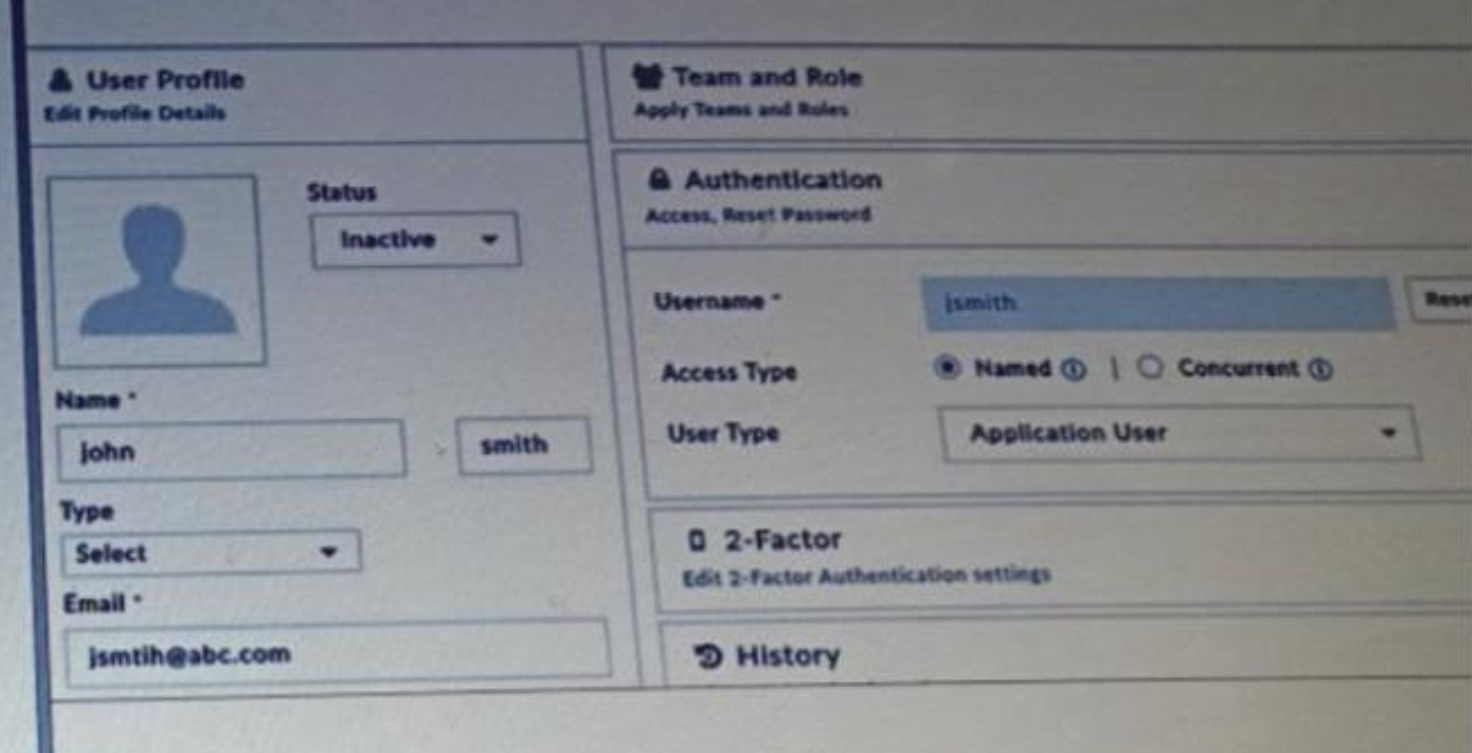
Why is this user's account inactive? (Choose one answer)
Answer : D
Comprehensive and Detailed Explanation From FortiSOAR 7.3 Exact Extract study guide:
According to the FortiSOAR 7.3 Administration and Deployment Guides, specifically in the 'Licensing FortiSOAR' and 'Security Management' sections:
Licensing Enforcement: FortiSOAR strictly enforces the number of active users based on the installed license. The license specifies the maximum number of active users allowed in the system at any given point in time.
User Status (Active vs. Inactive): When the number of active users reaches the limit defined by the license, any additional users created or imported will be set to an Inactive status by default. An administrator cannot change their status to 'Active' until an existing active user is deactivated or deleted, or the license is upgraded to support more users.
Locked Status (Option A): It is important to distinguish between 'Inactive' and 'Locked.' Users become temporarily locked out of FortiSOAR when they exceed the configured number of authentication attempts (defaulting to 5 times) within a specific period. A locked user profile will typically display a 'Locked' indicator or a checkbox to 'Unlock' rather than a simple 'Inactive' status.
Other Options: While an email ID is required for account creation, its validity does not automatically trigger an 'Inactive' status (Option B). Similarly, a required password reset (Option C) forces a password change upon login but does not disable the account.
Question 6
What are two system-level logs that can be purged using application configuration? (Choose two.)
Answer : C, D
In FortiSOAR, system-level logs that can be purged include both 'Audit logs' and 'Executed Playbook logs.' These types of logs can be configured to be purged periodically to free up storage space and ensure that unnecessary logs do not impact system performance. The application configuration allows administrators to schedule automatic purges, which can be especially useful in high-activity environments where log data accumulates quickly. Purging these logs helps maintain a cleaner and more efficient system.
Question 7
Which two roles are default roles configured on FortiSOAR? (Choose two answers)
Answer : A, D
Comprehensive and Detailed Explanation From FortiSOAR 7.3 Exact Extract study guide:
FortiSOAR comes with several pre-defined (out-of-the-box) roles designed to align with common Security Operations Center (SOC) functions. According to the FortiSOAR 7.3 Administration Guide under the 'Security Management' section:
T1 Analyst (Tier 1): This role is a default configuration intended for front-line analysts who perform initial triaging of alerts and basic incident response tasks.
Connector Administrator: This is a specialized default role that grants permissions specifically for configuring, updating, and managing the lifecycle of connectors within the environment.
While FortiSOAR is highly customizable and allows for the creation of T2 or T3 roles, they are not always present as specific 'default' named roles in the same way the T1 Analyst is across all base installations. Furthermore, 'FortiSOAR Agent' refers to a technical component or a deployment architecture rather than a standard user RBAC (Role-Based Access Control) role. Other common default roles include Security Administrator, Application Administrator, and Full Access.
 All Official Question Types