Page: 1
/ 14
Total 44 questions
Fortinet NSE 6 - FortiSOAR 7.6 Analyst NSE6_FSR_AN-7.6 Exam Questions
Question 1
Which two statements about upgrading a FortiSOAR HA cluster are true7 (Choose two.)
Answer : C, D
Upgrading a FortiSOAR HA cluster follows the same procedure regardless of whether it is configured in an active-active or active-passive setup. The process generally involves upgrading one node at a time to minimize service disruption. Best practices recommend upgrading the passive secondary node first before moving to the active primary node. This sequence helps maintain cluster stability and ensures that at least one node remains operational during the upgrade.
Question 2
On FortiSOAR. which default role is used to assign privileges to other teams and is recommended to not be removed?
Answer : A
In FortiSOAR, the 'Application Administrator' role is a default role that holds broad privileges, including the ability to assign permissions to other teams. This role is fundamental to system administration and is recommended not to be removed as it provides crucial administrative capabilities. Removing or modifying this role could impact FortiSOAR's ability to manage user roles and permissions effectively, which could hinder system operations and user management.
Question 3
Refer to the exhibit.
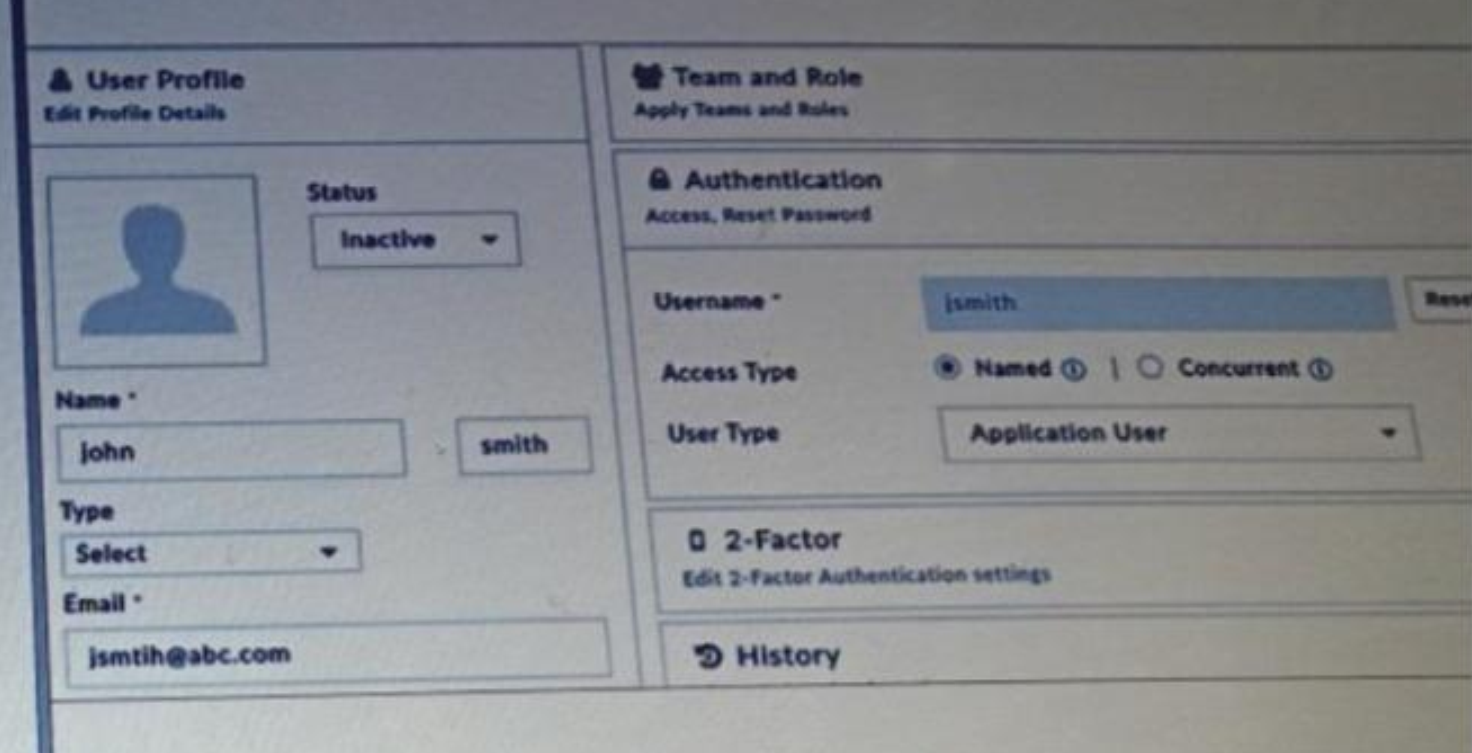
Why is this user's account inactive? (Choose one answer)
Answer : D
Comprehensive and Detailed Explanation From FortiSOAR 7.3 Exact Extract study guide:
According to the FortiSOAR 7.3 Administration and Deployment Guides, specifically in the 'Licensing FortiSOAR' and 'Security Management' sections:
Licensing Enforcement: FortiSOAR strictly enforces the number of active users based on the installed license. The license specifies the maximum number of active users allowed in the system at any given point in time.
User Status (Active vs. Inactive): When the number of active users reaches the limit defined by the license, any additional users created or imported will be set to an Inactive status by default. An administrator cannot change their status to 'Active' until an existing active user is deactivated or deleted, or the license is upgraded to support more users.
Locked Status (Option A): It is important to distinguish between 'Inactive' and 'Locked.' Users become temporarily locked out of FortiSOAR when they exceed the configured number of authentication attempts (defaulting to 5 times) within a specific period. A locked user profile will typically display a 'Locked' indicator or a checkbox to 'Unlock' rather than a simple 'Inactive' status.
Other Options: While an email ID is required for account creation, its validity does not automatically trigger an 'Inactive' status (Option B). Similarly, a required password reset (Option C) forces a password change upon login but does not disable the account.
Question 4
Which three features are installed with the FortiSOAR Incidence Response Content Pack? (Choose three answers)
Answer : B, C, D
Comprehensive and Detailed Explanation From FortiSOAR 7.3 Exact Extract study guide:
The FortiSOAR Incidence Response Content Pack (which is essentially the predecessor or foundational component of the SOAR Framework Solution Pack in version 7.3) is designed to provide users with an immediate, functional environment. According to the FortiSOAR 7.3 Administration Guide and Content Hub documentation:
Sample Alerts and Incidents (C): The content pack includes a set of demo records.3 Upon installation and clicking the 'Demo IR Records' button, the system populates the Alerts and Incidents modules with pre-configured samples, including associated indicators and assets, to demonstrate how records are handled.4
System Playbooks (D): It installs a comprehensive collection of 'out-of-the-box' (OOB) playbooks. These include system-level playbooks used for triaging, indicator extraction, and managing standard record lifecycles (such as auto-populating dates when a record is closed).5
Sample Data for Playbooks (B): Along with the records themselves, the pack includes simulation and training data (often referred to as 'Playbook Samples' or 'Mock Data').6 This allows administrators to test playbook logic and workflows without requiring live feeds from third-party security tools.
Why other options are incorrect:
System monitoring connectors (A): While the pack may configure some basic internal connectors (like the Code Snippet connector), 'system monitoring connectors' are generally standalone integrations or part of specific device solution packs rather than the core IR pack.
SLA template module (E): Although the pack includes playbooks that manage SLAs (calculating response and resolution times), the 'SLA Management' or 'SLA Template' capability is often categorized as an additional module or handled via the Module Editor, rather than being a specific 'feature' installed solely by the IR pack.
Question 5
Which two statements about Elasticsearch are true? (Choose two.)
Answer : A, D
Elasticsearch in FortiSOAR is used for its robust data handling capabilities, allowing rapid storage, searching, and analysis of vast amounts of data in near real-time. Its integration with FortiSOAR's global search enables efficient querying across all records, providing quick response times and a seamless user experience. The Elasticsearch database is crucial for handling extensive datasets and delivering swift search results, making it integral to FortiSOAR's performance and data management capabilities.
Question 6
Refer to the exhibit.
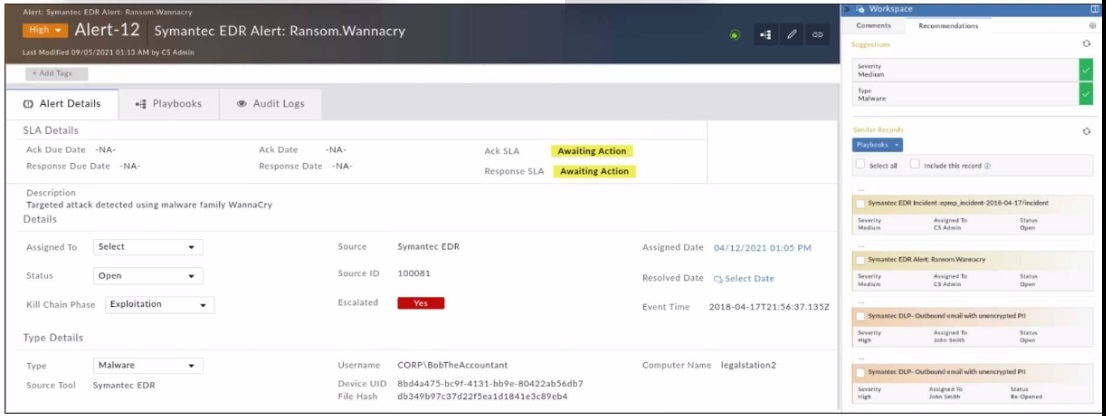
Which two statements about the recommendation engine are true? (Choose two.)
Answer : B, D
The Recommendation Engine in FortiSOAR is designed to assist in alert triage by suggesting values for certain fields based on historical data and machine learning models. In this case, the engine is trained to predict both the Severity and Type fields, suggesting values that align with past incidents and threat intelligence. Although the current alert severity is High, the recommendation engine has suggested adjusting it to Medium based on the pattern of similar past alerts, indicating a less critical threat level than initially perceived. This functionality helps analysts by providing data-driven insights, which can optimize alert handling and resource allocation.
Question 7
Which log file contains license synchronization logs on FortiSOAR?
Answer : A
The fdn.log file in FortiSOAR contains logs related to license synchronization activities. This log file records events and errors associated with license checks and synchronization with Fortinet's licensing servers, ensuring that the FortiSOAR instance remains compliant with licensing requirements. Monitoring fdn.log can help administrators troubleshoot issues related to license synchronization and ensure the system operates within the licensed limits.
 All Official Question Types