Page: 1
/ 14
Total 34 questions
Fortinet NSE 7 - Advanced Analytics 6.3 NSE7_ADA-6.3 Exam Questions
Question 1
What are the modes of Data Ingestion on FortiSOAR? (Choose three.)
Answer : B, C, E
The modes of Data Ingestion on FortiSOAR are notification based, app push, and schedule based. Notification based mode allows FortiSOAR to receive data from external sources via webhooks or email notifications. App push mode allows FortiSOAR to receive data from external sources via API calls or scripts. Schedule based mode allows FortiSOAR to pull data from external sources at regular intervals using connectors. Reference:Fortinet NSE 7 - Advanced Analytics 6.3 Exam Description, page 17
Question 2
In the event of a WAN link failure between the collector and the supervisor, by default, what is the maximum number of event files stored on the collector?
Answer : B
By default, the maximum number of event files stored on the collector in the event of a WAN link failure between the collector and the supervisor is 10.000. This value can be changed in the collector.properties file by modifying the parameter max_event_files_to_store. Reference:Fortinet NSE 7 - Advanced Analytics 6.3 Exam Description, page 13
Question 3
What happens to UEBA events when a user is off-net?
Answer : B
When a user is off-net, meaning they are not connected to a network where a FortiSIEM collector is reachable, then UEBA events will be cached locally by the agent if it cannot upload them to a FortiSIEM collector. The agent will store up to 100 MB of events in a local database file and try to upload them when it detects a network change or every five minutes.
Question 4
Refer to the exhibit.
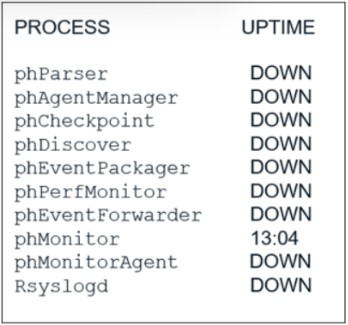
An administrator deploys a new collector for the first time, and notices that all the processes except the phMonitor are down.
How can the administrator bring the processes up?
Answer : C
The collector processes are dependent on the registration with the supervisor. The phMonitor process is responsible for registering the collector to the supervisor and monitoring the health of other processes. After the registration is successful, the phMonitor will start the other processes on the collector.
Question 5
Refer to the exhibit.
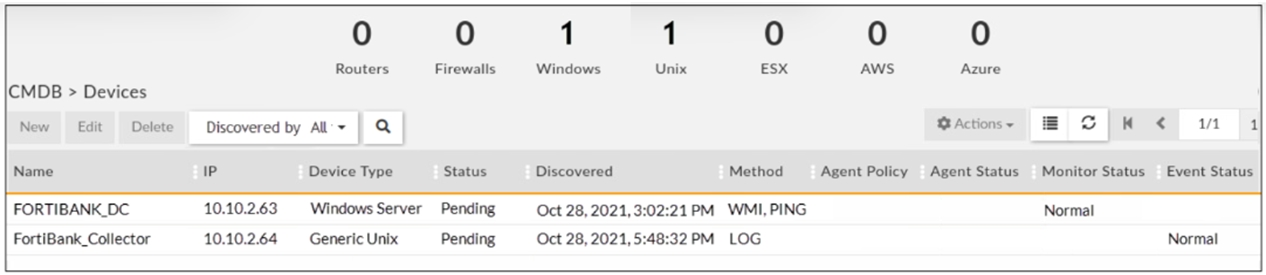
Why is the windows device still in the CMDB, even though the administrator uninstalled the windows agent?
Answer : D
The windows device is still in the CMDB, even though the administrator uninstalled the windows agent, because the device must be deleted manually from the CMDB. Uninstalling the windows agent does not automatically remove the device from the CMDB, as there may be other sources of data for the device, such as SNMP or syslog. To delete the device from the CMDB, the administrator must go to CMDB > Devices > All Devices, select the device, and click Delete.
Question 6
Refer to the exhibit.
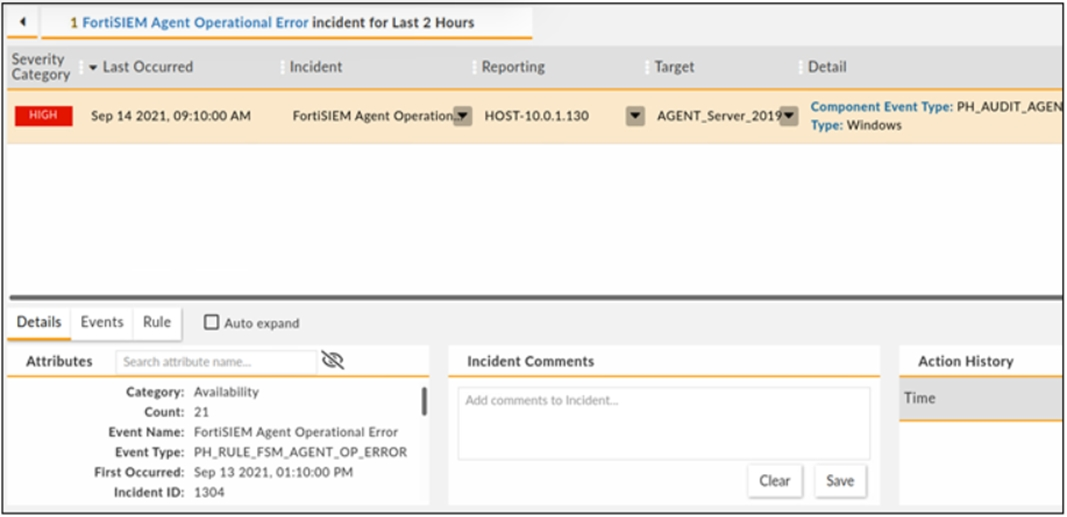
How long has the UEBA agent been operationally down?
Answer : A
The UEBA agent status shows that it has been operationally down for one day and three hours ago (1d3h). This means that it has been down for 24 hours plus three hours, which is equal to 21 hours.
Question 7
Refer to the exhibit.
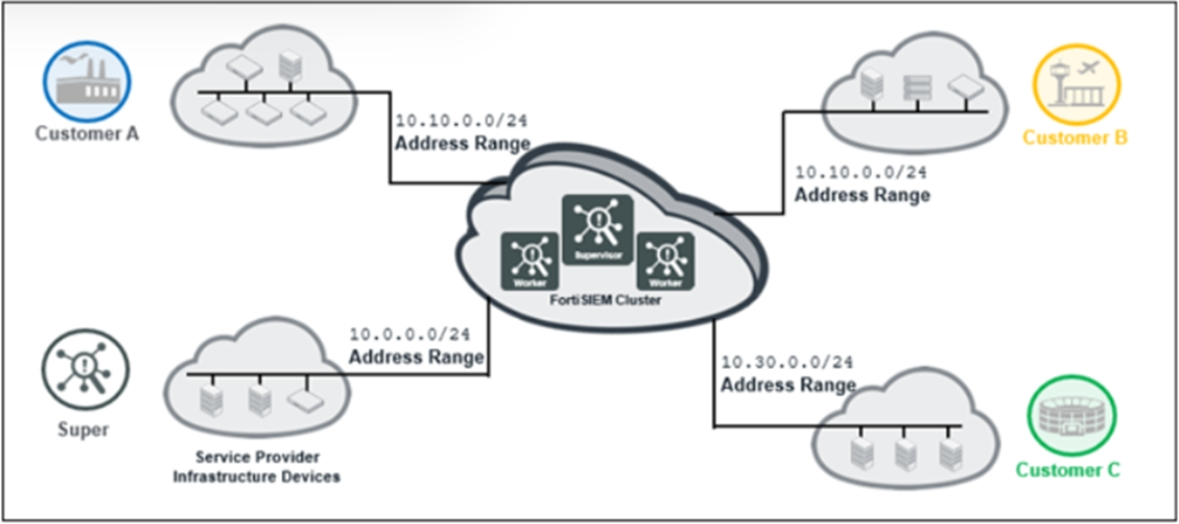
The service provider deployed FortiSIEM without a collector and added three customers on the supervisor.
What mistake did the administrator make?
Answer : A
The mistake that the administrator made is that customer A and customer B have overlapping IP addresses. This will cause confusion and errors in event collection and correlation, as well as CMDB discovery and classification. To avoid this problem, each customer should have a unique IP address range or use NAT to translate their IP addresses.
 All Official Question Types