Page: 1
/ 14
Total 81 questions
Fortinet NSE 7 - FortiSASE 25 Enterprise Administrator NSE7_SSE_AD-25 Exam Questions
Question 1
You are configuring FortiSASE SSL deep inspection. What is required for FortiSASE to inspect encrypted traffic? (Choose one answer)
Answer : D
SSL deep inspection (DPI) is a critical security function that allows FortiSASE to decrypt and inspect the actual payload of encrypted traffic (such as HTTPS, SMTPS, and FTPS) to identify and block hidden threats.
The Role of the CA: For this process to occur, FortiSASE must act as a 'man-in-the-middle' by intercepting the SSL session, decrypting it for inspection, and then re-encrypting it before sending it to the endpoint.2 To re-encrypt the traffic, FortiSASE acts as a Certificate Authority (CA) and signs a new certificate for the destination website on the fly.
Certificate Types: This CA role can be fulfilled using the default self-signed certificate provided by Fortinet (typically Fortinet_CA_SSL) or a certificate issued by an organization's internal/private CA. Publicly trusted third-party CAs (like DigiCert or Let's Encrypt) do not sell CA-capable certificates that can be used for this type of inspection.
Client Machine Requirement: Because the endpoint's browser or operating system will not natively trust a certificate signed by a private or self-signed CA, the root CA certificate must be imported into the Trusted Root Certification Authorities store on all managed client machines. Failure to do so results in persistent certificate warnings or blocked connections for the end user.
Supported Features: Once enabled, SSL deep inspection provides the necessary visibility for high-level security features to function, including Antivirus, Web Filtering, Data Loss Prevention (DLP), File Filter, and Application Control.
Question 2
What are two benefits of deploying secure private access (SPA) with SD-WAN? (Choose two answers)
Answer : B, D
According to the NSE7 SASE Enterprise Guide (Pages 46 & 61), deploying Secure Private Access (SPA) with SD-WAN provides advanced security and networking capabilities by routing traffic through global Points of Presence (PoPs).
Inline Security Inspection (D): A major advantage of this approach is that traffic is routed through FortiSASE PoPs before it reaches private applications. This enables inline security inspection, providing robust protection against threats by applying the full SASE security stack---including antivirus, intrusion prevention, and deep packet inspection---to private access traffic.
Support for TCP and UDP (B): Organizations with existing FortiGate SD-WAN deployments benefit from broader and seamless access to privately hosted applications. The SD-WAN SPA use case explicitly supports both TCP- and UDP-based applications, ensuring that legacy or specialized services that rely on UDP function correctly over the secure tunnel.
SD-WAN Optimization: This method leverages the benefits of SD-WAN to optimize traffic flow between the SASE PoP and the corporate SD-WAN hub or data center FortiGate. It is particularly useful for mission-critical applications that require an extra layer of security combined with path optimization.
Architecture: In this configuration, the FortiSASE Security PoPs act as spokes in the organization's SD-WAN network, relying on IPsec VPN overlays and BGP for secure dynamic routing.
While ZTNA posture checks are a feature of the broader ecosystem, the NSE7 Guide specifically highlights inline inspection and application support (TCP/UDP) as primary advantages of the SD-WAN integrated SPA approach.
Question 3
Which statement best describes the Digital Experience Monitor (DEM) feature on FortiSASE? (Choose one answer)
Answer : C
The Digital Experience Monitor (DEM) feature in FortiSASE is a specialized monitoring tool integrated into the SASE cloud to ensure optimal application performance and user satisfaction.2
Purpose and Visibility: DEM is designed to provide end-to-end network visibility by monitoring the health and performance of the connections between the global FortiSASE security Points of Presence (PoPs) and specific SaaS applications (such as Microsoft 365, WebEx, or Dropbox).
Performance Metrics: It identifies and helps troubleshoot issues related to latency, jitter, and packet loss. By leveraging vantage points within the SASE infrastructure, administrators can determine if a performance bottleneck resides within the local network, the SASE backbone, or the SaaS provider's environment.
Integration: This feature is often powered by FortiMonitor, allowing for synthetic transaction monitoring (STM) to simulate user interactions and proactively spot performance issues before they impact the hybrid workforce.
Operational Efficiency: By providing comprehensive insights across users and PoPs, DEM reduces the time required to resolve 'slowness' complaints, which are common in remote work scenarios.
Comparison of Other Features:
Option A: While FortiSASE monitors PoP health, DEM's primary value is the end-to-end path to the application.
Option B: Compliance checks are a function of Endpoint Profiles and ZTNA tagging rules, not the monitoring dashboard.
Option D: Vulnerability management is handled by the Vulnerability Scan feature within the managed FortiClient settings.
Question 4
Refer to the exhibit.
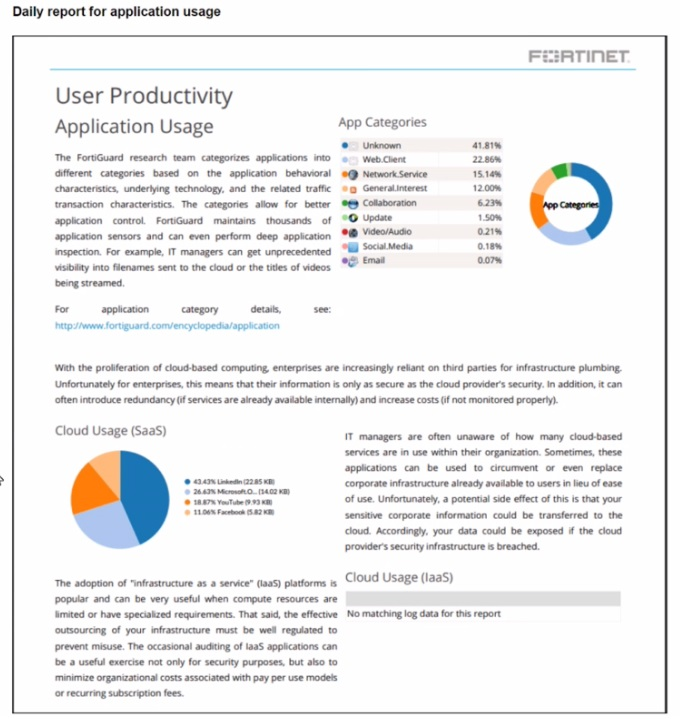
The daily report for application usage shows an unusually high number of unknown applications by category.
What are two possible explanations for this? (Choose two.)
Answer : B, D
In FortiSASE, the accuracy of application usage reports depends on two primary factors: the ability to identify the application (visibility) and the configuration to log that data (reporting).
Deep Inspection Requirement (D): Modern applications frequently use encryption (SSL/TLS) and dynamic ports. Without Deep Inspection (SSL decryption), the FortiSASE security engine cannot see the application payload and is limited to inspecting headers or SNI. This results in many applications being identified only by their generic protocol (e.g., 'SSL' or 'HTTPS') and subsequently appearing as Unknown in reports because the specific Layer 7 application signature cannot be matched.
Application Control Monitor Setting (B): Even when an application is correctly identified, it must be properly logged to appear accurately in the 'Daily report for application usage'. In the inline-CASB (Application Control) profile, categories are assigned actions such as 'Allow', 'Block', or 'Monitor'. If categories are set to 'Allow' instead of Monitor, the traffic is permitted but granular session details---including the specific application category---may not be logged for reporting purposes, causing them to be grouped into an 'Unknown' or 'Uncategorized' bucket in high-level summaries.
Analysis of Incorrect Options:
Option A: While certificate inspection provides more visibility than no inspection, it is still insufficient for many applications that require deep packet inspection for identification. Therefore, the lack of Deep inspection (Option D) is the more accurate technical explanation for 'Unknown' results.
Option C: ZTNA tags are used for access control and posture-based policy enforcement; they do not impact the application identification engine's ability to categorize traffic flows.
Question 5
Which two benefits come from integrating SoCaaS with FortiSASE? (Choose two answers)
Answer : B, C
The integration of FortiGuard SOCaaS with FortiSASE significantly strengthens an organization's security posture by offloading complex security operations to Fortinet's expert analysts.4
Continuous Threat Monitoring (B): FortiGuard SOCaaS provides 24x7x365 threat monitoring for all endpoints connected to the FortiSASE environment. This service eliminates the need for organizations to hire and maintain their own round-the-clock security operations staff while ensuring that threats are detected and verified in as little as 15 minutes.
Centralized Visibility (C): By forwarding FortiSASE logs to the SOCaaS cloud, administrators gain centralized visibility of all security events through a single, user-friendly portal. This portal allows security teams to track threats, review expert-led incident escalations, and communicate directly with Fortinet SOC analysts to streamline the incident response process.
Operational Efficiency: The integration uses AI-driven alert triage and automated correlation to distill data from the Fortinet Security Fabric, focusing on legitimate threats and reducing the alert fatigue often experienced by internal IT teams.
Question 6
Refer to the exhibits.
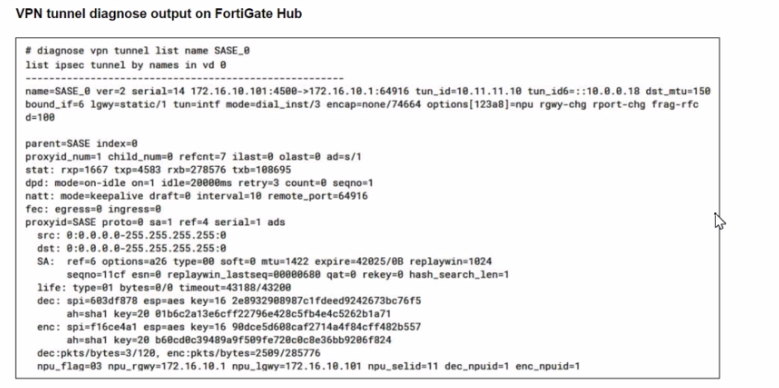
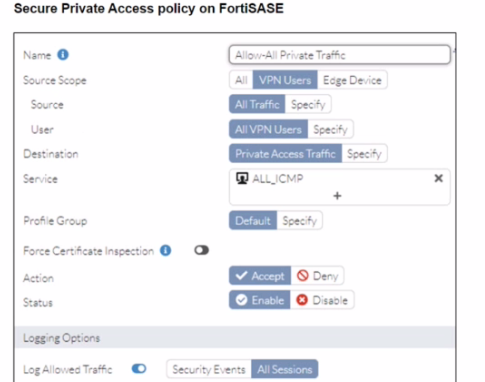
A FortiSASE administrator is trying to configure FortiSASE as a spoke to a FortiGate hub. The tunnel is up to the FortiGale hub. However, the administrator is not able to ping the webserver hosted behind the FortiGate hub.
Based on the output, what is the reason for the ping failures?
Answer : B
The reason for the ping failures is due to the quick mode selectors restricting the subnet. Quick mode selectors define the IP ranges and protocols that are allowed through the VPN tunnel, and if they are not configured correctly, traffic to certain subnets can be blocked.
Quick Mode Selectors:
Quick mode selectors specify the source and destination subnets that are allowed to communicate through the VPN tunnel.
If the selectors do not include the subnet of the webserver (192.168.10.0/24), then the traffic will be restricted, and the ping will fail.
Diagnostic Output:
The diagnostic output shows the VPN configuration details, but it is important to check the quick mode selectors to ensure that the necessary subnets are included.
If the quick mode selectors are too restrictive, they will prevent traffic to and from the specified subnets.
Configuration Check:
Verify the quick mode selectors on both the FortiSASE and FortiGate hub to ensure they match and include the subnet of the webserver.
Adjust the selectors to allow the necessary subnets for successful communication.
FortiOS 7.6 Administration Guide: Provides detailed information on configuring VPN tunnels and quick mode selectors.
FortiSASE 23.2 Documentation: Explains how to set up and manage VPN tunnels, including the configuration of quick mode selectors.
Question 7
During FortiSASE provisioning, how many security points of presence (POPs) need to be configured by the FortiSASE administrator?
Answer : D
During FortiSASE provisioning, the FortiSASE administrator needs to configure at least one security point of presence (PoP). A single PoP is sufficient to get started with FortiSASE, providing the necessary security services and connectivity for users.
Security Point of Presence (PoP):
A PoP is a strategically located data center that provides security services such as secure web gateway, firewall, and VPN termination.
Configuring at least one PoP ensures that users can connect to FortiSASE and benefit from its security features.
Scalability:
While only one PoP is required to start, additional PoPs can be added as needed to enhance redundancy, load balancing, and performance.
FortiOS 7.6 Administration Guide: Provides details on the provisioning process for FortiSASE.
FortiSASE 23.2 Documentation: Explains the configuration and role of security PoPs in the FortiSASE architecture.
 All Official Question Types