Page: 1
/ 14
Total 45 questions
Fortinet NSE I - OT Security 7.6 Architect NSEI_OTS_AR-7.6 Exam Questions
Question 1
Refer to the exhibits.
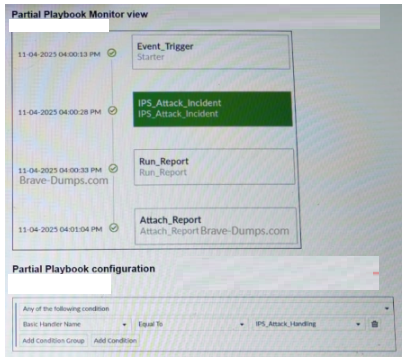
A partial view of the Playbook Monitor page and the corresponding playbook configuration are shown. Based on the monitor page and the configuration of the playbook, what has triggered the Run_Report task? (Choose one answer)
Answer : A
Based on the provided exhibits from the FortiAnalyzer playbook engine:
Playbook Trigger Condition: The Partial Playbook configuration exhibit shows that the playbook is set to trigger based on a condition where the Basic Handler Name is Equal To IPS_Attack_Handling.
Event vs. Log: In FortiAnalyzer, the field Basic Handler Name is a property of an Event record, indicating the specific Event Handler that generated it. A playbook configured with this condition is triggered by an Event, not directly by a raw log.
Playbook Execution Flow: The Partial Playbook Monitor view shows the execution sequence:
Event_Trigger (Starter): This is the entry point of the playbook, which matches the condition defined in the configuration.
IPS_Attack_Incident: The first task executed after the trigger.
Run_Report: The task in question, which is executed as part of the automated workflow initiated by the starter.
Conclusion: Since the playbook's 'Starter' is defined by the IPS_Attack_Handling handler name, an event produced by that handler is the root trigger for the entire playbook execution, including the Run_Report task.
Therefore, the Run_Report task was triggered (as part of the playbook) by an IPS_Attack_Handling event.
Question 2
What are two advantages provided by industrial Ethernet? (Choose two answers)
Answer : B, D
The correct answers are B. Real-time control and D. Determinism. The study guide defines industrial Ethernet as the ''use of Ethernet and TCP/IP as transport mechanisms for industrial protocols'' and states that it provides ''real-time control,'' ''low latency,'' and ''determinism (meaning reliable and predictable data delivery)'' in harsh environments. It further explains that industrial Ethernet ''provides deterministic communication between machine controllers, actuators, sensors, and other units.'' These statements directly confirm that the two key advantages are real-time control and determinism.
The other options are not supported by the study guide as core advantages of industrial Ethernet. Encryption is not listed as one of the benefits in this section, and remote access is discussed elsewhere in the OT architecture but not as a defining advantage of industrial Ethernet itself. The guide is explicit that the main benefits here are predictable delivery and real-time communication, which are essential in industrial control environments where timing and reliability matter.
Question 3
Refer to the exhibit.
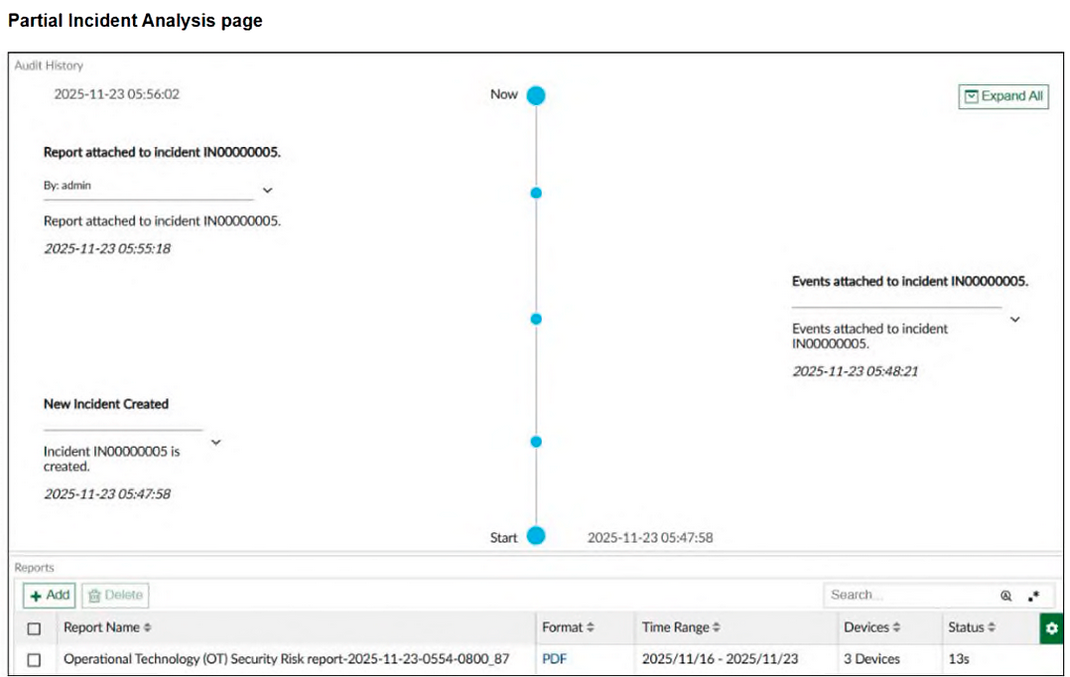
A partial Incident Analysis page is shown. How was the 360-Degree Security Review OT report attached to the incident? (Choose one answer)
Answer : D
The study guide says playbooks are used to automate tasks such as running reports and creating/updating incidents. It also says that after a playbook is triggered, it flows through its configured tasks.
It further shows a sample playbook sequence where an event is detected, an incident is created, a report runs, and details are attached to the incident. That is exactly the kind of workflow shown in the incident analysis view.
By contrast, the study guide says event handlers generate events when logs match configured rules. Event handlers are for detection, not for attaching reports to incidents.
Question 4
Refer to the exhibit.
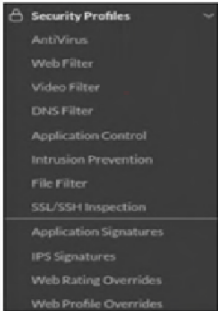
The OT devices behind the ruggedized FortiGate have vulnerabilities and you want to apply a virtual patching profile in the firewall policy. Why is Virtual Patching not available in the Security Profiles section? (Choose one answer)
Answer : A
The correct answer is A. You must enable Virtual Patching in the Feature Visibility section.
The study guide states clearly that ''By default, virtual patching profiles are hidden on the GUI, and you must enable them through System > Feature Visibility.'' That exactly matches the situation in the exhibit, where Virtual Patching does not appear under Security Profiles. So the issue is not that the feature is unsupported, but that it is simply hidden in the GUI until it is enabled.
The other options do not answer the question being asked. A valid OT security service license is required for virtual patching signatures and protection workflow, and OT signatures are relevant to IPS-based OT protection, but those do not explain why the menu item itself is missing from the Security Profiles section. The guide specifically identifies Feature Visibility as the reason the Virtual Patching profile is not shown in the GUI. Therefore, the required action is to enable Virtual Patching in System > Feature Visibility.
Question 5
Refer to the exhibit.
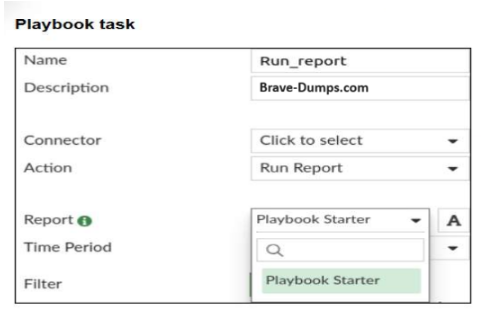
A Run_report task is shown. You want to automate the generation of a newly created report on FortiAnalyzer. When you configure the Run_report task in Playbook, why is the report not shown in the Report field? (Choose two answers)
Answer : B, C
Based on the architecture of FortiAnalyzer within the Security Fabric and its automation capabilities:
Automation Stitch and Reports: Within the Security Fabric environment, FortiAnalyzer serves as a key element in creating automation stitches and playbooks. For a report to be selectable within a Playbook task (such as the Run_report task shown in the exhibit), it must meet specific technical prerequisites in the report configuration.
Auto-cache Requirement (Answer C): For a report to be used for automated generation, it must be 'ready' to be processed by the engine without manual intervention. Auto-cache must be enabled in the report settings to ensure the report can be generated dynamically and efficiently when triggered by the playbook.
Extended Log Filtering (Answer B): Playbooks often pass specific variables from the trigger (such as a specific device IP or a time range) into the report. For the report to accept these dynamic parameters and be visible as an 'automation-compatible' report in the Playbook interface, Extended Log Filtering must be enabled.
Workflow Constraints: Without these two settings enabled on the report itself, the Playbook engine cannot guarantee the report's successful generation or parameter injection, and thus filters it out of the available selection list in the Run_report task.
Question 6
Refer to the exhibit.
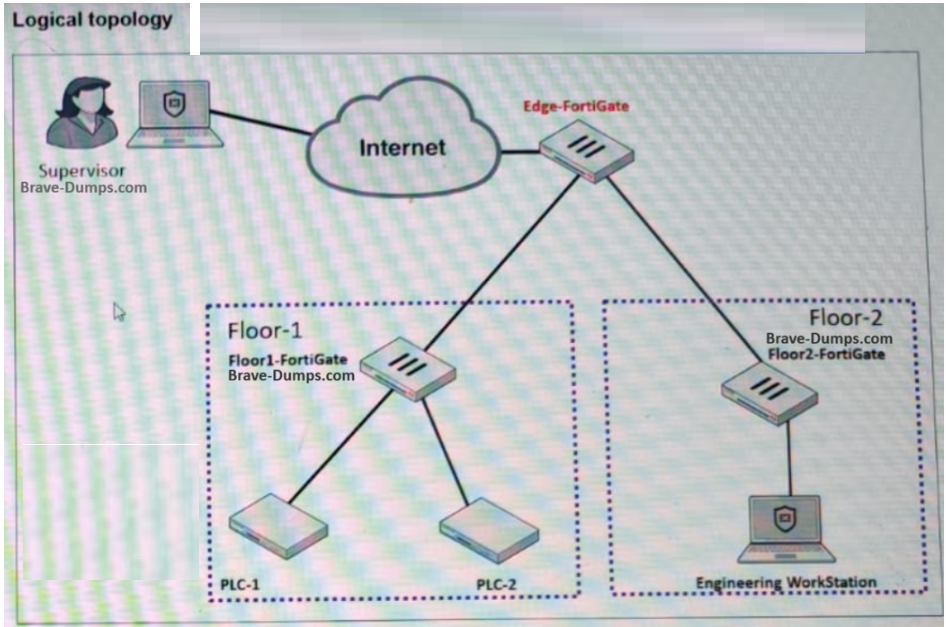
A partial OT network is shown. You want to provide the supervisor with secure remote access. Which two features can you implement on Edge-FortiGate? (Choose two answers)
Answer : A, B
Based on the exhibit and the OT Security 7.6 Architect standards for Secure Remote Access:
Secure Tunneling (Statement A): The exhibit shows a Remote PC connecting through a VPN Cloud to the Edge-FortiGate. In the Fortinet architecture, IPsec VPN is the primary method for establishing a secure, encrypted tunnel for remote administrators or supervisors to access the internal OT segments (Level 2/3) from an external location.
Multi-Factor Authentication (Statement B): Secure remote access in OT environments (aligned with IEC 62443 standards) requires strong authentication. The study guide emphasizes the use of FortiToken to provide Two-Factor Authentication (2FA) for VPN users, ensuring that compromised credentials alone are not enough to gain access to critical infrastructure.
FSSO (Statement D): Fortinet Single Sign-On is generally used for identifying internal users already on the network to apply identity-based policies; it is not the primary mechanism for establishing the remote connection itself.
SD-WAN (Statement C): While SD-WAN can manage the path of the VPN traffic, it is a WAN optimization and reliability feature, not a 'secure remote access' feature for a supervisor in the context of authentication and encryption.
Question 7
Refer to the exhibit.
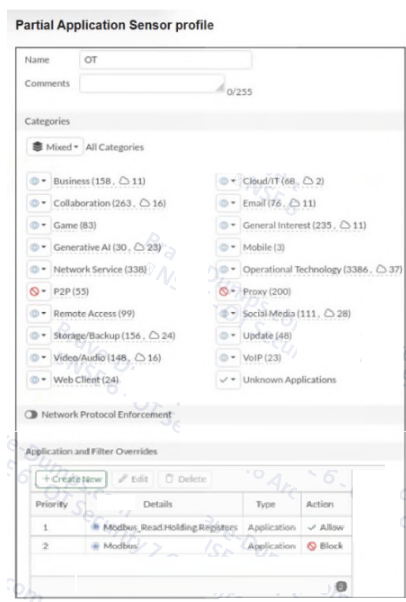
A partial Application Sensor profile is shown. When you apply this profile in firewall policy, which two statements are correct? (Choose two answers)
Answer : A, C
The correct answers are A and C. The study guide explains that ''You can use application control signatures to detect OT protocols'' and that application control provides ''granular message type identification.'' In the exhibit, the Operational Technology application category is included in the Application Sensor profile, so OT application signatures are enabled in this profile.
Option C is also correct because the override table shows Modbus_Read.Holding.Registers = Allow and Modbus = Block. The study guide states that you can use specific granular application control signatures to allow a specific Modbus command and block all others, and it also shows that application control can identify read and write commands separately at message level. Therefore, Modbus write commands are blocked by this profile.
Option B is incorrect because the profile is not simply monitoring all OT protocols; it contains a Block action for Modbus. Option D is incorrect because the study guide links OT protocol visibility specifically to the monitor status, while in the exhibit Modbus_Read.Holding.Registers is set to Allow, not Monitor.
 All Official Question Types