Page: 1
/ 14
Total 70 questions
HPE Campus Access Switching Expert Written HPE7-A06 Exam Questions
Question 1
A customer has sot a requirement for VLAN 151 to be an isolated VLAN. A colleague has copied and pasted a partial configuration, but you do not achieve the desired outcome. This is the code that was added:
What should be added to the configuration before this code to achieve the desired result?
A)
B)
C)
D)
Answer : A
The customer requires VLAN 151 to be configured as an isolated Private VLAN. A partial configuration was added, but the desired outcome wasn't achieved. We need to determine which configuration snippet should be added before the (unspecified) partial configuration to correctly set up the Private VLAN structure.
Private VLAN Configuration Fundamentals:
A Primary VLAN must be defined. This VLAN carries traffic between promiscuous ports and ports in associated secondary VLANs.
Secondary VLANs (either isolated or community) are associated with the primary VLAN.
Ports are then mapped to either the primary VLAN (promiscuous ports, typically router/firewall connections) or a secondary VLAN (host ports). Isolated ports within the same isolated VLAN cannot communicate with each other.
Analyzing the Options (Assuming VLAN 15 is the intended Primary):
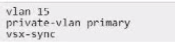
A)
vlan 15
private-vlan primary
vsx-sync
This correctly defines VLAN 15 as the Primary Private VLAN. The vsx-sync command ensures this configuration is synchronized across a VSX pair (relevant if applicable). This is the necessary prerequisite before defining VLAN 151 as an isolated secondary VLAN and associating it with VLAN 15.
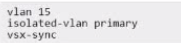
B) isolated-vlan primary is incorrect syntax. The command is private-vlan primary.
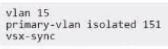
C) primary-vlan isolated 151 is incorrect syntax for defining either the primary or secondary VLAN type/association within the primary VLAN context.
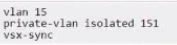
D) private-vlan isolated 151 within the vlan 15 context is incorrect syntax. The private-vlan isolated command belongs under the configuration of the secondary VLAN (VLAN 151 in this case).
Conclusion: Before configuring VLAN 151 as private-vlan isolated and associating it, the primary VLAN must be defined. Option A correctly shows the command (private-vlan primary) under the intended primary VLAN's configuration (vlan 15) to establish it as the primary VLAN.
Question 2
A pair of CX 8325 series switches a configured in a VSX cluster. Which function is executed on both VSX members during normal operation?
Answer : A
The question asks which function is executed on both VSX members (CX 8325 switches) during normal operation in a VSX cluster.
Analysis of Options:
Option A: Correct. Both VSX switches reply to ARP requests with the cluster's virtual MAC (vMAC) for SVIs configured with active-gateway, ensuring consistent Layer 3 forwarding.
Option B: Incorrect. PIM (Protocol Independent Multicast) and PIM-DR roles are typically handled by one switch, not both, in a VSX cluster.
Option C: Incorrect. DHCP relay or server functions are not necessarily performed by both switches simultaneously.
Option D: Incorrect. Gratuitous ARP and broadcast hello packets are typically sent by the primary switch or specific protocols, not both VSX members for all cases.
Why Option A is Correct: In a VSX cluster, the active-gateway feature allows both switches to respond to ARP requests for Switched Virtual Interfaces (SVIs) using a shared virtual MAC address (vMAC). This ensures seamless Layer 3 forwarding and high availability, as clients receive consistent ARP replies regardless of which VSX switch processes the request. The vsx-sync feature ensures the vMAC is synchronized, enabling both switches to perform this function during normal operation, as per HPE Aruba Networking's VSX architecture.
Relevance to Certification Objectives:
Network Resiliency and Virtualization (8%): Designing and troubleshooting VSX for redundancy and active-active forwarding.
Switching (19%): Implementing Layer 2/3 technologies, including ARP handling in VSX.
Routing (16%): Ensuring consistent Layer 3 operations in VSX environments.
HPE Aruba Networking AOS-CX Configuration Guide: VSX Configuration, detailing active-gateway and vMAC usage.
HPE7-A06 Study Guide: Covers VSX Layer 3 functions and ARP handling.
HPE Aruba Networking Technical Documentation: VSX Active-Gateway Best Practices.
Question 3
When using the cable diagnostic feature on an AOS-CX switch to test a 1000BaseT connection, what the accuracy of 'distance to fault"?
Answer : D
The question asks about the accuracy of the 'distance to fault' measurement provided by the cable diagnostic feature (using Time Domain Reflectometry - TDR) on an AOS-CX switch for a 1000BaseT connection.
TDR Accuracy: TDR works by sending a signal down the cable and measuring the time it takes for reflections to return, which indicates faults like opens or shorts. The accuracy depends on the quality of the TDR circuitry, the calibration, and the cable characteristics. Network equipment vendors typically specify the expected accuracy.
AOS-CX Specification: According to HPE Aruba Networking documentation for AOS-CX switches, the accuracy of the TDR-based cable diagnostics for distance to fault on copper cabling is typically specified as +/- 1 meter.
Analysis of Options:
A: +/- 10m - Too inaccurate.
B: +/- 2m - Less accurate than specified.
C: +/- 6m - Too inaccurate.
D: +/- 1m - Matches the documented accuracy for AOS-CX TDR.
Question 4
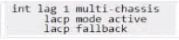
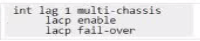
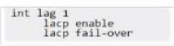
With the configuration of two CX 8325 switches in the VSX cluster, how would you prepare a link-aggregation for a 7000 gateway for a zero-touch provision to support protocol-based port redundancy?
A)

B)
C)
D)
Answer : B
The goal is to configure a Link Aggregation Group (LAG) on a VSX cluster (pair of CX 8325 switches) that connects to an Aruba 7000 series gateway undergoing Zero Touch Provisioning (ZTP). The LAG needs to support 'protocol-based port redundancy' (LACP) and allow connectivity during ZTP.
VSX Requirement: Since the LAG connects to two separate physical switches operating as a VSX pair, the LAG must be configured as a Multi-Chassis LAG (MC-LAG) on the switches. This allows the gateway to form a single LAG across both upstream devices. The command multi-chassis under the interface lag <id> context enables this.
Protocol Redundancy Requirement: 'Protocol-based port redundancy' indicates that Link Aggregation Control Protocol (LACP) should be used to dynamically negotiate and manage the LAG bundle between the switches and the gateway. The command lacp mode active enables LACP in active negotiation mode.
ZTP Requirement: During ZTP, the gateway might not have its full configuration, including LACP settings, enabled immediately. To ensure the gateway can establish basic IP connectivity for ZTP (e.g., reach Activate/Central via DHCP/DNS), the switch ports should allow traffic even if LACP negotiation hasn't completed. The lacp fallback feature enables this, allowing individual LAG member ports to become active if LACP PDUs are not received from the peer.
Analyzing the Options:
A) Configures lacp mode active and lacp fallback but lacks the multi-chassis command required for VSX.
B) Correctly configures the LAG as multi-chassis, enables lacp mode active, and enables lacp fallback. This meets all requirements.
C) Configures multi-chassis but uses potentially older or less standard syntax lacp enable and lacp fail-over instead of lacp mode active and lacp fallback.
D) Lacks the multi-chassis command and uses potentially older/less standard syntax.
Conclusion: Option B provides the complete and correct configuration using standard AOS-CX syntax to create an MC-LAG on the VSX pair with LACP enabled for redundancy and LACP fallback enabled to support gateway connectivity during ZTP.
Question 5
Exhibit.
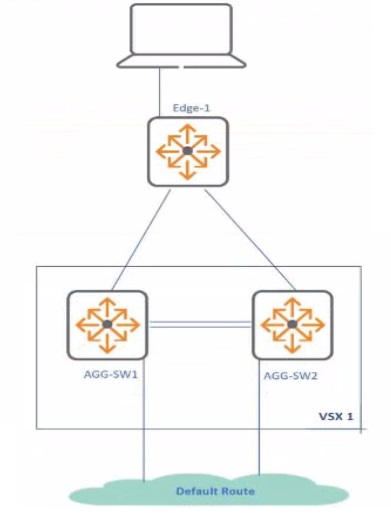
After an initial setup of CX 8325 VSX configuration, the active gateway is set up for SVI 10. For testing purposes. SVI 10 on sw-aggi is shut down while traffic from the client connected to Edge-1 is initiated towards the default route.
What is the expected behavior white performing this test?
Answer : C
The question involves a VSX configuration with CX 8325 switches (agg-sw1 and agg-sw2) where SVI 10's active-gateway is set up. For testing, SVI 10 on agg-sw1 is shut down, and traffic from a client connected to Edge-1 is initiated toward the default route. The task is to determine the expected behavior.
Analysis of Options:
Option A: Incorrect. Traffic is not dropped, as VSX ensures redundancy via the active-gateway on agg-sw2.
Option B: Incorrect. Traffic does not traverse the ISL unnecessarily; agg-sw2 takes over directly.
Option C: Correct. Traffic continues unaffected, with a 50ms failover time for agg-sw2 to assume forwarding responsibilities for SVI 10.
Option D: Incorrect. Traffic is not dropped, and vsx-sync does not disable SVI 10 on agg-sw2; it ensures consistency.
Why Option C is Correct: In a VSX cluster with active-gateway, both switches (agg-sw1 and agg-sw2) share a virtual IP and vMAC for SVI 10, allowing either to respond to ARP requests and forward traffic. Shutting down SVI 10 on agg-sw1 triggers agg-sw2 to take over Layer 3 forwarding, leveraging the active-gateway configuration. VSX's fast failover mechanism ensures a typical failover time of approximately 50ms, making the transition seamless for clients on Edge-1. The vsx-sync feature ensures SVI configurations remain consistent, preventing traffic disruption. This behavior aligns with HPE Aruba Networking's VSX high-availability design.
Relevance to Certification Objectives:
Network Resiliency and Virtualization (8%): Designing and troubleshooting VSX for high availability.
Routing (16%): Ensuring seamless Layer 3 forwarding in VSX environments.
Troubleshooting (10%): Diagnosing failover behavior in campus networks.
HPE Aruba Networking AOS-CX Configuration Guide: VSX Active-Gateway and Failover.
HPE7-A06 Study Guide: Covers VSX high-availability and failover times.
HPE Aruba Networking Technical Documentation: VSX Best Practices for Layer 3 Redundancy.
Question 6
Refer to the exhibit.
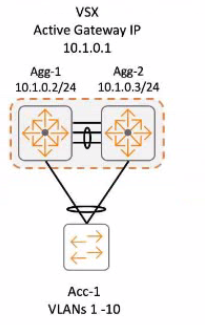
IGMP v3 was enabled on both VSX switches. Which switch becomes the IGMP querier for clients connected to Ace-1 switch?
Answer : C
The setup has Agg-1 and Agg-2 as a VSX pair with IGMPv3 enabled. Ace-1 is a downstream switch connected to clients. The question asks which switch becomes the IGMP querier for clients connected to Ace-1.
IGMP Snooping & Querier: In a Layer 2 network using IGMP snooping, an IGMP querier is required on each VLAN to periodically send general queries. This prompts hosts to send membership reports, allowing snooping switches to learn which ports need which multicast streams.
Querier Election: If multiple devices capable of querying exist on a VLAN (like routers or capable switches), an election occurs. Typically, the device with the lowest IP address on the VLAN becomes the querier.
VSX & IGMP Querier: In an ArubaOS-CX VSX environment, the IGMP querier functionality is managed by the VSX pair. Documentation indicates that the primary VSX switch typically assumes the role of the IGMP querier for the VLANs it serves, including those extended via MC-LAG to downstream switches.
Analysis of Options:
A . Agg-2: Would only be the querier if it were the primary VSX switch.
B . Both Agg-1 and Agg-2: Incorrect, only one active querier per VLAN is standard.
C . Agg-1: Likely the primary VSX switch (often designated or wins election based on priority/lower system MAC/IP) and thus becomes the querier.
D . Active gateway IP: This is the virtual IP used for unicast routing, but the querier function runs on a physical switch, usually the primary.
Conclusion: Assuming Agg-1 is the primary VSX switch (as is common convention or based on default election parameters if not explicitly configured), it will act as the IGMP querier for the VLAN serving clients connected to Ace-1.
Question 7
What is the best practice for using Dynamic Segmentation?
Answer : B
The question asks for the best practice for using Dynamic Segmentation.
Dynamic Segmentation Overview: It's an architecture that provides unified policy and segmentation for wired and wireless clients by combining role-based access control, traffic tunneling (like UBT), and overlay technologies (like VXLAN/GRE). Policies are enforced centrally, typically at an Aruba Gateway.
Analysis of Options:
A: UBT is a component, but Dynamic Segmentation encompasses more than just creating isolated networks with UBT.
B: Correctly describes the core principle: using a combination of role-based access (for defining who gets what policy) and overlay technologies (for transporting traffic to the policy enforcement point and providing segmentation). This creates a layered security approach.
C: Incorrect. A key benefit is unified policy across both wired and wireless access.
D: LUR and DUR are role types, but how they are assigned isn't the fundamental description of Dynamic Segmentation itself.
Conclusion: Option B accurately captures the essence of Dynamic Segmentation as a best practice approach, integrating role-based policies with overlay networking for secure, unified access control.
 All Official Question Types