Page: 1
/ 14
Total 60 questions
HP Advanced HPE Storage Architect Written HPE7-J01 Exam Questions
Question 1
An administrator needs to use a plug-in to provide monitoring of the performance of applications, servers, databases, tools, and services through an SaaS-based data analytics platform. Which Morpheus plug-in should the administrator install?
Answer : B
HPE Morpheus Enterprise provides extensive native monitoring for provisioned resources, but for deep, full-stack observability into applications, databases, and third-party services via a specialized SaaS-based analytics platform, it integrates with external providers through plugins.
The Datadog Integration Plugin is a primary example of this capability. Datadog is an industry-leading SaaS data analytics platform that monitors performance across every layer of the stack---from infrastructure metrics to application traces and logs. By installing the Datadog plugin in Morpheus, the administrator bridges the gap between the orchestration engine (Morpheus) and the observability platform (Datadog). This plugin adds a contextual 'Datadog' tab to instances within the Morpheus UI, pulling real-time performance telemetry directly from the SaaS backend into the Morpheus management pane. This allows the administrator to view workload health and deep-dive analytics without switching consoles.
While HPE OpsRamp (Option C) is part of the broader HPE CloudOps Software suite and provides similar observability features, it is often treated as a separate, complementary software component rather than a specific 'SaaS plugin' used within the core Morpheus instance-level analytics in the same context as Datadog's marketplace integration. The Morpheus Agent (Option A) is a local software component used for guest-level automation and basic health checks, not a SaaS analytics platform. By choosing Datadog, the administrator leverages a purpose-built SaaS solution to gain the 'monitoring of applications, servers, and databases' required by the prompt through a pre-validated community or enterprise plugin.
Question 2
A company is going to upgrade a SAP HANA solution. The company is looking for competitive bids, and only SAP HANA hardware that is certified should be included in a bid. When building the bid, what must you first determine before you can right-size the solution with the appropriate HPE hardware?
Answer : A
Sizing a storage solution for SAP HANA is fundamentally different from sizing general-purpose virtualization workloads. SAP HANA is an in-memory database, but it has extremely strict requirements for the underlying persistent storage layer to ensure data integrity during savepoints and log writes. SAP enforces these requirements through the SAP HANA Tailored Data Center Integration (TDI) program.
To begin the sizing process and ensure the solution will pass the SAP Hardware Configuration Check Tool (HWCCT) or the newer SAP HANA System Check, a storage architect must first determine the required IOPS rate, specifically for the /hana/data and /hana/log volumes. SAP provides specific KPIs for latency and throughput that must be met. For instance, the log volume requires extremely low-latency writes to handle the sequential redo logs, while the data volume requires high-throughput (MB/s) and specific IOPS to handle asynchronous savepoints.
While the number of nodes (Option C) and replication features (Option D) are important for the overall architecture, they do not dictate the 'right-sizing' of the storage performance tier in the same way the IOPS and throughput requirements do. If the storage cannot meet the SAP-certified IOPS and latency thresholds, the entire solution will be unsupported, regardless of how many nodes are present. By identifying the IOPS and throughput needs first, the architect can determine if the customer requires an All-Flash Alletra 9000 or if an Alletra MP configuration with specific drive counts is necessary to provide the required 'parallelism' to hit SAP's performance targets.
Question 3
A customer wants to implement an HPE Morpheus life-cycle management solution at a single site with 1004 VMs using a redundant architecture and distributed services. Which statement is correct regarding the setup and operation of this solution?
Answer : A
When designing an HPE Morpheus environment for an enterprise-scale workload (such as 1,000+ VMs), a standalone 'all-in-one' installation is insufficient for high availability (HA) and performance requirements. Instead, a 3-node Distributed Architecture must be implemented to ensure redundancy across all critical service layers.
In a distributed, redundant Morpheus setup, the architecture is broken down into three primary tiers: the Application tier, the Database tier (MySQL/Percona), and the Messaging/Search tier (Elasticsearch and RabbitMQ). To achieve a basic redundant footprint, you require at least two Morpheus application nodes, three database nodes (for quorum), and a messaging cluster. According to the HPE Morpheus Architecture and Sizing Guide, a standard HA deployment starts with a minimum of six VMs to separate these functions. However, for a production environment of this size, it is recommended to have a minimum of 10 VMs. This expanded footprint typically includes 3 App nodes, 3 Database nodes, and a 3-node cluster for Elasticsearch/RabbitMQ, plus a dedicated load balancer or management node, ensuring that the loss of any single host does not impact the management plane's availability.
Option C is incorrect because a distributed installation is significantly more complex than the 'all-in-one' appliance approach and requires manual configuration of externalized services. Option B is slightly inaccurate because while RabbitMQ itself is required, a dedicated 'RabbitMQ load balancer' is often handled by the primary application load balancer (like an F5 or NetScaler) rather than being a specific required installation component. Option D is incorrect as upgrades in a distributed environment involve a coordinated, multi-step process across all nodes, which typically requires a scheduled maintenance window rather than 'minimal' downtime.
Question 4
Refer to the exhibit.
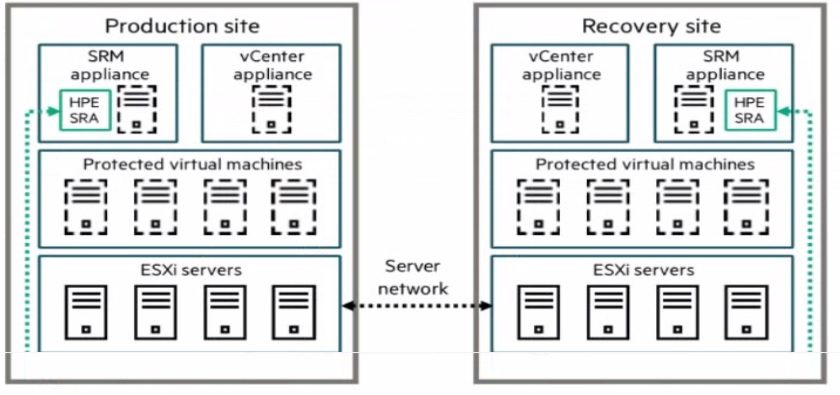
A company is implementing a disaster recovery solution. The Asynchronous Remote Copy feature has been implemented between the HPE AUetra 9000 arrays at both sites. The customer Is interested in providing a disaster recovery (DR) solution that allows for business connectivity of their VMware VMs.
Which VMware solution should the company implement?
Answer : B
To provide automated orchestration and business continuity for VMware virtual machines in a disaster recovery scenario, the industry-standard solution integrated with HPE storage is VMware Live Site Recovery (formerly known as VMware Site Recovery Manager or SRM).
When a customer utilizes Asynchronous Remote Copy on HPE Alletra 9000 arrays, the storage layer handles the data replication between the production and recovery sites. However, the storage array alone cannot automate the re-registration of virtual machines, the mapping of network port groups, or the specific power-on sequencing required for complex applications at the secondary site. VMware Live Site Recovery serves as the orchestration engine that bridges this gap. It works in conjunction with a Storage Replication Adapter (SRA) provided by HPE. The HPE SRA allows the VMware software to communicate directly with the Alletra 9000 arrays to initiate tasks such as promoting recovery volumes to a read-write state, taking temporary snapshots for DR testing, and automating the 'failover' and 'failback' workflows.
As shown in the exhibit (image_6601ef.jpg), a complete solution requires an SRM appliance and a vCenter appliance at both the production and recovery sites. This architecture ensures that even if the primary site is completely lost, the recovery site has all the necessary metadata and orchestration instructions to bring the business-critical VMs online with minimal manual intervention. Option A (Lifecycle Management) is for patching and updates, Option D (Storage DRS) is for load balancing within a cluster, and Option C refers to operational monitoring rather than disaster recovery orchestration. For a customer already invested in Alletra 9000 Remote Copy, VMware Live Site Recovery is the 'Better Together' choice for achieving low Recovery Time Objectives (RTO).
Question 5
Which HPE system can be integrated into a factory-built HPE Qumulo solution for a customer?
Answer : A
The HPE Solutions for Qumulo are a result of a strategic partnership designed to provide a high-performance, scale-out NAS (Network Attached Storage) platform for unstructured data. According to the HPE Solutions with Qumulo Reference Architecture, the primary hardware platform utilized for these factory-built, integrated solutions is the HPE Apollo 4000 series, specifically the HPE Apollo 4200.
The Apollo 4200 is chosen for this role because it is a density-optimized, storage-centric server that provides an ideal balance of compute and massive internal storage capacity within a standard 2U rack footprint. Architecturally, the Apollo 4200 supports an 'SSD-first' hybrid configuration or an all-flash configuration, which aligns perfectly with Qumulo's file system requirements. Qumulo's software uses the SSDs for a high-speed metadata layer and write-cache, while utilizing high-capacity HDDs for the data plane, ensuring that even with billions of files, the system maintains near-flash performance.
While the HPE ProLiant DL325 is also used for specific all-NVMe nodes in the Qumulo portfolio, the Apollo 4200 remains the foundational building block for the hybrid and archive nodes that comprise the bulk of enterprise deployments. The HPE Apollo 4500 (Option D) is a 4U system that, while part of the Apollo family, is not the standard integrated platform for the mainstream Qumulo joint offering. The HPE Alletra 5000 (Option B) is a block-storage-focused platform derived from the Nimble lineage, and the ProLiant DL360 (Option C) is a general-purpose 1U compute server that lacks the internal drive density required for a high-capacity scale-out file storage solution. By selecting the Apollo 4200, customers benefit from a pre-validated, factory-integrated solution that simplifies the deployment of massive file lakes for workloads like video surveillance, medical imaging, and big data analytics.
Question 6
An HPE Partner is creating a proposal for an HPE customer that involves HPE Morpheus Enterprise. What does the partner need to determine to configure the correct number of Morpheus licenses in Online Config Advanced (OCA)?
Answer : C
HPE Morpheus Enterprise is a comprehensive multi-cloud management and orchestration platform that enables self-service provisioning and lifecycle management across private and public clouds. To accurately size and quote a Morpheus solution in tools like HPE Online Config Advanced (OCA), the primary licensing metric is the Workload Element (WLE), also frequently referred to as a Workload Element (WE) in some documentation.
A Workload Element is defined as a granular unit of compute directly associated with an application service that is being managed or inventoried by Morpheus. This includes:
Virtual Machines (VMs) on-premises (e.g., VMware vCenter, Hyper-V).
Instances in the public cloud (e.g., AWS EC2, Azure VMs, Google Cloud instances).
Bare metal servers if they are provisioned to run application services.
Container deployments (such as Kubernetes pods).
Importantly, Morpheus does not count supporting infrastructure like storage arrays, load balancers, or physical hypervisor hosts (e.g., the physical server running ESXi) as Workload Elements. Licensing is typically based on a concurrent model, meaning the customer must license the total number of WLEs under management at any given time, regardless of whether they are located on-prem or in a public cloud. Therefore, the partner must calculate the aggregate sum of all VMs and cloud instances the customer intends to manage to ensure the license quantity in OCA is correct.
Question 7
A customer currently has an HPE Alletra 9000 with data reduction on all volumes and plans to migrate to an HPE Alletra MP B10000. Which formula should be used to size the new solution?
Answer : A
When sizing a migration from a highly efficient array like the HPE Alletra 9000 (or Primera) to the next-generation HPE Alletra MP B10000, storage architects must account for the difference between the 'Written Capacity' (what the host thinks it has stored) and the 'Consumed Capacity' (the physical space used after data reduction).
The standard best practice for an HPE Master ASE when performing these migrations is to Size to consumption multiplied by 1.25. This '1.25 factor' (representing a 25% overhead) is the recommended safety margin used in sizing tools like HPE NinjaStars and the HPE Cloud Physics assessment reports.
This 25% buffer is designed to cover several critical architectural requirements:
System Metadata and Overhead: Both the Alletra 9000 and Alletra MP require physical capacity to store internal metadata, map tables, and the structures required for their respective data reduction engines.
Snapshot Reserve: While snapshots are thin and pointer-based, they still consume physical space as data changes over time. The 1.25 multiplier ensures there is enough 'headroom' for typical snapshot retention policies.
Data Reduction Parity: Data reduction ratios (deduplication and compression) can fluctuate based on the specific workload. Sizing exactly to current consumption without a buffer risks an out-of-space condition if the new array's reduction engine handles a specific block pattern slightly differently during the initial ingest.
Operational Performance: SSD-based arrays perform best when they are not 'packed' to 100% capacity, as the garbage collection and wear-leveling processes require free blocks to operate efficiently.
Sizing to 'original capacity' (Option D) would lead to a massive over-provisioning and wasted cost, as it ignores the benefits of modern data reduction. Option C (1.5) is generally considered overly conservative for modern flash environments, while 1.25 provides the optimal balance of cost-efficiency and technical risk mitigation.
 All Official Question Types