Page: 1
/ 14
Total 77 questions
Juniper Mist AI, Associate Exam JN0-251 JNCIA-MistAI Exam Questions
Question 1
Which Mist location-based feature would be used for wayfinding?
Answer : C
The Mist location-based feature that would be used for wayfinding is thevBLE Engagement. This feature leverages the directional virtual Bluetooth Low Energy (vBLE) arrays in the Mist Access Points to provide accurate and scalable indoor location services. The vBLE Engagement feature enables use cases such as wayfinding, proximity notifications, asset tracking, and analytics.
Wayfinding is the ability to guide users to their desired destination within an indoor environment, such as a mall, airport, hospital, or campus. Wayfinding requires a mobile app that integrates the Mist SDK and a floor plan that defines the wayfinding paths. The app can show the user's current location as a blue dot on the map and provide turn-by-turn navigation instructions based on the user's destination.
Question 2
Mist Insights will provide detailed information about which two categories? (Choose two.)
Answer : A, B
Mist Insights is a feature that provides detailed information about the network performance and user experience of your Mist-managed sites, access points (APs), and clients1.You can use Mist Insights to monitor, troubleshoot, and optimize your network by accessing various types of data and analytics collected by the Mist cloud1.
Mist Insights allows you to view insights for different contexts, such as the entire site, a specific AP, or a specific client2.You can select the context from the dropdown menu on the Insights dashboard in the Mist portal2.Depending on the context, you can see different sections of information and insights, such as site events, client events, AP events, applications, network servers, pre-connection and post-connection metrics, current site properties, current WLANs, access points, clients, and wired switches2.
Therefore, AP and client are two categories that Mist Insights will provide detailed information about. You can learn more about Mist Insights from theJuniper Networks documentationor theMist documentation.
Question 3
You want to determine where you have coverage issues in your network using Marvis Actions.
Which Marvis Action category should you use in this situation?
Answer : D
You want to determine where you have coverage issues in your network using Marvis Actions. The Marvis Action category that you should use in this situation isAP. The AP category contains actions that are related to the access points on your network, such as offline APs, health check failed APs, non-compliant APs, and coverage hole APs.
The coverage hole AP action will detect any coverage issues on your site and provide a floorplan visual of the APs on your map experiencing these issues. You can use this visual to find the low coverage spaces identified on your site and make the necessary improvements. You can also view the details of the coverage hole action, such as the number of affected clients, the average RSSI, and the root cause classifier.
To access the AP category of Marvis Actions, you need to navigate to Marvis > Actions and select the AP tab. You will see a list of all the AP actions that are detected on your network. You can filter and sort the actions by various criteria, such as site, severity, status, or date. You can also perform actions on the APs, such as upgrade, RMA, or block.
Question 4
Click the Exhibit button.
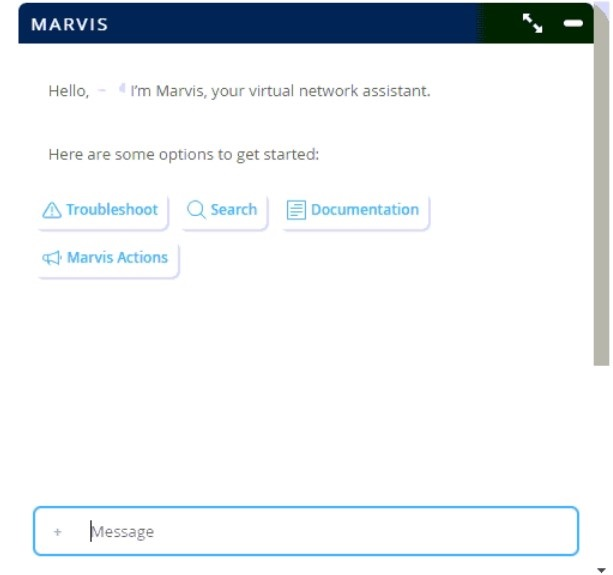
Referring to the exhibit, which Marvis language would you use to query Mist about an issue?
Answer : A
Referring to the exhibit, the Marvis language that you would use to query Mist about an issue isnatural language. Natural language is the language that humans use to communicate with each other, such as English, Spanish, or Hindi. Natural language is different from formal or programming languages, such as SQL, Python, or query language, which have strict rules and syntax.
Marvis is a virtual network assistant that allows you to interact with the Mist network using natural language commands. You can type or speak your queries to Marvis in plain English and get answers in a conversational manner. For example, you can ask Marvis questions like ''Why is my Wi-Fi slow?'' or ''How many devices are connected to AP1?'' or ''Show me the throughput of SSID2''. Marvis will understand your intent and provide relevant information, insights, and actions.
Marvis uses natural language processing (NLP) to analyze and interpret your queries. NLP is a branch of artificial intelligence that deals with the interaction between computers and human languages. NLP involves various tasks, such as speech recognition, natural language understanding (NLU), natural language generation (NLG), sentiment analysis, machine translation, etc.
Question 5
How does Mist detect rogue APs?
Answer : C
According to the web search results, Mist detects rogue APs by using the AP's third dedicated radio, which is used for scanning the wireless spectrum and detecting unauthorized APs on both 2.4 GHz and 5 GHz radio bands1.A rogue AP is an unauthorized access point that is installed on a network without the knowledge or consent of the network administrator1.A rogue AP can pose a serious security threat to a network, as it can allow attackers to bypass the network's security policies and gain access to sensitive data or launch other attacks1.A rogue AP can also interfere with the performance of the legitimate APs and cause network congestion or degradation1.
Mist APs have three radios: one for 2.4 GHz, one for 5 GHz, and one for scanning1.The scanning radio is used for detecting rogue, neighbor, and honeypot APs on both 2.4 GHz and 5 GHz radio bands1.This means that regardless of which radios you have enabled on your AP (2.4 GHz or 5 GHz), it will still be able to detect unauthorized APs at any frequency using the scanning radio1.The scanning radio can also provide other benefits, such as monitoring the network performance, optimizing the channel selection, and enhancing the location services1.
Therefore, based on the web search results, Mist detects rogue APs by using the AP's third dedicated radio, which is used for scanning the wireless spectrum and detecting unauthorized APs on both 2.4 GHz and 5 GHz radio bands.
Question 6
Which Marvis Action category will detect a bad cable based on information and behavior of a single AP?
Answer : D
According to the web search results, the Marvis Action category that will detect a bad cable based on information and behavior of a single AP is Switch1.The Switch category lists the issues related to the switches that are connected to the Mist APs, such as missing VLANs, L2 loops, or bad cables1.The bad cable action detects if an AP is connected to a switch port that has a faulty cable, which can cause packet loss, CRC errors, or link flaps1.The bad cable action is based on the information and behavior of a single AP, such as the AP's MAC address, IP address, switch port, and link status1.The bad cable action also provides a recommended solution, which is to replace the cable or use another switch port1.
Question 7
Which device categories are included in WAN Assurance? (Choose two.)
Answer : C, D
WAN Assurance is a cloud-based service that provides visibility and insights into the WAN performance and user experience. WAN Assurance supports two device categories:SSRandSRX. SSR stands for Session Smart Router, which is a software-defined WAN (SD-WAN) solution that delivers high-performance, secure, and reliable connectivity for distributed enterprises. SRX stands for Services Gateway, which is a next-generation firewall (NGFW) that provides advanced security and threat prevention for branch and remote locations.
WAN Assurance does not support EX or Mist Edge devices. EX is a series of Ethernet switches that provide high-performance, scalable, and secure switching for campus and data center networks. Mist Edge is a device that extends the Mist Cloud to the edge of the network, enabling local processing of WLAN functions, such as authentication, encryption, and firewall.
You can find more information about WAN Assurance in the Juniper TechLibrary1or the Juniper Mist WAN Assurance Overview2.
 All Official Question Types