Page: 1
/ 14
Total 102 questions
Juniper Mist AI, Associate JN0-253 Exam Questions
Question 1
Which two statements are correct when considering Juniper Mist clouds? (Choose two.)
Answer : B, C
The Juniper Mist Cloud operates as a regionally distributed cloud infrastructure, where each geographic region (for example, US, EU, APAC) hosts its own isolated Mist Cloud instance. This design ensures compliance with regional data privacy regulations, improves network performance, and enhances scalability and reliability.
According to the Juniper Mist Cloud Administration and Operations Guide, user accounts and organizations are region-specific, meaning:
''Users and organizations exist within specific regional Mist Clouds. A user account created in one regional cloud is valid only within that region and cannot be used to access organizations hosted in another cloud.''
This structure ensures data sovereignty and security while maintaining logical separation between regions. When administrators create a new user, that user's credentials and access privileges apply only to the Mist Cloud region in which the user was created.
Therefore:
B is correct because users created in a regional cloud can only manage organizations within that same cloud.
C is correct because a newly created user is enabled only for the regional cloud where it was registered.
Options A and D are incorrect because Mist Clouds are isolated --- cross-region user or organization access is not supported.
-- Juniper Mist Cloud Administration and Operations Guide
-- Juniper Mist Cloud Regional Deployment and Data Residency Documentation
-- Juniper Mist Cloud Fundamentals and Architecture Study Guide
Question 2
Exhibit:
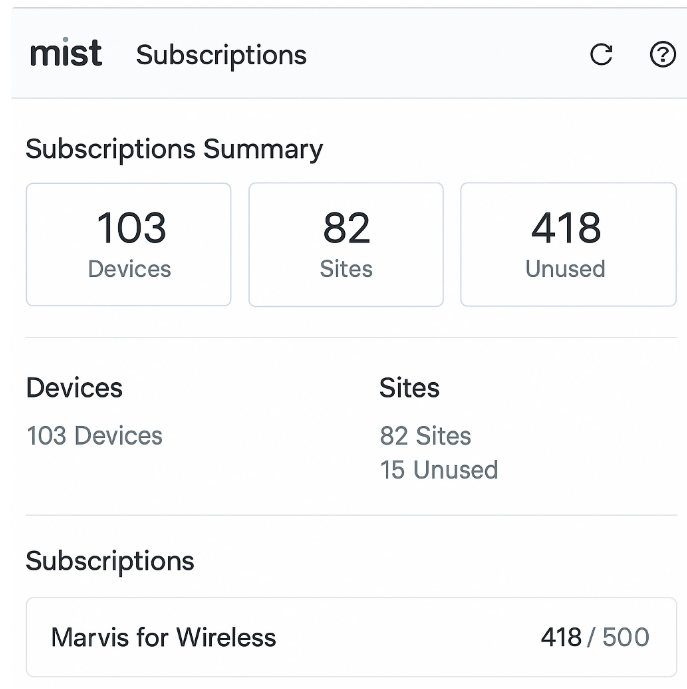
Referring to the exhibit, how many sites have unused Marvis for Wireless subscriptions?
Answer : B
In the Juniper Mist Cloud, the Subscriptions page provides administrators with detailed information about the status of service licenses and subscriptions associated with devices, sites, and organizations. This includes visibility into the number of active devices, sites, and any unused subscriptions across the organization.
According to the Juniper Mist Cloud Licensing and Subscription Management Guide, the ''Sites'' section under Subscriptions Summary shows:
''The total number of configured sites within the organization and the number of sites that currently do not have assigned subscriptions.''
In the exhibit, the summary shows:
82 Sites total
15 Unused sites
This indicates that 15 sites currently have no active or assigned Marvis for Wireless subscriptions. The ''Unused'' label under Sites refers specifically to the count of sites not yet utilizing their allocated subscription entitlements.
Therefore, the correct answer is B. 15.
-- Juniper Mist Cloud Licensing and Subscription Management Guide
-- Juniper Mist Cloud Administration and Operations Documentation
-- Juniper Mist AI Service Subscription Overview
Question 3
What is the purpose of Audit Logs in Juniper Mist?
Answer : C
The purpose of Audit Logs in Juniper Mist is to record administrative activities within the Mist dashboard. According to the official Juniper Mist documentation: 'Audit Logs provide a detailed chronological record of each configuration change, administrative action, and user activity within the Mist Cloud portal. These logs include information such as the action performed (e.g., adding or removing sites, devices, or users), the timestamp, and the user who performed the action. Audit Logs are critical for accountability, compliance, and troubleshooting, enabling administrators to trace changes and ensure that only authorized users are making modifications to their network settings. Mist stores audit log records securely and makes them accessible for review by organization administrators from the dashboard's Organization > Audit Logs section.'
This directly aligns with option C, as the logs primarily track configuration changes and administrative actions---not performance events, security alerts, or SLE violations. Such activities include site creation, modification, device assignment, role changes, and other user or configuration updates.
Question 4
What are device-specific WAN Edge templates used for in an SD-WAN configuration?
Answer : B
In the Juniper Mist SD-WAN solution, device-specific WAN Edge templates are used to streamline the deployment and configuration of Juniper SRX or SSR (Session Smart Router) devices serving as WAN Edge nodes. These templates ensure consistent and accurate configurations across a distributed WAN environment while accounting for differences in hardware models and interface types.
According to the Juniper Mist WAN Assurance and SD-WAN Configuration Guide, device-specific templates:
''Automatically generate configuration elements tailored to the hardware platform, including interfaces, ports, and device capabilities.''
They are part of Mist's cloud-managed SD-WAN automation framework, which combines WAN Assurance and AI-driven insights to manage branch connectivity. The templates simplify provisioning by populating device-level parameters such as:
Interface naming and mapping based on the device model.
Hardware-specific configurations like tunnel endpoints, IP addressing, and routing settings.
Security and performance policies consistent with the organization's SD-WAN design.
Options A, C, and D are incorrect because:
A (WLAN template automation) pertains to wireless network configuration, not WAN edge devices.
C (traffic inspection) relates to firewall or security policies handled by SRX's UTM features, not templates.
D (monitoring and attack prevention) falls under Mist's security or analytics capabilities, not the template function.
Therefore, the correct answer is B. To automatically generate configuration elements specific to device models.
-- Juniper Mist WAN Assurance and SD-WAN Configuration Guide
-- Juniper Mist Cloud Device Template Management Documentation
-- Juniper Mist AI-Driven SD-WAN Deployment Overview
Question 5
What is required for Marvis Minis to operate?
Answer : C
Marvis Minis is an advanced feature within the Juniper Mist AI ecosystem designed to perform autonomous, synthetic network testing. It uses Mist Access Points (APs) to simulate client behavior---such as association, authentication, DHCP, DNS, and application reachability---to proactively detect service issues before real users are affected.
According to the Juniper Mist Marvis Minis Deployment Guide and Marvis AI documentation, the key requirement for enabling Marvis Minis is that all participating access points must be running a minimum supported firmware version that includes the Minis agent functionality.
The documentation specifies:
''Marvis Minis requires APs running the minimum firmware version that supports synthetic testing. APs on earlier versions will not be capable of running Minis tests or reporting results to the Mist Cloud.''
Additional subscriptions such as WAN Assurance, Premium Analytics, or WLAN templates are not prerequisites for operation. While Marvis licensing must be active, the feature itself relies primarily on compatible firmware within the Mist-managed APs.
Therefore, the correct answer is C. Minimum AP firmware --- ensuring the APs are on a supported firmware release is essential for Marvis Minis functionality.
-- Juniper Mist Marvis Minis Deployment and Configuration Guide
-- Juniper Mist AI Operations and Troubleshooting Documentation
-- Juniper Mist Wireless Assurance and Firmware Management Guide
Question 6
Which statement is true about wireless security?
Answer : B
The correct statement is that Juniper APs have a dedicated radio to scan for rogue and honeypot APs. The official Juniper Mist documentation specifies: 'Juniper APs include a dedicated scanning radio to detect rogue, neighbor, and honeypot APs and their clients... The dedicated scanning radios operate on 2.4, 5, and 6 GHz Wi-Fi bands.' This third radio operates independently from the client-serving radios and enables continuous threat detection on all Wi-Fi bands, enhancing security and allowing real-time performance adjustments. BLE radios are used for location-based services and asset tracking, not for rogue AP detection. Client-serving radios can also scan, but detection is always enabled and optimized by the dedicated radio.
Rogue, Neighbor, and Honeypot Access Points | Mist
Juniper Mist Wireless Assurance Configuration Guide
Question 7
What are two guest portal authentication options in the UI? (Choose two.)
Answer : A, C
In Juniper Mist Cloud, guest access is managed through the Guest Portal feature, which allows administrators to configure secure and flexible authentication methods for temporary or visitor access. These options are designed to provide a balance between user convenience and network security.
According to the Juniper Mist Guest Access and Captive Portal Configuration Guide, the supported authentication options include:
''Authentication Code (Self-registration) and Sponsored Guest workflows, among others, which provide different levels of administrative control and ease of use.''
Authentication Code (A):
Visitors receive a temporary authentication code (PIN) via email or SMS that they use to log in. This method is ideal for self-service access while maintaining accountability.
Sponsored Guest (C):
In this mode, guests must be approved by a designated employee or sponsor before gaining access. This adds an extra layer of security by involving internal personnel validation.
MAC Authentication (B) and SAML (D) are not used for guest portals; they are designed for device-based authentication and enterprise-level identity federation, respectively.
-- Juniper Mist Guest Access and Captive Portal Configuration Guide
-- Juniper Mist Cloud Administration and Access Management Documentation
-- Juniper Mist Wireless Assurance Guest Network Overview
 All Official Question Types