Page: 1
/ 14
Total 295 questions
Microsoft Administering Windows Server (old) 70-411 Exam Questions
Question 1
Your network contains one Active Directory forest named contoso.com.
You create a starter Group Policy object (GPO) named Starter_GPO1.
From the Delegation tab Of Starter_GPO1, you add a group named GPO_Admins and you assign the Edit settings permissions to the group.
You create a new GPO named GPO1 from Starter_GPO1.
You need to identity which action can he performed by the members of the GPO Admins group.
What should you identify?
Answer : B
Permission rights applied to starter GPO objects are relative to the starter GPO objects only; they are not inherited from actual GPOs created from starter GPOs. B is wrong because Starter GPOs do not have preferences, only Administrative Template policy settings.
https://technet.microsoft.com/en-us/library/cc753200.aspx
Question 2
You are a network administrator of an Active Directory domain named contoso.com.
You have a server named Server1 that runs Windows Server 2012 R2. Server1 has the DHCP Server server role and the Network Policy Server role service installed.
You enable Network Access Protection (NAP) on all of the DHCP scopes on Server1.
You need to create a DHCP policy that will apply to all of the NAP non-compliant DHCP clients.
Which criteria should you specify when you create the DHCP policy?
Answer : B
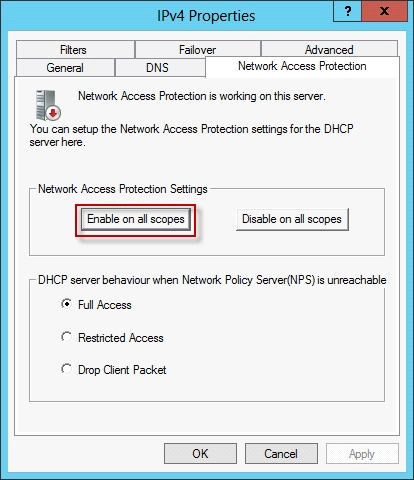
To configure a NAP-enabled DHCP server
On the DHCP server, click Start, click Run, in Open, type dhcpmgmt. smc, and then press ENTER.
In the DHCP console, open <servername>\IPv4.
Right-click the name of the DHCP scope that you will use for NAP client computers, and then click Properties.
On the Network Access Protection tab, under Network Access Protection Settings, choose Enable for this scope, verify that Use default Network Access Protection profile is selected, and then click OK.
In the DHCP console tree, under the DHCP scope that you have selected, right-click Scope Options, and then click Configure Options.
On the Advanced tab, verify that Default User Class is selected next to User class.
Select the 003 Router check box, and in IP Address, under Data entry, type the IP address for the default gateway used by compliant NAP client computers, and then click Add.
Select the 006 DNS Servers check box, and in IP Address, under Data entry, type the IP address for each router to be used by compliant NAP client computers, and then click Add.
Select the 015 DNS Domain Name check box, and in String value, under Data entry, type your organization's domain name (for example, woodgrovebank. local), and then click Apply. This domain is a full-access network assigned to compliant NAP clients.
On the Advanced tab, next to User class, choose Default Network Access Protection Class.
Select the 003 Router check box, and in IP Address, under Data entry, type the IP address for the default gateway used by noncompliant NAP client computers, and then click Add. This can be the same default gateway that is used by compliant NAP clients.
Select the 006 DNS Servers check box, and in IP Address, under Data entry, type the IP address for each DNS server to be used by noncompliant NAP client computers, and then click Add. These can be the same DNS servers used by compliant NAP clients.
Select the 015 DNS Domain Name check box, and in String value, under Data entry, type a name to identify the restricted domain (for example, restricted. Woodgrovebank. local), and then click OK. This domain is a restricted-access network assigned to noncompliant NAP clients.
Click OK to close the Scope Options dialog box.
Close the DHCP console.
Question 3
You have a server named Server1 that runs Windows Server 2012 R2.
On Server1, you configure a custom Data Collector Set (DCS) named DCS1. DCS1 is configured to store performance log data in C:\Logs.
You need to ensure that the contents of C:\Logs are deleted automatically when the folder reaches 100 MB in size.
What should you configure?
Answer : B
To configure data management for a Data Collector Set
1. In Windows Performance Monitor, expand Data Collector Sets and click User Defined.
2. In the console pane, right-click the name of the Data Collector Set that you want to configure and click Data Manager.
3. On the Data Manager tab, you can accept the default values or make changes according to your data retention policy. See the table below for details on each option.
When Minimum free disk or Maximum folders is selected, previous data will be deleted according to the Resource policy you choose (Delete largest or Delete oldest) when the limit is reached. When Apply policy before the data collector set starts is selected, previous data will be deleted according to your selections before the data collector set creates its next log file.
When Maximum root path size is selected, previous data will be deleted according to your selections when the root log folder size limit is reached.
4. Click the Actions tab. You can accept the default values or make changes. See the table below for details on each option.
5. When you have finished making your changes, click OK.
Question 4
Your network contains an Active Directory domain named contoso.com. The domain contains a domain controller named DC1 that runs Windows Server 2012 R2. DC1 is backed up daily.
The domain has the Active Directory Recycle Bin enabled.
During routine maintenance, you delete 500 inactive user accounts and 100 inactive groups. One of the deleted groups is named Group1. Some of the deleted user accounts are members of some of the deleted groups.
For documentation purposes, you must provide a list of the members of Group1 before the group was deleted.
You need to identify the names of the users who were members of Group1 prior to its deletion.
You want to achieve this goal by using the minimum amount of administrative effort.
What should you do first?
Answer : A
The Active Directory Recycle Bin does not have the ability to track simple changes to objects.
If the object itself is not deleted, no element is moved to the Recycle Bin for possible recovery in the future. In other words, there is no rollback capacity for changes to object properties, or, in other words, to the values of these properties.
Question 5
You deploy a Windows Server Update Services (WSUS) server named Server01.
You plan to use a Group Policy object (GPO) to configure all client computers to use Server01 as a Microsoft Update server and to assign the client computers to computer groups.
You need to ensure that the computers are assigned to the correct computer groups automatically when the GPO is deployed.
Which two actions should you perform before you deploy the GPO? Each correct answer presents part of the solution.
Answer : B, D
References:
https://technet.microsoft.com/en-us/library/dd939829(v=ws.10).aspx
Question 6
You deploy a Windows Server Update Services (WSUS) server named Server01.
You need to ensure that you can view update reports and computer reports on Server01.
Which two components should you install? Each correct answer presents part of the solution.
Answer : B, D
Question 7
Your network contains a Network Policy Server (NPS) server named Server1. The network contains a server named SQL1 that has Microsoft SQL Server 2008 R2 installed. All servers run Windows Server 2012 R2.
You configure NPS on Server1 to log accounting data to a database on SQL1.
You need to ensure that the accounting data is captured if SQL1 fails. The solution must minimize cost.
What should you do?
Answer : C
In Windows Server 2008 R2, an accounting configuration wizard is added to the Accounting node in the NPS console. By using the Accounting Configuration wizard, you can configure the following four accounting settings:
SQL logging only. By using this setting, you can configure a data link to a SQL Server that allows NPS to connect to and send accounting data to the SQL server. In addition, the wizard can configure the database on the SQL Server to ensure that the database is compatible with NPS SQL server logging.
Text logging only. By using this setting, you can configure NPS to log accounting data to a text file.
Parallel logging. By using this setting, you can configure the SQL Server data link and database. You can also configure text file logging so that NPS logs simultaneously to the text file and the SQL Server database.
SQL logging with backup. By using this setting, you can configure the SQL Server data link and database. In addition, you can configure text file logging that NPS uses if SQL Server logging fails.
 All Official Question Types