Page: 1
/ 14
Total 269 questions
Microsoft Networking with Windows Server 2016 70-741 Exam Questions
Question 1
Note: This question is part of a series of questions that present the same scenario. Each question in the series contains a unique solution that might meet the stated goals. Some question sets might have more than one correct solution, while others might not have a correct solution.
After you answer a question in this sections, you will NOT be able to return to it. As a result, these questions will not appear in the review screen.
Your network contains an Active Directory domain named adatum.com. The domain contains two DHCP servers named Server1 and Server2.
Server1 has the following IP configuration.
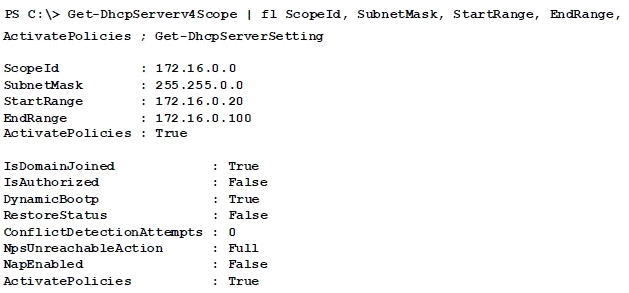
Server2 has the following IP configuration.
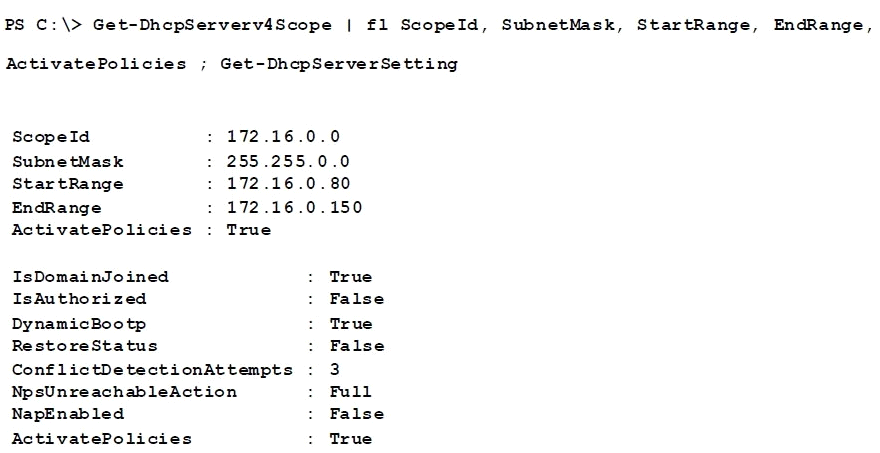
Some users report that sometimes they cannot access the network because of conflicting IP addresses.
You need to configure DHCP to avoid leasing addresses that are in use already.
Solution: On Server2, you modify the StartRange IP address of the scope.
Does this meet the goal?
Answer : B
Question 2
Note: This question is part of a series of questions that present the same scenario. Each question in the series contains a unique solution that might meet the stated goals. Some question sets might have more than one correct solution, while others might not have a correct solution.
After you answer a question in this sections, you will NOT be able to return to it. As a result, these questions will not appear in the review screen.
You network contains an Active Directory domain named contoso.com. The domain contains a member server named Server1 that runs Windows Server 2016 and has the DNS Server role installed. Automatic scavenging of state records is enabled and the scavenging period is set to 10 days.
All client computers dynamically register their names in the contoso.com DNS zone on Server1.
You discover that the names of multiple client computers that were removed from the network several weeks ago can still be resolved.
You need to configure Server1 to automatically remove the records of the client computers that have been offline for more than 10 days.
Solution: You modify the Zone Aging/Scavenging properties of the zone.
Does this meet the goal?
Answer : A
https://technet.microsoft.com/en-us/library/cc771362(v=ws.10).aspx
Question 3
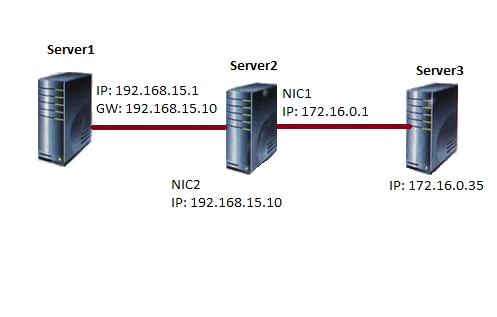
You have three servers named Server1, Server2, and Server3 that run Windows Server 2016. On all three servers, Windows Firewall is configured to allow ICMP traffic. Server2 has two network adapters named NIC1 and NIC2.
Your network is configured as shown in the exhibit. (Click the Exhibit button.)
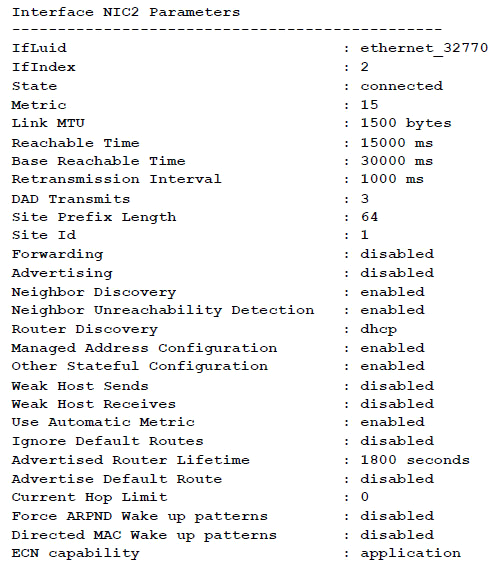
The parameters for NIC2 on Server1 are shown in the following output.
Which ping request will result in a reply from the destination host?
Answer : A
Question 4
You have a Hyper-V host named Server1 that runs Windows Server 2016. Server1 has multiple network adapters that have virtual machine queue (VMQ) enabled.
On Server1, you create a virtual machine named VM1 as shown in the exhibit.
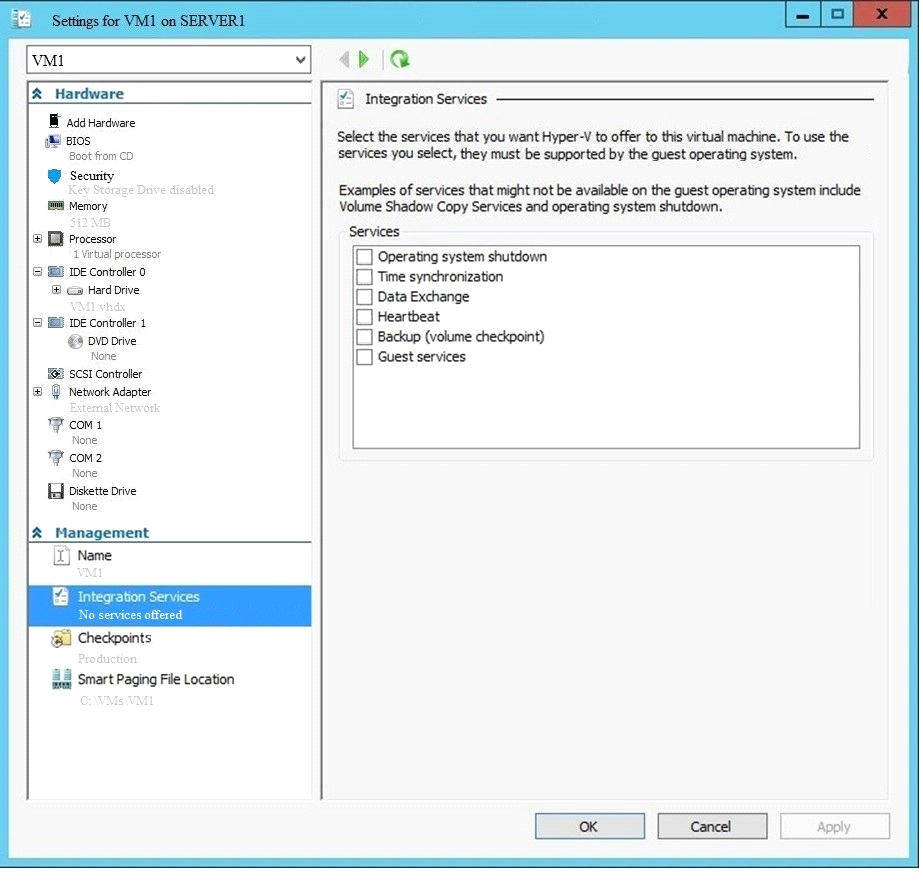
You need to ensure that you can use virtual Receive-side Scaling (vRSS) on VM1.
What should you do?
Answer : B
References:
https://docs.microsoft.com/en-us/windows-server/networking/technologies/vrss/vrss-top
Question 5
Note: This question is part of a series of questions that present the same scenario. Each question in the series contains a unique solution that might meet the stated goals. Some question sets might have more than one correct solution, while others might not have a correct solution.
After you answer a question in this sections, you will NOT be able to return to it. As a result, these questions will not appear in the review screen.
You network contains an Active Directory domain named contoso.com. The domain contains a DHCP server named Server2 than runs Windows Server 2016.
Users report that their client computers fail to obtain an IP address.
You open the DHCP console as shown in the Exhibit. (Click the Exhibit button.)
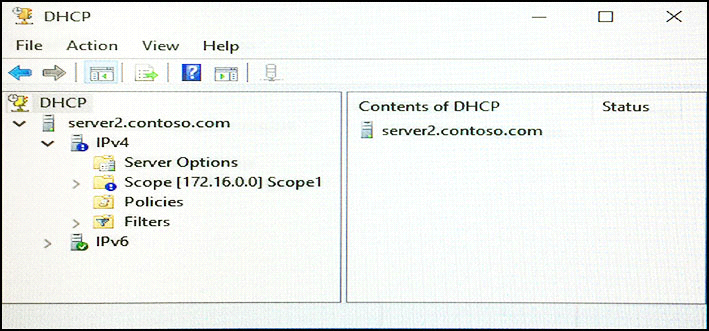
Scope1 has an address range of 172.16.0.10 to 172.16.0.100 and a prefix length of 23 bits.
You need to ensure that all of the client computers on the network can obtain an IP address from Server2.
Solution: You run the Reconcile-DhcpServerv4IPRecord cmdlet.
Does this meet the goal?
Answer : B
https://technet.microsoft.com/itpro/powershell/windows/dhcp-server/set-dhcpserverv4scope
Question 6
You have a DHCP server named Server1 that runs Windows Server 2016. Server1 has the scopes configured as shown in the following table.

All other scope settings are set to the default values. There is no available address space for another scope to be created.
Your network has 150 desktop computers that have access to the corporate network. Your company also provides visitors with WI-FI access to the network. There can be up to 200 visitors each day.
You discover that some visitors fail to access the WI-FI network because there are no available addresses to allocate to the visitors.
You need to prevent this issue from reoccurring.
What should you do?
Answer : C
References:
https://docs.microsoft.com/en-us/previous-versions/windows/desktop/dhcpserverpsprov/dhcpserverv4scope
Question 7
You plan to deploy a Software Defined Networking (SDN) infrastructure.
Which service provides name resolution for the virtual machines on a tenant network?
Answer : C
References:
https://docs.microsoft.com/en-us/windows-server/networking/sdn/technologies/idns-for-sdn
 All Official Question Types