Page: 1
/ 14
Total 267 questions
Microsoft Provisioning SQL Databases 70-765 Exam Questions
Question 1
You administer a Microsoft SQL Server 2014 Enterprise Edition server that uses 64 cores.
You discover performance issues when large amounts of data are written to tables under heavy system load.
You need to limit the number of cores that handle I/O.
What should you configure?
Answer : D
The affinity Input-Output (I/O) mask Server Configuration Option.
To carry out multitasking, Microsoft Windows 2000 and Windows Server 2003 sometimes move process threads among different processors. Although efficient from an operating system point of view, this activity can reduce Microsoft SQL Server performance under heavy system loads, as each processor cache is repeatedly reloaded with data. Assigning processors to specific threads can improve performance under these conditions by eliminating processor reloads; such an association between a thread and a processor is called processor affinity.
References:
http://msdn.microsoft.com/en-us/library/ms189629.aspx
Question 2
You deploy a new Microsoft Azure SQL Database instance to support a variety of mobile application and public websites.
You have the following requirements:
* You must be able to replicate the database to azure datacenter in other region geo-replication.
* Clients must only connect to the Azure SQL Datacenter by using contained database users.
* You must be able to move the database to other in the future.
* Only application in the 23.96.52.0-23.96.52.255 IP range are permitted to access the database.
* Only application settings for the instance must not provide access to any other Azure services.
You need to configured the firewall for the requirement.
Which three actions should you perform? Each correct answer presents part of the solution.
Answer : B, C, F
References:
https://docs.microsoft.com/en-us/sql/relational-databases/system-stored-procedures/sp-set-database-firewall-rule-azure-sql-database?view=azuresqldb-current
https://docs.microsoft.com/en-us/sql/relational-databases/system-stored-procedures/sp-set-firewall-rule-azure-sql-database?view=azuresqldb-current
https://docs.microsoft.com/en-us/azure/sql-database/sql-database-vnet-service-endpoint-rule-overview
Question 3
You administer a Microsoft SQL Server 2014 instance. After a routine shutdown, the drive that contains tempdb fails.
You need to be able to start the SQL Server.
What should you do?
Answer : B
If you have configuration problems that prevent the server from starting, you can start an instance of Microsoft SQL Server by using the minimal configuration startup option.
When you start an instance of SQL Server in minimal configuration mode, note the following:
Only a single user can connect, and the CHECKPOINT process is not executed.
Remote access and read-ahead are disabled.
Startup stored procedures do not run.
tempdb is configured at the smallest possible size.
References:
https://docs.microsoft.com/en-us/sql/database-engine/configure-windows/start-sql-server-with-minimal-configuration
Question 4
You have an on-premises server that runs Windows Server 2012 R2. The server has a Microsoft SQL Server 2016 instance that has one user database. The database is 2 TB.
Your company has a Win32 application installed on 1,000 computers. The application connects to the database by using a network name of server1.contoso.local.
You need to migrate the database to SQL Server 2016 on a Microsoft Azure virtual machine that runs Windows Server 2016. The solution must minimize outages to the application.
What should you do?
Answer : B
SQL Server high availability and disaster recovery (HADR) technologies that are supported in Azure include:
Question 5
You administer a SQL Server 2014 server that contains a database named SalesDB. SalesDb contains a schema named Customers that has a table named Regions. A user named UserA is a member of a role named Sales.
UserA is granted the Select permission on the Regions table. The Sales role is granted the Select permission on the Customers schema.
You need to ensure that UserA is disallowed to select from any of the tables in the Customers schema.
Which Transact-SQL statement should you use?
Answer : G
Use SQL Data Warehouse or Parallel Data WarehouseGRANT and DENY statements to grant or deny a permission (such as UPDATE) on a securable (such as a database, table, view, etc.) to a security principal (a login, a database user, or a database role).
References:https://docs.microsoft.com/en-us/sql/t-sql/statements/permissions-grant-deny-revoke-azure-sql-data-warehouse-parallel-data-warehouse
Question 6
You administer a Microsoft SQL Server 2014 instance named SQL2012 that hosts an OLTP database of 1 terabyte in size.
The database is modified by users only from Monday through Friday from 09:00 hours to 17:00 hours. Users modify more than 30 percent of the data in the database during the week.
Backups are performed as shown in the following schedule:
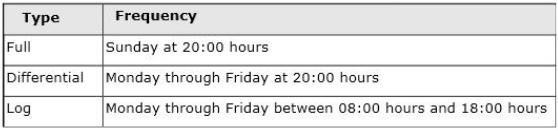
The Finance department plans to execute a batch process every Saturday at 09:00 hours. This batch process will take a maximum of 8 hours to complete.
The batch process will update three tables that are 10 GB in size. The batch process will update these tables multiple times.
When the batch process completes, the Finance department runs a report to find out whether the batch process has completed correctly.
You need to ensure that if the Finance department disapproves the batch process, the batch operation can be rolled back in the minimum amount of time.
What should you do on Saturday?
Answer : C
References:https://docs.microsoft.com/en-us/sql/relational-databases/databases/database-snapshots-sql-server
Question 7
You deploy a Microsoft SQL Server instance to support a new application. The application uses the tempdb database maintain session state data.
Users reports performance issues with the application. You observer performance problems immediately and begin troubleshooting. You observer numerous instances of the page PAGE_up and PAGEELATCH_EX wait events in the logs for the server. The resources for the description for the wait is 2:1:1.
Answer : A
Note: PAGELATCH_EX occurs when a task is waiting on a latch for a buffer that is not in an I/O request. The latch request is in Exclusive mode.
PAGELATCH_UP occurs when a task is waiting on a latch for a buffer that is not in an I/O request. The latch request is in Update mode.
References:
https://docs.microsoft.com/en-us/sql/relational-databases/system-dynamic-management-views/sys-dm-os-wait-stats-transact-sql?view=sql-server-2017
 All Official Question Types