Page: 1
/ 14
Total 90 questions
Microsoft Administering Microsoft 365 and AI Services AB-650 Exam Questions
Question 1
You have a Microsoft 365 subscription that has an initial domain named contoso.onmicrosoft.com and two verified custom domains named contoso.com and fabrikam.com.
The fabrikam.com domain is the default domain.
The contoso.com domain uses managed authentication, and has 750 references across unused user accounts, application identifier URIs, and mail-enabled security groups.
You need to remove contoso.com from the subscription. The solution must minimize manual changes to Microsoft Entra objects.
What should you do?
Answer : C
Microsoft Entra ID supports the ForceDelete operation for removing custom domains that still have references to directory objects. This operation automatically updates supported references, reducing the need for manual administrative changes.
Option C is correct because the domain meets the main ForceDelete prerequisites: it uses managed authentication, is not the default domain, and has fewer than 1,000 references.
However, Microsoft explicitly requires administrators to update or remove domain references from Exchange-managed objects, including mail-enabled security groups and distribution lists, before executing ForceDelete.
After these references are removed, ForceDelete can automatically update eligible user principal names, email addresses, proxy addresses, group addresses, and application identifier URIs to the tenant's initial onmicrosoft.com domain.
Option A is incorrect because manually updating all 750 references creates unnecessary administrative effort.
Option B is incorrect because ForceDelete cannot automatically remove all Exchange-managed dependencies. The mail-enabled security group references must be corrected first.
Option D is incorrect because a default domain cannot be deleted while it remains designated as the default.
Therefore, clearing the Exchange-managed references and using ForceDelete is the most efficient supported approach.
Microsoft Reference:
Microsoft Learn --- Manage custom domain names and ForceDelete.
Microsoft Graph --- domain: forceDelete.
Question 2
You have a Microsoft 365 subscription.
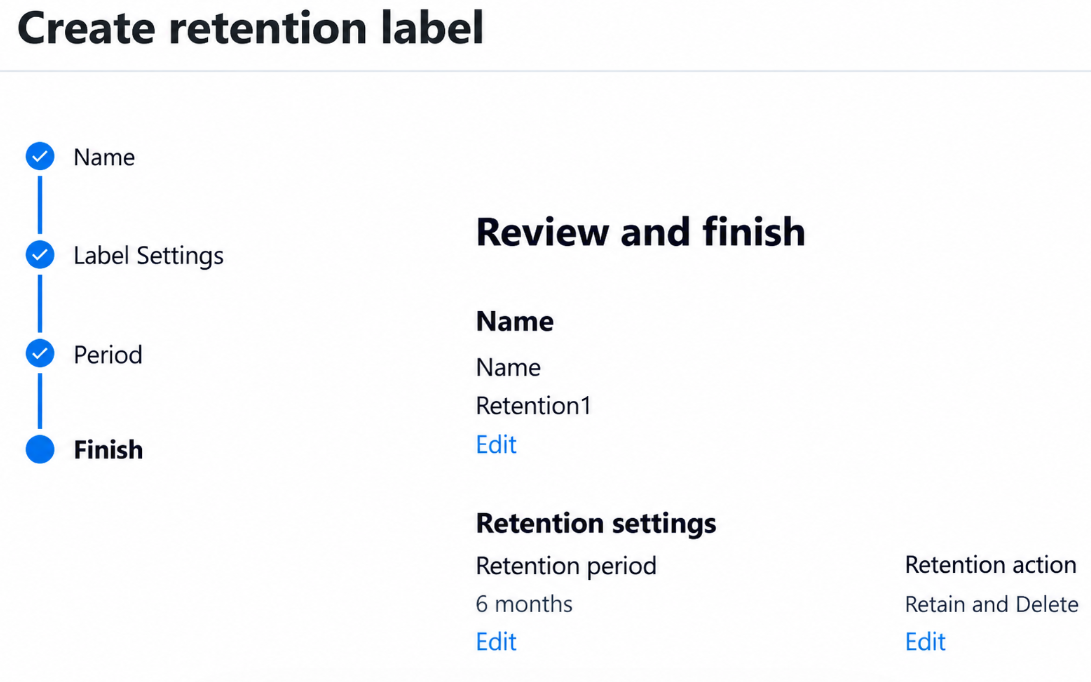
You create a retention label named Retention1 as shown in the following exhibit.
You apply Retention1 to all the Microsoft OneDrive content.
On January 1, 2025, a user stores a file named File1 in OneDrive.
On January 10, 2025, the user modifies File1.
On February 1, 2025, the user deletes File1.
When will File1 be removed permanently and unrecoverable from OneDrive?
Answer : B
Microsoft Purview retention labels control how long content must be preserved and what action occurs after the configured retention period expires.
Option B is the intended examination answer, based on the default retention-period start date.
The exhibit shows Retention1 configured with a six-month retention period and the Retain and Delete action.
Microsoft documents that retention periods start from the content creation date by default, unless the label is explicitly configured to use another trigger.
File1 was created on January 1, 2025. Therefore, its six-month retention period ends on July 1, 2025.
The modification on January 10 does not reset the retention period under the default configuration. Similarly, deleting File1 on February 1 does not override the retention requirement.
Option A ignores the retention configuration. Option C would apply if retention began on the last modification date. Option D incorrectly calculates six months from the user-initiated deletion.
Important technical distinction: The question says permanently and unrecoverable. Microsoft's current SharePoint and OneDrive documentation states that retained content is subsequently moved through the Recycle Bin, where an additional 93-day recovery period can apply. Consequently, July 2025 represents the intended retention expiration and deletion processing date, not necessarily the final irreversible deletion date. Strictly interpreted, none of the options guarantees that outcome.
Microsoft Reference:
Microsoft Learn --- Retention policies and labels.
Microsoft Learn --- Retention behavior for SharePoint and OneDrive.
Question 3
You have a Microsoft 365 subscription that contains an agent named Agent1. Agent1 uses a Model Context Protocol (MCP) server named MCP1.
An MCP server named MCP2 has Status set to Available. MCP2 exposes procurement data but has NOT completed a security review.
You need to prevent Agent1 from invoking MCP2. The solution must ensure that MCP1 and Agent1 remain available.
What should you do in Microsoft Agent 365?
Answer : D
Microsoft Agent 365 provides centralized governance of tools and Model Context Protocol (MCP) servers that AI agents use to access external services and organizational data.
Option D is correct because the Microsoft 365 admin center's Tools management interface enables administrators to block an individual MCP server without disabling the agent or unrelated MCP servers.
In this scenario, MCP2 is currently marked Available but has not completed its security review. Allowing agents to invoke MCP2 could expose procurement information before appropriate security controls have been validated.
Administrators can navigate to the Microsoft 365 admin center, select Agents Tools Registry, locate MCP2, and select Block.
Blocking MCP2 changes its availability and prevents agents from using the tools exposed by that server. MCP1 remains available because it is a separate MCP server, and Agent1 itself is not disabled.
Option A is incorrect because agent management rules do not provide the direct server-specific blocking action requested.
Option B is incorrect because the Agent Registry manages agents, whereas the Tools Registry provides MCP server controls.
Option C is incorrect because policy templates are not the direct mechanism for blocking an individual MCP server.
Therefore, blocking MCP2 from Tools satisfies the requirements.
Microsoft Reference:
https://learn.microsoft.com/en-us/microsoft-365/admin/manage/manage-plugins-skills-mcp-servers
https://learn.microsoft.com/en-us/microsoft-365/admin/manage/agent-tools-overview
Question 4
You have a Microsoft 365 subscription.
You need to create a data loss prevention (DLP) policy that is configured to use the Set headers action.
To which location can the policy be applied?
Answer : B
Microsoft Purview Data Loss Prevention (DLP) policies support different actions depending on the Microsoft 365 workload to which a policy is applied. Administrators must select a supported location before configuring a particular DLP action.
Option B is correct because the Set headers action is supported specifically for Exchange Online email.
This action allows administrators to add or modify an email message header when the message matches the conditions of a DLP rule. For example, an organization can configure a rule that detects sensitive financial information and adds a custom header indicating that the email requires additional handling.
Microsoft documents Set headers as a non-halting action, meaning it does not automatically stop subsequent DLP rule processing.
Option A is incorrect because OneDrive policies govern files and sharing activities rather than Exchange transport message headers.
Option C is incorrect because SharePoint DLP policies primarily protect stored documents and control access to sensitive content.
Option D is incorrect because Teams chat and channel messages do not expose the Exchange-specific Set headers action.
Therefore, the DLP policy must include the Exchange email location to support Set headers.
Microsoft Reference: Microsoft Learn --- Data Loss Prevention policy reference.
Question 5
You have a Microsoft 365 subscription.
You have product documents in an external software as a service (SaaS) knowledge base named KB1.
You plan to enable users to find and reason over the content in KB1 by using Microsoft 365 Copilot and Microsoft Search.
You need to configure a Copilot connector. The solution must meet the following requirements:
Index the KB1 content into Microsoft Graph.
Preserve the source permissions of KB1.
What should you configure?
Answer : A
Microsoft 365 Copilot connectors integrate information from external systems into Microsoft 365 Copilot and Microsoft Search. Two principal connector architectures are available: synced connectors and federated connectors.
Option A is correct because synced Copilot connectors ingest external content into Microsoft Graph and make the indexed information available for search and Copilot grounding.
A synced connector can connect to external SaaS knowledge bases, retrieve documents and associated metadata, and store the indexed information in Microsoft's search infrastructure.
The connector also supports access control lists (ACLs), ensuring that users receive search results and Copilot responses only for content they are authorized to access in the source system.
Preserving source permissions requires configuring the connector to honor the knowledge base's original access control model rather than making the indexed content visible to everyone.
Option B is incorrect because a custom Power Platform connector provides integration with external APIs but does not inherently index knowledge base content into Microsoft Graph.
Option C is incorrect because federated Copilot connectors retrieve external data in real time without indexing the information into Microsoft 365. This directly conflicts with the indexing requirement.
Option D is incorrect because embedding exported files in a Copilot Studio agent does not provide the required Microsoft Graph indexing and synchronized source permissions.
Therefore, a synced Copilot connector satisfies both requirements.
Microsoft Reference:
https://learn.microsoft.com/en-us/microsoft-365/copilot/connectors/overview
https://learn.microsoft.com/en-us/microsoft-365/copilot/connectors/manage-access-permissions
Question 6
You have a Microsoft 365 subscription that uses Microsoft Defender for Office 365. The subscription contains a group named Group1.
Group1 receives recurring unwanted email from countries where your company does NOT do business.
You need to reduce the unwanted email for Group1 without affecting other groups.
What should you configure?
Answer : C
Microsoft Defender for Office 365 provides configurable inbound anti-spam policies that enable administrators to filter unwanted email according to sender characteristics, geographic origin, languages, and recipient groups.
Option C is correct because a custom anti-spam inbound policy supports geographic filtering through the From these countries setting and can be scoped to selected recipient groups.
Administrators can configure the policy through the following steps:
Navigate to Microsoft Defender portal Email & collaboration Policies & rules Threat policies Anti-spam.
Select Create policy Inbound.
Under Users, groups, and domains, specify Group1 as the recipient group.
Under Bulk email threshold & spam properties, enable From these countries and select the countries or regions from which unwanted messages originate.
Configure the appropriate spam action, such as moving detected messages to Junk Email or quarantine.
This configuration ensures that geographic spam filtering applies specifically to Group1 without altering protection settings for other recipients.
Option A is incorrect because connection filter policies operate on source IP addresses and do not provide the required group-specific geographic filtering.
Options B and D are incorrect because preset security policies do not provide the required customizable country-based filtering settings.
Option E is incorrect because anti-phishing policies focus on spoofing, impersonation, and phishing detection rather than geographic spam filtering.
Implementation consideration: Recipient-group targeting supports mail-enabled security groups, distribution groups, and Microsoft 365 groups. Also, Standard or Strict preset security policies take precedence over custom inbound anti-spam policies for recipients included in those presets.
Question 7
You have a Microsoft 365 subscription that contains a Microsoft SharePoint communication site named Site1 and a security group named Group1.
Some users that are outside of Group1 have direct permissions or sharing links to the content in Site1.
You need to ensure that users can access Site1 and its content only when they meet both of the following conditions.
The user is a member of Group1.
The user has SharePoint permissions to the content.
The solution must meet the following requirements:
Apply only to Site1.
Preserve the existing SharePoint permissions.
Minimize administrative effort.
What should you do?
Answer : C
Microsoft SharePoint Restricted Access Control (RAC) provides an additional authorization boundary for SharePoint sites. It restricts site and content access to members of designated Microsoft Entra security groups or Microsoft 365 groups while preserving existing SharePoint permissions.
Option C is correct because configuring Restricted Access Control for Site1 and specifying Group1 satisfies both conditions simultaneously. Users must belong to Group1 and already possess appropriate SharePoint permissions. Membership in Group1 alone does not grant access.
Users outside Group1 are denied access even if they have direct permissions or previously received sharing links. Restricted Access Control can be configured for an individual communication site without modifying its existing permission assignments.
Option A is incorrect because sharing restrictions primarily control sharing operations rather than comprehensively enforcing the existing-content access boundary required.
Option B is incorrect because Restricted Content Discovery limits content visibility in organization-wide search and Microsoft 365 Copilot but does not prevent users with existing permissions from directly accessing files.
Option D is incorrect because manually changing SharePoint permissions could achieve access restrictions but would violate the requirement to preserve existing permissions and minimize administrative effort.
Therefore, configuring Restricted Access Control specifically for Site1 is the appropriate solution.
Microsoft Reference: Microsoft Learn --- Restrict SharePoint site access.
 All Official Question Types