Page: 1
/ 14
Total 176 questions
Microsoft Configuring and Operating a Hybrid Cloud with Microsoft Azure Stack Hub AZ-600 Exam Questions
Question 1
You have an Azure Stack Hub integrated system.
You unlock the privileged endpoint (PEP).
How long will the PEP session remain unlocked?
Answer : D
Unlocking the privileged endpoint for support scenarios
During a support scenario, the Microsoft support engineer might need to elevate the privileged endpoint PowerShell session to access the internals of the Azure Stack Hub infrastructure. This process is sometimes informally referred to as 'break the glass' or 'unlock the PEP'.
An elevated PEP session has a validity of 8 hours, after which, if not terminated, the elevated PEP session will automatically lock back to a regular PEP session.
Question 2
You need to implement disaster recovery for the priv1 region to meet the technical requirements.
Which main components should you include in the disaster recovery plan?
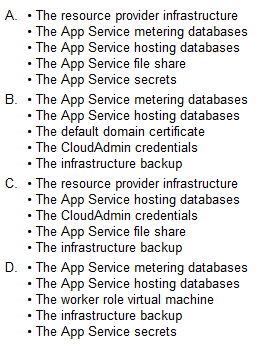
Answer : A
Question 3
You need to configure name resolution to support the planned changes.
Which PowerShell cmdlet should you run?
Answer : B
Configure the integrated system to resolve external names by using a DNS Server that has an IP address of 10.100.100.100.
Resolving external DNS names from Azure Stack Hub
To resolve DNS names for endpoints outside Azure Stack Hub (for example: www.bing.com), you need to provide DNS servers that Azure Stack Hub can use to forward DNS requests for which Azure Stack Hub isn't authoritative. For deployment, DNS servers that Azure Stack Hub forwards requests to are required in the Deployment Worksheet (in the DNS Forwarder field). Provide at least two servers in this field for fault tolerance. Without these values, Azure Stack Hub deployment fails. You can edit the DNS Forwarder values with the Set-AzSDnsForwarder cmdlet after deployment.
Configure conditional DNS forwarding
Important
This only applies to an AD FS deployment.
To enable name resolution with your existing DNS infrastructure, configure conditional forwarding.
To add a conditional forwarder, you must use the privileged endpoint.
For this procedure, use a computer in your datacenter network that can communicate with the privileged endpoint in Azure Stack Hub.
1. Open an elevated Windows PowerShell session (run as administrator), and connect to the IP address of the privileged endpoint. Use the credentials for CloudAdmin authentication.
$cred=Get-Credential
Enter-PSSession -ComputerName <IP Address of ERCS> -ConfigurationName PrivilegedEndpoint -Credential $cred
2. After you connect to the privileged endpoint, run the following PowerShell command. Substitute the sample values provided with your domain name and IP addresses of the DNS servers you want to use.
Register-CustomDnsServer -CustomDomainName 'contoso.com' -Custom
https://learn.microsoft.com/en-us/azure-stack/operator/azure-stack-integrate-dns
Question 4
Note: This question is part of a series of questions that present the same scenario. Each question in the series contains a unique solution that might meet the stated goals. Some question sets might have more than one correct solution, while others might not have a correct solution.
After you answer a question in this section, you will NOT be able to return to it. As a result, these questions will not appear in the review screen.
You plan to install an update to an Azure Stack Hub integrated system.
You need to verify whether the integrated system is healthy, and whether you can apply the update. You must achieve the goal as quickly as possible.
Solution: From a privileged endpoint (PEP) session, you run
Test-AzureStack --Group "UpdateReadiness".
Does this meet the goal?
Answer : A
https://docs.microsoft.com/en-us/azure-stack/operator/azure-stack-diagnostic-test?view=azs-2008
Question 5
Note: This question is part of a series of questions that present the same scenario. Each question in the series contains a unique solution that might meet the stated goals. Some question sets might have more than one correct solution, while others might not have a correct solution.
After you answer a question in this section, you will NOT be able to return to it. As a result, these questions will not appear in the review screen.
You have an Azure Stack Hub integrated system that connects to the Internet. The integrated system uses an Enterprise Agreement (EA) for licensing.
You are creating an Azure Resource Manager template to generate a marketplace item for a virtual machine that runs Windows Server 2019 Datacenter and a custom application.
You need to ensure that Windows Server is licensed by using the bring-your-own-license model.
Solution: You add licenseType: None to the Azure Resource Manager template.
Does this meet the goal?
Answer : B
https://docs.microsoft.com/en-us/azure-stack/operator/azure-stack-windows-server-faq?view=azs-2008&tabs=az1%2Caz2
Question 6
You have an Azure Stack Hub integrated system that is linked to an Azure AD tenant named contoso.onmicrosoft.com. The Azure Stack Hub portals are configured as shown in the following table.

You register a guest Azure AD tenant named adatum.onmicrosoft.com that contains a user named user1@fabrikam.com. User1 needs to subscribe to art Azure Stack Hub integrated system offer. Which URL should User1 use?
Answer : D
For multinode systems, the user portal URL is formatted as https://portal.<region>.<FQDN>. For an ASDK deployment, the URL is https://portal.local.azurestack.external.
In our case we must also direct any foreign principals (users in the Adatum directory without the suffix of adatum.onmicrosoft.com) to sign in using https://<user-portal-url>/adatum.onmicrosoft.com. If they don't specify the /adatum.onmicrosoft.com directory tenant in the URL, they're sent to their default directory and receive an error that says their administrator hasn't consented.
Question 7
Which three components are required to configure an Azure Stack Hub infrastructure backup? Each correct
answer presents part of the solution.
NOTE: Each correct selection is worth one point.
Answer : A, B, D
https://docs.microsoft.com/en-us/azure-stack/operator/azure-stack-backup-reference?view=azs-2008
 All Official Question Types