Page: 1
/ 14
Total 510 questions
Microsoft Administering Windows Server AZ-802 Exam Questions
Question 1
You have a Microsoft Sentinel deployment and 100 Azure Arc-enabled on-premises servers. All the Azure Arc-enabled resources are in the same resource group. You need to onboard the servers to Microsoft Sentinel. The solution must minimize administrative effort. What should you use to onboard the servers to Microsoft Sentinel?
Answer : B
For onboarding a large number of Azure Arc-enabled servers that already sit within a common resource group, Microsoft documents Azure Policy as the at-scale mechanism for deploying the required Sentinel data connector (the Azure Monitor Agent, along with its associated data collection rule) across every resource in that scope automatically, rather than installing an extension or configuring each server individually by hand. An administrator assigns a single policy definition to the resource group, and Azure evaluates and remediates compliance for all 100 servers, deploying the agent and connecting them to Microsoft Sentinel without any per-server manual steps. Azure Automation is used for runbook-based automation tasks rather than at-scale agent deployment for onboarding. Manually installing Azure virtual machine extensions on each of the 100 servers individually would technically work but requires far more administrative effort than a single policy assignment. Microsoft Defender for Cloud is a separate security posture management service and is not itself the onboarding mechanism for Sentinel. Therefore, Azure Policy is the option that minimizes administrative effort for this at-scale onboarding.
Question 2
Your on-premises network contains an Active Directory Domain Services (AD DS) domain. The domain contains a server named Server1 that hosts an app named App1. App1 uses Active Directory authentication. You have a Microsoft Entra tenant that contains a user named User1. You deploy Microsoft Entra Connect sync and configure password synchronization. User1 fails to authenticate to App1. You need to ensure that User1 can authenticate to App1. What should you do?
Answer : C
Microsoft Entra Connect password hash synchronization is strictly a one-way flow that pushes password hashes from the on-premises AD DS domain up to Microsoft Entra ID; it never creates or populates an on-premises AD DS account for a user who currently exists only as a cloud-only object in the Microsoft Entra tenant. Because App1 authenticates against AD DS on Server1 rather than against Microsoft Entra ID, User1 needs a genuine on-premises AD DS account for that Active Directory authentication path to succeed at all, so the correct fix is to create a matching AD DS account for User1 directly in the domain. Microsoft Entra Connect's default soft-match logic then links that newly created on-premises account to User1's existing cloud object on the very next synchronization cycle, based on matching attributes such as the primary SMTP address, rather than creating a duplicate, unlinked identity in the tenant. Enabling password writeback only pushes cloud-initiated password resets back down to an on-premises account that is already linked through synchronization, which does not help when no on-premises account exists yet, and disabling soft match or enabling BlockCloudObjectTakeoverThroughHardMatch would each make it harder, not easier, to link a newly created on-premises account back to User1's existing cloud identity.
Question 3
You have a failover cluster named Cluster1 that hosts an application named App1. The General tab in App1 Properties is shown in the General exhibit. The Failover tab in App1 Properties is shown in the Failover exhibit. Server1 shuts down unexpectedly. You need to ensure that when you start Server1, App1 continues to run on Server2. Solution: From the General settings, you increase the priority of Server2 in the Preferred Owners list. Does this meet the goal?
Answer : B
The Preferred Owners list on a clustered role's General tab only sets placement priority -- which node Failover Clustering tries first when the role needs to start or move -- it does not control whether a role automatically fails back to a node once that node returns to and rejoins the cluster. That failback behavior is governed exclusively by the separate Failback settings on the Failover tab, specifically the choice between Prevent failback and Allow failback, with Allow failback optionally restricted to a scheduled time window. Reordering or increasing Server2's priority within the Preferred Owners list on the General tab therefore does nothing to change whether App1 automatically fails back to Server1 once Server1 finishes restarting and rejoins the cluster; if Allow failback remains configured on the Failover tab, App1 could still move back to Server1 automatically regardless of how the Preferred Owners priorities are arranged. To actually guarantee App1 keeps running on Server2 after Server1 comes back online, the administrator needs to set Failback to Prevent failback on the Failover tab instead, so increasing Server2's priority in the Preferred Owners list does not meet the stated goal.
Question 4
You have an Azure subscription. The subscription contains a virtual machine named VM1 that runs Windows Server and uses Azure Disk Encryption. You need to identify which Azure key vault stores the encryption keys for VM1. The solution must minimize administrative effort. Which PowerShell cmdlet should you run?
Answer : C
Running Get-AzVMDiskEncryptionStatus against VM1 returns the current Azure Disk Encryption status for both its operating system disk and its data disks in a single call, and that returned status includes the key vault URL or resource ID where the encryption secrets for VM1 are actually stored, so this one cmdlet directly answers the question with no additional lookup steps required. Get-AzKeyVaultKey and Get-AzDiskEncryptionSet both require the administrator to already know which specific key vault or disk encryption set resource to query before they can return anything useful, which does not minimize effort when the goal is precisely to discover which key vault is associated with VM1 in the first place. Get-AzKeyVault, similarly, only enumerates the key vaults that exist within the subscription without tying any particular vault to VM1's encryption configuration, so it would require the administrator to manually check each vault's contents to find the right one. Because Get-AzVMDiskEncryptionStatus ties the VM directly to its encryption key vault in a single, minimal-effort cmdlet call, it is the correct choice for identifying which key vault stores VM1's encryption keys.
Question 5
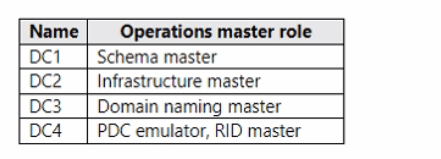
You have an Active Directory Domain Services (AD DS) domain that contains the domain controllers shown in the following table: DC1 (Schema master), DC2 (Infrastructure master), DC3 (Domain naming master), DC4 (PDC emulator, RID master). The domain contains an app named App1 that uses a custom application partition to store configuration dat
a. You decommission App1. When you attempt to remove the custom application partition, the process fails. Which domain controller is unavailable?
Domain controller FSMO role table
Answer : C
Adding or removing an application directory partition in AD DS -- including custom partitions such as the one App1 used to store its configuration data -- is an operation that must be performed against, and requires the availability of, the domain controller holding the Domain Naming Master FSMO role for the forest. This is the single operations master responsible for maintaining the list of domains and application partitions in the forest and for coordinating additions or removals of directory partitions; if that role holder is offline or unreachable, attempts to add or remove an application partition will fail, even though normal object read/write operations against other partitions (users, groups, and so on) may continue to function against any available domain controller. According to the exhibit's role assignments, DC3 holds the Domain Naming Master role. The Schema master (DC1) governs schema extensions, the Infrastructure master (DC2) governs cross-domain object reference updates, and the PDC emulator/RID master (DC4) govern time synchronization, password/authentication emulation, and relative ID pool allocation respectively -- none of these roles are involved in application partition add/remove operations. Because the removal of the custom application partition specifically failed, the unavailable domain controller must be the Domain Naming Master role holder, DC3.
Question 6
Note: This question is part of a series of questions that present the same scenario. Each question in the series contains a unique solution that might meet the stated goals. Your network contains an Active Directory Domain Services (AD DS) forest. The forest contains three Active Directory sites named Site1, Site2, and Site3. Each site contains two domain controllers. The sites are connected by using DEFAULTIPSITELINK. You open a new branch office that contains only client computers. You need to ensure that the client computers in the new office are primarily authenticated by the domain controllers in Site1. Solution: You create a new site named Site4 and associate Site4 to DEFAULTIPSITELINK. Does this meet the goal?
Answer : B
Creating a new site named Site4 does not, by itself, put the branch office's client computers into Site1, which is the only thing that would make them prefer Site1's domain controllers. A client's site membership is computed exclusively from its IP address matched against subnet objects defined in Active Directory Sites and Services; simply creating Site4 and linking it to DEFAULTIPSITELINK affects replication topology (which sites can replicate with which, and on what schedule/cost), not which site a given IP subnet, and therefore which client, belongs to. Without associating the branch office's actual subnet to a site, and specifically to Site1 as required here, the branch clients remain unassigned to any site (or fall back to whatever default site-coverage logic applies), and creating an unrelated fourth site changes nothing about that. Even if Site4 were intended to represent the branch office, the solution never creates or maps a subnet object to it, let alone to Site1, so there is no mechanism by which client authentication traffic would be steered toward Site1's domain controllers. The only way to meet the goal is to create a subnet object for the branch office's IP range and associate that subnet directly with Site1. Because this solution does neither of those things, it does not meet the stated goal.
Question 7
You have five Azure virtual machines. You have a dedicated Azure Storage account to collect performance dat
a. You need to send the collected data directly to the Azure Storage account. What should you install on the virtual machines?
Answer : D
Sending collected performance data directly to a dedicated Azure Storage account is a specific capability of the Azure Diagnostics extension, often abbreviated WAD, which can be configured to write performance counter data and event log data straight into tables and blobs inside a specified storage account with no intermediate monitoring service required at all. The Azure Monitor Agent, by contrast, ships the data it collects through Data Collection Rules only to destinations such as a Log Analytics workspace, Azure Monitor Metrics, Azure Data Explorer, or Microsoft Fabric; it has no data flow destination that targets a general-purpose Azure Storage account directly, so it cannot satisfy this exact requirement even though it is the newer, more broadly capable agent overall. The Dependency agent exists to map process-level dependencies for VM insights rather than to collect performance counters, the Telegraf agent is used specifically to feed Linux VM metrics into Azure Monitor Metrics, and the Azure Connected Machine agent exists purely to onboard non-Azure servers to Azure Arc; none of those three routes performance data into Azure Storage at all. Therefore, installing the Azure Diagnostics extension on the five virtual machines is the correct action.
 All Official Question Types