Page: 1
/ 14
Total 243 questions
Microsoft Implementing an Azure Data Solution DP-200 Exam Questions
Question 1
You need to implement event processing by using Stream Analytics to produce consistent JSON documents.
Which three actions should you perform? Each correct answer presents part of the solution.
NOTE: Each correct selection is worth one point.
You need to ensure that the missing indexes for REPORTINGDB are added.
What should you use?
Answer : D
Automatic tuning options include create index, which identifies indexes that may improve performance of your workload, creates indexes, and automatically verifies that performance of queries has improved.
Scenario:
REPORTINGDB stores reporting data and contains server columnstore indexes.
Migrate SALESDB and REPORTINGDB to an Azure SQL database.
References:
https://docs.microsoft.com/en-us/azure/sql-database/sql-database-automatic-tuning
Question 2
You use Azure Stream Analytics to receive Twitter data from Azure Event Hubs and to output the data to an Azure Blob storage account.
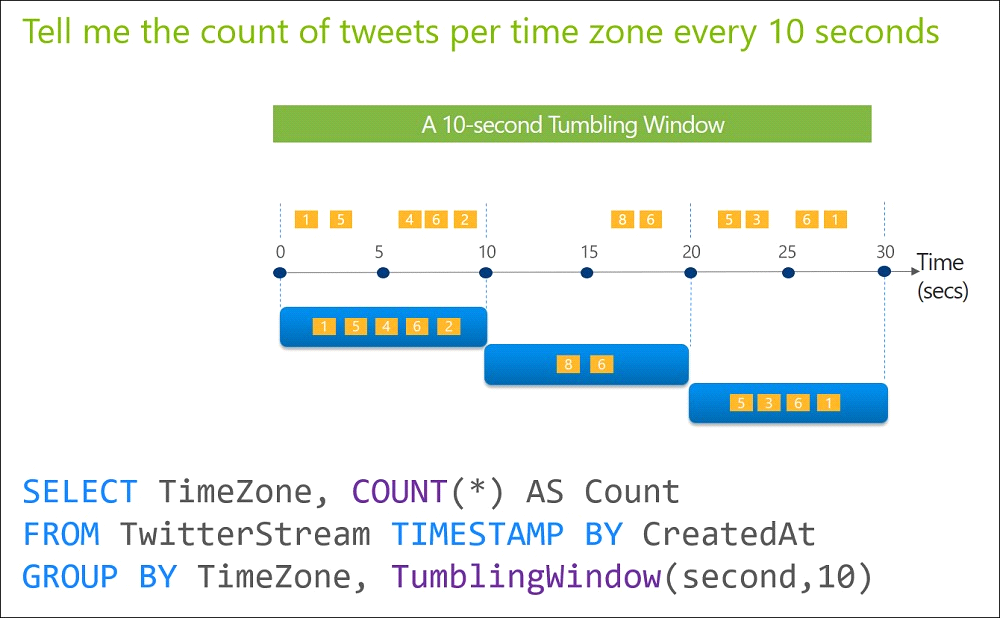
You need to output the count of tweets during the last five minutes every five minutes. Each tweet must only be counted once.
Which windowing function should you use?
Answer : C
Tumbling window functions are used to segment a data stream into distinct time segments and perform a function against them, such as the example below. The key differentiators of a Tumbling window are that they repeat, do not overlap, and an event cannot belong to more than one tumbling window.
References:
https://docs.microsoft.com/en-us/azure/stream-analytics/stream-analytics-window-functions
Question 3
Use the following login credentials as needed:
Azure Username: xxxxx
Azure Password: xxxxx
The following information is for technical support purposes only:
Lab Instance: 10277521
You plan to deploy an integration runtime named Runtime1 to an Azure virtual machine.
You need to create an Azure Data Factory V2, and then prepare the required Data Factory resources for App1.
To complete this task, sign in to the Azure portal.
Answer : A
Question 4
Note: This question is part of a series of questions that present the same scenario. Each question in the series contains a unique solution. Determine whether the solution meets the stated goals.
You develop a data ingestion process that will import data to a Microsoft Azure SQL Data Warehouse.
The data to be ingested resides in parquet files stored in an Azure Data lake Gen 2 storage account.
You need to load the data from the Azure Data Lake Gen 2 storage account into the Azure SQL Data Warehouse.
Solution;
1. Create an external data source pointing to the Azure Data Lake Gen 2 storage account.
2. Create an external tile format and external table using the external data source.
3. Load the data using the CREATE TABLE AS SELECT statement.
Does the solution meet the goal?
Answer : A
You need to create an external file format and external table using the external data source.
You load the data using the CREATE TABLE AS SELECT statement.
References:
https://docs.microsoft.com/en-us/azure/sql-data-warehouse/sql-data-warehouse-load-from-azure-data-lake-store
Question 5
A company manages several on-premises Microsoft SQL Server databases.
You need to migrate the databases to Microsoft Azure by using the backup process of Microsoft SQL Server.
Which data technology should you use?
Answer : D
Question 6
Use the following login credentials as needed:
Azure Username: xxxxx
Azure Password: xxxxx
The following information is for technical support purposes only:
Lab Instance: 10277521
You need to increase the size of db2 to store up to 250 GB of data.
To complete this task, sign in to the Azure portal.
Answer : A
Question 7
You have an Azure subscription that contains the resources shown in the following table.
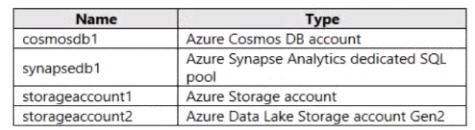
All the resources have the default encryption settings.
Answer : D
 All Official Question Types