Page: 1
/ 14
Total 87 questions
Microsoft Developing AI-Enabled Database Solutions DP-800 Exam Questions
Question 1
Your team is developing an Azure SQL dataset solution from a locally cloned GitHub repository by using Microsoft Visual Studio Code and GitHub Copilot Chat.
You need to disable the GitHub Copilot repository-level instructions for yourself without affecting other users.
What should you do?
Answer : A
GitHub documents that repository custom instructions for Copilot Chat can be disabled for your own use in the editor settings, and that doing so does not affect other users. In VS Code, this is controlled through settings related to instruction files, where you can disable the use of repository instruction files for your own environment.
The other options are incorrect:
B is not a documented mechanism for disabling repository-level Copilot instructions.
C would remove the repository instruction file itself and therefore affect everyone using that repository, which violates the requirement.
Question 2
You have a SQL database in Microsoft Fabric that contains a table named dbo.Orders, dbo.Orders has a clustered index, contains three years of data, and is partitioned by a column named OrderDate by month.
You need to remove all the rows for the oldest month. The solution must minimize the impact on other queries that access the data in dbo.orders.
Solution: Identify the partition number for the oldest month, and then run the following Transact-SQL statement.
TRUNCATE TABIE dbo.Orders
WITH (PARTITIONS (partition number));
Does this meet the goal?
Answer : A
Yes, this meets the goal. Microsoft documents that on a partitioned table, you can use TRUNCATE TABLE ... WITH (PARTITIONS (...)) to remove data from a specific partition, and that this is an efficient maintenance operation that targets only that data subset rather than the whole table. Microsoft's partitioning guidance explicitly lists truncating a single partition as an example of a fast partition-level maintenance or retention operation.
That matches the requirement to remove the oldest month while minimizing impact on other queries. Because the table is already partitioned by month on OrderDate, identifying the partition number for that oldest month and truncating only that partition is the correct low-impact approach, assuming the table and indexes are aligned as required for partition truncation.
Question 3
You have an Azure SQL database that contains a table named dbo.ManualChunks. dbo.HonualChunks contains product manuals
A retrieval query already returns the top five matching chunks as nvarchar(max) text.
You need to call an Azure OpenAI REST endpomt for chat completions. The request body must include both the user question and theretiieved chunks.
You write the following Transact-SQL code.
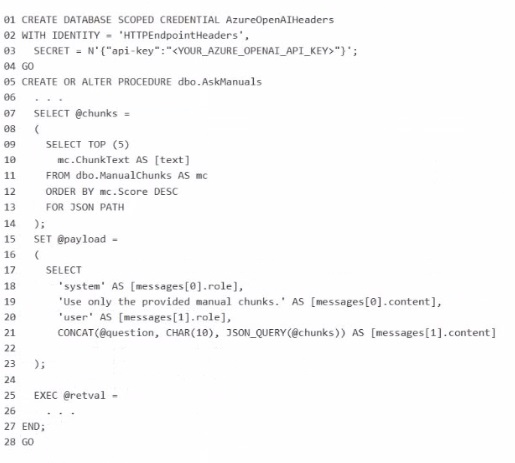
What should you insert at line 22?
Answer : D
The correct insertion at line 22 is FOR JSON PATH, WITHOUT_ARRAY_WRAPPER.
The request body for the Azure OpenAI chat completions call must be a single JSON object containing the messages array with both the system/user content and the retrieved chunks. Microsoft documents that FOR JSON PATH is the preferred way to shape JSON output, especially when you want precise control over nested property names like messages[0].role and messages[1].content.
The key detail is WITHOUT_ARRAY_WRAPPER. By default, FOR JSON returns results enclosed in square brackets as a JSON array. Microsoft documents that WITHOUT_ARRAY_WRAPPER removes those brackets so a single JSON object is produced instead. That is exactly what is needed here for @payload, because the stored procedure is building one request body, not an array of request bodies.
Question 4
You need to design a generative Al solution that uses a Microsoft SOL Server 2025 database named DB1 as a data source. The solution must generate responses that meet the following requirements:
* Ait' grounded In the latest transactional and reference data stored in D61
* Do NOT require retraining or fine-tuning the language model when the data changes
* Can include citations or references to the source data used in the response
Which scenario is the best use case for implementing a Retrieval Augmented Generation (RAG) pattern? More than one answer choice may achieve the goal. Select the BEST answer
Answer : C
The best use case for RAG is answering user questions based on company-specific knowledge. Microsoft defines RAG as a pattern that augments a language model with a retrieval system that provides grounding data at inference time, which is exactly what you need when responses must be based on the latest transactional and reference data, must avoid retraining/fine-tuning, and should be able to include citations or references to source data.
The other options do not fit as well:
summarizing free-form user input does not inherently require retrieval from DB1,
training a custom model contradicts the requirement to avoid retraining/fine-tuning,
generating marketing slogans is a creative generation task, not a grounding-and-citation scenario. RAG is specifically strong when answers must come from your organization's own changing knowledge.
Question 5
You have an Azure SQL database that supports the OLTP workload of an order-processing application.
During a 10-minute incident window, you run a dynamic management view query and discover the following:
Session 72 is sleeping with open_transaction_count = 1.
Multiple other sessions show blocking_session_id = 72 in sys.dm_exec_requests.
sys.dm_exec_input_buffer(72, NULL) returns only BEGIN TRANSACTION UPDATE Sales.Orders.
Users report that updates to Sales.Orders intermittently time out during the incident window. The timeouts stop only after you manually terminate session 72.
What is a possible cause of the blocking?
Answer : C
The best explanation is an open explicit transaction. During the incident, session 72 was sleeping but still had open_transaction_count = 1, and sys.dm_exec_input_buffer(72, NULL) showed only BEGIN TRANSACTION UPDATE Sales.Orders. That pattern indicates the session executed an update inside an explicit transaction and then remained idle without committing or rolling back, while still holding locks. Other sessions showing blocking_session_id = 72 is the expected symptom of that situation. Microsoft explains that blocking occurs when one session holds a lock on a resource and another session requests a conflicting lock, and sleeping sessions can continue to block if they retain locks through an open transaction.
This also fits the observed behavior that the timeouts stopped only after session 72 was terminated. Killing the session would roll back the active transaction and release the locks, allowing waiting updates to continue. That is much more consistent with an uncommitted transaction than with a deadlock, because deadlocks are normally detected and one session is chosen as the victim automatically rather than persisting until manual termination.
Question 6
You have an SDK-style SQL database project stored in a Git repository. The project targets an Azure SQL database.
The CI build fails with unresolved reference errors when the project leferences system objects.
You need to update the SQL database project to ensure that dotnet build validates successfully by including the correct system objects in the database model for Azure SQL Database.
Solution: Add an artifact reference to the Azure SQL Database master.dacpac file.
Does this meet the goal?
Answer : B
For an SDK-style SQL database project targeting Azure SQL Database, Microsoft recommends using the Azure SQL system DACPAC as a NuGet package reference rather than adding a direct artifact reference to master.dacpac for new SDK-style development. Microsoft's SQL Database Projects documentation says direct .dacpac artifact references are not recommended for new development in SDK-style projects; instead, use NuGet package references.
Because the goal is specifically to make dotnet build validate successfully with the correct Azure SQL system objects, adding an artifact reference to master.dacpac is not the recommended SDK-style solution. It can work in some project styles, but it does not meet the stated goal as the proper approach for SDK-style Azure SQL projects.
Question 7
You need to recommend a solution that will resolve the ingestion pipeline failure issues. Which two actions should you recommend? Each correct answer presents part of the solution. NOTE: Each correct selection is worth one point.
Answer : D, E
The two correct actions are D and E because the ingestion failures are caused by malformed JSON and duplicate payloads, and these two controls address those two problems directly. Microsoft's JSON documentation states that SQL Server and Azure SQL support validating JSON with ISJSON, and Microsoft specifically recommends using a CHECK constraint to ensure JSON text stored in a column is properly formatted.
For the duplicate-payload issue, creating a unique index on a hash of the payload is the appropriate design. Microsoft documents using hashing functions such as HASHBYTES to hash column values, and SQL Server allows a deterministic computed column to be used as a key column in a UNIQUE constraint or unique index. That makes a persisted hash-based computed column plus a unique index a practical and exam-consistent way to reject duplicate payloads efficiently.
The other options do not solve the stated root causes:
Snapshot isolation addresses concurrency behavior, not malformed JSON or duplicate payload detection.
A trigger to rewrite malformed JSON is not the right integrity control and is brittle.
Foreign key constraints enforce referential integrity, not JSON validity or duplicate-payload prevention
 All Official Question Types