Page: 1
/ 14
Total 440 questions
Microsoft Managing and Securing Microsoft 365 Endpoints by using Intune MD-102 Exam Questions
Question 1
You use a Microsoft Intune subscription to manage iOS devices.
You configure a device compliance policy that blocks jailbroken iOS devices.
You need to enable Enhanced jailbreak detection.
What should you configure?
Answer : B
Question 2
You have the devices shown in the following table.
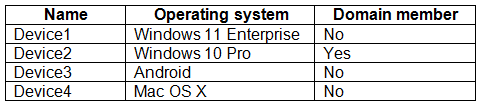
You plan to implement Microsoft Defender for Endpoint.
You need to identify which devices can be onboarded to Microsoft Defender for Endpoint.
What should you identify?
Answer : D
Here is the list of Windows versions. Win10 and Win11 supported. The sentence '(standalone or as part of other Microsoft 365 plans)' excludes the domain needs.
https://learn.microsoft.com/en-us/microsoft-365/security/defender-endpoint/minimum-requirements?view=o365-worldwide
Here is the link for Android. No information about the specific version therefore it is supported.
https://learn.microsoft.com/en-us/microsoft-365/security/defender-endpoint/microsoft-defender-endpoint-android?view=o365-worldwide
Here is the link for MacOS
System requirements: 14 (Sonoma), 13 (Ventura), 12 (Monterey). MAC OS X is older therefore unsupported.
https://learn.microsoft.com/en-us/microsoft-365/security/defender-endpoint/microsoft-defender-endpoint-mac?view=o365-worldwide
Question 3
You need to meet the technical requirements for the IT department.
What should you do first?
Answer : C
https://docs.microsoft.com/en-us/sccm/comanage/tutorial-co-manage-clients
Question 4
You have a Microsoft 365 subscription that contains 1,000 Android devices enrolled in Microsoft Intune. You create an app configuration policy that contains the following settings:
* Device enrollment type: Managed devices
* Profile Type: All Profile Types
* Platform: Android Enterprise
Which two types of apps can be associated with the policy? Each correct answer presents a complete solution. NOTE: Each correct selection is worth one point.
Answer : B, D
Question 5
You have an Azure AD tenant that contains the devices shown in the following table.
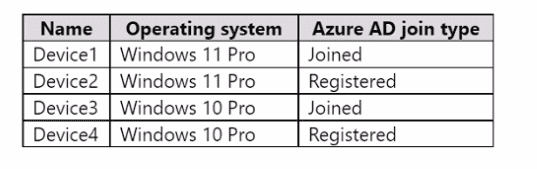
You purchase Windows 11 Enterprise E5 licenses.
Which devices can use Subscription Activation to upgrade to Windows 11 Enterprise?
Answer : C
Question 6
You have a Microsoft 365 E5 subscription and use Microsoft Intune.
You need to use a Sync bulk device action on all corporate-owned Windows devices.
What is the maximum number of devices you can include the action?
Answer : C
Question 7
You have a Microsoft 365 E5 subscription. You are implementing Microsoft Defender for Cloud Apps. You need to ensure that you can create OAuth app policies.
Solution: You configure Cloud Discovery. Does this meet the goal?
Answer : B
 All Official Question Types