Page: 1
/ 14
Total 470 questions
Microsoft Power BI Data Analyst PL-300 Exam Questions
Question 1
Note: This question is a part of a series of questions that present the same scenario. For your convenience, the scenario is repeated in each question. Each question presents a different goal and answer choices, but the text of the scenario is exactly the same in each question in this series.
Start of repeated scenario
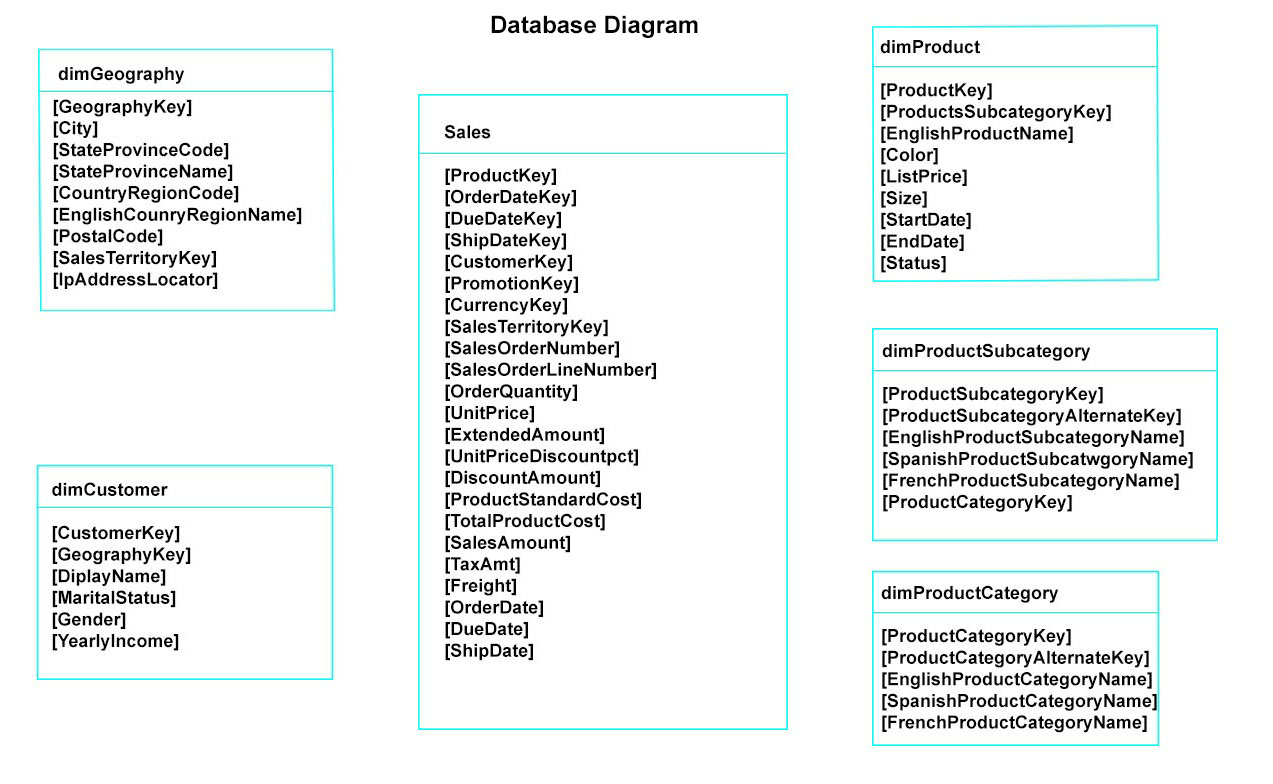
You have a Microsoft SQL Server database that has the tables shown in the Database Diagram exhibit. (Click the Exhibit.)
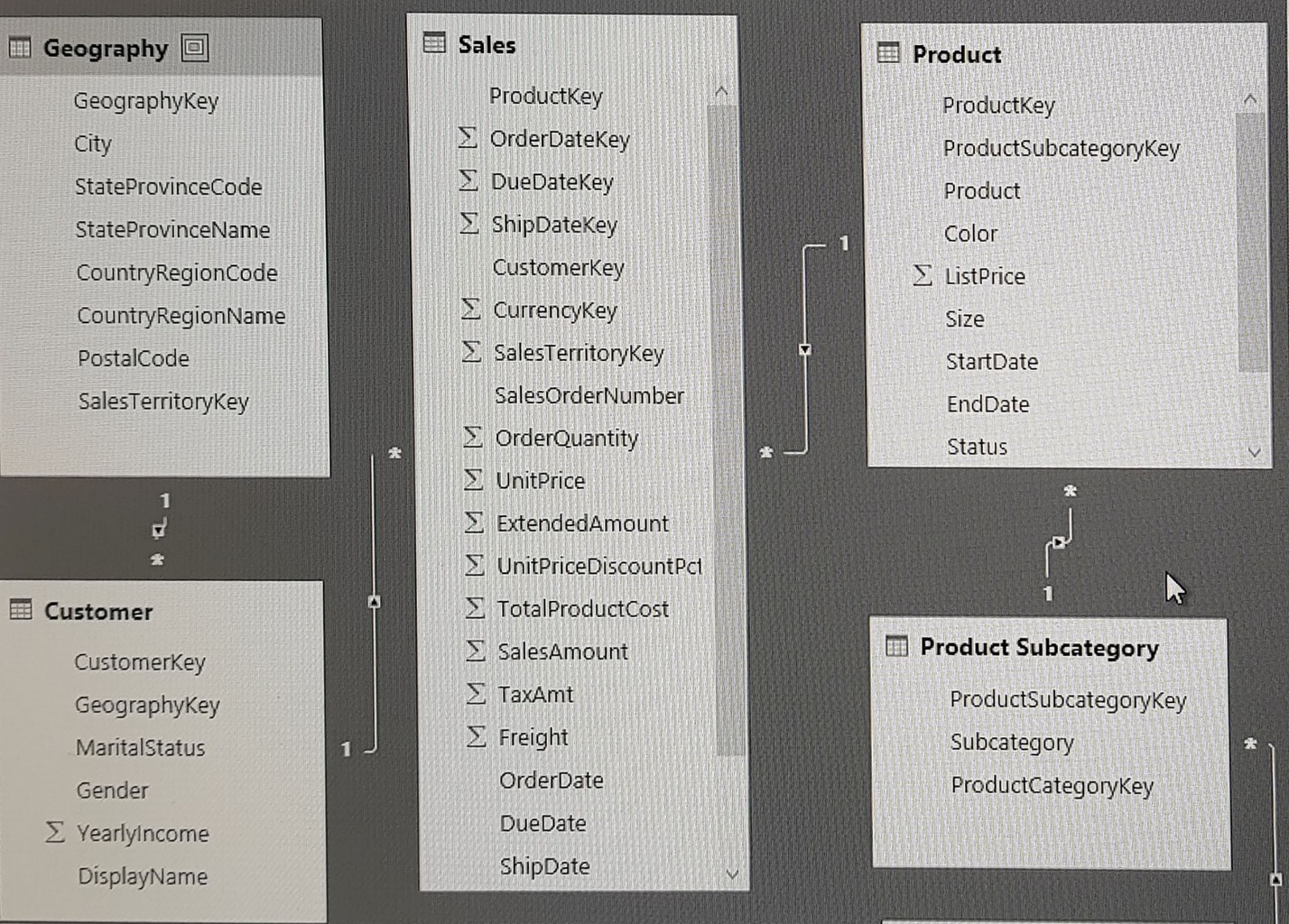
You plan to develop a Power BI model as shown in the Power BI Model exhibit. (Click the Exhibit).
You plan to use Power BI to import data from 2013 to 2015.
Product Subcategory [Subcategory] contains NULL values.
End of repeated scenario.
You implement the Power BI model.
You need to add a measure to rank total sales by product. The results must appear as shown in the following table.
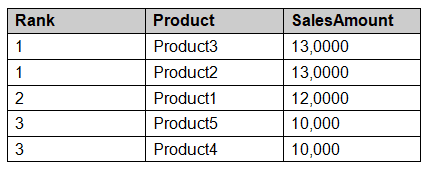
Which DAX formula should you use?
Answer : B
DAX calculations depend on evaluation context. Aggregators, iterators, and filter-modifying functions must be combined so the expression evaluates the intended rows while retaining or replacing filters only where required. The key constraint is to add a measure to rank total sales by product. The results must appear as shown in the following table. The supported selection is B (Product Ranking= RANKX (ALL, ('Product'), [SalesAmount],, DESC, Dense)). The relevant current PL-300 study-guide bullet is 'Create single aggregation measures'. An alternative that changes the source or creates a stored column either ignores filter context or increases model size without meeting a dynamic measure requirement.
Microsoft Learn reference: https://learn.microsoft.com/en-us/dax/ | PL-300 objective: 'Create single aggregation measures' | Study guide: https://learn.microsoft.com/en-us/credentials/certifications/resources/study-guides/pl-300
Question 2
You are creating a Power BI report to analyze consumer purchasing patterns from a table named Transactions. The Transactions table contains a numeric field named Spend. You need to include a visual that identifies which fields have the greatest impact on Spend. Which type of visual should you use?
Answer : D
The correct answer is D (key influencers). Visual selection follows the analytical question: line charts
show change over time, bars compare categories, scatter charts expose relationships and outliers, KPIs track progress against a target, and AI visuals explain likely drivers. The technical decision turns on how to include a visual that identifies which fields have the greatest impact on Spend. The other visual or configuration choices encode a different task, lose the required interaction, or fail one of the stated display constraints. For exam alignment, this is assessed under 'Select an appropriate visual' in the current study guide. The result remains understandable to report consumers and responds correctly to the interaction or filtering behavior described in the question.
Microsoft Learn reference: https://learn.microsoft.com/en-us/power-bi/visuals/power-bi-visualizations-overview | PL-300 objective: 'Select an appropriate visual' | Study guide: https://learn.microsoft.com/en-us/credentials/certifications/resources/study-guides/pl-300
Question 3
You merge data from Sales.Region, Region_Manager, Sales_Manager, and Manager into a single table named Region. What should you do next to meet the reporting requirements of the executives?
Answer : D
A model hierarchy provides an ordered drill path. Placing manager above sales manager lets the executive visual move from the broader management level to the individual sales-management level without duplicating the fields in every visual. The scenario is asking for a way to select the next action needed to meet the reporting requirements of the executives. The correct answer is D (In the Region table, create a hierarchy that has the manager name, and then the sales manager name). The relevant current PL-300 study-guide bullet is 'Configure table and column properties'. Changing a visual alone does not assign semantic meaning to a field, and changing the underlying values is unnecessary when a model property supplies the required behavior.
Microsoft Learn reference: https://learn.microsoft.com/en-us/power-bi/transform-model/desktop-field-list | PL-300 objective: 'Configure table and column properties' | Study guide: https://learn.microsoft.com/en-us/credentials/certifications/resources/study-guides/pl-300
Question 4
You need to use Power BI to create a visual that will allow users to compare the sales performance of five sales regions for the current month.
Which visual should you use?
Answer : A
Visual selection follows the analytical question: line charts
show change over time, bars compare categories, scatter charts expose relationships and outliers, KPIs track progress against a target, and AI visuals explain likely drivers. The answer resolves to A (a stacked bar chart). The technical decision turns on how to use Power BI to create a visual that will allow users to compare the sales performance of five sales regions for the current month. The other visual or configuration choices encode a different task, lose the required interaction, or fail one of the stated display constraints. This rationale is anchored to the PL-300 objective 'Select an appropriate visual'.
Microsoft Learn reference: https://learn.microsoft.com/en-us/power-bi/visuals/power-bi-visualizations-overview | PL-300 objective: 'Select an appropriate visual' | Study guide: https://learn.microsoft.com/en-us/credentials/certifications/resources/study-guides/pl-300
Question 5
You need to create the semantic model. Which semantic model mode should you use?
Answer : D
The supported selection is D (Composite). The required outcome is to create the semantic model. DirectQuery leaves data at the source and sends queries when users interact with a report. Transformations therefore need to preserve source compatibility and, where possible, query folding. This directly matches the current study-guide objective 'Choose between DirectLake, DirectQuery, and Import'. Importing or materializing the result would change the storage behavior, while a nonfolding transformation can force inefficient source retrieval. It also preserves predictable filter context and aggregation behavior when the result is used by several visuals or report pages. This choice satisfies the full scenario rather than only one visible part of the requested result.
Microsoft Learn reference: https://learn.microsoft.com/en-us/power-bi/connect-data/desktop-directquery-about | PL-300 objective: 'Choose between DirectLake, DirectQuery, and Import' | Study guide: https://learn.microsoft.com/en-us/credentials/certifications/resources/study-guides/pl-300
Question 6
You are creating a new semantic model in Microsoft Power BI Desktop.
You connect to a recently used data source and receive an error message indicating that the password is expired.
You need to update the credentials for the data source.
What should you do?
Answer : D
Power Query errors should be diagnosed from the failing source or transformation step. File location, credentials, data types, and row-level conversion errors have different causes, so the selected action addresses the error described in the question rather than hiding it. The correct answer is D (From Data Source settings, select the data source, and then select Edit Permissions). What determines the answer is the need to update the credentials for the data source. Removing error rows can conceal the symptom but does not correct an invalid path, credential, conversion, or source value that caused the refresh failure. This rationale is anchored to the PL-300 objective 'Resolve data import errors'.
Microsoft Learn reference: https://learn.microsoft.com/en-us/power-query/dealing-with-errors | PL-300 objective: 'Resolve data import errors' | Study guide: https://learn.microsoft.com/en-us/credentials/certifications/resources/study-guides/pl-300
Question 7
Note: This question is part of a series of questions that present the same scenario. Each question in the series contains a unique solution that might meet the stated goals. Some question sets might have more than one correct solution, while others might not have a correct solution.
After you answer a question in this scenario, you will NOT be able to return to it. As a result, these questions will not appear in the review screen.
You have several reports and dashboards in a workspace.
You need to grant all organizational users read access to a dashboard and several reports.
Solution: You publish an app to the entire organization.
Does this meet the goal?
Answer : A
The correct response is A (Yes): the proposed action - You publish an app to the entire organization - meets the requirement. A Power BI app distributes a curated selection of workspace content to defined audiences without granting those recipients workspace authoring rights. App access is therefore distinct from workspace membership. The technical decision turns on how to evaluate whether this proposal meets the goal: You publish an app to the entire organization. Adding recipients as workspace members exposes the authoring environment; an app is the curated distribution boundary for consumers. For exam alignment, this is assessed under 'Configure and update an app' in the current study guide.
Microsoft Learn reference: https://learn.microsoft.com/en-us/power-bi/collaborate-share/service-create-distribute-apps | PL-300 objective: 'Configure and update an app' | Study guide: https://learn.microsoft.com/en-us/credentials/certifications/resources/study-guides/pl-300
 All Official Question Types