How should a patch be downloaded to perform a One-Click Upgrade of an NDB Environment with access to the Internet?
Answer : B
For a One-Click Upgrade of an NDB environment with internet access, the patch should be downloaded directly within the NDB interface. The 'Administrator > Maintenance' section of NDB provides an option to connect to the Nutanix download repository (e.g., https://download.nutanix.com) and download the latest patch or upgrade bundle automatically. This streamlined process ensures compatibility and simplifies the upgrade workflow. The One-Click Upgrade feature then applies the downloaded patch to update NDB components efficiently.
Other options are incorrect:
A . Download the patch from the Nutanix Support Portal and upload via the NDB CLI: This is suitable for dark sites but unnecessary with internet access, as NDB can download directly.
C . Open Prism Central and deploy the current version of NDB from the Apps and Marketplace section: This is for initial deployment, not upgrading an existing NDB instance.
D . Open Prism Element and use LCM to update the software: Lifecycle Manager (LCM) is for Nutanix cluster updates, not NDB-specific upgrades.
Thus, the verified answer is B, leveraging NDB's built-in maintenance capabilities.
Official Nutanix Database Automation Reference:
Nutanix Database Management & Automation (NDMA) course, Module 2: Deploying and Configuring an NDB Solution, Lesson 2.4: Updating NDB with Internet Access.
Nutanix Certified Professional - Database Automation (NCP-DB) v6.5 Knowledge Objectives, Section 2: Deploy and Configure an NDB Solution, Objective 2.3: Perform NDB Updates (applicable to v6.10).
Nutanix NDB Administration Guide: 'One-Click Upgrade Process' section.
An administrator created a database clone that is scheduled for removal on the last day of the month.
A request has been received to keep the clone for an additional 14 days.
After selecting the desired clone, how should the administrator satisfy this task?
Answer : D
The Removal schedule is a feature of Nutanix Era that allows you to specify when a database clone will be automatically deleted. You can modify the Removal schedule of an existing clone by selecting the clone from the Clones page, clicking on the Update button, and changing the Removal schedule option to the desired date. This way, you can extend or shorten the lifespan of a clone as per your requirements. You do not need to remove the existing Removal schedule and add a new one, as this would be an unnecessary step. You also do not need to update the Removal schedule to the end of the month, as this would not meet the request of keeping the clone for an additional 14 days.Reference::
A development team has requested that an administrator provide them a copy of the production Finance database. The business requires that any financial data is masked before going into development.
How should the administrator create a clone with masked data for the development environment?
Answer : B
What are the three severity levels displayed under the Alert dashboard?
Which two processes should an administrator take to create a software profile version for a newly-released Oracle ISc patch? (Choose
two.)
Answer : C, D
To create a software profile version for a newly-released Oracle ISc patch, an administrator should follow these steps:
Please note that these answers are based on the information available as of my last update in 2021 and may need to be verified with the most recent Nutanix Database Automation (NCP-DB) documentation or resources.
An administrator would like to replicate database snapshots to remote Nutanix clusters.
What should the administrator do to manage Time Machine data availability across all registered Nutanix clusters in NDB?
Answer : A
To replicate database snapshots to remote Nutanix clusters, the administrator needs to add Data Access to each Nutanix cluster and assign a Data Availability Management (DAM) policy. Data Access is a feature of NDB that enables cross-cluster data mobility and protection. A DAM policy defines the replication frequency, retention period, and priority of the database snapshots across the clusters. By adding Data Access to each Nutanix cluster and assigning a DAM policy, the administrator can manage the Time Machine data availability across all registered Nutanix clusters in NDB.
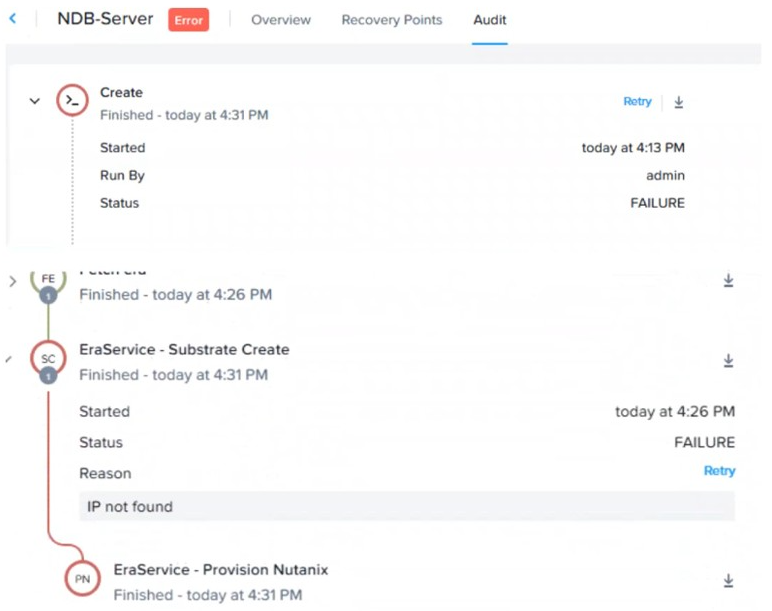
An administrator has run into an error when provisioning a new Oracle database VM.
What is the best action that the administrator should perform in the NDB GUI to provide the most complete picture to send to Nutanix support on that specific operation?
Answer : C
When an administrator encounters an error provisioning a new Oracle database VM in NDB, the best action to provide Nutanix support with the most complete picture is to select the failed job in the Operations menu and choose Generate Bundle from the lower right. The 'Generate Bundle' option creates a comprehensive diagnostic package, including logs, configuration details, and error traces specific to the failed operation. This bundle is ideal for troubleshooting and can be uploaded to Nutanix Support for analysis.
Other options are less comprehensive:
A . From the Administration section of NDB, go to the Diagnostics section and choose Generate Bundle: This generates a general diagnostic bundle, not specific to the failed job.
B . Copy the error message from the Operations menu: This provides limited context compared to a full bundle.
D . Take a screenshot of the error in the Operations menu: A screenshot lacks detailed logs and system data needed for support.
Thus, the verified answer is C, ensuring detailed support data.
Official Nutanix Database Automation Reference:
Nutanix Database Management & Automation (NDMA) course, Module 6: Monitoring and Alerts, Lesson 6.4: Troubleshooting and Support.
Nutanix Certified Professional - Database Automation (NCP-DB) v6.5 Knowledge Objectives, Section 6: Optimize NDB Solutions, Objective 6.4: Generate Support Bundles (applicable to v6.10).
Nutanix NDB Administration Guide: 'Generating Support Bundles for Failed Operations' section.